Palo Alto Networks Certified XSOAR Engineer — Free Practice Questions
10 free sample questions from a bank of 70, with the correct answers and explanations. No signup required — start practising right now.
- Playbook is marked as complete.
- Commands cannot be executed in the War Room.
- Timers can no longer run.
- Running timers are in a paused state.
The short version
AB — Closing an incident completes the playbook and makes the War Room read-only for commands. Two behaviors occur on closure: the playbook is marked as complete, and no new commands can be run in the War Room.
Key concepts in this question
- Incident closure: finalizes an investigation and stops the automation attached to it.
- Playbook completion: the playbook linked to the incident is marked as complete when the incident closes.
- War Room lockdown: after closure the War Room no longer accepts command execution.
- SLA timers: timers are automatically stopped on closure, not paused.
Why AB are correct
When an incident is closed, Cortex XSOAR marks its playbook as complete, ending the automated flow. The incident's War Room also becomes read-only, so commands cannot be executed there. These are the two documented closure behaviors.
Why the others are wrong
- C. Timers stop on closure but are not permanently disabled; a stopped timer can be reset with the resetTimer command, so they can run again.
- D. Timers are stopped, not paused. Pause preserves accumulated time for a restart; closure finalizes the timer.
XSOAR-Engineer exam tip
Closed means the playbook is complete and no new War Room commands can run. Timers stop (not pause) and can be reset, so they are not the answer.
- Exhibit A
- Exhibit B
- Exhibit C
- Exhibit D
The short version
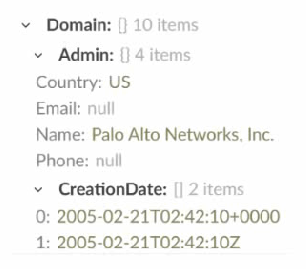
C — filter Country Equals US and get the Name. Correct field, correct case, correct projection.
Key concepts in this question
- Filter field: Domain.Admin.Country carries the country value.
- Case sensitivity: US matches; lowercase us matches nothing.
- Projection: Domain.Admin.Name returns the name, not the object.
Why C is correct
Exhibit C filters Domain.Admin.Country Equals US and gets Domain.Admin.Name: the exact selection asked for.
Why the others are wrong
- A. Lowercase us never equals US in a case-sensitive filter.
- B. Filters the wrong field (Domain.Admin) with the wrong case.
- D. Gets the whole Domain.Admin object instead of the Name.
XSOAR Engineer exam tip
Filters fail on field, case, or projection: check all three, every time.
- The underlying fields within the tab sections was incorrectly mapped.
- The tab was not added to the junior analyst role group.
- The tab was marked as read-only in the layout configuration for the junior analyst roles.
- A display filter was applied to the tab in the layout editor.
The short version
D — Display filter hides the Forensics tab for juniors. Juniors do not match the tab display criteria, so the tab is hidden from them while seniors still see it.
Key concepts in this question
- Incident layout tabs: configurable containers for fields and sections in an incident layout.
- Display filters: conditional rules on tabs or sections that control visibility by field values, roles, or other context.
- Role-based layout behavior: different analyst groups can see different views of the same incident type.
Why D is correct
The most likely cause is a display filter on the Forensics tab. Display filters show or hide a tab by role, field value, or other criteria. If the filter targets senior roles or conditions juniors do not meet, juniors will not see the tab at all, which matches the report.
Why the others are wrong
- A. Incorrect field mapping would show empty or broken fields, not hide the whole tab.
- B. There is no per-tab assignment to a role group; visibility is controlled by layout filters and role permissions, not by adding a tab to a group.
- C. Read-only would still display the tab with non-editable fields; it would not make the tab disappear.
XSOAR Engineer exam tip
If a whole tab is invisible for some roles but visible for others, think display filter first; if fields are visible but not editable, think read-only or RBAC.
The short version
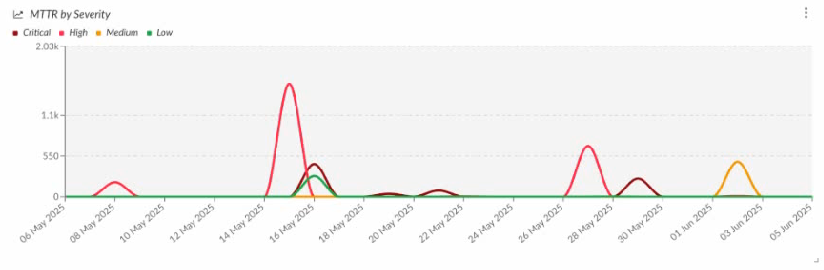
B — Average of the custom value openDuration/60, grouped by Date Occurred, second group by Severity, on a line-chart widget. It is the only option that combines the correct MTTR calculation, the correct groupings, and the line-graph widget type.
Key concepts in this question
- MTTR here: mean time an incident was open, taken from the incident field openDuration.
- Values: aggregation Average over a custom calculation openDuration/60 (seconds converted to minutes).
- Axis and grouping: Group by Date Occurred with daily time resolution, and Second group by Severity to draw one line per severity.
- Widget type: the widget toolbar must have the line-graph icon selected.
Why B is correct
Option B sets Values to Average Custom openDuration/60, Group by Date Occurred, Time resolution by Days, and Second group by Severity, and its toolbar shows the line-chart icon selected. That produces exactly the “MTTR by Severity” line graph shown in the exhibit.
Why the others are wrong
- A. Uses (remediationsla.endDate - detectionsla.startDate)/60, an SLA span instead of the incident open duration, and its selected widget type is not the line chart.
- C. Values is Severity - Offense, so it plots a severity score rather than MTTR, and the second group is SLA.
- D. Uses the correct openDuration/60 value, but its toolbar has the bar/column-chart icon selected, so it renders a bar chart, not the line graph shown.
XSOAR-Engineer exam tip
For MTTR: Values = Average of openDuration/60, Group by Date Occurred, Second group by Severity, and pick the line-graph widget icon.
- Marketplace
- Content Repository page
- Custom integration instances
- "Export all custom content" feature
The short version
B — Content Repository page exists only on the development tenant. It is the staging area where content is developed, versioned, and pushed to production.
Key concepts in this question
- Dev/Prod model: separate development tenant for authoring and production tenant for live operations.
- Content Repository: development-side page for managing custom packs, commits, branches, and pushes.
- Marketplace and instances: available in both tenants for installing packs and running integrations.
Why B is correct
In a Dev/Prod deployment, authoring happens only in development. The Content Repository page is the Git-backed content management view used to create, review, and push custom content to production, so it is exposed only in the development tenant. Production consumes reviewed content rather than authoring it there. Marketplace, integration instances, and export functions exist for operating and moving content, but the repository workflow itself lives in dev, making B the distinctive dev-only item.
Why the others are wrong
- A. Marketplace is available in both tenants to install and update packs.
- C. Custom integration instances can be configured and run in either tenant where needed.
- D. Export of custom content can be performed to move content out; it is not the dev-only repository management page.
XSOAR Engineer exam tip
Remember Dev creates and pushes, Prod consumes: Content Repository equals dev-only authoring and Git push workflow.
- Hidden from the Context Data but accessible
- Visible within Context Data and fully accessible
- Visible with Context Data, grayed out, and fully accessible
- Hidden from Context Data and no longer accessible
XSOAR separatesContext DatafromIncident Layout fields. When an incident field is populated, its value is stored in Context, even if the incident type later changes. The Admin Guide clearly states that context is persistent and not dependent on whether a field belongs to the new incident type.If an incident is reassigned to a different incident type, fields not included in the new type’s layout are no longer visiblein the UI, but the data is fully retained in Context. Analysts can still retrieve the values through playbooks, scripts, or JSON view. This ensures investigations are not disrupted and historical information is never lost due to schema changes.The data isnot deleted, nor is it hidden from context (ruling out options A and D). It also does not appear grayed out in the UI (C), because the fields no longer appear at all unless re-added to the layout.Thus, per XSOAR’s data retention model, the correct state isB: Visible within Context Data and fully accessible.
.explanation p {
font-size: 16px;
line-height: 25px;
margin-bottom: 14px;
}
Paloalto Networks XSOAR-Engineer View All Questions
Paloalto Networks XSOAR-Engineer Summary
Vendor: Paloalto Networks
Product: XSOAR-Engineer
Update on: Sep 3, 2026
Questions: 204
Price: $52.5 $149.99
Next
You can customize most aspects of the incident layout, including which three of the following?
The code snippet below is from the fetch command of an integration instance configured to...
Previous
Payments We Accept
Your purchase with ExamsVCE is safe and fast. Your products will be available for immediate download after your payment has been received.
The ExamsVCE website is protected by 256-bit SSL from McAfee, the leader in online security.
Home
About Us
All Exams
All Vendors
Guarantee
Testimonials
Conta
- Cortex XDR Incident - Quasar
- Cortex XDR Incident
- Unclassified
- Default
The short version
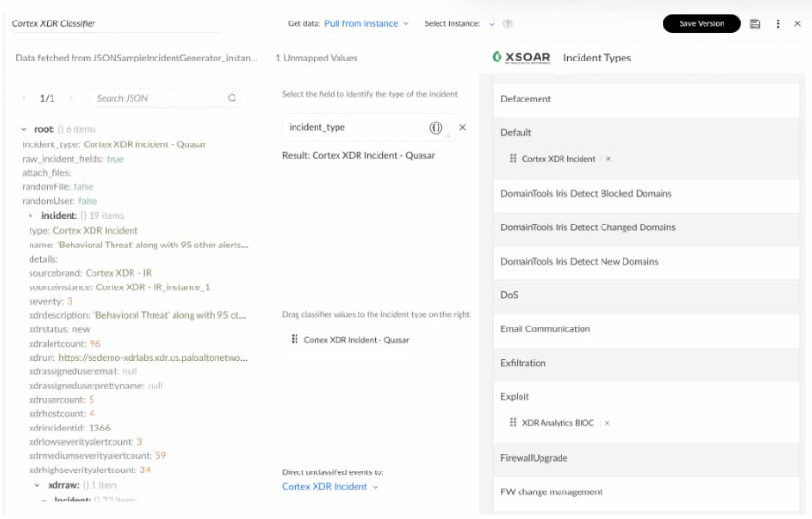
A — The new incident type is Cortex XDR Incident - Quasar. The classifier mapping shown routes this source to that specific type.
Key concepts in this question
- Classifier and mapping: incoming raw fields are mapped to XSOAR incident types.
- Cortex XDR incident variants: distinct types such as Cortex XDR Incident and Cortex XDR Incident - Quasar for different ingestion paths.
- Incident type selection: the mapped type drives layout, SLA, and default playbook.
Why A is correct
The image shows the classification resolving to the Quasar variant rather than the generic XDR type, Unclassified, or Default. Classifiers map vendor-specific values to precise types, and when the mapping points to Cortex XDR Incident - Quasar, that becomes the created type and drives layout and playbook.
Why the others are wrong
- B. Generic Cortex XDR Incident would apply only if the mapping resolved to the base type, which the image does not show.
- C. Unclassified is the fallback when no classifier rule matches; here a specific rule does match.
- D. Default is used when no type is determined; here the classifier explicitly determines the Quasar type.
XSOAR Engineer exam tip
For type questions with images, follow the classifier arrow: mapped value wins over generic, Unclassified, or Default.
- Classification
- Inputs
- Extend context
- Mapping
The short version
C — Extend context links task output to an incident field. It lets a playbook persist selected outputs into fields for layout, search, and reuse.
Key concepts in this question
- Playbook editor outputs: commands return context paths that downstream tasks can consume.
- Extend context: mechanism to map task outputs into incident fields.
- Inputs vs mapping vs classification: separate steps for feeding data in, routing incidents, and typing events.
Why C is correct
Within the playbook editor, Extend context is the function used to associate a task output with an incident field. It takes values produced by a task and extends them into the incident context and designated fields, so the data appears in the layout, can trigger field-change logic, and is available to later tasks. This is the standard documented way to persist enrichment or findings from a task into the incident record during playbook design.
Why the others are wrong
- A. Classification assigns incoming events to incident types; it does not map task outputs to fields.
- B. Inputs supply values into a playbook or sub-playbook at launch; they do not persist outputs to fields.
- D. Mapping in this context refers to classifier or incoming-field mapping, not binding a running task output to an incident field.
XSOAR Engineer exam tip
Outputs to fields equals Extend context; inputs feed in, classification types the incident.
- Verdict: Malicious - Other Fields: Values from Integration A
- Verdict: Malicious - Other Fields: Values from Integration B
- Verdict: Benign - Other Fields: Values from Integration A
- Verdict: Benign - Other Fields: Values from Integration B
The short version
D — Latest fetch wins when reliability ties: Benign verdict plus Integration B fields. Equal reliability means recency decides the indicator record.
Key concepts in this question
- Source reliability: letter grade such as B Usually reliable that ranks feed trust.
- Indicator reconciliation: how XSOAR merges verdict and fields from multiple feeds for the same indicator.
- Recency tie-breaker: when reliability is equal, the most recently fetched source determines values.
Why D is correct
Both integrations share reliability B, so neither outranks the other on trust. XSOAR then falls back to recency: Integration B was fetched after Integration A, so its verdict Benign and its other field values become the current indicator values. This keeps the record fresh when sources are equally trusted. The result is a Benign verdict with other fields from Integration B, exactly as stated in the banked key.
Why the others are wrong
- A. Malicious from A is stale; with tied reliability the older fetch does not win.
- B. Mixing Malicious from A with fields from B breaks the single-winner rule for tied reliability.
- C. Mixing Benign verdict with A fields is inconsistent; the winning source supplies both verdict and fields.
XSOAR Engineer exam tip
Same reliability means newest fetch wins for both verdict and fields; higher reliability would override recency.
- Whois.IP.asn_registry.entities
- Whois.IP.[0].network.name
- Whois.IP.network.name
- Whois.IP.entities
The short version
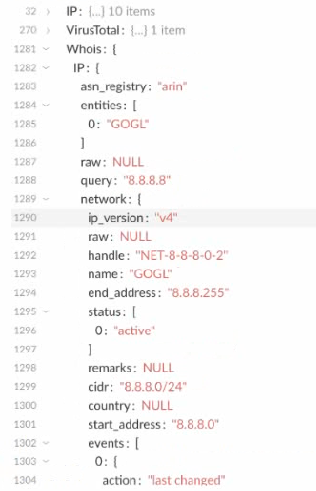
C — Whois.IP.network.name holds the string GOGL. It is the network-name leaf in the Whois IP context tree.
Key concepts in this question
- Context paths: dot-notation addresses for values produced by commands.
- Whois IP structure: network object with a name field versus entities arrays.
- String vs object leaves: only the correct leaf resolves to the plain string shown.
Why C is correct
In the context shown, the string GOGL appears as the value of the network name for the Whois IP result. The full path Whois.IP.network.name navigates from the Whois root to the IP result to its network object to the name leaf, which contains that string. This matches the standard Whois integration context layout where network metadata such as name, CIDR, and country sits under network, while contacts and entities sit elsewhere. Selecting that exact path returns GOGL.
Why the others are wrong
- A. Whois.IP.asn_registry.entities points to an entities collection under ASN data, not the network name string.
- B. Whois.IP.[0].network.name uses an incorrect indexed form; the displayed branch is the plain network object path.
- D. Whois.IP.entities points to the contacts or entities array, which holds objects rather than the GOGL name string.
XSOAR Engineer exam tip
To find a string in context, read the tree strictly: parent object plus leaf field name gives the exact dotted path.
Want the full bank of 70 questions for Palo Alto Networks Certified XSOAR Engineer? See all practice exams.