UiRPA — Free Practice Questions
10 free sample questions from a bank of 60, with the correct answers and explanations. No signup required — start practising right now.
1A developer wants a new data table, dt_Result, that is only populated with common rows found in two data tables, dt_PreviousEmployees and dt_NewEmployees. Which activity should be used to perform this operation?
- Sort Data Table
- Merge Data Table
- Join Data Table
- Filter Data Table
Answer: C
2By default, which arguments are available and should remain in the Global Exception Handler?
- errorinfo with the "In" direction result with the "In" direction
- errorinfo with the "Out" direction result with the "In/Out" direction
- errorinfo with the "In" direction result with the "Out" direction
- errorinfo with the "In" direction result with the "In/Out" direction
Answer: C
3When creating a new argument, which argument property can be left blank?
- Default value
- Name
- Direction
- Argument type
Answer: A
4When a UiPath project is started with Run mode, what happens when there is a breakpoint on an activity?
- Project pauses for 5 seconds when it reaches the activity
- Project pauses at the activity until the Continue button is clicked
- Project executes without pausing at the activity
- Project throws an error when it reaches the activity
Answer: B
5By default, in which activity can a developer add a UI activity that has a full selector?
- Open Application
- Attach Window
- Sequence
- Attach Browser
Answer: C
6A developer executes the following workflow in Debug mode with "Continue on Exception" enabled. How many times will the workflow pause the execution?
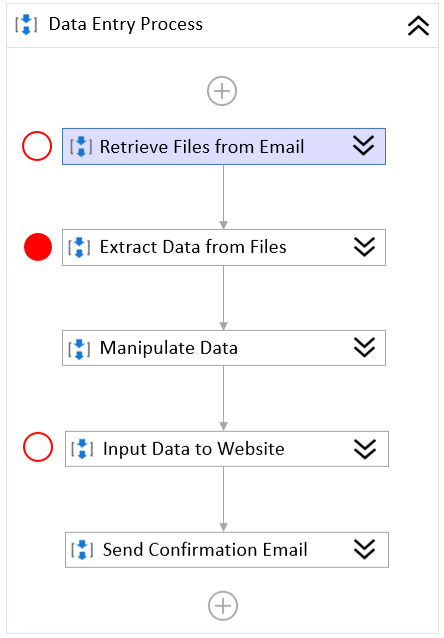
- 0
- 1
- 2
- 3
Answer: A
7Based on best practices, which steps should a developer perform to upgrade the Ui Path.UI Automation.Activities package from version 19.11.5 to version 21.10.5 in the project?
- Remove version 19.11.5 of UiPath.UIAutomation.Activities from the project.json file Restart UiPath Studio
- Open the Manage Packages window and select Project Dependencies Change UiPath.UI Automation.Activities to version 21.10.5 and save
- Open the Manage Packages window and select Settings Modify the Default package sources Restart UiPath Studio
- Open the Manage Packages window and select Project Dependencies Uninstall UiPath.UIAutomation.Activities version 19.11.5 and restart UiPath Studio Install the UiPath.UIAutomation.Activities version 21.10.5
Answer: D
8A developer invoked a workflow file with three arguments: one "In", one "Out", and one "In/Out". In the Invoked Workflow Arguments window, how can the Value be configured for each argument?
- In: Variable or Hard-coded value Out: Variable or Hard-coded value In/Out: Hard-coded value only
- In: Variable only - Out: Variable only - In/Out: Variable only
- In: Variable or Hard-coded value Out: Variable only - In/Out: Variable only
- In: Variable or Hard-coded value Out: Hard-coded value only - In/Out: Variable only
Answer: A
9A developer has declared a variable of type Double named "DoubleValue". If the variable is assigned a value of 54.14, what is the output of the expression, Clnt(DoubleValue)?
- 0.14
- 54
- 54.1
- 5414
Answer: B
10A developer has defined the StrVar variable of type String. Which expression should the developer use to return four characters starting with the second character?
- StrVar.Substring(1, 4)
- StrVar.Substring(1, 5)
- StrVar.Substring(2, 4)
- StrVar.Substring(2, 5)
Answer: A
Want the full bank of 60 questions for UiRPA? See all practice exams.