UiARD — Free Practice Questions
10 free sample questions from a bank of 221, with the correct answers and explanations. No signup required — start practising right now.
1A developer reviewed the following sequence: The parameters of the Invoke Method are: In order to get the table name of the first element in the DataSet, which expressions should the developer use?
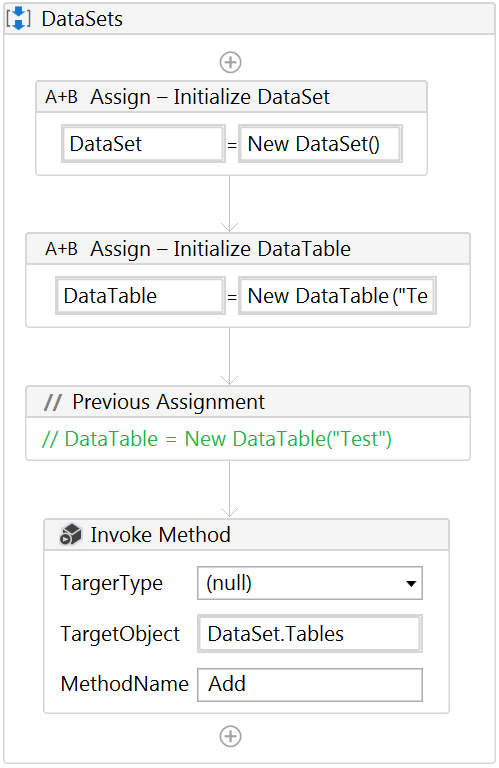
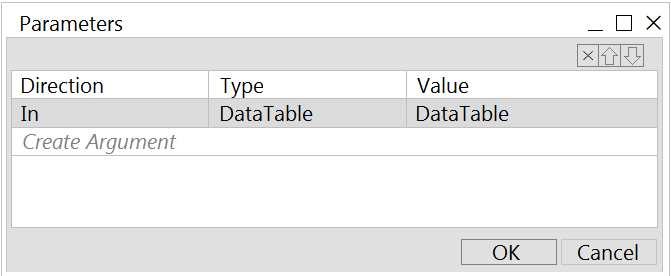
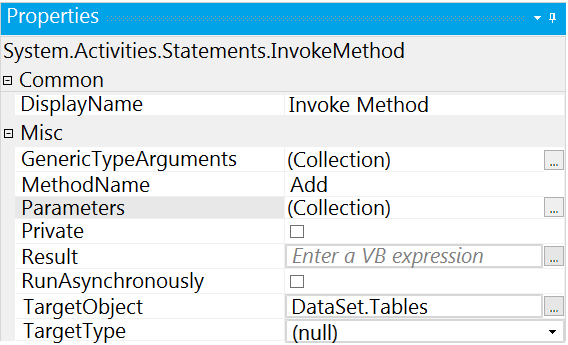
- DataSet.Tables(0).TableName
- DataSet.Tables(1).TableName
- DataSet.Rows(0).TableName
- DataSet.Rows(1).TableName
Answer: A
2A developer is working on an automation. The automated process must log into Citrix and click on the "Generate Shipment Details" button. Ideally, this generates a table of shipping records. If the generated table displays only the header row and no data is available, then it should be marked as an exception since the data is incomplete.
What is this type of exception?
- BusinessRuleException
- NullReferenceException
- ApplicationException
- SystemException
Answer: A
3A developer wants to create an attended automation process. The process will take information from emails in the current user's inbox.
Assuming the email/domain or password for the user's email inbox are not provided in the automation, which activity can be used to get unread emails with the subject line "Email for Robot"?
- Get Exchange Mail Messages
- Get POP3 Mail Messages
- Get Outlook Mail Messages
- Get IMAP Mail Messages
Answer: C
4A developer was assigned a task to build a process that will interact with hidden or minimized windows on an employee's machine.
To ensure the UI automation runs in the background which commonly used activity property must always be avoided?
- Default
- Simulate Type
- Activate
- SendWindowMessages
Answer: C
5A developer needs to create a process that writes the table to an Excel file. While creating this process, the developer notices that two activities with the same name can write the scraped DataTable to Excel.
What are the differences between the Workbook and Excel Write Range activities?
- (Excel) Write Range activity only works in the foreground, visible to the user. (Workbook) Write Range activity only works in the background.
- (Excel) Write Range activity must be included in an Excel Application Scope activity. (Workbook) Write Range activity requires that the file is not opened by the user before running.
- Excel Write Range activity will create the file in the WorkbookPath property if it does not exist. Workbook Write Range activity can only be used when Excel is installed.
- (Excel) Write Range activity only works in the background. (Workbook) Write Range activity will create the file in the WorkbookPath property if it does not exist.
Answer: B
6A developer wanted to use a Type Into activity which interacts with hidden or minimized windows. However, the process was only able to run on foreground windows. Which activity property configuration would cause the automation to run only on foreground windows?
- SendWindowMessages property was enabled in the Type Into activity.
- SimulateType property was enabled in the Type Into activity.
- Activate property was disabled in the Type Into activity.
- Default property selections of the Type Into activity were used.
Answer: D
7Review the following exhibit: Based on the exhibit, what is the result of the Write Line in the sequence?
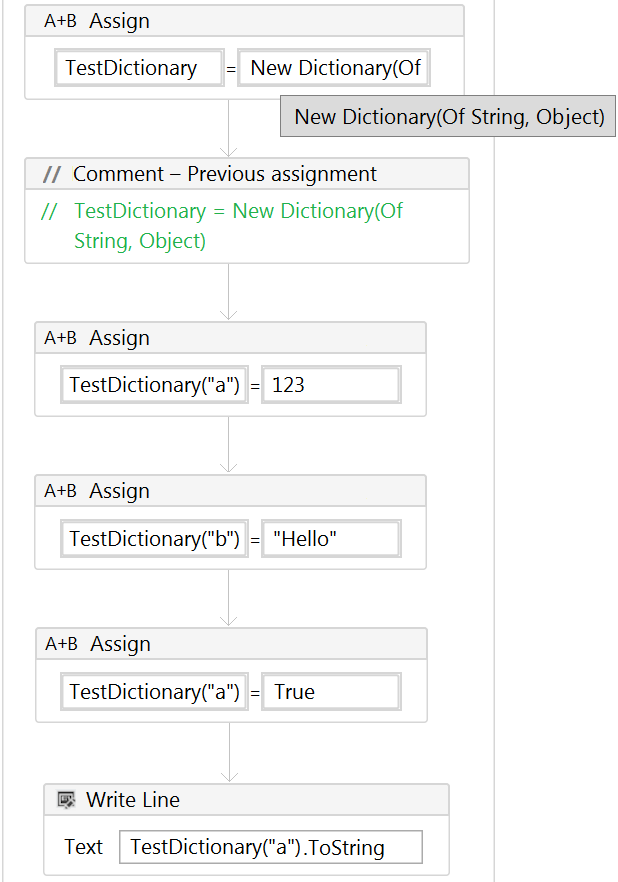
- 123
- True
- Hello
- 123True
Answer: B
8Review the following exhibits: Based on the exhibits, what is the output of the sequence?
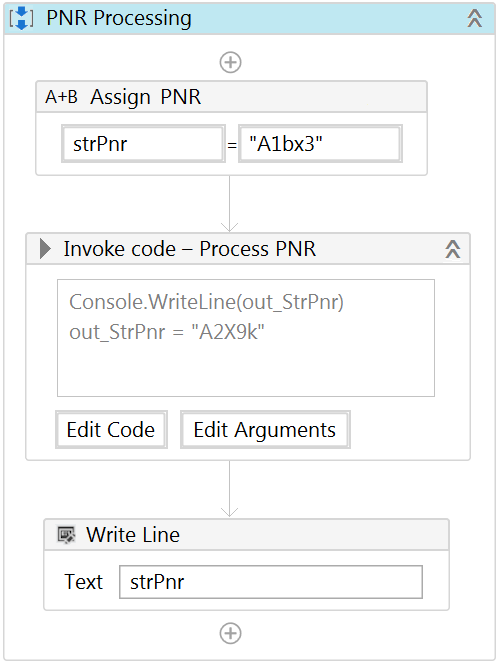
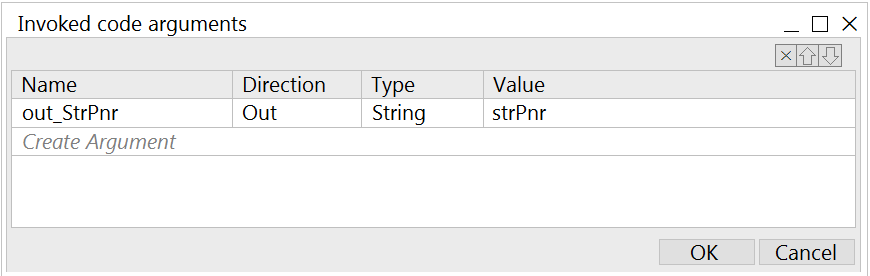
- A2X9k
- A1bx3 - A1bx3
- A1bx3 - A2X9k
- A2X9k - A2X9k
Answer: A
9A developer wants to extract data from "Sheet1" of the "Test.xls" file using the following code: In addition, the developer configured the following properties of the Read Range activity: Based on the exhibits, what is the result of the execution?
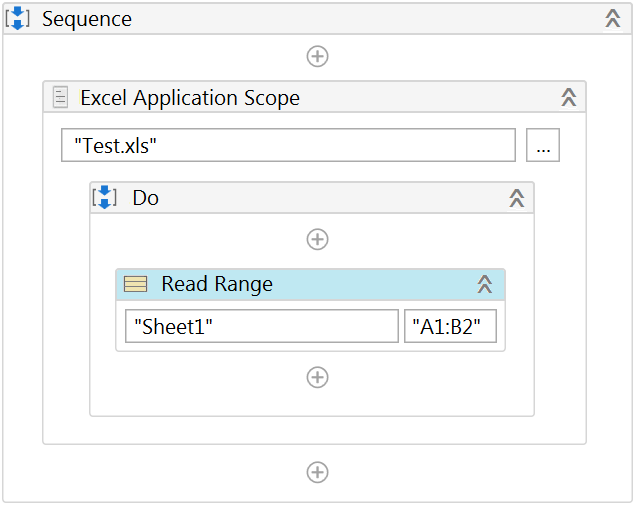
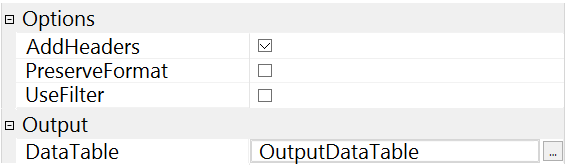
- OutputDataTable object will have 2 columns and 1 row containing values of cells "A1" and "B1"
- OutputDataTable object will have 2 columns and 1 row containing values of cells "A2" and "B2"
- OutputDataTable object will have 2 columns and 2 rows containing values of cells "A2" and "B2"
- OutputDataTable object will have 2 columns and 10000 rows; the first row will contain values of cells "A1" and "B1"
Answer: B
10A developer needs to extract data from "Sheet1" of the "Test.xls" file that contains 10,000 rows of data using the code shown in the following exhibit: In addition, the developer configured the following properties of the Read Range activity: Based on the exhibits, what is the output of the expression, OutputDataTable.Rows.Count and what values will be contained in the OutputDataTable?
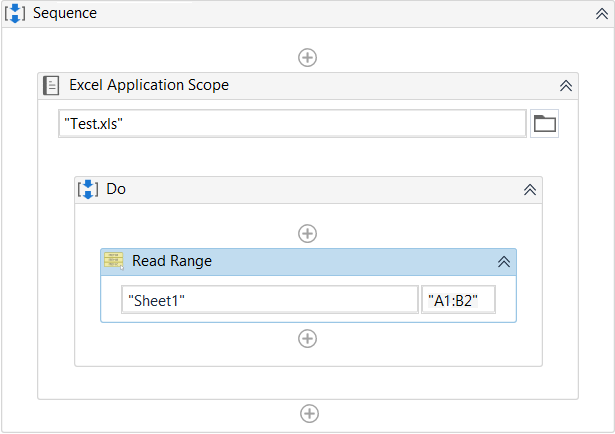
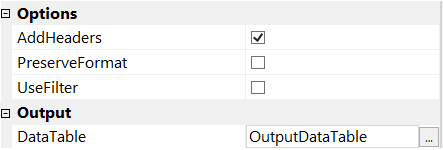
- OutputDataTable.Rows.Count = 1 - Contains the values of cells "A2" and "B2"
- OutputDataTable.Rows.Count = 2 - Contains the values of cells "A1" and "B1"
- OutputDataTable.Rows.Count = 2 - Contains the values of cells "A2" and "B2"
- OutputDataTable.Rows.Count = 10,000 Contains the values of cells "A2" and "B2"
Answer: A
Want the full bank of 221 questions for UiARD? See all practice exams.