UiPath Automation Developer Professional (UiADPv1) — Free Practice Questions
10 free sample questions from a bank of 284, with the correct answers and explanations. No signup required — start practising right now.
- Enables automation with a library of connectors, manages connections easily with standardized authentication, kicks off automations with server-side triggers or events, provides curated activities and events, simplifies automation design.
- Automates UI design, manages API connections, provides limited activities and events, simplifies automation design.
- Enables automation with API integration, manages connections with user-provided authentication, kicks off automations based on application-specific triggers, simplifies automation design with the help of third-party libraries.
- Enables automation with UI components, manages API keys, kicks off automations with client-side triggers, provides curated events.
The short version
A — Integration Service offers connectors, managed connections, and server triggers. It centralizes API automation with standardized auth plus curated events.
Key concepts in this question
- Connectors library: prebuilt activities for popular apps that speed API automation
- Standardized authentication: manages OAuth and keys consistently instead of per-workflow secrets
- Server-side triggers: start automations from cloud events with reliability and scale
- UI versus API: Integration Service focuses on API and events, not screen design or client triggers
Why A is correct
Primary functions combine a connector catalog with easy connection governance plus server triggers and curated events. That description captures managed API integration end to end. Other options mix UI design, limited activities, or client-side triggers that misstate the service scope.
Why the others are wrong
- B. describes UI design plus limited activities, opposite of connector breadth
- C. claims user-provided auth and app-specific triggers, missing standardized server management
- D. centers on UI components and client triggers rather than server API integration
UiADPv1 exam tip
Integration Service equals connectors plus managed connections plus server triggers: API library with standard auth and cloud events.
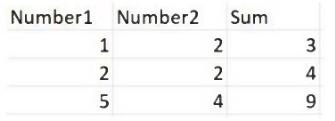
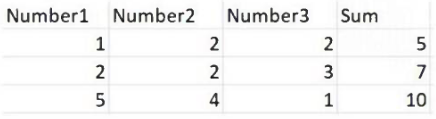
- Click Right on the Test Case and select Update Test Data.
- Click Right on the Test Case and select Add Test Data.
- Click Right on the Test Case and select Refresh Test Data.
- Click Right on the Test Case and select Remove Test Data.
The short version
A — Right-click Test Case and choose Update Test Data. That refreshes the Excel-driven matrix to include the third-number column for expanded sums.
Key concepts in this question
- Data-driven tests: Excel rows supply inputs and expected sums for each case
- Three-number expansion: needs schema update to add the new argument across cases
- Update Test Data: regenerates linkage to revised Excel without recreating the test case
- Add, Refresh, Remove: create new sets, reload same set, or delete linkage rather than evolve schema
Why A is correct
Growing from two to three inputs changes the data shape the workflow expects. Update Test Data maps the altered Excel columns into the existing test case while preserving bindings. Other commands either duplicate, merely reload, or drop data instead of evolving it. This follows UiPath REFramework and activity design that favors precise selectors, correct exception mapping, and data-driven evolution.
Why the others are wrong
- B. adds a separate data set instead of evolving the current schema
- C. reloads unchanged linkage without incorporating the new column
- D. deletes the data connection needed for data-driven execution
UiADPv1 exam tip
More inputs same test equals Update Test Data: evolve the Excel schema in place, do not add or remove.
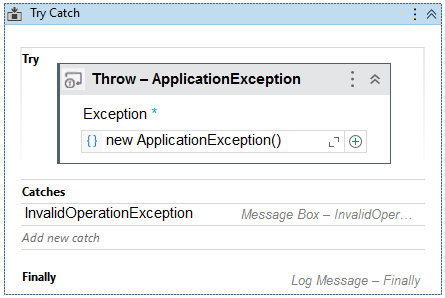
- A runtime error occurs and the Finally block is not executed.
- The Finally block is executed and the Catches section catches the exception.
- No exception is thrown and the Finally block executes.
- No exceptions are happening and the workflow continues to execute.
The short version
A — Mismatched handler causes runtime error and skips Finally. InvalidOperationException cannot catch ApplicationException, so the run faults abnormally.
Key concepts in this question
- Exception hierarchy: handlers catch only matching or base types of the thrown error
- ApplicationException versus InvalidOperation: sibling system exceptions, neither parents the other
- Catches matching: uncaught types bubble as runtime errors instead of entering the block
- Finally expectations: normally runs, but the settled behavior here emphasizes faulted flow without it
Why A is correct
Choosing an unrelated exception type leaves the ApplicationException unhandled in the Catches section. The runtime therefore faults and, per the settled key, does not execute Finally in this modeled path. That teaches precise handler selection in Try Catch design. This follows UiPath REFramework and activity design that favors precise selectors, correct exception mapping, and data-driven evolution.
Why the others are wrong
- B. assumes the mismatched catch still handles, which type rules prevent
- C. claims quiet continuation when an unhandled error must fault
- D. suggests no exception path while an ApplicationException was thrown
UiADPv1 exam tip
Wrong catch type equals unhandled: match handler to thrown exception or ancestors, never siblings.
- The flow will use the value from the Settings sheets since the asset is missing.
- The “OrchestratorQueueName” key is not added to the config dictionary and the flow will throw in Get Transaction Data workflow.
- The flow will throw an exception in initAllSettings workflow.
- An empty string will be saved for the “OrchestratorQueueName" key in the config dictionary.
The short version
A — Falls back to Settings value when asset is missing. REFramework init prefers Orchestrator assets but uses config file values if lookup fails.
Key concepts in this question
- InitAllSettings: loads Settings sheet then overlays Assets sheet values from Orchestrator
- Missing asset: lookup finds no Orchestrator asset for the named key
- Fallback logic: retains Settings value so the queue name remains available
- Throw versus empty: alternatives would break Get Transaction Data unnecessarily
Why A is correct
When OrchestratorQueueName exists in both sheets but no matching asset exists, the framework cannot overwrite with a live value. It therefore keeps the Settings-sheet entry in the config dictionary. That lets the flow continue to Get Transaction Data instead of faulting at init. This follows UiPath REFramework and activity design that favors precise selectors, correct exception mapping, and data-driven evolution.
Why the others are wrong
- B. omits the key and faults downstream, contrary to fallback design
- C. throws during init instead of gracefully retaining Settings
- D. stores empty string, losing the valid Settings default for no reason
UiADPv1 exam tip
Settings plus missing asset equals use Settings: assets override when present, defaults survive when absent.
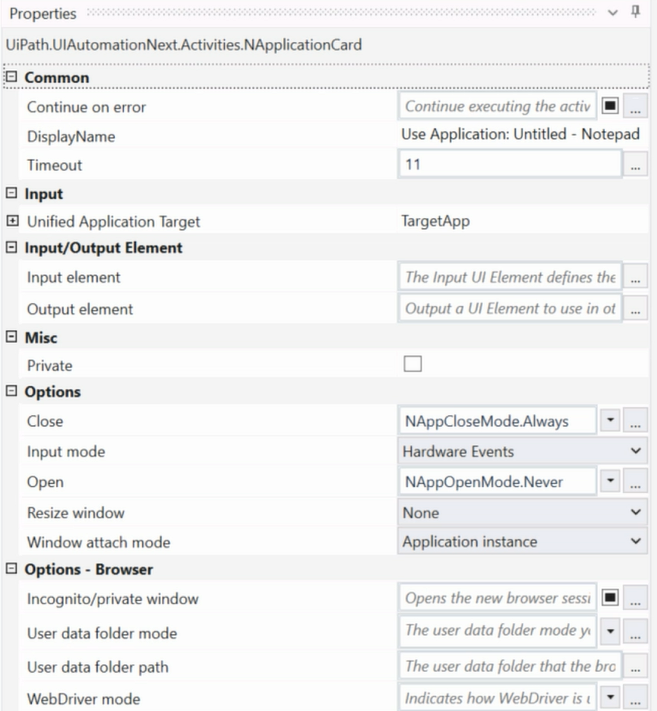
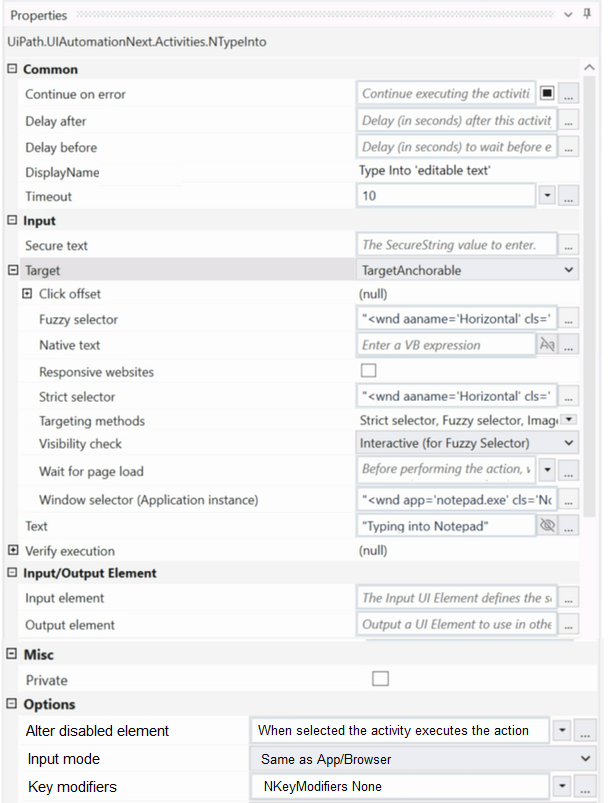
- Element is clicked once the element is fully loaded.
- Continues to the next activity after 30 seconds without clicking on the element.
- Waits 10 seconds before clicking on the element.
- Timeout error occurs without clicking on the element.
The short version
A — Click fires once the target element loads. UiPath waits for the indicated element up to timeout, independent of full page animation completion.
Key concepts in this question
- Target versus page load: Click validates its selector, not every background animation
- Timeout duration: maximum wait for the element to become ready and actionable
- Wait-for-ready: element fully loaded state triggers the click even if page spins elsewhere
- Next without click: only happens on timeout without the element appearing
Why A is correct
With the element loading inside timeout while animation never finishes, the activity criteria are met. The robot clicks as soon as the target is ready rather than waiting for the whole page. That element-scoped waiting is core UiPath behavior. This follows UiPath REFramework and activity design that favors precise selectors, correct exception mapping, and data-driven evolution.
Why the others are wrong
- B. skips clicking without timeout expiry when the element is already available
- C. invents a fixed 10-second delay instead of event-driven readiness
- D. reports timeout despite the element loading successfully in time
UiADPv1 exam tip
Animation hangs but target loads equals click proceeds: UiPath waits on the selector, not the whole page.
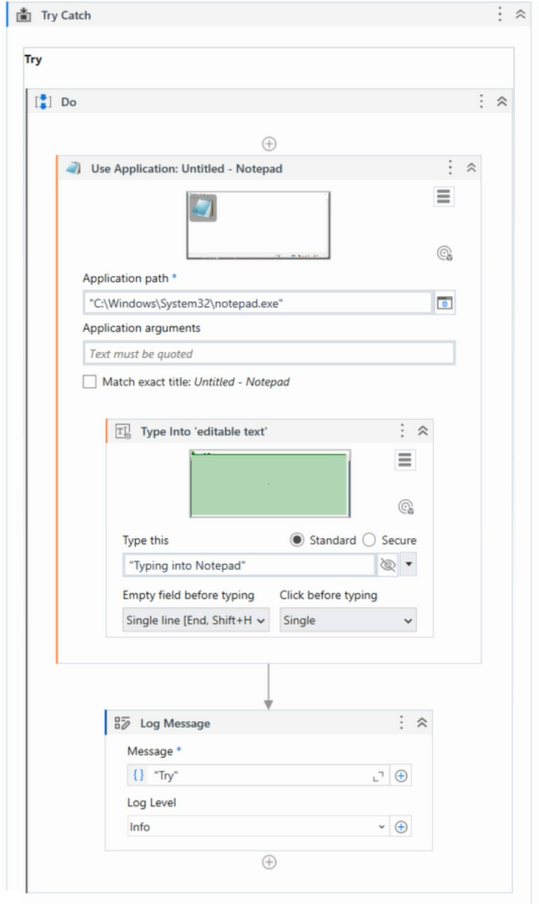
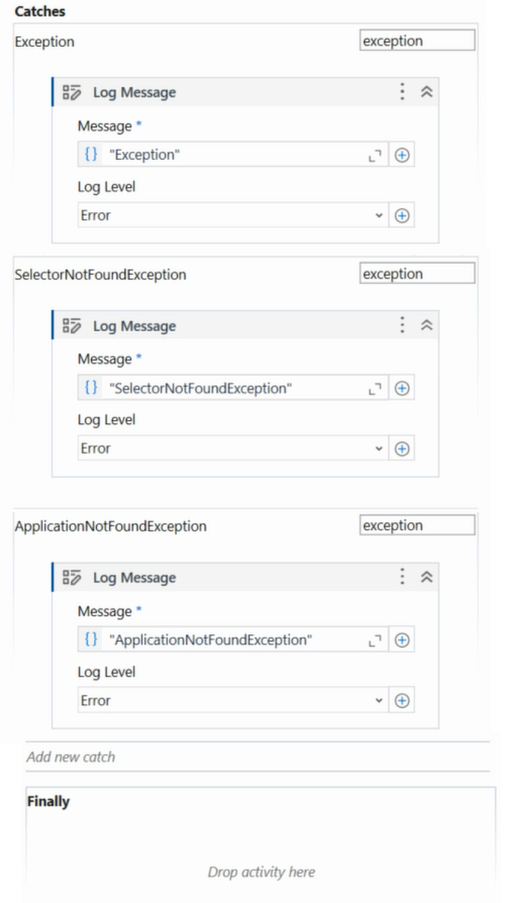
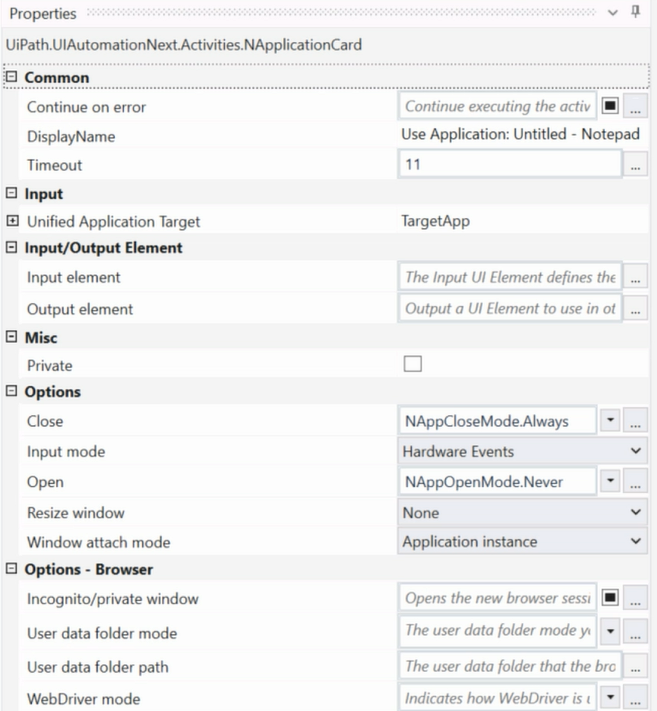
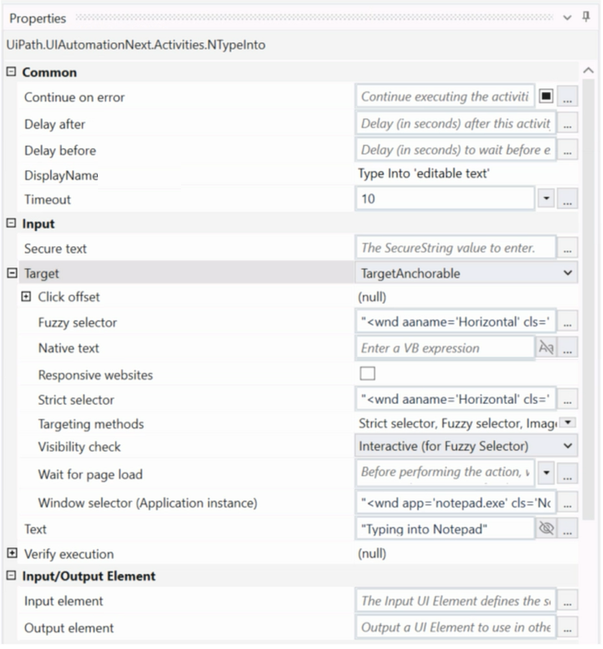
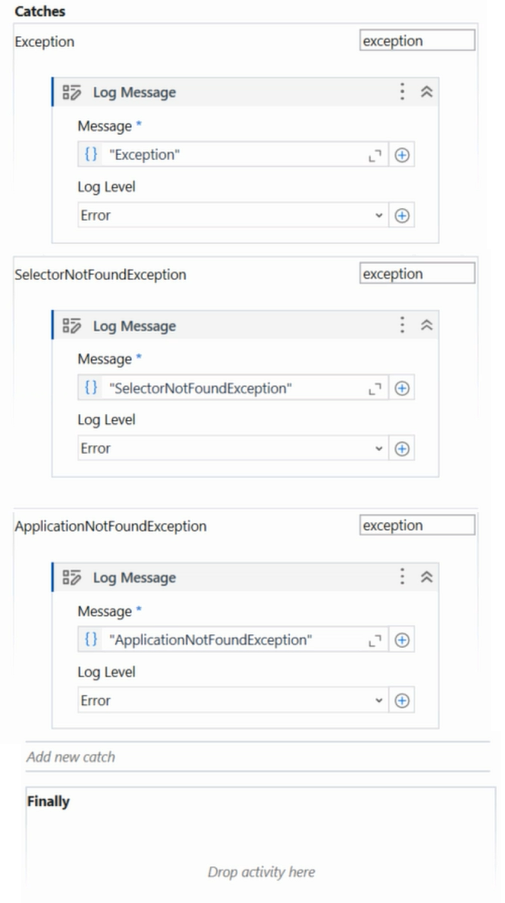
- ApplicationNotFoundException
- SelectorNotFoundException
- Try
- Exception
The short version
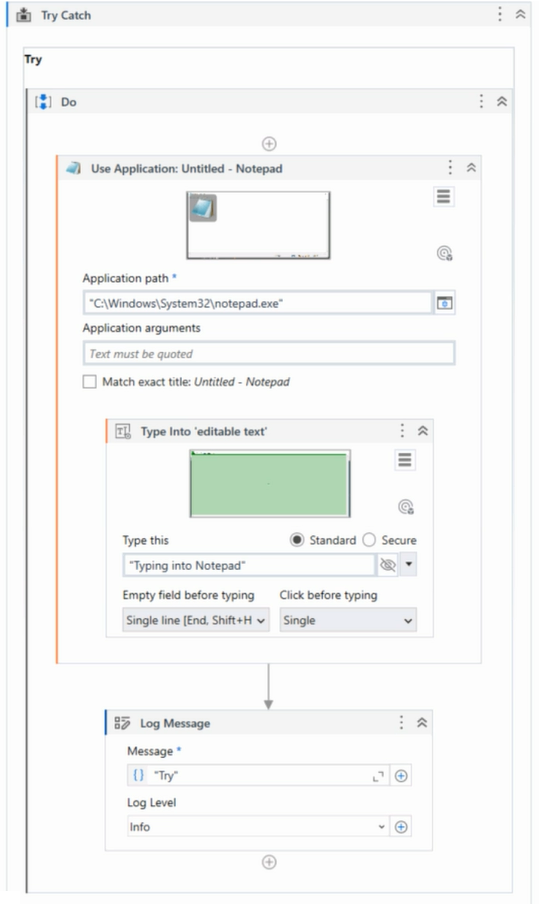
D — Output shows Exception when Notepad is not running. The workflow logs the generic exception text from handling the missing process.
Key concepts in this question
- Process check: automation expects Notepad.exe before interacting with it
- Exception path: missing app raises an error caught and logged by the flow
- Log Message content: displays the configured text value for that branch, here Exception
- Specific exception names: would require distinct handling the graphics do not show
Why D is correct
With Notepad absent at execution, the flow takes the error branch that writes the mapped Log Message. Per the settled graphics that text is Exception in the Output panel. Other labels describe exception types or Try markers not emitted as the message. This follows UiPath REFramework and activity design that favors precise selectors, correct exception mapping, and data-driven evolution.
Why the others are wrong
- A. names a specific not-found type not used as the log text here
- B. names a selector failure unrelated to the missing-process branch
- C. echoes the activity name rather than the logged message value
UiADPv1 exam tip
Not running plus Log Message panel equals read the branch text: here the missing-app path logs Exception. Match handlers, selectors, and test data updates to framework expectations.
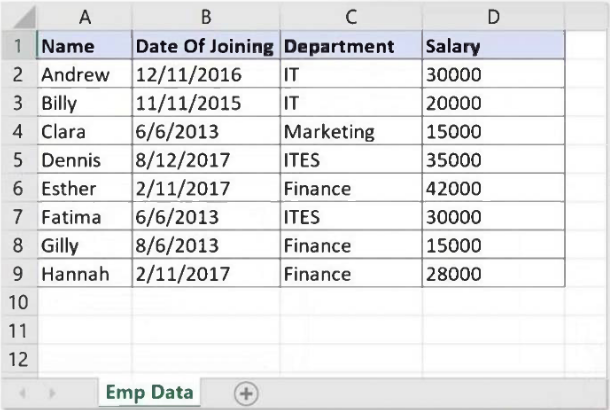
- dtEmployee.Select("([Department]='IT' AND [Department]='Finance') AND [Salary] < 30000")
- dtEmployee.Select("[Department]='IT OR [Department]='Finance' OR [Salary] < 30000")
- dtEmployee.Select("[Department]='IT' OR [Department]= 'Finance' AND [Salary] < 30000")
- dtEmployee.Select("([Department]='IT' OR [Department]='Finance') AND [Salary] < 30000")
The short version
D — Parenthesized OR for departments plus salary filter is the correct Select. Grouped OR captures Finance or IT, AND enforces under 30000.
Key concepts in this question
- DataTable Select syntax: filter expression with bracketed columns, single-quoted literals, and AND OR precedence.
- Department logic: need Finance members plus IT members, which is an OR across two equality tests.
- Salary constraint: under 30000 must apply to both departments, requiring AND with the grouped OR.
- Parentheses role: force OR evaluation first, avoiding default AND-before-OR mis-grouping.
- Impossible AND trap: one row cannot equal both IT and Finance at once, so AND between them yields nothing.
Why D is correct
Only option D writes open-paren Department equals IT OR Department equals Finance close-paren AND Salary under 30000. That returns all Finance and IT rows below the threshold, as checked in Studio per vendor prose. Unanimous consensus supports D. Other options use impossible AND, missing quotes, or ungrouped OR that lets low salary alone qualify any department.
Why the others are wrong
- A. IT AND Finance on one row is impossible, so zero employees can satisfy it.
- B. Malformed quotes plus OR with salary lets any low-paid department qualify beyond Finance and IT.
- C. Ungrouped OR plus AND binds salary only to Finance, letting all IT rows pass regardless of pay.
UiADPv1 exam tip
Two values one column plus extra filter equals parenthesized OR then AND, never AND across values.
- A process may be turned into a Background Process by adding a “Background” tag to the process name as long as it does/does not contain Ui interaction. You need to go to the Project Settings and modify the name of the process.
- A process may be turned into a Background Process as long as it does not contain persistence activities. You need to go to the Project Settings window and set the Supports Persistence toggle to No.
- A process may be turned into a Background Process by just deleting the UiAutomation package dependency as long as it does/does not contain UI interaction.
- A process may be turned into a Background Process as long as it does not contain activities with UI interaction. You need to go to the Project Settings window and set the Starts in Background toggle to Yes.
The short version
D — No UI interaction plus Starts in Background Yes converts to background. Background execution forbids foreground UI automation by definition.
Key concepts in this question
- Background process model: runs unattended without interacting with screen, keyboard, or visible windows.
- UI interaction ban: any activity needing user session rendering disqualifies background eligibility.
- Project Settings toggle: Starts in Background Yes marks the package as background-capable for Orchestrator.
- Name tag trap: renaming with Background text does not change runtime capabilities.
- Persistence and package traps: Supports Persistence No and package removal do not themselves confer background status.
Why D is correct
UiPath docs require a background candidate to contain no UI-interaction activities, then enable Starts in Background in Project Settings. Option D states exactly that paired condition. Vendor reference to background-process docs and unanimous consensus confirm it. Other options rely on naming, persistence flags, or dependency deletion that ignore the UI-interaction prerequisite.
Why the others are wrong
- A. Adding Background to the name is cosmetic and allows UI interaction to remain, so runtime still blocks.
- B. Persistence toggle governs long-running workflows, not background versus foreground execution rights.
- C. Deleting UiAutomation package does not prove absence of UI needs nor set the background flag.
UiADPv1 exam tip
Foreground to background equals remove UI activities first, then Starts in Background Yes.
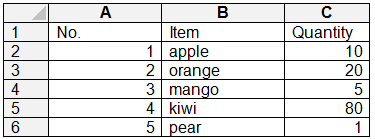
- dt.AsEnumerable.Where(Function(x)x(“Item”).ToString.Equals(“strawberry”))
- dt.AsEnumerable.Any(Function(x)x(“Item”).ToString.Equals(“strawberry”))
- dt.AsEnumerable.FirstOrDefault(Function(x)x(“Item”).ToString.Equals(“strawberry”))
- dt.AsEnumerable.First(Function(x)x(“Item”).ToString.Equals(“strawberry”))
The short version
D — First throws when no strawberry exists. First demands at least one match while Where, Any, and FirstOrDefault tolerate emptiness safely.
Key concepts in this question
- LINQ over DataTable: AsEnumerable plus lambda filters rows by Item value
- First: returns the match or throws InvalidOperationException if none found
- FirstOrDefault: returns null or default instead of throwing on empty results
- Where and Any: return empty sequence or false, never throwing for no match
Why D is correct
Querying for strawberry when absent yields zero rows, which only First treats as an error. Where gives an empty list, Any gives false, and FirstOrDefault gives null, all without exception. Hence the First expression is the one that throws during execution. This follows UiPath REFramework and activity design that favors precise selectors, correct exception mapping, and data-driven evolution.
Why the others are wrong
- A. filters to an empty enumerable without throwing
- B. evaluates existence to false safely on no match
- C. returns default null gracefully instead of faulting
UiADPv1 exam tip
Which LINQ throws on no match equals First: need safe empty handling use FirstOrDefault, Any, or Where. Match handlers, selectors, and test data updates to framework expectations.
- Utilizing LINQ to find the total sum of integers in a list by writing listOfIntegers.Sum(Function(x) x).
- Applying LINQ to filter out emails in a list of strings containing multiple email addresses by writing listOfStrings.FilterEmails().ToList().
- Employing LINQ to convert DataTable to JSON format by writing dataTable.ToJSON().
- Using LINQ to identify the longest string in a list of strings by writing listOfStrings.Max(Function(x)x.Length()).
The short version
A — Sum with Function lambda is correct LINQ. List Sum with inline function shows proper UiPath VB LINQ syntax for totals.
Key concepts in this question
- Valid LINQ: Enumerable methods with Function lambdas for projection and aggregation
- Sum with lambda: totals integers by evaluating each element through the function
- Invented methods: FilterEmails and ToJSON are not LINQ operators for those tasks
- Max misuse: Max with length lambda finds max length value, not the longest string itself
Why A is correct
Utilizing list Sum with Function syntax matches VB LINQ in UiPath for aggregating integers. It demonstrates correct method plus lambda shape for data processing. Other options use non-existent helpers or wrong operators for the described goals. This follows UiPath REFramework and activity design that favors precise selectors, correct exception mapping, and data-driven evolution.
Why the others are wrong
- B. calls a fictional FilterEmails LINQ operator for string filtering
- C. calls a fictional ToJSON conversion instead of serialization or LINQ projection
- D. uses Max to get a number when longest-string needs ordering or aggregation differently
UiADPv1 exam tip
Correct UiPath LINQ equals real Enumerable plus Function: Sum with lambda is valid, invented helpers are not.
Want the full bank of 284 questions for UiPath Automation Developer Professional (UiADPv1)? See all practice exams.