SnowPro Advanced Data Engineer — Free Practice Questions
10 free sample questions from a bank of 65, with the correct answers and explanations. No signup required — start practising right now.
- Add additional virtual warehouses.
- Increase the size of the virtual warehouse.
- Rewrite the query using Common Table Expressions (CTEs).
- Change the order of the joins and start with smaller tables first.
The short version
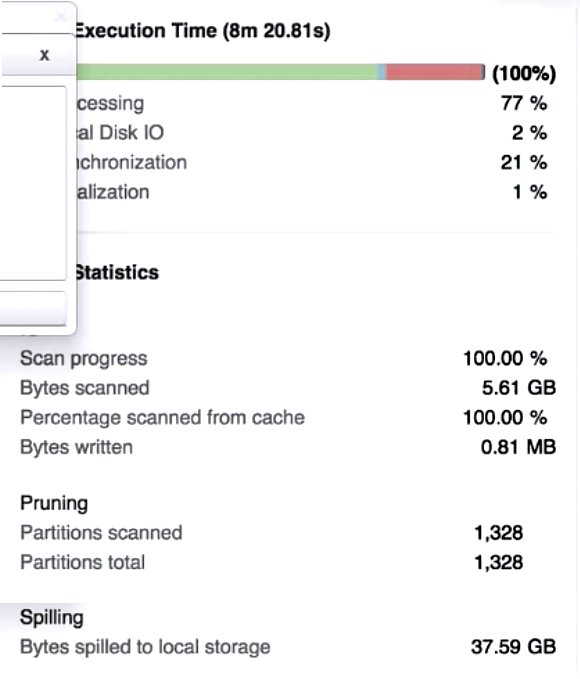
Disk spilling in the Query Profile means the warehouse ran out of memory, so answer B — increase the warehouse size — gives each node more memory.
Key concepts in this question
Query Profile spilling, bytes spilled to local vs remote storage, warehouse sizing vs multi-cluster scaling, memory-intensive operations (joins, sorts, aggregations).
Why B is correct
Spilling happens when an operation cannot fit in warehouse memory and falls back to local disk then remote storage, adding heavy I/O. A larger warehouse provides more memory per node, allowing the same operation to fit in memory and eliminating spilling. Adding clusters does not add memory per query since a query uses one cluster.
Why the others are wrong
A — Add additional virtual warehouses: adds separate warehouses / concurrency capacity, does not increase memory available to the single spilling query. C — Rewrite the query using CTEs: CTEs do not change memory footprint or execution resources; spilling is a resource issue. D — Change join order to start with smaller tables: Snowflake's optimizer already handles join ordering; it does not add memory to prevent spilling.
SnowPro-Advanced-Data-Engineer exam tip
For the exam, spilling = size up, queuing = scale out. If you see Bytes spilled to local/remote storage, choose a bigger warehouse, not more clusters.
- session.jdbc_connection()
- session.read.json()
- session.table()
- DataFrame.write()
- session.builder()
- session.sql()
The short version
In Snowpark you create DataFrames with session.table(), session.sql(), and the session.read readers such as session.read.json() — answers B, C, F.
Key concepts in this question
Snowpark Session entry points, DataFrame creation vs DataFrame actions, session.read file readers, session.table vs session.sql.
Why BCF is correct
B session.read.json() reads semi-structured files into a DataFrame via the DataFrameReader. C session.table() points a DataFrame at an existing table or view. F session.sql() creates a DataFrame from an arbitrary SQL query. These are the three documented creation methods among the choices.
Why the others are wrong
A — session.jdbc_connection(): not a Snowpark DataFrame factory; JDBC is for external connectivity, not listed as a DataFrame constructor. D — DataFrame.write(): this saves / writes a DataFrame, it does not create one. E — session.builder(): there is a Session.builder for building sessions, not a session.builder() method that returns a DataFrame.
SnowPro-Advanced-Data-Engineer exam tip
Memorize the trio: table(), sql(), read.<file>. Anything with write, col, select, or builder creates nothing — write saves, the rest transform.
- The role that owns the schema
- The role that owns the database
- The role that owns the CUSTOMER table
- The SYSADMIN role
- The SECURITYADMIN role
- The USERADMIN role with the MANAGE GRANTS privilege
The short version
In a managed access schema, only the schema owner and roles with global MANAGE GRANTS can grant access — answers A, E, F.
Key concepts in this question
Managed access schemas, loss of owner grant rights, schema owner vs object owner, SECURITYADMIN, MANAGE GRANTS privilege.
Why AEF is correct
With MANAGED ACCESS, object owners lose grant authority. Only the schema owner (A) or a role holding the global MANAGE GRANTS privilege can grant on the CUSTOMER table. SECURITYADMIN (E) holds MANAGE GRANTS by default, and USERADMIN with MANAGE GRANTS (F) explicitly qualifies.
Why the others are wrong
B — The role that owns the database: database ownership alone confers no grant rights inside a managed schema without MANAGE GRANTS. C — The role that owns the CUSTOMER table: in managed schemas table owners cannot grant — that is the core restriction. D — The SYSADMIN role: SYSADMIN does not hold MANAGE GRANTS by default, so it cannot grant unless explicitly given that privilege.
SnowPro-Advanced-Data-Engineer exam tip
See WITH MANAGED ACCESS and immediately eliminate the object owner. The only grantors are schema owner + anyone with MANAGE GRANTS.
- It generates an encrypted URL for accessing a file in a stage.
- It generates a staged URL for accessing a file in a stage.
- It generates a permanent URL for accessing files in a stage.
- It generates a temporary URL for accessing a file in a stage.
The short version
BUILD_STAGE_FILE_URL builds a long-lived file URL that does not expire — answer C, permanent URL.
Key concepts in this question
File URL vs scoped URL vs presigned URL, BUILD_STAGE_FILE_URL syntax, prolonged access, stage file access.
Why C is correct
Per docs, BUILD_STAGE_FILE_URL takes stage name + relative path and returns a Snowflake file URL permitting prolonged access — i.e., it does not expire. That matches permanent URL among the choices, unlike temporary/scoped URLs.
Why the others are wrong
A — It generates an encrypted URL: describes masking / encryption concepts, not this function. B — It generates a staged URL: vague distractor; the function generates a file URL, not a stage object reference. D — It generates a temporary URL: that describes BUILD_SCOPED_FILE_URL / presigned URLs which expire, the opposite of this function.
SnowPro-Advanced-Data-Engineer exam tip
URL trio: FILE_URL = permanent, SCOPED_FILE_URL = temporary/scoped, PRESIGNED = expiring external access. FILE in the name = forever.
- COPY command
- MERGE command
- FILE FORMAT object
- PIPE object
- STAGE object
- INSERT command
The short version
Answer is A + C + E. File structure (file format) can be given inline in COPY, as a named FILE FORMAT object, or as a default on a STAGE.
Key concepts
- FILE FORMAT object: named encapsulation of TYPE plus format options for loading/unloading.
- STAGE: named internal/external location; definition includes FILE_FORMAT clause.
- COPY INTO table/location: inline FILE_FORMAT clause for load and unload.
- PIPE: named object encapsulating a single COPY statement for Snowpipe; it has no FILE_FORMAT parameter of its own.
Why ACE is correct
- A (COPY): COPY INTO table and COPY INTO location both accept FILE_FORMAT = (FORMAT_NAME or TYPE with options), for loading and unloading.
- C (FILE FORMAT): CREATE FILE FORMAT creates a named object describing staged data for load/unload.
- E (STAGE): CREATE STAGE accepts FILE_FORMAT = (FORMAT_NAME or TYPE); both internal and external stages can include file format and copy options, so the stage defines the default structure.
Why the others are wrong
- B (MERGE): merges staged/foreign data using SQL logic; it does not define file structure or accept a FILE_FORMAT clause.
- D (PIPE): CREATE PIPE syntax is AS copy_statement with AUTO_INGEST/INTEGRATION/COMMENT only — no FILE_FORMAT parameter; any format comes from the embedded COPY/STAGE/FILE FORMAT, so PIPE itself is not a place to define structure, and it is load-only via Snowpipe.
- F (INSERT): row-based DML with VALUES/SELECT; no file-format concept.
SnowPro-Advanced-Data-Engineer exam tip
For where-can-format-be-defined choose-three, default to COPY + FILE FORMAT + STAGE. Do not pick PIPE just because its COPY text contains a format — PIPE has no FILE_FORMAT property.
- It is possible to join multiple tables using DataFrames.
- Snowpark operations are executed lazily on the server.
- User-Defined Functions (UDFs) are not pushed down to Snowflake.
- Snowpark requires a separate cluster outside of Snowflake for computations.
- Columns in different DataFrames with the same name should be referred to with squared brackets.
The short version
Snowpark DataFrames support full relational ops like joins and are lazily evaluated on the server — answers A and B.
Key concepts in this question
Snowpark lazy evaluation, server-side pushdown, DataFrame relational operations, Scala to Snowpark migration.
Why AB is correct
A: DataFrames expose join, select, filter, etc., so multi-table joins translate directly from Scala. B: DataFrames are lazy — they build a query plan and only execute on an action, with all computation pushed to Snowflake. Both are core documented characteristics.
Why the others are wrong
C — UDFs are not pushed down: false; Snowpark UDFs/UDFTs run inside Snowflake. D — Snowpark requires a separate cluster: false; compute is the Snowflake warehouse, no external Spark cluster needed. E — Columns with same name need squared brackets: false; use df.col("name") / df1.col vs df2.col to disambiguate, not bracket syntax.
SnowPro-Advanced-Data-Engineer exam tip
If a Snowpark option says external cluster, eager execution, or no joins/UDFs, it is wrong. Think lazy + server-side + full DataFrame API.
- The table is clustered very well on O_ORDERDATE, as there are 493 micro-partitions that could not be significantly improved by reclustering.
- The table is not clustered well on O_ORDERDATE, as there are 493 micro-partitions where the range of values in that column overlap with every other micro-partition in the table.
- The data in O_ORDERDATE does not change very often, as there are 493 micro-partitions containing rows where that column has not been modified since the row was created.
- The data in O_ORDERDATE has a very low cardinality, as there are 493 micro-partitions where there is only a single distinct value in that column for all rows in the micro-partition.
The short version
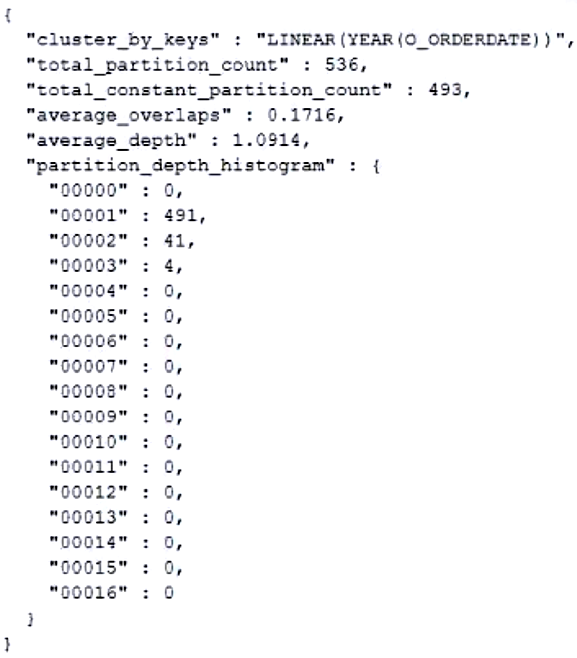
total_constant_partition_count counts micro-partitions that will not benefit from reclustering — high value means well clustered, answer A.
Key concepts in this question
SYSTEM$CLUSTERING_INFORMATION, constant vs overlapping partitions, clustering quality, partition pruning.
Why A is correct
Docs define total_constant_partition_count as micro-partitions in a constant state that will not benefit significantly from reclustering. 493 such partitions means O_ORDERDATE values are well colocated, enabling effective pruning, hence very well clustered.
Why the others are wrong
B — Not clustered well / overlap every partition: that describes high average_overlaps or average_depth, not constant partitions. C — Data does not change often / not modified: constant refers to clustering state, not DML recency. D — Very low cardinality / single distinct value: low cardinality is not what this counter measures; a partition can be constant without single-value content.
SnowPro-Advanced-Data-Engineer exam tip
constant = good, overlaps/depth = bad. When you see total_constant_partition_count, read it as already optimal partitions.
- Assign queries to a multi-cluster virtual warehouse with economy auto-scaling. Allow the system to automatically start and stop clusters according to demand.
- Assign all queries to a multi-cluster virtual warehouse set to maximized mode. Monitor to determine the smallest suitable number of clusters.
- Create a virtual warehouse for every 250 Analysts. Monitor to determine how many of these virtual warehouses are being utilized at capacity.
- Create a size XL virtual warehouse to support all the dashboard queries. Monitor query runtimes to determine whether the virtual warehouse should be resized.
The short version
Thousands of concurrent analysts with steady load and cache priority need maximized multi-cluster — always-on capacity, answer B.
Key concepts in this question
Multi-cluster modes (maximized vs auto-scale economy/standard), concurrency vs elasticity, result and warehouse cache preservation, responsiveness.
Why B is correct
Maximized mode (min = max > 1) starts all clusters up front, giving full compute immediately with no scale-up queuing and preserving warm caches. That fits large steady concurrency where responsiveness is top priority and demand does not fluctuate much.
Why the others are wrong
A — Economy auto-scaling: saves credits but queues queries before scaling, hurting responsiveness. C — A warehouse per 250 analysts: fragmentation destroys cache reuse and adds management overhead with no responsiveness gain. D — Single XL warehouse: one cluster cannot handle thousands of concurrent queries; concurrency queuing will occur regardless of size.
SnowPro-Advanced-Data-Engineer exam tip
Responsiveness + steady high concurrency = maximized. Fluctuating load + cost sensitivity = auto-scale. Never answer single huge warehouse for concurrency.
- 12 hours
- 24 hours
- 14 days
- 31 days
The short version
Reusing a persisted result resets its 24-hour clock up to 31 days from first execution — with 12-hour reuse, answer D.
Key concepts in this question
Persisted query results, 24-hour retention reset on reuse, 31-day absolute limit, unchanged data requirement.
Why D is correct
Docs: each reuse resets the 24-hour retention, capped at 31 days from first execution. A dashboard hitting the same SQL every 12 hours continuously resets the clock, so results remain available for the full 31-day maximum if data is unchanged.
Why the others are wrong
A — 12 hours: confuses the dashboard schedule with result lifetime. B — 24 hours: is only the single-use window without reuse; reuse extends it. C — 14 days: this is the Time Travel / historical data window, not persisted-results reuse limit.
SnowPro-Advanced-Data-Engineer exam tip
Memorize 24 hours resettable to 31 days. Any same-query interval under 24 hours with unchanged data = 31-day answer.
- Call the system function SYSTEM$ABORT_TRANSACTION.
- Call the system function SYSTEM$CANCEL_TRANSACTION.
- Set the LOCK_TIMEOUT to FALSE in the stored procedure.
- Set the TRANSACTION_ABORT_ON_ERROR to TRUE in the stored procedure.
The short version
An abruptly disconnected session leaves a detached transaction holding locks — abort it with SYSTEM$ABORT_TRANSACTION, answer A.
Key concepts in this question
Detached transactions, transaction locks, SYSTEM$ABORT_TRANSACTION vs cancel, LOCK_TIMEOUT, TRANSACTION_ABORT_ON_ERROR.
Why A is correct
Docs direct that a transaction left in a detached state by abrupt disconnect must be aborted via SYSTEM$ABORT_TRANSACTION by the starter or admin. That immediately releases locks so a new transaction can run.
Why the others are wrong
B — SYSTEM$CANCEL_TRANSACTION: no such function for this purpose; cancel applies to queries/statements, not detached transactions. C — Set LOCK_TIMEOUT to FALSE: LOCK_TIMEOUT controls wait time, it does not release an existing detached lock. D — Set TRANSACTION_ABORT_ON_ERROR to TRUE: affects future error behavior inside procedures, does not abort the already-detached transaction.
SnowPro-Advanced-Data-Engineer exam tip
Detached = ABORT_TRANSACTION. Remember the 5-minute blocked / 4-hour idle auto-abort rules as backup, but the immediate action is abort.
Want the full bank of 65 questions for SnowPro Advanced Data Engineer? See all practice exams.