PCDRA — Free Practice Questions
10 free sample questions from a bank of 132, with the correct answers and explanations. No signup required — start practising right now.
1Phishing belongs which of the following MITRE ATT&CK tactics?
- Initial Access, Persistence
- Persistence, Command and Control
- Reconnaissance, Persistence
- Reconnaissance, Initial Access
Answer: D
2When viewing the incident directly, what is the “assigned to” field value of a new Incident that was just reported to Cortex?
- Pending
- It is blank
- Unassigned
- New
Answer: C
3In incident-related widgets, how would you filter the display to only show incidents that were “starred”?
- Create a custom XQL widget
- This is not currently supported
- Create a custom report and filter on starred incidents
- Click the star in the widget
Answer: D
4Where would you view the WildFire report in an incident?
- next to relevant Key Artifacts in the incidents details page
- under Response --> Action Center
- under the gear icon --> Agent Audit Logs
- on the HUB page at apps.paloaltonetworks.com
Answer: A
5What does the following output tell us?
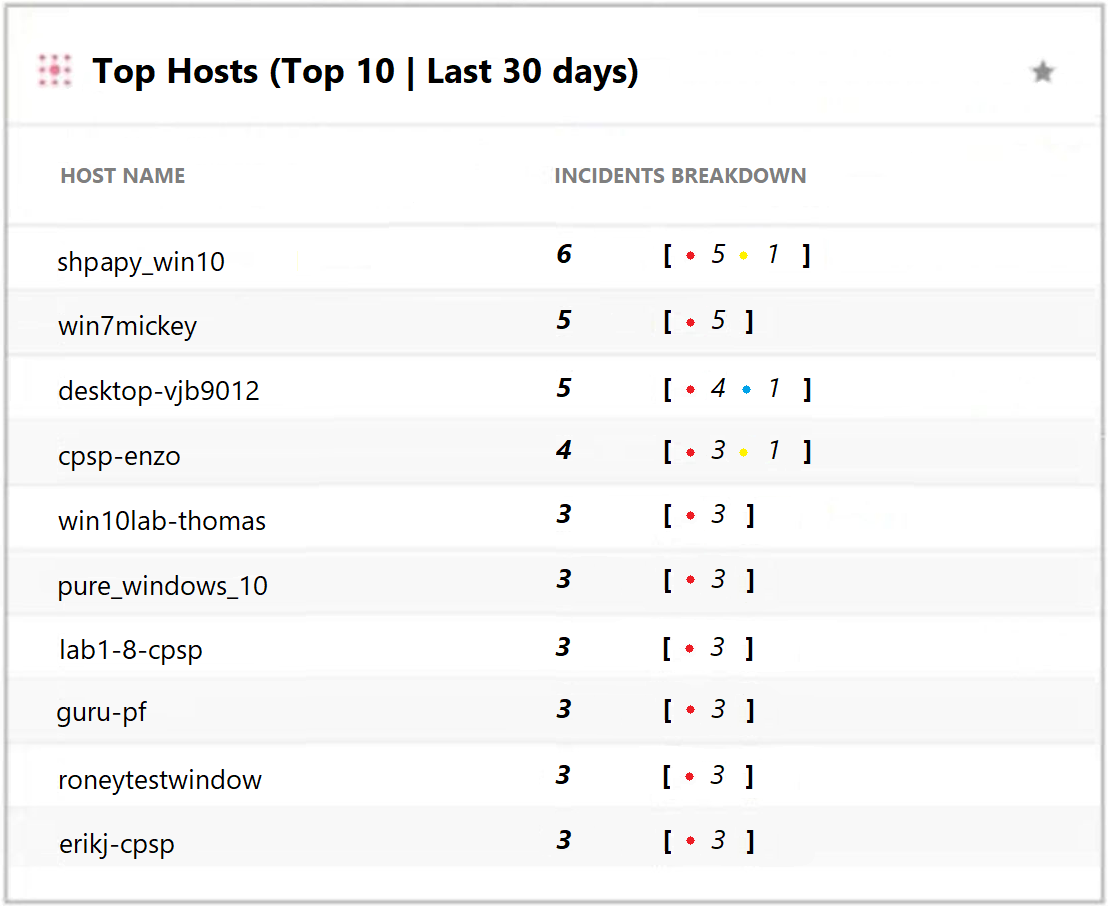
- There is one low severity incident.
- Host shpapy_win10 had the most vulnerabilities.
- There is one informational severity alert.
- This is an actual output of the Top 10 hosts with the most malware.
Answer: A
6Which engine, of the following, in Cortex XDR determines the most relevant artifacts in each alert and aggregates all alerts related to an event into an incident?
- Sensor Engine
- Causality Analysis Engine
- Log Stitching Engine
- Causality Chain Engine
Answer: B
7Which type of BIOC rule is currently available in Cortex XDR?
- Threat Actor
- Discovery
- Network
- Dropper
Answer: D
8In Windows and macOS you need to prevent the Cortex XDR Agent from blocking execution of a file based on the digital signer. What is one way to add an exception for the singer?
- In the Restrictions Profile, add the file name and path to the Executable Files allow list.
- Create a new rule exception and use the singer as the characteristic.
- Add the signer to the allow list in the malware profile.
- Add the signer to the allow list under the action center page.
Answer: C
9As a Malware Analyst working with Cortex XDR you notice an alert suggesting that there was a prevented attempt to download Cobalt Strike on one of your servers. Days later, you learn about a massive ongoing supply chain attack. Using Cortex XDR you recognize that your server was compromised by the attack and that Cortex XDR prevented it. What steps can you take to ensure that the same protection is extended to all your servers?
- Create Behavioral Threat Protection (BTP) rules to recognize and prevent the activity.
- Enable DLL Protection on all servers but there might be some false positives.
- Create IOCs of the malicious files you have found to prevent their execution.
- Enable Behavioral Threat Protection (BTP) with cytool to prevent the attack from spreading.
Answer: A
10Which statement is true based on the following Agent Auto Upgrade widget?
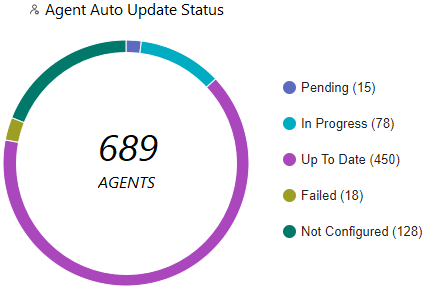
- There are a total of 689 Up To Date agents.
- Agent Auto Upgrade was enabled but not on all endpoints.
- Agent Auto Upgrade has not been enabled.
- There are more agents in Pending status than In Progress status.
Answer: B
Want the full bank of 132 questions for PCDRA? See all practice exams.