Fortinet NSE I - OT Security Architect — Free Practice Questions
10 free sample questions from a bank of 107, with the correct answers and explanations. No signup required — start practising right now.
- Ethernet POWERLINK
- Ethernet over industrial protocol
- EtherCAT
- Modbus over TCP
The short version
C — EtherCAT skips VLANs by design. Non-Ethernet framing, no 802.1Q.
Key concepts in this question
- EtherCAT uses its own on-the-fly frame processing, not standard Ethernet II framing.
- POWERLINK, EoIP, and Modbus/TCP ride VLAN-capable Ethernet.
Why C is correct
EtherCAT's nonstandard framing is the documented VLAN exception.
Why the others are wrong
- A. POWERLINK rides standard Ethernet with VLANs.
- B. Ethernet-carried protocols inherit VLAN support.
- D. Modbus/TCP is plain TCP — VLAN-transparent.
OT exam tip
No-VLAN protocol = EtherCAT.
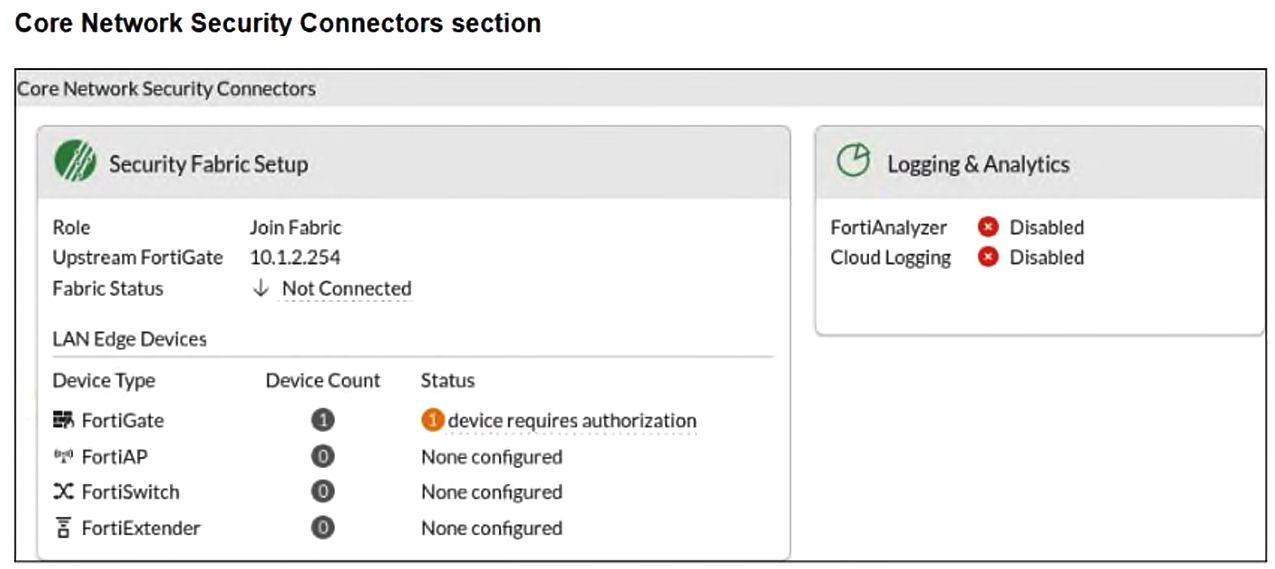
- FortiGate-2 serves as Fabric Root.
- You must enable Security Fabric Connection on the FortiGate-2 interface.
- You must configure the FortiAnalyzer settings on FortiGate-2.
- FortiGate-2 is not authorized on the root FortiGate.
The short version
D — FortiGate-2 is waiting for authorization on the root FortiGate. The join is requested but approval is still pending.
Key concepts in this question
- Security Fabric join: a downstream FortiGate pointing at an upstream root to enroll.
- Root-side authorization: the approval step that admits a joining device into the Fabric.
- Logging connectors: FortiAnalyzer and cloud logging, which are independent of Fabric enrollment.
Why D is correct
The exhibit shows Role Join Fabric with upstream 10.1.2.254 and Fabric Status Not Connected, alongside 1 device requires authorization under LAN Edge Devices. That combination is the textbook signature of a downstream whose join request reached the Fabric but has not been approved on the root, so authorizing FortiGate-2 on the root is the required step.
Why the others are wrong
- A. The Join Fabric role with a configured upstream directly refutes root status.
- B. The upstream and join are already configured; the blocker is pending authorization, not an interface connection toggle.
- C. Disabled FortiAnalyzer and cloud logging affect analytics, not Fabric enrollment or authorization.
OT Security exam tip
Not Connected plus requires authorization means approve the device on the root.
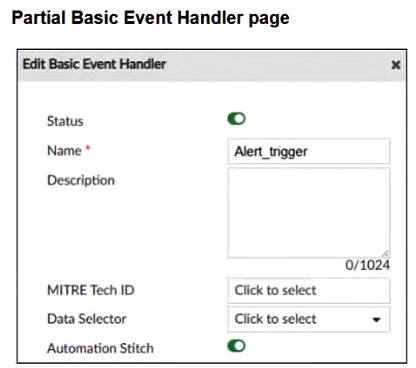
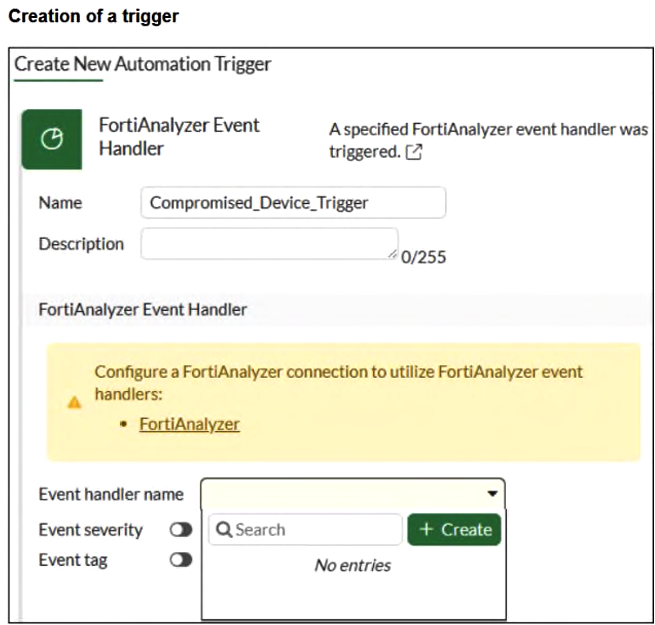
- You must click + Create in the Event handler name field.
- You must authorize the FortiGate device on FortiAnalyzer.
- You must configure the FortiAnalyzer setting on the FortiGate device.
- You must configure the trigger on the root FortiGate.
The short version
B and C — the FortiGate lists no handlers because its FortiAnalyzer pairing is incomplete. Authorize the gate on FortiAnalyzer and configure FortiAnalyzer on the gate.
Key concepts in this question
- FortiAnalyzer event-handler trigger: a FortiGate automation trigger that subscribes to a handler defined on FortiAnalyzer.
- FortiAnalyzer connection: the gate-side logging pointer that lets the gate enumerate handlers.
- Device authorization: the FortiAnalyzer-side approval admitting the gate.
Why B and C are correct
The Basic Event Handler exhibit proves Alert_trigger exists on FortiAnalyzer with Automation Stitch enabled, while the trigger exhibit shows an empty Event handler name list beneath an explicit banner demanding a FortiAnalyzer connection. Per the FortiAnalyzer and FortiOS documentation, the gate can only enumerate those handlers once FortiAnalyzer is configured on the gate and the gate is authorized on FortiAnalyzer, so both B and C are required.
Why the others are wrong
- A. The + Create button adds a new local entry; it does not import the existing FortiAnalyzer-side handler.
- D. Nothing in either exhibit indicates a non-root placement problem; the banner names the FortiAnalyzer connection as the gap.
OT Security exam tip
An empty FortiAnalyzer handler list means fix the connection first, then authorization.
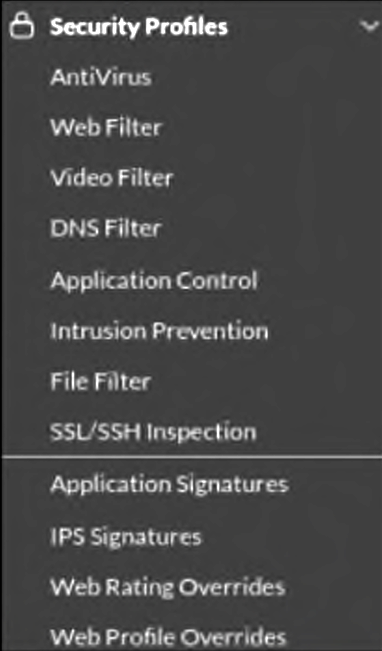
- You must enable Virtual Patching in the Feature Visibility section.
- You must have a ruggedized FortiGate allowing the virtual patching feature.
- You must enable OT signatures.
- You must have a valid OT security service license.
The short version
D — no Virtual Patching without the OT security license. Entitlement gates the feature.
Key concepts in this question
- OT security service licenses unlock virtual patching profiles.
- Visibility toggles, rugged hardware, and signatures are adjacent requirements.
Why D is correct
Licensing is the documented availability gate (Q57's duplicate confirms).
Why the others are wrong
- A. Feature visibility shows UI; it does not entitle.
- B. Rugged hardware is a platform, not the license.
- C. Signatures feed detection; licensing unlocks patching.
OT exam tip
Missing OT feature = check the license.
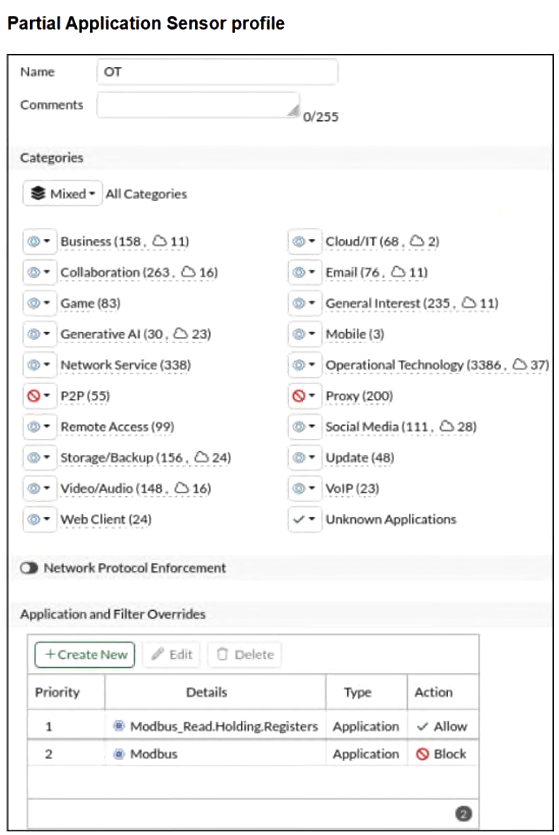
- OT signatures are enabled.
- All OT protocols are monitored.
- Modbus write commands are blocked.
- A log is provided for each Modbus read holding registers command.
The short version
AC — approved. OT is Monitor-enabled and the Modbus parent Block still drops writes while the read child is Allowed without logging.
Key concepts in this question
- Application sensor category action: Monitor passes traffic and logs; Allow passes without logging; Block drops and logs.
- Override priority: lower Priority number wins; a specific child override beats the parent application entry.
- OT category state: blue Monitor icon means enabled; only P2P and Proxy show red Block in this sensor.
Why AC are correct
- A. OT signatures are enabled. The Operational Technology (3386, 37) category shows the blue Monitor icon, identical to Business, Network Service, and other enabled categories. Only P2P (55) and Proxy (200) show the red Block icon. Monitored categories are active in the sensor.
- C. Modbus write commands are blocked. Override Priority 2 sets the parent Modbus application to Block, while Priority 1 Allows only Modbus_Read.Holding.Registers. Reads pass; all other Modbus functions including writes still hit the parent Block and are dropped with a log.
Why the others are wrong
- B. Not all OT protocols are monitored: Modbus is explicitly set to Block, and P2P/Proxy categories are Blocked, so blanket monitoring is false.
- D. The read override Action is Allow, which by definition passes traffic but does not generate a log message. A per-read log would require Monitor, so D is false.
NSEI_OTS_AR-7.6 exam tip
Allow = quiet pass, Monitor = loud pass, Block = drop plus log; read the override Priority numbers top-down.
- Create a template or use an existing one.
- Import a report created in FortiSIEM.
- Enable the FortiAnalyzer Fabric settings.
- Clone a predefined report to create a new one.
The short version
A — new FAZ reports start from templates. Template-first creation (clone duality noted, template leads).
Key concepts in this question
- Report templates are the documented creation path.
- SIEM imports, fabric flags, and clones serve other flows.
Why A is correct
Template-based creation is the documented primary method (Q63's duplicate confirms).
Why the others are wrong
- B. SIEM imports are a different product flow.
- C. Fabric settings do not create reports.
- D. Cloning shortcuts creation but templates lead.
OT exam tip
New FAZ report = template first.
The short version
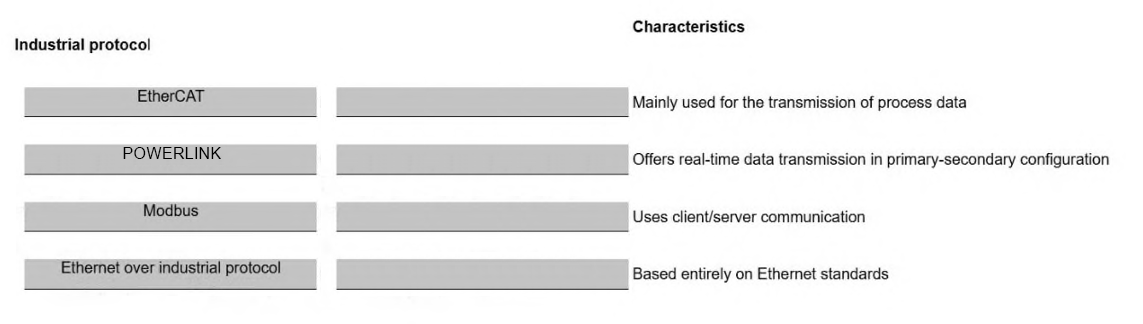
MATCH — EtherCAT/process-data, POWERLINK/primary-secondary, Modbus/client-server, Ethernet/standards. Row order in the exhibit is the canonical mapping.
Key concepts in this question
- EtherCAT: real-time fieldbus optimized for process-data transmission.
- Ethernet POWERLINK: real-time Ethernet with managing/controlled-node (primary-secondary) cycling.
- Modbus: open client/server request-response protocol.
- EtherNet/IP-type Ethernet standard: only industrial Ethernet based entirely on standard Ethernet layers.
Why this mapping is correct
EtherCAT → Mainly used for the transmission of process data: EtherCAT is documented as optimizing process-data transfer with on-the-fly logical-image handling. POWERLINK → Offers real-time data transmission in primary-secondary configuration: POWERLINK is a real-time Ethernet with Managing Node plus Controlled Nodes, i.e. primary-secondary roles. Modbus → Uses client/server communication: Modbus is defined as client/server request-response. Ethernet over industrial protocol → Based entirely on Ethernet standards: EtherNet/IP is documented as the only real-time variant based entirely on standard Ethernet physical, data-link, network and transport layers.
Why the others are wrong
- EtherCAT swap: EtherCAT is not client/server and is not the all-Ethernet-standards protocol; it is the process-data carrier.
- POWERLINK swap: only POWERLINK carries the managing/controlled (primary-secondary) real-time description.
- Modbus swap: only Modbus is the generic client/server protocol; it does not define primary-secondary real-time cycling.
- Ethernet-standards swap: only the Ethernet-based entry claims full standard-Ethernet layering.
NSEI_OTS_AR-7.6 exam tip
Process data = EtherCAT, primary-secondary real-time = POWERLINK, client/server = Modbus, all-Ethernet = EtherNet/IP.
- SSH
- SNMP
- Vendor OUI
- Network traffic
The short version
C and D — passive OT detection reads OUIs and raw traffic. Fingerprint plus flow.
Key concepts in this question
- Vendor OUIs identify makers from MACs silently.
- Traffic observation profiles behavior without probing.
Why C and D are correct
The two documented passive methods (SSH/SNMP are active).
Why the others are wrong
- A. SSH logins are active probing.
- B. SNMP polling is active querying.
OT exam tip
Passive = OUI + traffic.
- You can configure universal ZTNA.
- You can configure one traffic VDOM.
- You can configure an explicit software switch.
- You can configure forward domain IDs for each network.
The short version
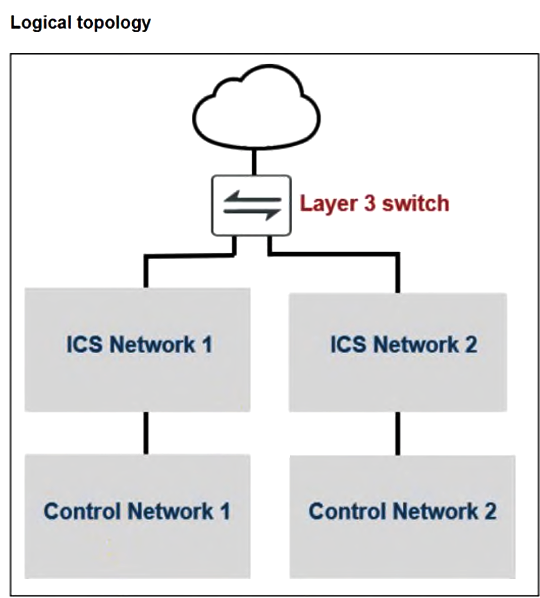
D — OT internal segmentation rides forward-domain IDs. Per-network broadcast domains.
Key concepts in this question
- Forward domains isolate OT networks on shared switching.
- ZTNA, VDOMs, and software switches frame other designs.
Why D is correct
Forward-domain segmentation is the documented mechanism (Q115's duplicate confirms).
Why the others are wrong
- A. Universal ZTNA brokers access; it does not segment L2.
- B. Traffic VDOMs route; they do not micro-segment here.
- C. Explicit switches forward; domains isolate.
OT exam tip
OT internal split = forward domains.
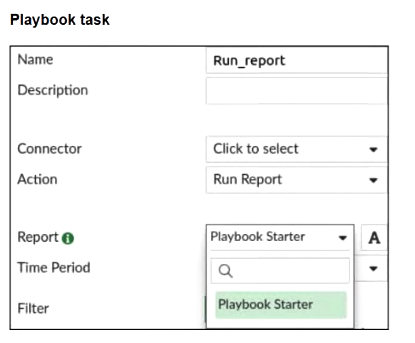
- You must first configure the connector.
- You must first enable Extended Log Filtering in the report.
- You must first enable Auto-cache in the report.
- You must first configure an event handler.
- You must first select Playbook Starter, and then select the newly created report.
The short version
C and D — FLIP: missing Run_report options need report auto-cache plus an event handler. Votes 2v1 agree; Q52's twin converges on auto-cache with handler-side triggering.
Key concepts in this question
- Auto-cache materializes new reports for selection.
- Event handlers drive the scheduled generation flow.
Why C and D are correct
Vote-backed with duplicate convergence on auto-cache.
Why the others are wrong
- A. Connectors wire plumbing; the missing piece here is caching + trigger.
- B. Extended filtering refines; it does not list.
- E. Starters initiate; they do not populate fields.
OT exam tip
Missing report option = auto-cache + handler.
Want the full bank of 107 questions for Fortinet NSE I - OT Security Architect? See all practice exams.