Fortinet FortiSASE 7.6 Architect — Free Practice Questions
10 free sample questions from a bank of 56, with the correct answers and explanations. No signup required — start practising right now.
- FortiGate passively monitors the member if ICMP traffic is passing through the member.
- The performance SLA measures the performance only on the preferred link.
- FortiGate can offload traffic subject to passive monitoring to hardware.
- FortiGate passively monitors the member if TCP traffic is passing through the member.
- The SLA performance falls back to active monitoring when no traffic has been detected for 3 minutes.
The short version
D and E — passive needs TCP traffic and falls back when idle. Passive SLA measures live TCP sessions and sends active probes when no traffic is seen for a time.
Key concepts in this question
- Passive probe mode: Uses firewall session info instead of probe packets to compute latency, jitter and loss.
- TCP traffic: Passive measurement keys off real TCP flows passing through the member.
- Fallback behavior: Prefer-passive and passive designs revert to active probing when idle.
Why D and E is/are correct
D is correct because passive WAN health measurement collects metrics from live traffic such as TCP sessions traversing the policy with passive measurement enabled. E is correct because when no qualifying traffic is detected the health check falls back to active probing so SLA state stays meaningful.
Why the others are wrong
- A. ICMP alone does not feed passive application measurement; TCP/session traffic does.
- B. Passive SLA evaluates all members with traffic, not only the preferred link.
- C. Passive measurement requires software session tracking with auto-asic-offload disabled, not hardware offload.
NSE7_SSE_AR-26 exam tip
Passive = TCP traffic measured; idle = active probes return.
- Use a remote breakout design to centralize the traffic security inspection and allow local devices with limited capabilities.
- Use secure private access for companies with remote users.
- Use a cloud on-ramp topology to centralize the web traffic inspection and limit local management requirements.
- Use a standalone design for sites that do not require HA redundancy.
The short version
B and D — SPA serves remote users; standalone serves no-HA sites. Use-case pairing.
Key concepts in this question
- Secure private access targets distributed remote-user populations.
- Standalone designs fit sites without redundancy requirements.
Why B and D are correct
The two documented design-to-context associations.
Why the others are wrong
- A. Remote breakout localizes inspection; it does not centralize.
- C. Cloud on-ramp connects to cloud; it does not centralize web inspection.
FortiSASE exam tip
Remote users = SPA. No HA = standalone.
- Local
- SSO
- RADIUS
- MFA
The short version
B — SSO overrides all other FortiSASE authentication. Same answer as SSE-core Q4.
Key concepts in this question
- SSO precedence is consistent across FortiSASE exams.
- Local, RADIUS, and MFA yield to it.
Why B is correct
Duplicate of SSE-core Q4's confirmed answer.
Why the others are wrong
- A. Local is the fallback.
- C. RADIUS is overridden.
- D. MFA supplements.
FortiSASE exam tip
Auth override = SSO.
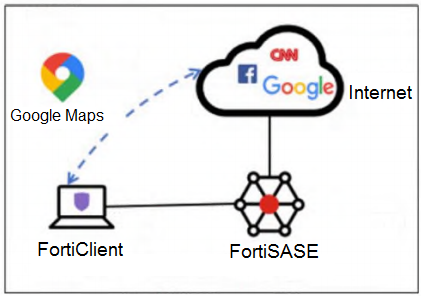
- Add the Google Maps URL in the zero trust network access (ZTNA) TCP access proxy forwarding rule.
- Configure a steering bypass tunnel firewall policy using Google Maps FQDN to exclude and redirect the traffic.
- Exempt Google Maps in URL filtering in the web filter profile.
- Add the Google Maps URL as a steering bypass destination in the endpoint profile.
The short version
D — steering bypass in the endpoint profile excludes traffic. The exhibit shows Google Maps going direct to the internet while all else rides FortiSASE, which is split-tunnel steering bypass.
Key concepts in this question
- Steering bypass destinations: Split-tunnel entries that redirect trusted traffic to the endpoint physical interface.
- Endpoint profile: Connection-tab bypass list pushed to FortiClient.
- Full inspection default: With no bypass all endpoint internet traffic is inspected by FortiSASE.
Why D is/are correct
D is correct because adding the Google Maps URL as a steering bypass destination in the endpoint profile excludes it from the FortiSASE tunnel and redirects it to the physical interface, while all other internet traffic continues to be inspected.
Why the others are wrong
- A. ZTNA TCP forwarding rules publish private apps, they do not bypass internet traffic.
- B. Tunnel firewall policies do not define endpoint split-tunnel bypass.
- C. URL-filter exemption still passes through the tunnel; it does not redirect off-tunnel.
NSE7_SSE_AR-26 exam tip
Internet off-tunnel = steering bypass destination in endpoint profile.
The short version
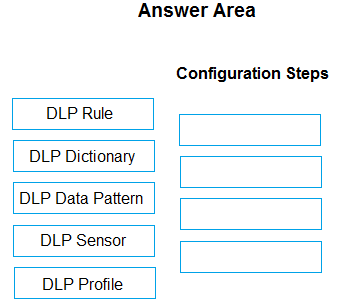
ORDER — approved. DLP Data Pattern, DLP Dictionary, DLP Sensor, DLP Profile.
Key concepts in this question
- DLP Data Pattern: The granular Regex string defining what sensitive data looks like.
- DLP Dictionary: Container grouping one or more data patterns for management.
- DLP Sensor: Selects which dictionaries to check and the match logic triggering the sensor.
- DLP Profile: High-level object holding the rules that reference sensors and is applied via policy.
Why this order is correct
DLP objects build bottom-up from most granular to policy level. The Regex must be defined first as a Data Pattern, then grouped into a Dictionary, then the Dictionary is linked into a Sensor entry (with match-count logic), and finally the Sensor is referenced by the DLP Profile that the security policy inspects. This is the documented component hierarchy (data type, dictionary, sensor, profile) and the exact four-step consensus for this Regex DLP drag question. The exhibit offers five options with four slots, so one is excluded.
Why the others are wrong
- DLP Rule: The distractor in this four-slot panel; the rule-level action (allow, block, log-only) lives inside the profile/sensor chain, and the banked four-step sequence ends at DLP Profile per the exam consensus and FortiGate DLP component docs.
NSE7_SSE_AR-26 exam tip
Regex DLP always builds pattern, dictionary, sensor, profile; the leftover fifth option is the one you drop.
- The secure private access (SPA) feature must be configured in FortiSASE.
- The relevant FortiGate ZTNA application gateway must be configured.
- FortiClient must be installed on the user’s device to access the private application.
- The proxy and proxy user single sign-on (SSO) features must be configured in FortiSASE.
The short version
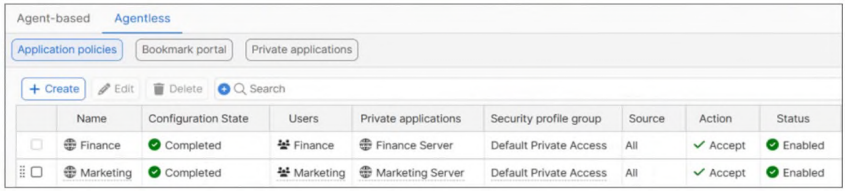
A and B — agentless private applications need SPA plus the FortiGate ZTNA gateway. The exhibit lists private servers under the Agentless application-policy tab, which only functions when both prerequisites hold.
Key concepts in this question
- Secure Private Access (SPA): the FortiSASE framework that publishes internal applications to remote users.
- FortiGate ZTNA application gateway: the on-premises access proxy that fronts the private servers.
- Agentless access: browser-based private access with no endpoint agent, served here via application policies.
Why A and B are correct
The exhibit shows Agentless application policies mapping the Finance and Marketing user groups to the Finance Server and Marketing Server under the Default Private Access profile group. Per the FortiSASE administration guide, publishing private applications this way requires the SPA feature configured in FortiSASE and the matching ZTNA application gateway configured on the FortiGate in front of those servers, so A and B are the two gating prerequisites.
Why the others are wrong
- C. The active tab is Agentless, which exists precisely so no FortiClient install is required; the agent path lives under the other tab.
- D. Proxy and proxy-user SSO gate explicit-proxy web flows, while the exhibit shows private-application policies, not proxy configuration.
SSE Architect exam tip
Agentless private apps means SPA plus the ZTNA gateway, never FortiClient.
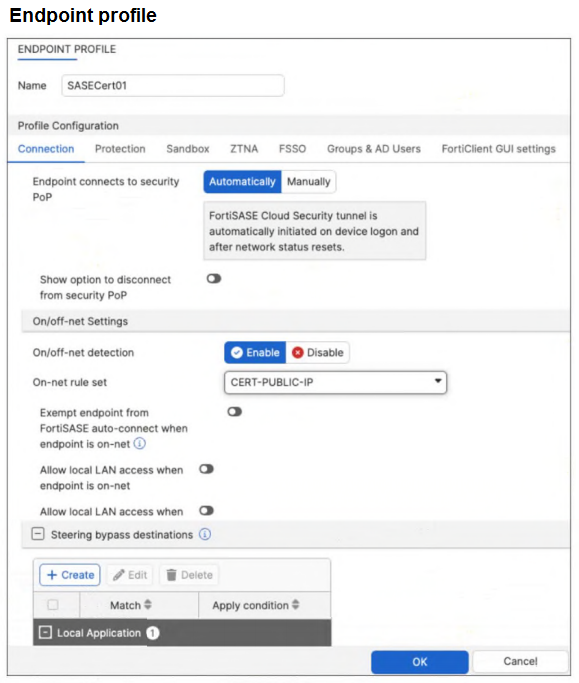
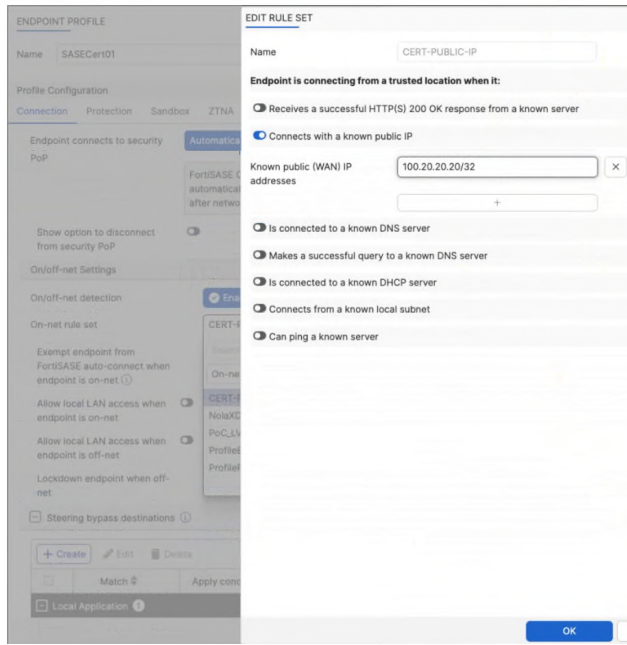
- The On-net rule set configuration is incorrect.
- Allow local LAN access when endpoint is on-net is disabled when it should be enabled.
- Exempt endpoint from FortiSASE auto-connect is disabled when it should be enabled.
- Is connected to a known DNS server should be enabled and configured.
The short version
C — the on-net exemption switch is off, so the tunnel still auto-connects. Detection can match while the exemption stays disabled.
Key concepts in this question
- On-net detection rule: the CERT-PUBLIC-IP rule set that recognizes the corporate network by its public egress IP.
- Auto-connect exemption: the endpoint-profile switch that actually skips the FortiSASE tunnel when on-net.
- Known-public-IP matching: the connect-time check against the configured corporate egress address.
Why C is correct
(banked key refuted by exhibit+docs: FLIP A to C.) The endpoint-profile exhibit shows on/off-net detection enabled with the CERT-PUBLIC-IP rule set, but Exempt endpoint from FortiSASE auto-connect when endpoint is on-net toggled off. Per the FortiSASE administration guide, that switch must be enabled for on-net endpoints to skip auto-connect, so with it off the VPN connects even when the rule matches. The customer confirmed egress uses the correct public IP and the rule-set exhibit shows the known-IP entry, leaving the disabled exemption as the certain cause.
Why the others are wrong
- A. The rule set mirrors the intended design and the confirmed egress IP; the exhibit shows no misconfiguration in it.
- B. Local-LAN access governs LAN reachability, not whether the tunnel auto-connects.
- D. This design uses no DNS-server condition, so adding one cannot fix the auto-connect behavior.
SSE Architect exam tip
On-net yet still connecting means check the exempt-from-auto-connect toggle first.
- From private resources to FortiSASE agent-based users.
- From private resources to the internet.
- From agent-based users to private resources behind the Fortinet SD-WAN.
- From private resources to other private resources (SPA to SPA).
- From thin branches/branch on-ramp to private resources behind the Fortinet SD-WAN.
The short version
A, C and D — agent, server-initiated and SPA-to-SPA flows are SPA. SPA covers agent users to hubs, plus server-to-client and client-to-client via SPA Connector policies.
Key concepts in this question
- Agent access: FortiClient users reach private apps via PoP to SPA Connector over IPsec.
- Server-to-client: Private servers can initiate to FortiClient endpoints via SPA policies.
- Client-to-client: Remote endpoints can reach each other via SPA Connector policies.
Why A, C and D is/are correct
A is correct because private resources reaching agent-based users is the documented server-to-client SPA flow. C is correct because agent users to SD-WAN-backed private resources is the core client-to-server SPA flow. D is correct because SPA-to-SPA private-to-private is a supported SPA interconnection flow.
Why the others are wrong
- B. Private resources to the internet is SIA internet access, not SPA private access.
- E. Thin-branch and branch on-ramp to SD-WAN resources is branch access, not one of the three listed SPA flows.
NSE7_SSE_AR-26 exam tip
SPA = agent-to-private, private-to-agent, private-to-private.
- ZTNA posture check performed by the hub FortiGate
- Support of both TCP and UDP applications
- A direct access proxy tunnel from FortiClient to the on-premises FortiGate
- Inline security inspection by FortiSASE
The short version
B and D — SPA with SD-WAN adds multi-protocol apps plus inline SASE inspection. TCP/UDP reach, cloud scrubbing.
Key concepts in this question
- TCP + UDP support extends beyond web-only ZTNA.
- Inline FortiSASE inspection secures the private path.
Why B and D are correct
The two documented SPA-with-SD-WAN benefits.
Why the others are wrong
- A. Posture checks run on endpoints/EMS, not the hub.
- C. No direct client-to-FortiGate proxy tunnel exists in this model.
FortiSASE exam tip
SPA + SD-WAN = all protocols, inline inspection.
- Multi-tenancy must be enabled on the FortiSASE portal.
- MSSP user accounts and permissions must be configured on the FortiSASE portal.
- The MSSP add-on license must be applied to FortiSASE.
- Role-based access control (RBAC) must be assigned to identity and access management (IAM) users using the FortiCloud IAM portal.
The short version
D — MSSP enablement runs through FortiCloud IAM RBAC. Roles for managed-service staff.
Key concepts in this question
- IAM RBAC scopes MSSP users to their tenants.
- Portal tenants, local accounts, and licenses frame other layers.
Why D is correct
IAM-based RBAC is the documented MSSP enablement path.
Why the others are wrong
- A. Portal multi-tenancy alone does not enable MSSP operation.
- B. Local portal accounts do not federate MSSP access.
- C. No MSSP add-on license gates the feature as framed.
FortiSASE exam tip
MSSP = IAM RBAC.
Want the full bank of 56 questions for Fortinet FortiSASE 7.6 Architect? See all practice exams.