Fortinet NSE 7 - Security Operations 7.6 Architect — Free Practice Questions
10 free sample questions from a bank of 56, with the correct answers and explanations. No signup required — start practising right now.
- Remove unused devices.
- Enable deep inspection on firewall policies.
- Forward all firewall logs to the security information and event management (SIEM) system.
- Implement macrosegmentation.
The short version
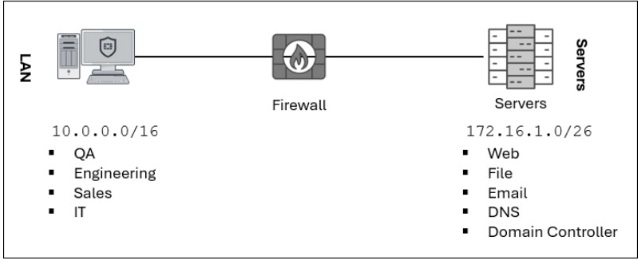
D — flat shared LAN and server blocks call for macrosegmentation. Splitting broad zones shrinks lateral movement and exposed services.
Key concepts in this question
- Attack surface: reachable hosts, services, and trust zones an attacker can pivot through.
- Macrosegmentation: dividing coarse zones such as departments and server roles with policy boundaries.
- Detection vs reduction: inspection and logging observe threats; segmentation removes exposure.
Why D is correct
The exhibit shows one flat LAN 10.0.0.0/16 mixing QA, Engineering, Sales, and IT behind a single firewall hop to one flat server block 172.16.1.0/26 mixing Web, File, Email, DNS, and Domain Controller. Any compromised LAN host can reach every server role, and any server can pivot freely. Macrosegmentation splits these coarse zones so department and role traffic crosses enforced policy, most effectively shrinking the reachable surface.
Why the others are wrong
- A. Removing unused devices trims endpoints but leaves the flat any-to-any trust intact.
- B. Deep inspection improves visibility into allowed flows; it does not remove reachable paths.
- C. Forwarding logs to SIEM improves detection and response; it does not reduce exposure.
SOC exam tip
Flat zones plus mixed roles = segment first.
The short version
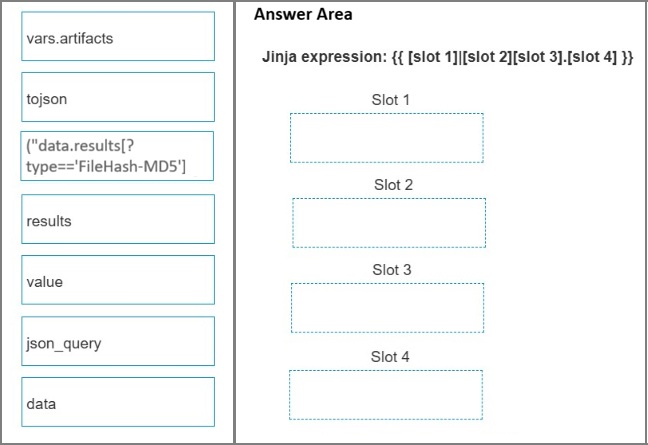
ORDER — approved. The MD5 filter is vars.artifacts | json_query("data.results[?type=='FileHash-MD5'].value").
Key concepts in this question
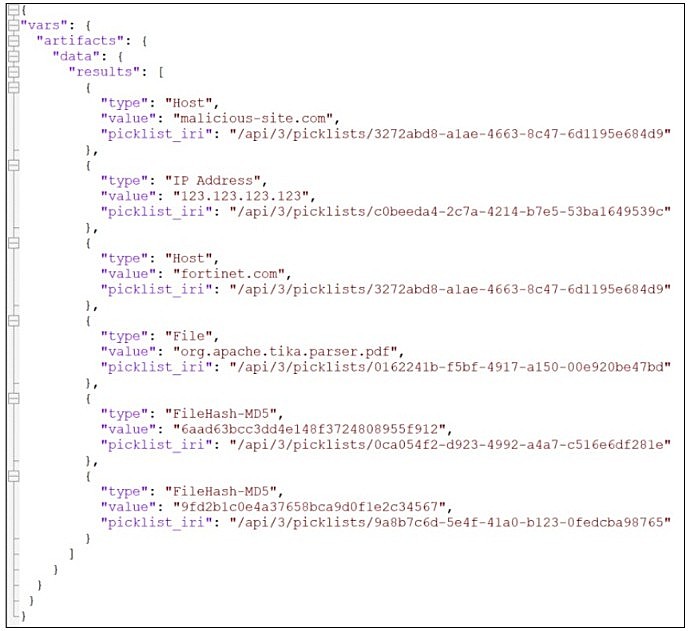
- vars.artifacts: Root JSON object holding the data.results array shown in the exhibit.
- json_query: JMESPath filter used in FortiSOAR to select list items by condition.
- JMESPath projection: The [?type=='FileHash-MD5'].value pattern keeps only matching objects, then returns their value field.
Why this order is correct
Slot 1 must be vars.artifacts because the template starts right after {{ and the exhibit JSON is rooted at vars.artifacts. Slot 2 must be json_query because only that filter can apply a conditional list query. Slot 3 must be ("data.results[?type=='FileHash-MD5'] because it is the only option containing both the data.results path and the type condition, matching the two FileHash-MD5 objects in the exhibit (6aad63bcc3dd4e148f3724808955f912 and 9fd2b1c0e4a37658bca9d0f1e2c34567). Slot 4 must be value because the MD5 strings live in the value key, and the template has a dot before slot 4. The assembled expression returns exactly the two MD5 hash strings.
Why the others are wrong
- data: Standalone data would duplicate the path already inside slot 3 and cannot start the expression without vars.artifacts.
- results: Standalone results is subsumed inside the slot 3 query string; using it alone loses the type filter.
- tojson: Serializes to a JSON string and would break further field projection; the question asks for filtered values, not stringification.
NSE7_SOC_AR-7.6 exam tip
When the Jinja option already contains data.results plus [?...], slot 1 is vars.artifacts and the query option goes in slot 3.
The short version
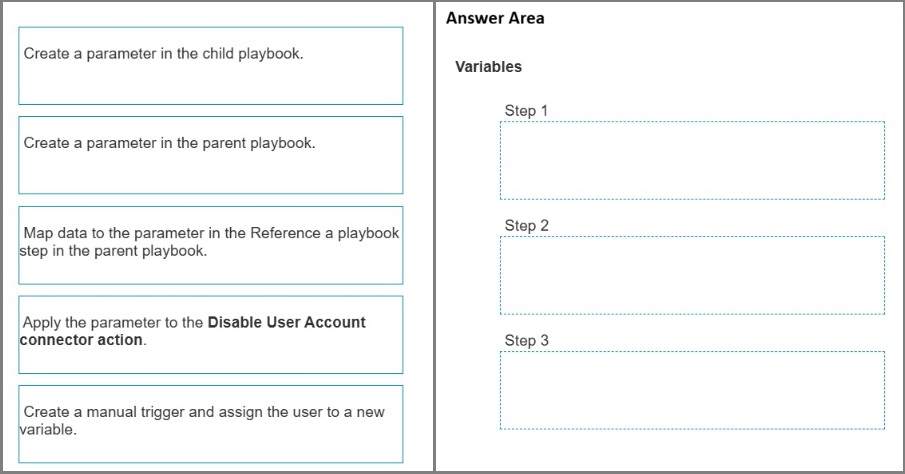
ORDER — approved. Child parameter first, map it in the parent Reference step second, consume it in the child connector action third.
Key concepts in this question
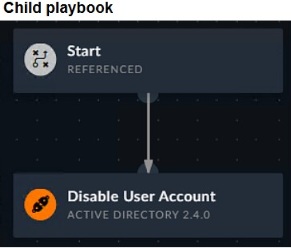
- Referenced trigger: The child playbook starts with a REFERENCED trigger (exhibit image6) and receives outside data only via input parameters.
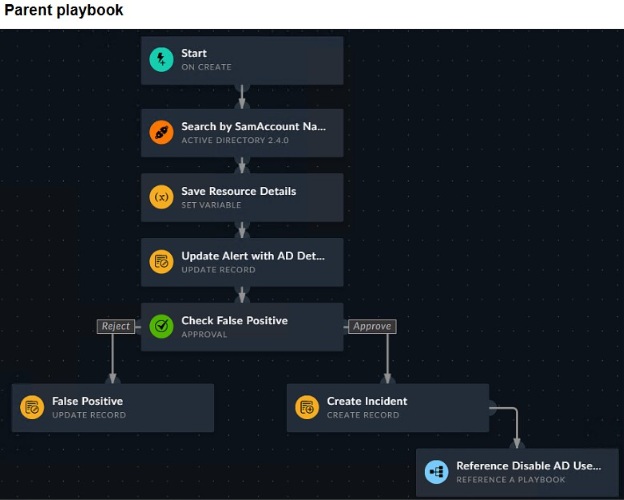
- Reference a Playbook step: The parent playbook step (exhibit image5, Reference Disable AD User) that calls the child and maps parent data into child parameters.
- Dynamic Values: After mapping, the child parameter appears in the child Dynamic Values window for use in connector inputs.
Why this order is correct
Step 1 must create the input parameter in the child playbook because a referenced child does not inherit parent variables automatically; the parameter is the inbox (Tools > Edit Parameters on the Referenced Start step). Step 2 maps parent data (the SamAccountName search result) into that parameter in the parent Reference a Playbook step; the field only appears after step 1. Step 3 applies the now-available parameter inside the child Disable User Account (Active Directory 2.4.0) connector action via {{vars.input.params.<name>}}. The exhibit flow (Approve path to Create Incident to Reference Disable AD User) requires the AD identity to travel parent to child exactly this way.
Why the others are wrong
- Create a parameter in the parent playbook.: Parent parameters receive data from outside the parent; they are not the mechanism for sending data down to a child.
- Create a manual trigger and assign the user to a new variable.: The parent already uses an ON CREATE trigger and retrieves AD details; a manual trigger is unrelated to parent-to-child passing.
NSE7_SOC_AR-7.6 exam tip
Parent-to-child data always flows child-parameter, parent-mapping, child-consumption; anything mentioning a parent parameter is the distractor.
- Customize the display columns for this incident.
- Remove the Reporting IP attribute from the raw logs using parsing rules.
- Disable correlation for the Reporting IP field in the rule subpattern.
- Clear the Reporting IP field from the Triggered Attributes section when you configure the Incident Action.
The short version
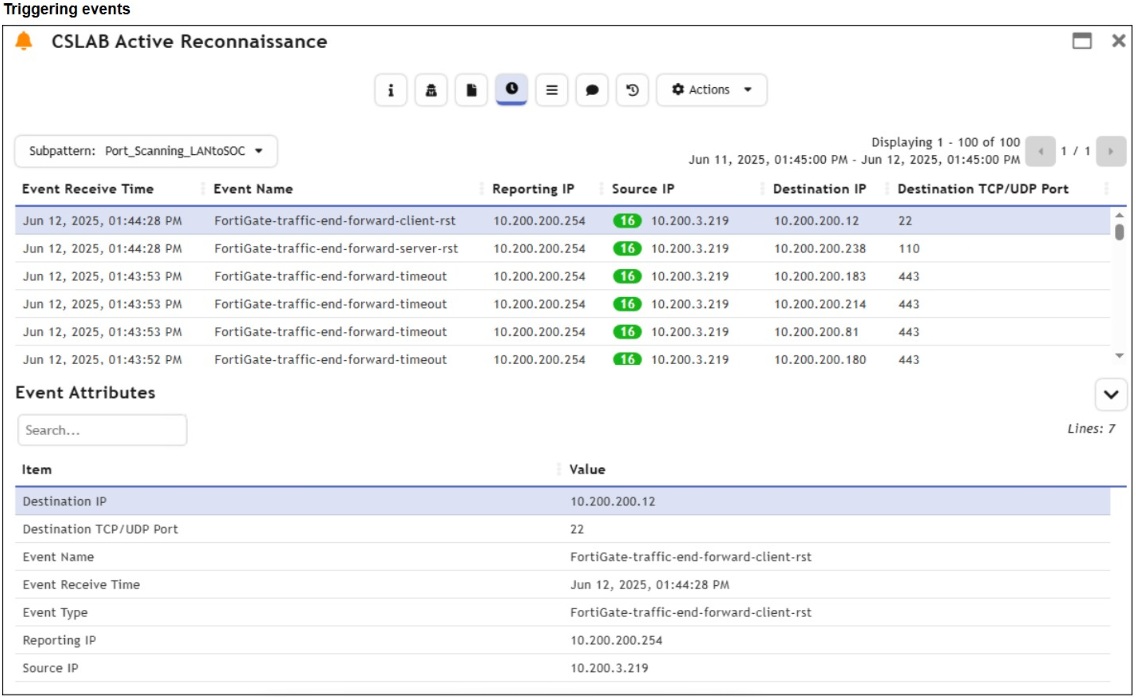
A — single-firewall topologies customize the incident display columns. Hide the meaningless column.
Key concepts in this question
- Display-column customization trims incident views per topology.
- Parsing, correlation, and action configs are not view controls.
Why A is correct
Column customization is the documented view-trimming method.
Why the others are wrong
- B. Parsing rules alter data, not views.
- C. Correlation toggles detection, not display.
- D. Triggered attributes feed actions, not column layout.
SOC exam tip
Trim incident views = customize columns.
- Tactics, techniques, and procedures are hard because adversaries must adapt their methods.
- Tools are easy because often, multiple alternatives exist.
- IP addresses are easy because adversaries can spoof them or move them to new resources.
- Artifacts are easy because adversaries can alter file paths or registry keys.
The short version
A and C — Pyramid of Pain: TTPs hurt to change, IPs rotate freely. Top pain vs bottom pain.
Key concepts in this question
- TTPs force adversaries to retool methods entirely.
- IP addresses respawn trivially via spoofing and new infra.
Why A and C are correct
The two documented pyramid placements.
Why the others are wrong
- B. Tools sit mid-pyramid, not bottom-easy as framed.
- D. Artifacts sit low-mid, not bottom-easy as framed.
SOC exam tip
Pyramid top = TTPs. Bottom = IPs.
- Generate a hypothesis.
- Tune correlation rules.
- Perform packet analysis.
- Automate workflows.
- Enrich records with threat intelligence.
The short version
A, C, E — threat hunting means hypothesize, dissect packets, enrich with intel. Think, look, contextualize.
Key concepts in this question
- Hypotheses direct hunts; packet analysis finds traces; enrichment attributes them.
- Rule tuning and workflow automation are adjacent disciplines.
Why A, C and E are correct
The three documented hunting activities.
Why the others are wrong
- B. Rule tuning is detection engineering, not hunting.
- D. Automation scales response; it is not itself a hunt.
SOC exam tip
Hunt = hypothesize, packets, intel.
The short version
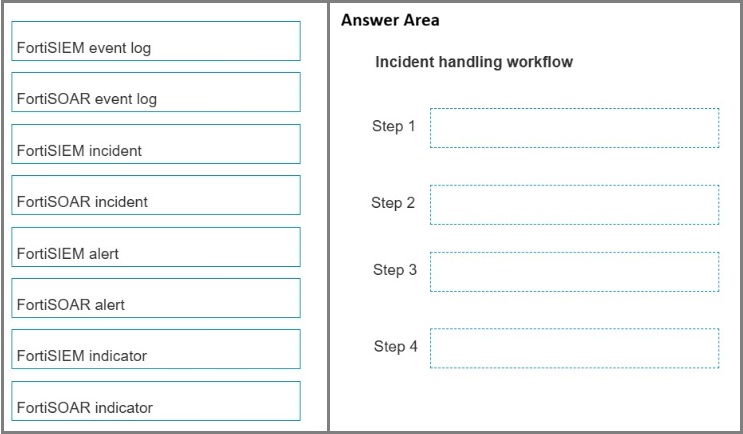
ORDER — approved. FortiSIEM event log, FortiSIEM incident, FortiSOAR alert, FortiSOAR incident.
Key concepts in this question
- FortiSIEM event log: Raw single log or data point collected from a monitored device.
- FortiSIEM incident: Created when a correlation rule fires on those events.
- FortiSOAR alert: The first SOAR-side record created by ingesting a FortiSIEM incident.
- FortiSOAR incident: Higher-level case container created only after an alert is validated and escalated.
Why this order is correct
The default data ingestion wizard maps FortiSIEM incidents into FortiSOAR alerts, not directly into FortiSOAR incidents. Raw device logs arrive first as FortiSIEM event logs; correlation produces a FortiSIEM incident; the wizard ingests that incident as a FortiSOAR alert for triage; a true positive is then escalated into a FortiSOAR incident. This matches the SOAR Framework flow (ingest alert, extract and enrich indicators, escalate true positives to incident) and the FortiSIEM-compatible playbook model where FortiSIEM supplies incident or raw event JSON to FortiSOAR.
Why the others are wrong
- FortiSOAR event log: Not a stage in this SIEM-to-SOAR handoff; ingestion targets the alerts module.
- FortiSIEM alert: FortiSIEM emits events and incidents; the alert object lives on the FortiSOAR side.
- FortiSIEM indicator: Indicators are extracted inside FortiSOAR after alert creation, not a FortiSIEM-side handoff stage.
- FortiSOAR indicator: Created by indicator-extraction playbooks after the alert exists, so it cannot precede the alert.
NSE7_SOC_AR-7.6 exam tip
SIEM incident becomes SOAR alert becomes SOAR incident; any answer starting anywhere else breaks the ingestion chain.
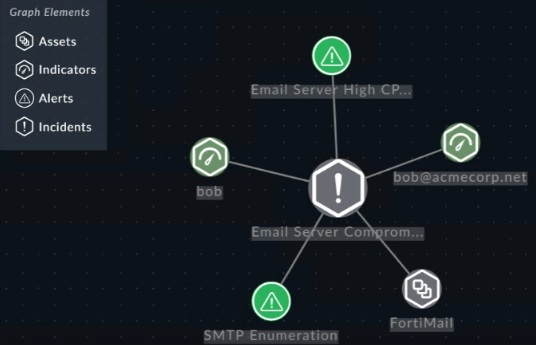
- Edit the incident template and add the Tickets module to the graph.
- Define move module relationships under Correlation Settings.
- Tag ticket records with the incident ID.
- Ingest ticket records through a custom connector.
The short version
A — extra modules join visual correlation through the incident template graph. Template defines the picture.
Key concepts in this question
- Incident templates declare which modules render in correlation graphs.
- Relationships, tags, and connectors feed data, not the graph layout.
Why A is correct
Template-graph membership is the documented method.
Why the others are wrong
- B. Correlation settings tune matching, not graph membership.
- C. ID tagging links records; it does not add modules to graphs.
- D. Connectors ingest; they do not lay out graphs.
SOC exam tip
Graph membership = incident template.
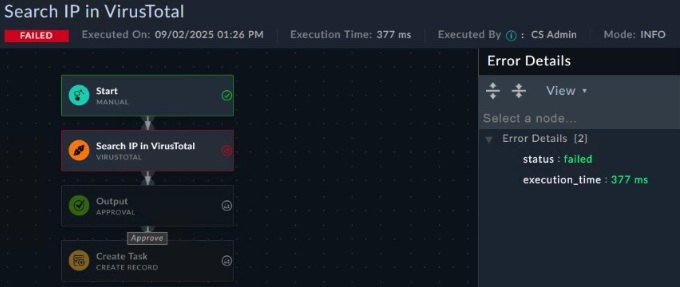
- The connector is deactivated.
- The playbook logging level must be debug.
- The Ignore Error option is enabled.
- The user that executed the playbook does not have the necessary permissions.
The short version
B — silent test failures mean logging is below debug. No detail captured, no detail shown.
Key concepts in this question
- Playbook logging levels gate execution detail visibility.
- Deactivation, ignore-error, and permissions fail differently and loudly.
Why B is correct
Sub-debug logging is the documented silent-failure cause.
Why the others are wrong
- A. Deactivated connectors error explicitly.
- C. Ignore-error suppresses failure, not detail.
- D. Permission failures deny with messages.
SOC exam tip
No error detail = raise logging to debug.
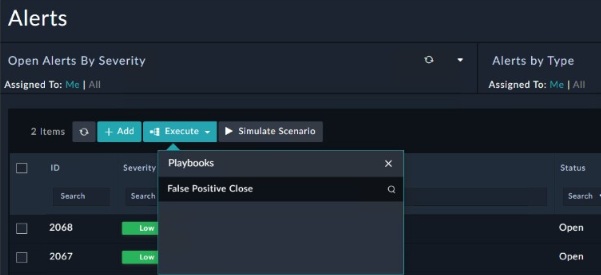
- The manual trigger is configured to require record input to run.
- The playbook must first be published using the Application Editor.
- The Alerts module is not among the list of modules the playbook can execute on.
- Another instance of the playbook is currently executing.
The short version
A and C — invisible playbooks lack record-input triggers or module execution scope. No input path, no target module.
Key concepts in this question
- Manual triggers requiring record input hide playbooks without context.
- Module execution lists gate which modules offer the playbook.
Why A and C are correct
The two documented invisibility causes.
Why the others are wrong
- B. Publishing gates availability globally, not search listing as framed.
- D. Concurrent execution does not hide listings.
SOC exam tip
Playbook missing = input trigger or module scope.
Want the full bank of 56 questions for Fortinet NSE 7 - Security Operations 7.6 Architect? See all practice exams.