NSE 7 - Secure Networking 7.6 Architect — Free Practice Questions
10 free sample questions from a bank of 139, with the correct answers and explanations. No signup required — start practising right now.
- Overlay links provide routing flexibility.
- Only wired connections can be used as underlay links.
- A VLAN is a type of overlay link.
- FortiLink interface is considered an underlay link.
- Wireless connections can be used to build overlay links.
The short version
A and E — overlays bring routing flexibility over any transport including wireless. Transport-agnostic agility.
Key concepts in this question
- Overlay links build over wired or wireless underlays alike.
- Flexibility is the overlay value proposition.
Why A and E are correct
The two documented underlay/overlay truths (matches SSE-Arch Q32).
Why the others are wrong
- B. Wireless serves fine as underlay.
- C. VLANs segment L2; they are not overlays.
- D. FortiLink manages switches/APs; it is not an underlay link.
Secure Networking exam tip
Overlay = any transport + flexibility.
- FortiGate accepts the SD-WAN member deletion with no further action.
- FortiGate displays an error message. SD-WAN zones must contain at least two members.
- FortiGate accepts the deletion and removes static routes as required.
- FortiGate accepts the deletion and places the member in the default SD-WAN zone.
The short version
A — approved. Deleting an unused SD-WAN member from the GUI simply succeeds with no zone or route side effects.
Key concepts in this question
- Unused members: a member referenced by no health-check and no SD-WAN rule is free to remove
- GUI deletion: FortiGate validates references and accepts the removal without extra actions
Why A is correct
FortiGate accepts the deletion because the member is no longer in use in health-checks or SD-WAN rules, so there is nothing to clean up or reassign. No minimum-members rule blocks zones with one or zero members.
Why the others are wrong
- B. No two-member minimum exists for SD-WAN zones; single-member and empty zones are allowed.
- C. No static-route cleanup is triggered; the member was already unused, and static routes are separate objects.
- D. Deleted members are not parked in the default virtual-wan-link zone; they are removed.
NSE7_FSN_AR-7.6 exam tip
Unused member delete = just works, no minimum, no move.
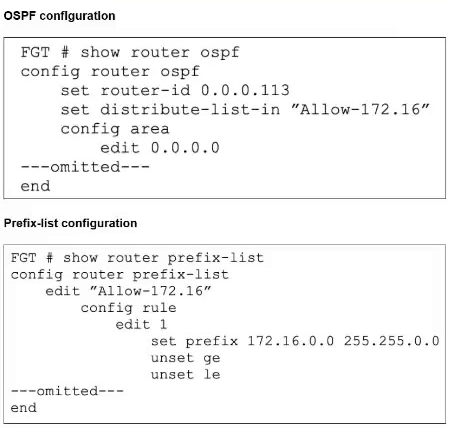
- Modify the default prefix-list behavior from implicit deny to implicit allow.
- Change the ge value to 17.
- Add another entry to the prefix list to specifically allow the 172.16.52.0/24 network.
- Change the le value to 16.
The short version
B and C — exact-match prefix-list blocks the /24; open ge or add an explicit entry. The unset ge/le permits only 172.16.0.0/16 exactly, so the /24 is filtered before the FIB.
Key concepts in this question
- Prefix-list exact match: with ge/le unset, only the exact prefix length is permitted.
- ge semantics: ge 17 on a /16 base permits lengths 17–32 inside that base.
- Explicit entries: a dedicated /24 rule admits the advertised subnet directly.
Why B and C are correct
The exhibit shows prefix 172.16.0.0 255.255.0.0 (/16) with ge and le unset, which matches only /16 exactly, so 172.16.52.0/24 is denied by the inbound distribute-list-in. Setting ge to 17 admits every subnet of length 17–32 within 172.16.0.0/16, including the /24. Adding a separate entry that specifically allows 172.16.52.0/24 likewise injects it without widening anything else.
Why the others are wrong
- A. Flipping implicit deny to allow would admit the /24 but also everything else; it is not one of the two targeted fixes.
- D. Changing le to 16 keeps the effective match at exactly /16, so the /24 stays filtered.
Secure Networking exam tip
Unset ge/le = exact length only; ge opens longer prefixes.
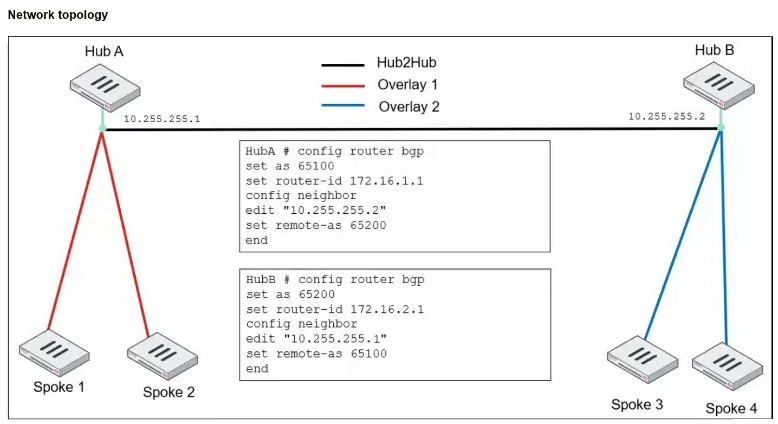
- set. ebgp-enforce-multihop enable
- set. ibgp-enforce-multihop advpn
- set. attribute-unchanged next-hop
- set. next-hop-self enable
The short version
A and C — Hub2Hub EBGP for ADVPN regions needs multihop plus preserved next-hop. Reach across hops, keep origin truth.
Key concepts in this question
- ebgp-enforce-multihop connects non-adjacent hub peers.
- attribute-unchanged next-hop preserves spoke origin for shortcut propagation (Q133's duplicate confirms).
Why A and C are correct
The two documented Hub2Hub settings (2-exam majority over next-hop-self).
Why the others are wrong
- B. ibgp-multihop-advpn is a spoke-side knob.
- D. next-hop-self rewrites origin, breaking shortcut propagation (Q123's outlier).
Secure Networking exam tip
Hub2Hub EBGP = multihop + unchanged next-hop.
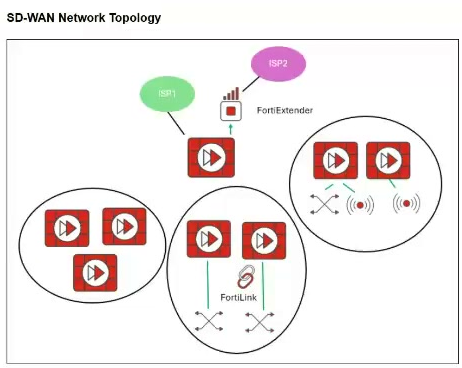
- You should exclude the FortiGate devices with FortiLink connection from the SD-WAN topology.
- You should build multiple SD-WAN topologies. Each topology should contain only one type of extension.
- You can build an SD-WAN topology that includes all devices. The hubs can be FortiGate devices with FortiExtender.
- You can build an SD-WAN topology that includes all devices. The hubs must be devices without extensions.
The short version
D — one SD-WAN topology can include every device, but keep extensions off the hubs. Mixed spokes are supported while hub stability stays paramount.
Key concepts in this question
- Single mixed topology: plain FortiGates plus FortiLink, FortiAP, and FortiExtender extensions coexist.
- Hub stability: hubs anchor overlays and orchestration, so they stay on plain devices.
- Extension spokes: switches, APs, and extenders hang off branches without fracturing the design.
Why D is correct
The exhibit shows a single SD-WAN network topology containing plain FortiGate groups alongside FortiLink-attached pairs and a FortiExtender-attached branch, which directly supports including all devices in one topology rather than excluding types or splitting per extension. Placing hubs on devices without extensions keeps tunnel termination and orchestration stable, while extension-bearing branches join as spokes.
Why the others are wrong
- A. Excluding FortiLink devices contradicts the exhibit, which includes them in the topology.
- B. Building one topology per extension type is unnecessary; the exhibit shows mixed types together.
- C. Making a FortiExtender-bearing device a hub risks WAN instability; hubs must stay extension-free.
Secure Networking exam tip
Mixed SD-WAN = all in, hubs plain.

- You must define a name for each device.
- You must define a value for each device and each user-defined metadata variable.
- You must associate a device blueprint with each device.
- You must define a value for each device and each metadata variable that defines an IP address.
The short version
A and C — ZTP CSVs need device names plus blueprint links. Identify, then template.
Key concepts in this question
- Device names individualize ZTP entries.
- Blueprints bind entries to provisioning logic.
Why A and C are correct
The two documented CSV prerequisites (matches SDW Q53).
Why the others are wrong
- B. User-defined metadata is optional.
- D. IP metadata is situational.
Secure Networking exam tip
ZTP CSV = names + blueprints.
- Check that the inspection mode configured for the web filter profile matches that of the firewall policy where it is applied.
- Check that the correct port is mapped to HTTP in the Protocol Options.
- Check that the communication between FortiGate and FortiGuard is stable.
- Check that FortiGate is not entering conserve mode.
The short version
C and D — flaky web filtering means shaky FortiGuard comms or conserve mode. Intermittent faults, resource causes.
Key concepts in this question
- FortiGuard reachability feeds rating lookups.
- Conserve mode sheds proxy features under pressure.
Why C and D are correct
The two documented intermittent-fault causes.
Why the others are wrong
- A. Mode mismatches break consistently, not intermittently.
- B. Port mapping affects protocols, not flakiness.
Secure Networking exam tip
Intermittent filtering = comms or conserve.
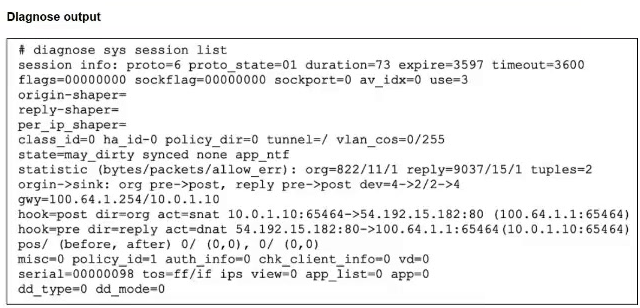
- The session state is preserved but the kernel will re-evaluate the session because the routing information will be flushed.
- The session is synchronized with the secondary device, however, because application control is applied, the session is marked dirty and has to be re-evaluated after failover.
- The session will be removed from the session table of the secondary device because the TCP session is not yet fully established.
- The session continues to permit traffic on the new primary device after failover, without requiring the client to restart the session with the server.
The short version
D — HA failover keeps the session alive with no client restart. State sync does its job.
Key concepts in this question
- Session synchronization carries established sessions to the new primary.
- Routing flushes and app-control dirtiness are edge cases, not the norm framed.
Why D is correct
Seamless continuation is the documented HA outcome.
Why the others are wrong
- A. Routing flushes do not gate continued sessions here.
- B. App-control dirtiness is not the framed outcome.
- C. Established TCP sessions sync normally.
Secure Networking exam tip
HA failover = sessions survive.
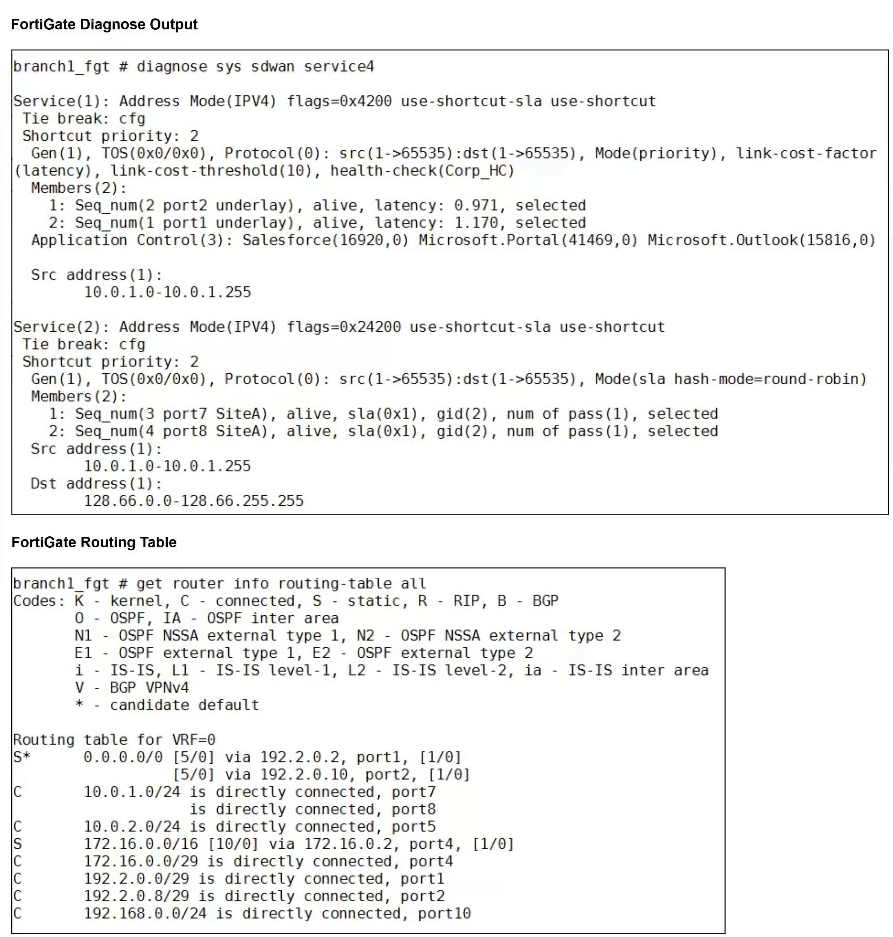
- FortiGate routes the traffic flow according to the forwarding information base (FIB).
- FortiGate drops the traffic flow.
- FortiGate steers the traffic flow through port7.
- FortiGate load balances the traffic flow through port7 and port8.
The short version
D — the flow hits Service(2), which load-balances across port7 and port8. Source and destination both fall inside that service, and both members are alive and selected.
Key concepts in this question
- SD-WAN service matching: longest, most specific src/dst service wins over the FIB.
- SLA round-robin mode: alive, selected members share matching flows.
- FIB precedence: SD-WAN rules steer before the routing table is consulted.
Why D is correct
Source 10.0.1.125 matches Service(2) Src 10.0.1.0–10.0.1.255 and destination 128.66.0.125 matches Dst 128.66.0.0–128.66.255.255, so Service(2) governs. Its two members, Seq 3 on port7 and Seq 4 on port8, are both alive, sla-passing, and selected under Mode sla with hash-mode round-robin, so the flow is load-balanced across port7 and port8 rather than pinned or dropped.
Why the others are wrong
- A. FIB routing applies only when no SD-WAN service matches; Service(2) matches here.
- B. Nothing is dead or denied; both members show alive, sla pass, and selected.
- C. Single-port steering would need priority mode on one member; this service is dual-member round-robin.
Secure Networking exam tip
Match src+dst to the service, then read the mode.
- CLI template
- Static route template
- Rules template
- BGP template
- IPsec tunnel template
The short version
A, D, E — spoke orchestrator templates: CLI, BGP, and IPsec tunnel. Same trio as SDW Q57 (letters shift, text matches).
Key concepts in this question
- CLI templates carry spoke customization.
- BGP plus IPsec templates build routing and tunnels.
Why A, D and E are correct
Text-matched to SDW Q57's confirmed trio.
Why the others are wrong
- B. Static routes are separate constructs.
- C. Rules templates are hub-side/policy-layer.
Secure Networking exam tip
Spoke templates = CLI + BGP + IPsec.
Want the full bank of 139 questions for NSE 7 - Secure Networking 7.6 Architect? See all practice exams.