NSE7_EFW-7.2 — Free Practice Questions
10 free sample questions from a bank of 73, with the correct answers and explanations. No signup required — start practising right now.
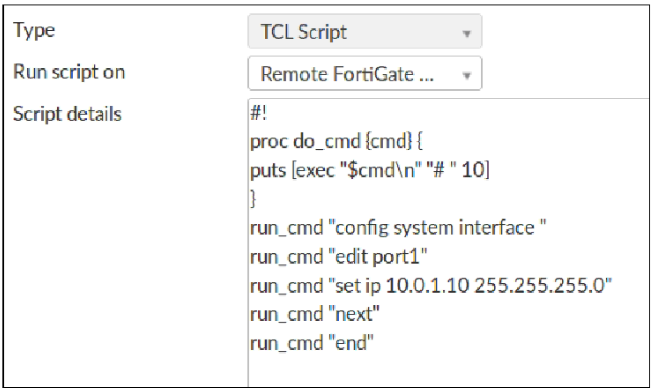
1Refer to the exhibit, which contains a TCL script configuration on FortiManager. An administrator has configured the TCL script on FortiManager, but the TCL script failed to apply any changes to the managed device after being run.
Why did the TCL script fail to make any changes to the managed device?
- The TCL procedure run_cmd has not been created.
- The TCL script must start with #include.
- There is no corresponding #! to signify the end of the script.
- The TCL procedure lacks the required loop statements to iterate through the changes.
Answer: A
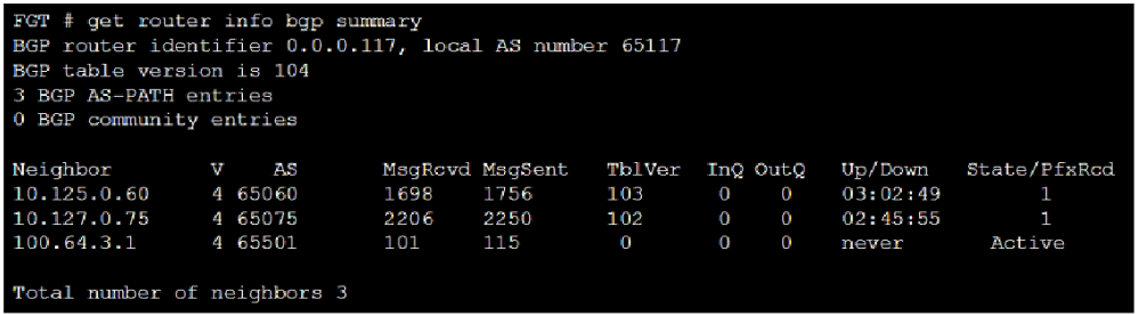
2Refer to the exhibit, which shows the output of a BGP summary. What two conclusions can you draw from this BGP summary? (Choose two.)
- The BGP session with peer 10.127.0.75 is established.
- External BGP (EBGP) exchanges routing information.
- The router 100.64.3.1 has the parameter bfd set to enable.
- The neighbors displayed are linked to a local router with the neighbor-range set to a value of 4.
Answer:
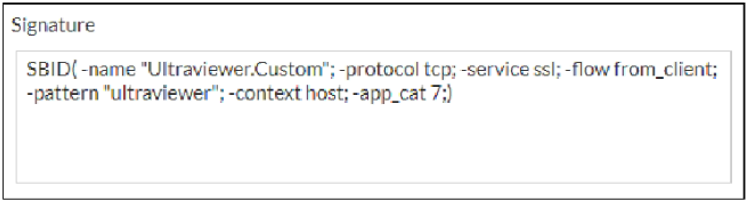
3Refer to the exhibit, which shows a custom signature. Which two modifications must you apply to the configuration of this custom signature so that you can save it on FortiGate? (Choose two.)
- Ensure that the header syntax is F-SBID.
- Add severity.
- Add attack_id.
- Start options with --.
Answer:
4What are two functions of automation stitches? (Choose two.)
- Automation stitches can be created to run diagnostic commands and email the results when CPU or memory usage exceeds specified thresholds.
- An automation stitch configured to execute actions in parallel can be set to insert a specific delay between actions.
- Automation stitches can be configured on any FortiGate device in a Security Fabric environment.
- An automation stitch configured to execute actions sequentially can take parameters from previous actions as input for the current action.
Answer:
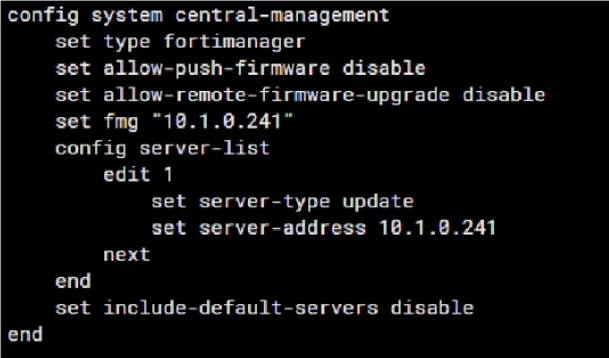
5Refer to the exhibit which shows config system central-management information. Which setting must you configure for the web filtering feature to function?
- Set update-server-location to automatic
- Add server.fortiguard.net to the Server list
- Configure securewf.fortiguard.net on the default servers
- Configure server-type with the rating option
Answer: D
6Which two statements about the Security Fabric are true? (Choose two.)
- FortiGate uses the FortiTelemetry protocol to communicate with FortiAnalyzer
- Only the root FortiGate sends logs to FortiAnalyzer
- Only FortiGate devices with configuration-sync set to default receive and synchronize global CMDB objects that the root FortiGate sends
- Only the root FortiGate collects network topology information and forwards it to FortiAnalyzer
Answer:
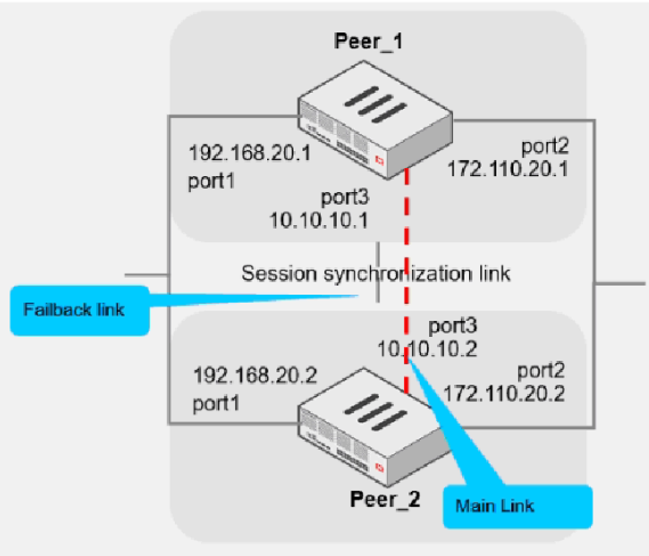
7Refer to the exhibit which shows two configured FortiGate devices and peering over
FGSP. The main link directly connects the two FortiGate devices and is configured using the set session-syn-dev command.
What is the primary reason to configure the main link?
- To have only configuration synchronization in layer 3
- To load balance both sessions and configuration synchronization between layer 2 and 3
- To have both sessions and configuration synchronization in layer 3
- To have both sessions and configuration synchronization in layer 2
Answer: D
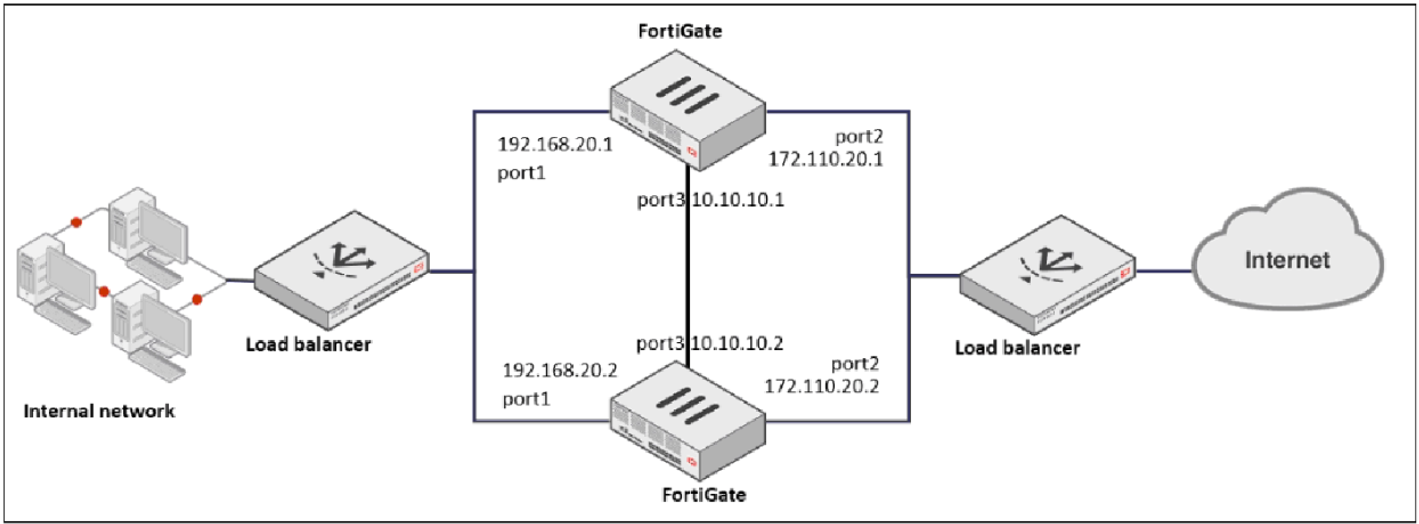
8Refer to the exhibit, which shows a network diagram. Which protocol should you use to configure the FortiGate cluster?
- FGCP in active-passive mode
- FGCP in active-active mode
- FGSP
- VRRP
Answer: C
9After enabling IPS, you receive feedback about traffic being dropped.
What could be the reason?
- IPS is configured to monitor.
- np-accel-node is set to enable.
- fail-open is set to disable.
- traffic-submit is set to disable.
Answer: C
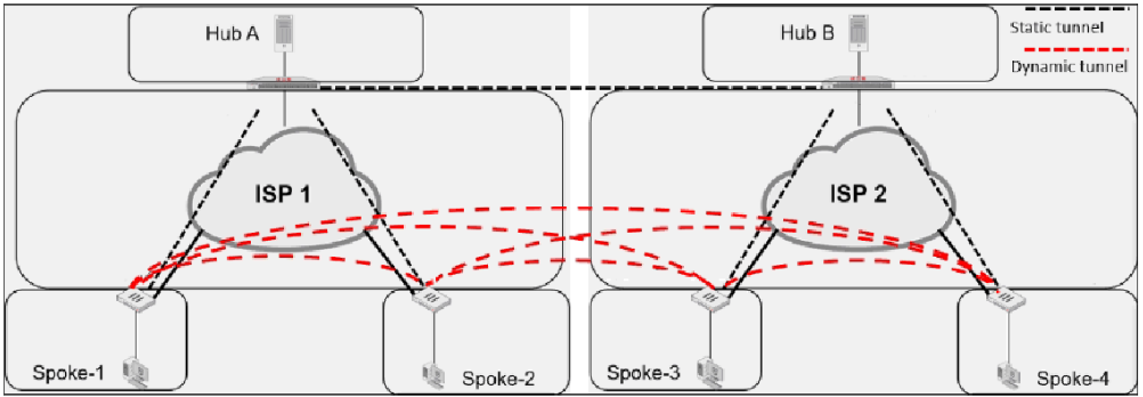
10Refer to the exhibit which shows an ADVPN network. Which VPN phase 1 parameters must you configure on the hub for the ADVPN feature to function? (Choose two.)
- set auto-discovery-sender enable
- set auto-discovery-receiver enable
- set add-route enable
- set auto-discovery-forwarder enable
Answer:
Want the full bank of 73 questions for NSE7_EFW-7.2? See all practice exams.