Fortinet NSE 6 - FortiManager 7.6 Administrator — Free Practice Questions
10 free sample questions from a bank of 62, with the correct answers and explanations. No signup required — start practising right now.
- Configure RADIUS authentication to assign ADOM roles to each user.
- Enable workflow mode, which is the only way to prevent concurrent configuration conflicts.
- Assign administrators with JSON API access to the FortiManager.
- Activate workspace mode in the ADOM settings.
The short version
D — same-ADOM teamwork without clashes means workspace mode. Lock, edit, merge.
Key concepts in this question
- Workspace mode serializes ADOM edits across admins.
- RADIUS, workflow-only, and API framings miss the mechanism.
Why D is correct
Workspace locking is the documented conflict-free collaboration.
Why the others are wrong
- A. RADIUS assigns roles; it does not serialize edits.
- B. Workflow adds approval; workspace prevents clashes (not the only way as framed).
- C. API access is programmatic, not conflict control.
FortiManager exam tip
Same ADOM, many admins = workspace.
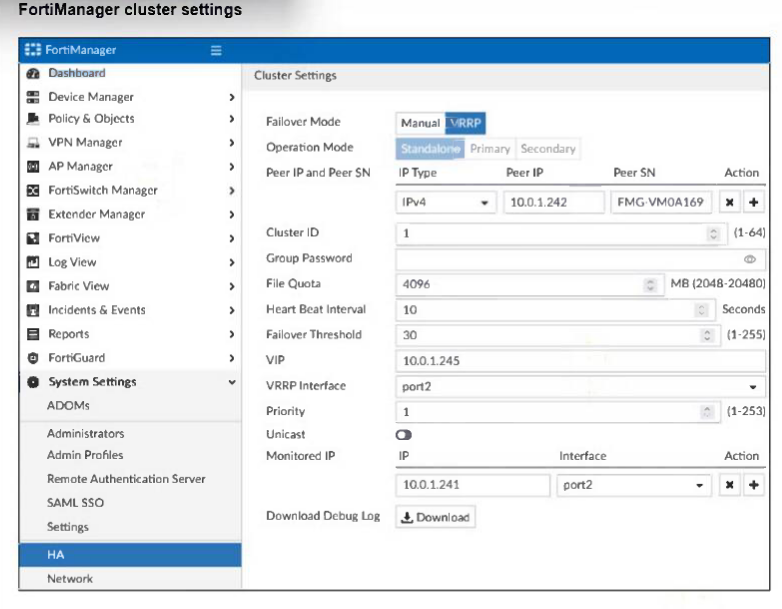
- The FortiManager HA failover is transparent to administrators and does not require any additional action.
- Manually promote one of the working secondary devices to the primary role: and reboot the original primary device to remove the peer IP address of the failed device.
- Reconfigure the primary device to remove the peer IP address of the failed device from its configuration.
- Check the integrity database of the primary device to force a secondary device to become the new primary with all active interfaces.
The short version
A — FMG HA failover is transparent; do nothing. Peers self-heal.
Key concepts in this question
- HA transparency means monitored-interface failures trigger automatic failover.
- Manual promotion and reconfigurations contradict HA design.
Why A is correct
Transparent failover is the documented HA behavior (5v1).
Why the others are wrong
- B. Manual promotion fights automation.
- C. Peer-IP surgery is unnecessary.
- D. Integrity checks do not drive failover.
FortiManager exam tip
FMG HA = transparent, hands off.
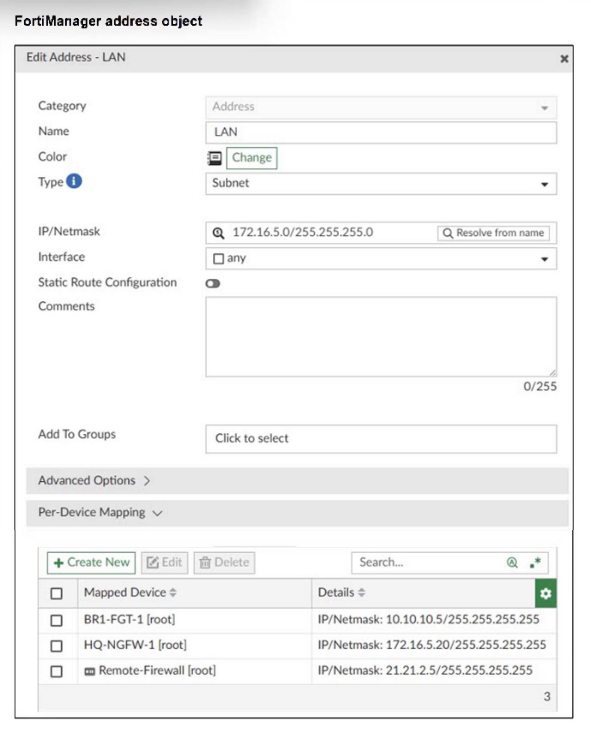
- 21.21.2.5/255.255.255.255
- 172.16.5.20/255.255.255.255
- 172.16.5.0/255.255.255.0
- 10.10.10.5/255.255.255.255
The short version
C — no matching per-device entry for VDOM1, so the base object installs. The exhibit maps Remote-Firewall [root] only, while the install target is Remote-Firewall [VDOM1].
Key concepts in this question
- Per-device mapping: device-plus-VDOM override that wins only on an exact match.
- Base object fallback: FortiManager installs the base IP when no mapping matches the target.
- VDOM-scoped installs: [root] and [VDOM1] are distinct destinations.
Why C is correct
The exhibit shows Edit Address LAN with base 172.16.5.0/255.255.255.0 and a Per-Device Mapping table where Remote-Firewall [root] maps to 21.21.2.5/255.255.255.255. The question asks for Remote-Firewall [VDOM1], which has no row in the table. Per-device mappings apply only to the listed device and VDOM, so the install falls back to the base subnet. Q56 in the same bank confirms the pattern: with no entry for Remote-Firewall, the base value installs.
Why the others are wrong
- A. 21.21.2.5 is the [root] mapping, not the [VDOM1] value.
- B. 172.16.5.20 is the HQ-NGFW-1 [root] mapping for a different device.
- D. 10.10.10.5 is the BR1-FGT-1 [root] mapping for another device.
FortiManager exam tip
Mapping wins only on exact device-plus-VDOM match; otherwise expect the base object.

- The administrator set the flag to 0 to prevent configuration overrides.
- The administrator reinstalled the policy package.
- The administrator needs to retrieve the device to correctly detect the FortiGate firmware version.
- The administrator installed only the device-level configuration.
The short version
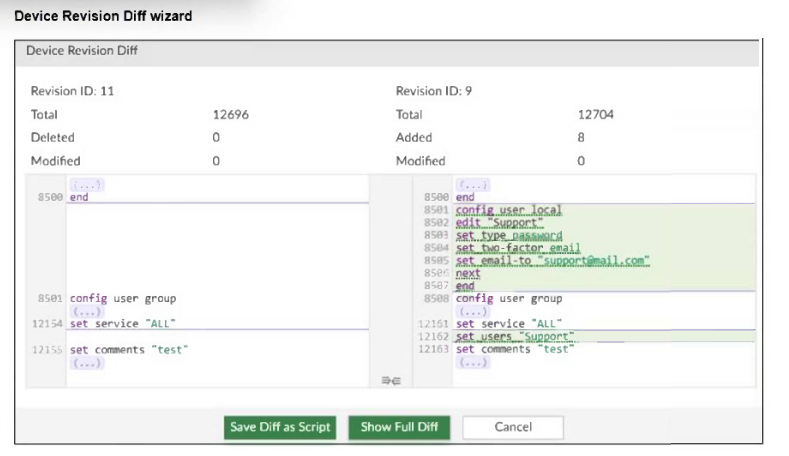
D — the CLI proves only device-level settings were pushed. Policy package status is unknown while device data is in sync and installed.
Key concepts in this question
- Device revision revert: restoring the device-level database to Revision ID 9.
- pkg:[unknown]: policy package was not installed or synchronized.
- Device versus policy install: user local and user group are device settings, not policy packages.
Why D is correct
The Device Revision Diff compares Revision ID 11 to Revision ID 9 and highlights added config user local edit Support plus config user group set users Support, which are the device-level objects saved in Revision 9. The diagnose dvm device list output shows dev-db not modified, conf in sync, dm installed and conn up, with pkg:[unknown]BR1-FGT-1, meaning the policy layer was left unknown while device settings installed cleanly. Firmware 7.0 MR6 is already detected, and flags:0 is a reported state, not a preventive setting.
Why the others are wrong
- A. flags:0 is reported status, not an admin hardening step to block overrides.
- B. A policy reinstall would clear the unknown state and show a package name, which it does not.
- C. A retrieve is unnecessary because firmware and sync state are already healthy and detected.
FortiManager exam tip
Unknown package plus in-sync device database equals device-settings-only install.
- Enable the prompt asking the administrator to accept firewall policies changes before saving.
- Enable the workspace (for all ADOMs) to control all changes made by any administrator.
- Enable device lock and the advanced mode feature in the ADOM.
- Enable workflow mode and the ADOM lock feature.
The short version
D — central checks before install means workflow mode plus ADOM lock. Approve, then gate.
Key concepts in this question
- Workflow mode routes changes through approval.
- ADOM locks serialize the approved edits.
Why D is correct
Workflow-plus-lock is the documented central-check design.
Why the others are wrong
- A. Save prompts do not centralize review.
- B. Workspace serializes; it does not approve.
- C. Device locks guard boxes, not policy review.
FortiManager exam tip
Central review = workflow + lock.
- When FortiManager installs device-level changes on a managed device
- When changes to the device-level database are made on FortiManager
- When FortiManager is auto-updated with configuration changes made directly on a managed device
- When a provisioning template is assigned to a managed device on the device-level database
The short version
A and C — new revisions come from installs and on-box auto-updates. Push out, pull in.
Key concepts in this question
- Installs snapshot the pushed state.
- Auto-updates snapshot retrieved on-box changes.
Why A and C are correct
The two documented revision triggers.
Why the others are wrong
- B. DB edits alone do not snapshot until install/retrieve.
- D. Template assignment stages; it does not snapshot.
FortiManager exam tip
Revisions = install or auto-update.
- The administrator will be able to select the option to assign the global policy package to the new policy package.
- FortiManager will automatically assign the global policy package to the new policy package.
- FortiManager will automatically install policies on the policy package in ADOM1.
- The administrator will have to assign the global policy package from the global ADOM.
The short version
B — global packages auto-attach to new ADOM packages. Assign once, inherit forever.
Key concepts in this question
- Global-to-ADOM assignment propagates to future packages automatically.
- Manual selection and global-side assignment contradict automation.
Why B is correct
Auto-assignment is the documented behavior (22v19 + Q36's workflow confirms).
Why the others are wrong
- A. No manual selection step exists for new packages.
- C. Assignment never auto-installs.
- D. Assignment flows global-to-ADOM once, then inherits.
FortiManager exam tip
Global packages = auto-inherited.
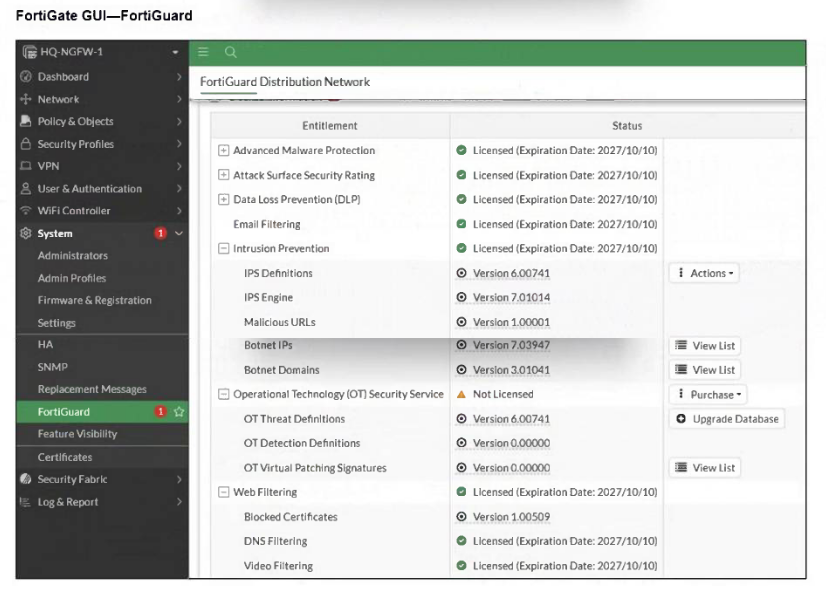
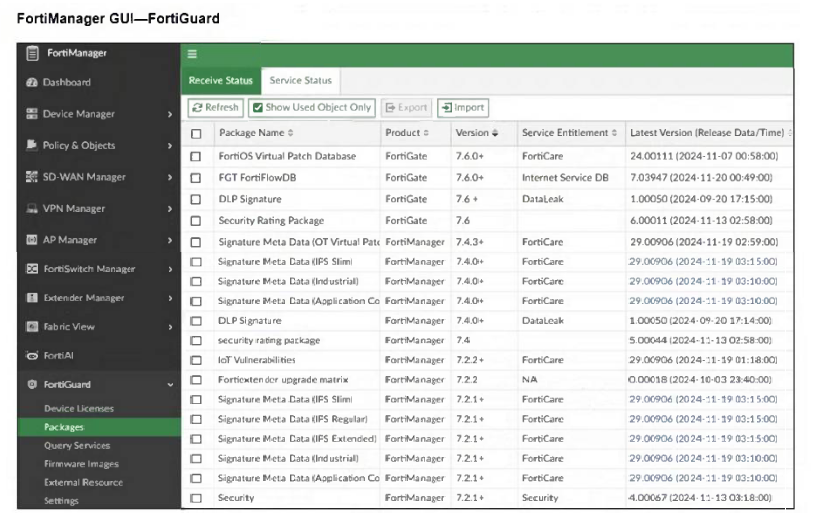
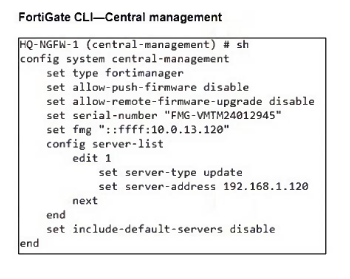
- FortiGate must enable rating for the FortiManager IP address, 192.168.1.120, in server list 1.
- FortiManager and FortiGate have different IPS database versions.
- The administrator must enable IPv6 connections for FortiGuard services on FortiManager.
- The administrator must enable the fortiguard-anycast option to correctly download all signatures from the local FDS.
The short version
B — unrecognized new signatures mean database version skew. FMG and FortiGate disagree on IPS vintage.
Key concepts in this question
- IPS database versions must align for signature recognition.
- Rating lists, IPv6, and anycast frame other update paths.
Why B is correct
Version skew is the documented closed-network gotcha.
Why the others are wrong
- A. Rating lists serve webfilter, not IPS.
- C. IPv6 does not gate signature recognition.
- D. Anycast serves public updates, not local FDS.
FortiManager exam tip
Unknown new signature = version skew.
- Store logs on FortiManager and use FortiView.
- Add and manage FortiAnalyzer from FortiManager.
- Enable advanced ADOM mode on FortiManager.
- Forward logs from FortiAnalyzer to FortiManager daily.
The short version
B — heavy logging wants FortiAnalyzer under FortiManager. Offload retention and analytics.
Key concepts in this question
- Managed FAZ absorbs log volume FortiManager cannot.
- Local stores, ADOM modes, and forwarding framings miss the scale answer.
Why B is correct
FAZ-offload is the documented high-volume recommendation.
Why the others are wrong
- A. FortiManager storage is not the scale answer.
- C. ADOM modes organize; they do not absorb logs.
- D. Forwarding direction is reversed.
FortiManager exam tip
Log floods = add FAZ.

- Make sure the user running the script has full access to the VDOM—AGEUSR.
- Run the script on the device database.
- Use metadata variables if they use VDOMs in the script.
- Create a normalized interface on the policy layer before running the script.
The short version
B — CLI scripts run against the device database, not policy packages. Scripts need the device layer.
Key concepts in this question
- Device-database execution resolves objects like NetFlow targets.
- Policy packages carry policies, not script context.
Why B is correct
Device-DB execution is the documented script fix (8v4).
Why the others are wrong
- A. VDOM access does not resolve unknown objects.
- C. Metadata helps VDOM variance, not object resolution.
- D. Normalized interfaces are a different fix.
FortiManager exam tip
Script object errors = run on device DB.
Want the full bank of 62 questions for Fortinet NSE 6 - FortiManager 7.6 Administrator? See all practice exams.