Fortinet NSE 5 - FortiSASE and SD-WAN 26 Core Administrator — Free Practice Questions
10 free sample questions from a bank of 49, with the correct answers and explanations. No signup required — start practising right now.
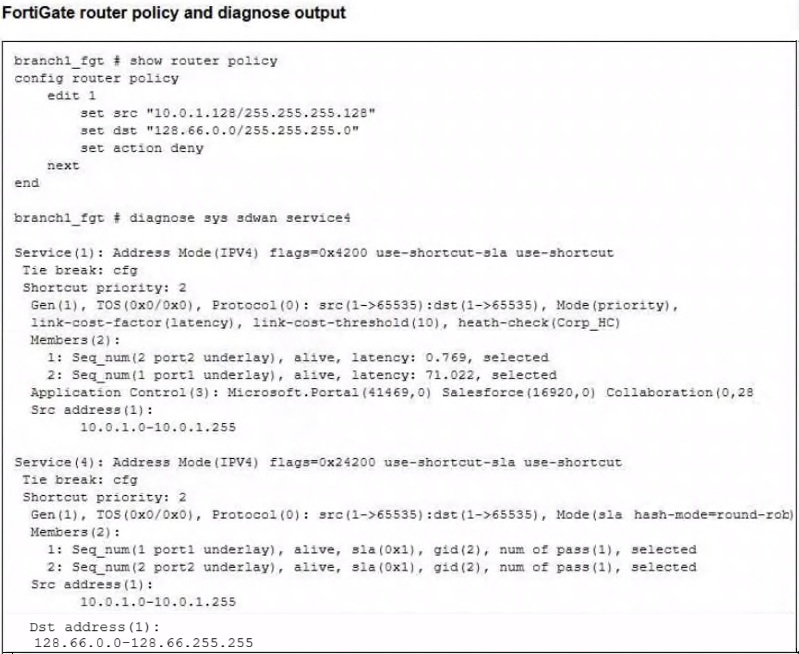
- FortiGate steers the traffic flow through port2.
- FortiGate routes the traffic flow according to the FIB.
- FortiGate load balances the traffic flow through port1 and port2.
- FortiGate drops the traffic flow.
The short version
D — matching deny policy route drops the flow before SD-WAN steering. Source and destination both fall inside the deny entry.
Key concepts in this question
- Policy-route precedence: matching router policy entries are evaluated before SD-WAN rules.
- Deny action: a matching deny policy route drops the traffic flow.
- SD-WAN versus FIB: steering and load balancing apply only when no deny policy route matches.
Why D is correct
Source 10.0.1.130 falls within 10.0.1.128/255.255.255.128 and destination 128.66.0.125 falls within 128.66.0.0/255.255.255.0, so router policy 1 with action deny matches and FortiGate drops the flow despite the SD-WAN services shown below.
Why the others are wrong
- A. Port2 steering from SD-WAN service 1 never happens because the deny policy route preempts it.
- B. FIB routing applies only absent a matching policy route, which is present here.
- C. Port1 plus port2 load balancing from service 4 is overridden by the same deny match.
FortiSASE-SD-WAN exam tip
Deny policy route match = drop before SD-WAN.
- When scheduled, the installation always starts immediately if the endpoint is online.
- An endpoint upgrade rule can be assigned to a user group.
- Scheduled upgrades automatically reboot macOS endpoints after installation.
- If the scheduled time is already past in the local time zone of the endpoint, installation starts the next day at that time.
The short version
D — Scheduled time uses endpoint local time with next-day rollover. If the endpoint clock is already past the scheduled time, FortiClient installs the next day at that time.
Key concepts in this question
- Endpoint upgrade rule: deploys the latest recommended FortiClient from Endpoint management > Endpoint upgrade.
- Schedule time modes: Immediate installs at once; Scheduled uses the endpoint local time zone.
- Group targeting: rules apply only to computer/device groups or objects, never to user groups.
Why D is correct
The Endpoint upgrade guide states for Scheduled (endpoint local time): the selected time is based on the endpoint local time zone, and if the endpoint clock is past the selected time, the FortiClient installation begins the next day at the selected time. That wording matches option D exactly.
Why the others are wrong
- A. Scheduled installs do not start immediately; the endpoint shows a notification with Suggested install time, Select a time, or Install now.
- B. FortiSASE cannot apply an endpoint upgrade rule to a user group or user object, only to a computer/device group or object.
- C. macOS needs no reboot to complete the install and shows no reboot prompt; the automatic-reboot setting applies only to Windows endpoints.
NSE5_SSE_AD-26 exam tip
Remember: scheduled = endpoint local time, past time = next day; upgrade rules target devices, not users.
- When configuring an SD-WAN rule, you can select multiple SLA targets from different performance SLAs.
- SLA targets are used only by SD-WAN rules that are configured with a Lowest Cost (SLA) strategy.
- Member metrics are measured only if a rule uses the SLA target.
- SD-WAN rules can use SLA targets to check whether the preferred members meet the SLA requirements.
- When configuring an SD-WAN rule, you can select multiple SLA targets if they are from the same performance SLA.
The short version
A, B, D — SD-WAN rules span SLA targets across performance SLAs, measure members only when targeted, and gate preferred members on SLA health. Flexible, lazy, gated.
Key concepts in this question
- SLA targets from different performance SLAs can attach to one rule.
- Metrics collection follows SLA-target usage by rules.
Why A, B and D are correct
Cross-SLA selection (A), strategy-scoped target use (B), and preferred-member gating (D) are the documented behaviors (6v1).
Why the others are wrong
- C. Member metrics without rule targets misstates the collection model.
- E. Same-SLA-only selection contradicts the documented flexibility.
FortiSASE exam tip
SLA targets = pick many, measure on use, gate preferred.
- RADIUS
- MFA
- Local
- SSO
The short version
D — SSO overrides every other FortiSASE user-auth method. Single sign-on wins the stack.
Key concepts in this question
- SSO sits atop the authentication precedence on FortiSASE.
- RADIUS, MFA, and local methods yield to it.
Why D is correct
SSO-override is the documented authentication precedence.
Why the others are wrong
- A. RADIUS is overridden, not overriding.
- B. MFA supplements; it does not override.
- C. Local auth is the fallback, not the winner.
FortiSASE exam tip
Auth override = SSO.
- Proxy user single sign-on (SSO)
- FortiClient Agent
- FortiGate with ZTNA proxy
- SD-WAN Private Access SPA
The short version
A and C — agentless ZTNA needs proxy SSO plus a FortiGate ZTNA proxy. Authenticate at proxy, enforce at gate.
Key concepts in this question
- Proxy user SSO authenticates agentless users.
- FortiGate ZTNA proxy terminates and authorizes the sessions.
Why A and C are correct
The two documented agentless-ZTNA prerequisites.
Why the others are wrong
- B. Agents are absent by definition in agentless designs.
- D. SPA is a separate access model, not a ZTNA prerequisite.
FortiSASE exam tip
Agentless ZTNA = proxy SSO + ZTNA proxy.
- It forces all remote users to connect only to the nearest security POP regardless of location.
- It allows administrators to define rules to prioritize on-premises FortiGate connections for users in specific countries, with failover to a security POP if the FortiGate device is unavailable.
- It restricts VPN access to users based on their geolocation without allowing failover options.
- It automatically balances VPN traffic across all available security POPs without prioritizing on-premises devices.
The short version
B — geofencing priority/failover steers on-premises-first per country with POP fallback. Local when present, cloud when not.
Key concepts in this question
- Priority rules prefer on-premises FortiGate for listed countries.
- Failover sends users to security POPs when local is unreachable.
Why B is correct
Country-scoped on-prem priority with POP failover is the documented feature purpose.
Why the others are wrong
- A. Nearest-POP-only ignores the on-prem priority half.
- C. Geolocation without failover contradicts the feature name.
- D. Blind balancing ignores country rules entirely.
FortiSASE exam tip
Geofencing priority = on-prem first, POP fallback.
- To provide a unique identifier for logging and monitoring user activities across multiple networks
- To ensure consistent and reliable access for specific users or devices
- To implement geolocation rules and source IP address anchoring
- To improve website performance by reducing load times
The short version
C — dedicated POP IPs exist for geolocation rules and source anchoring. Stable egress identity.
Key concepts in this question
- Dedicated IPs anchor tenant traffic to known sources.
- Geolocation policies and allowlists consume that stability.
Why C is correct
Geo-plus-anchoring is the documented dedicated-IP purpose.
Why the others are wrong
- A. Logging identifiers are a side effect, not the purpose.
- B. User/device access consistency is incidental.
- D. Performance is not the dedicated-IP story.
FortiSASE exam tip
Dedicated POP IP = geo rules + anchoring.
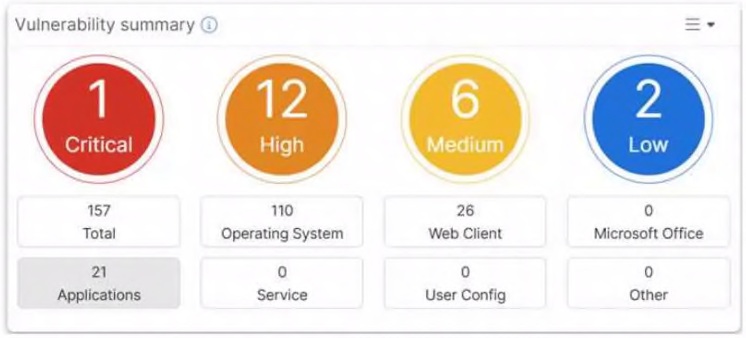
- Vulnerability scan is disabled in the endpoint profile.
- The dashboard shows the vulnerability score for unknown applications.
- Automatic vulnerability patching can be enabled for supported applications.
- The dashboard allows the administrator to drill down and view CVE data and severity classifications.
The short version
C and D — populated severity dashboard supports drill-down CVE review and auto-patching for supported apps. Counts prove scanning is active.
Key concepts in this question
- Active vulnerability scanning: populated Critical, High, Medium, and Low counts prove the scan is enabled.
- Severity classification: dashboard groups findings for drill-down into CVE detail.
- Automatic patching: supported applications can be set to patch automatically from the vulnerability workflow.
Why C and D are correct
The exhibit shows 1 Critical, 12 High, 6 Medium, and 2 Low with 157 Total and OS, Web Client, and Applications breakdowns, confirming an active scan whose severity groups support CVE drill-down and automatic patching for eligible supported applications.
Why the others are wrong
- A. Scan-disabled endpoints would show an empty dashboard, not 157 findings across severities.
- B. The exhibit lists Total, Operating System, Web Client, Microsoft Office, Applications, Service, User Config, and Other with no unknown-applications score shown.
FortiSASE-SD-WAN exam tip
Populated vuln counts = scan on, triage by severity, patch where supported.
- Presents raw log data in graphical format only, without sorting criteria or aggregated views.
- Generates real-time alerts for security events and presents them in a single text-based console without metadata.
- Displays individual logs on the GUI without aggregation, allowing administrators to sort events by time only.
- Provides consolidated consoles to analyze security events over time using graphical or text-based log views.
The short version
D — FortiView gives consolidated graphical-or-text event analysis over time. The analytic console.
Key concepts in this question
- FortiView aggregates logs into analyzable consoles.
- Raw-only, alert-only, and sort-by-time-only framings understate it.
Why D is correct
Consolidated multi-view analysis is the documented FortiView function.
Why the others are wrong
- A. Sorting and aggregation are core, not absent.
- B. Real-time alerts are one facet, not the whole.
- C. Aggregation plus multi-axis sorting are standard.
FortiSASE exam tip
FortiView = consolidated analysis consoles.
- You can select from four destination types: Infrastructure, FQDN, Local Application, or Subnet.
- Apply condition allows split tunneling destinations to be applied to On-net, Off-net, or both types of endpoints.
- Subnet is the only destination type that supports the Apply condition.
- Apply condition can be set only to On-net or Off-net, but not both.
The short version
A and B — steering bypass offers four destination types with On-net/Off-net/both apply conditions. Types plus scope.
Key concepts in this question
- Four destination types: Infrastructure, FQDN, Local Application, Subnet.
- Apply conditions scope bypass to On-net, Off-net, or both.
Why A and B are correct
The two documented bypass-configuration facts.
Why the others are wrong
- C. All types support conditions, not subnet-only.
- D. Both-scopes is explicitly allowed.
FortiSASE exam tip
Bypass = four types, three scopes.
Want the full bank of 49 questions for Fortinet NSE 5 - FortiSASE and SD-WAN 26 Core Administrator? See all practice exams.