Fortinet NSE 5 - FortiWeb 8.0 Administrator — Free Practice Questions
10 free sample questions from a bank of 63, with the correct answers and explanations. No signup required — start practising right now.
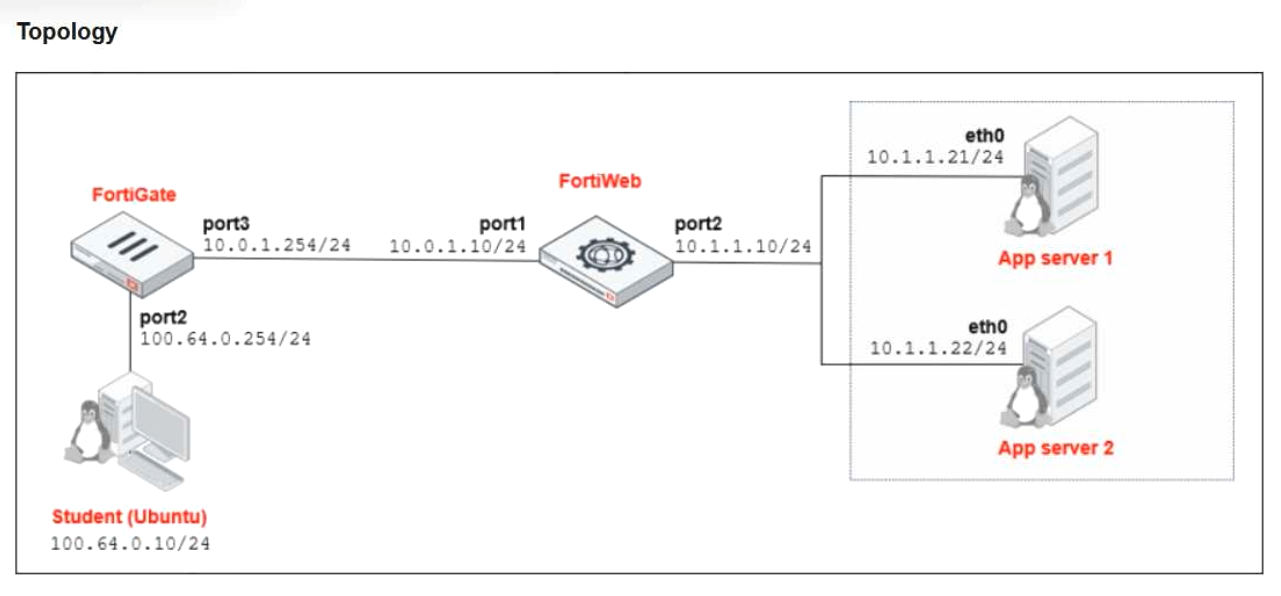
- Configure FortiWeb in transparent mode to force traffic inspection.
- Enable network address translation (NAT) mode on FortiWeb to hide the backend server IP addresses.
- Add static routes on FortiGate to route traffic back through the FortiWeb internal interface.
- Disable ip-forward to prevent traffic from passing through FortiWeb without a matching server policy.
The short version
D — kill ip-forward so unpolicied traffic cannot slip past. No server policy, no transit.
Key concepts in this question
- FortiWeb in transit forwards L3 traffic by default (ip-forward); inspection only happens under a matching server policy.
- With no policies configured, the box is a wire — students sail through unlogged.
Why D is correct
Disabling ip-forward stops all transit without a matching policy, forcing traffic to either match inspection or drop. It closes the bypass the test demonstrates.
Why the others are wrong
- A. Transparent mode still forwards unmatched traffic; it does not force inspection.
- B. NAT hides addresses; it does not create inspection or logging.
- C. FortiGate routes do not change FortiWeb's forwarding behavior.
FortiGate exam tip
Traffic passing uninspected with no policies = disable ip-forward.
- https://www.example.com/25.3.6/Browse/MediaData
- https://www.example.com/wordpress/?feed=rss2
- https://www.example.com/products/today
- https://www.example.com/about/team
The short version
A — version numbers in URLs leak fingerprintable intel. Rewrite the versioned path away.
Key concepts in this question
- Information disclosure: paths like /25.3.6/ advertise exact software versions to attackers.
- URL rewriting masks versioned paths without breaking the app.
Why A is correct
The 25.3.6 version string is the fingerprint risk; rewriting that URL removes the disclosure. The other URLs carry no version intel.
Why the others are wrong
- B/C/D. Feed URLs, dated content, and team pages disclose no version information.
FortiGate exam tip
Version string in URL = rewrite it. That is always the answer.
- Real server, IPsec tunnel, and static route
- Web application firewall (WAF) profile, DoS policy, and server name indication (SNI)-based certificate
- Virtual server, server pool, and port settings (service)
- DNS resolver, URL rewrite rule, and HTTP health check
The short version
C — a server policy needs a virtual server, a server pool, and the service ports. Listener, backends, ports.
Key concepts in this question
- Virtual server: the front-end listener (IP/port/certificate).
- Server pool: the load-balanced real servers. Service/ports: what is served.
Why C is correct
Those three components are the documented minimum to complete a forwarding server policy — each answers one question: where to listen, where to send, on what ports.
Why the others are wrong
- A. IPsec tunnels and static routes are network concerns, not policy components.
- B. WAF/DoS/SNI are protections layered on, not the policy skeleton.
- D. DNS resolvers and health checks support but do not constitute the policy.
FortiGate exam tip
Server policy trinity: virtual server + pool + ports.
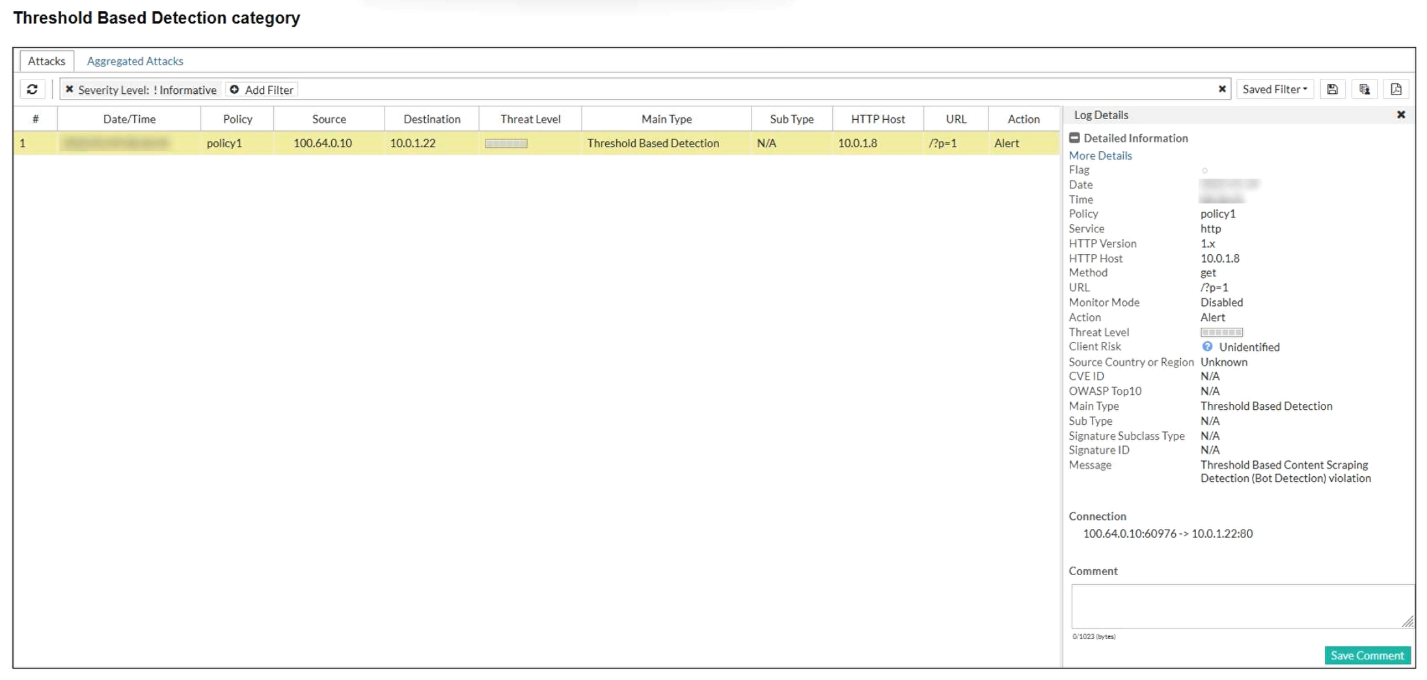
- An automated script or bot systematically accessing multiple pages to extract web content
- A layer 4 SYN flood attack overwhelming the web server
- A client sending malformed HTTP requests due to browser incompatibility
- A vulnerability scanner triggering rate limits by simulating browser behavior
The short version
A — systematic multi-page content extraction is scraping. Threshold content-scraping alerts mean bots harvesting.
Key concepts in this question
- Threshold Based Content Scraping Detection fires on bot-like systematic page access.
- SYN floods, malformed requests, and scanners trip different detections.
Why A is correct
The alert names bot detection for content scraping — an automated script walking pages to extract content matches exactly.
Why the others are wrong
- B. SYN floods are L4 DoS, not content scraping.
- C. Malformed requests signal fuzzing/incompatibility, not scraping.
- D. Scanners probe vulnerabilities; scrapers harvest content.
FortiGate exam tip
"Content Scraping (Bot Detection)" = automated harvesting script.
- Reverse proxy
- Web Cache Communication Protocol (WCCP) integration mode
- Transparent bridge mode
- Offline protection
The short version
A — full inline feature set means reverse proxy. Termination plus enforcement in the traffic path.
Key concepts in this question
- Reverse proxy terminates, validates, enforces, and blocks inline with zero limitations.
- Bridge/WCCP/offline modes trade features for transparency or out-of-band placement.
Why A is correct
Active inline inspection with the complete feature set (protocol validation, detection, enforcement) is the reverse-proxy deployment — the only mode without operational caveats.
Why the others are wrong
- B. WCCP redirection limits some inline actions.
- C. Transparent bridge cannot terminate/decrypt fully.
- D. Offline sees copies only; it blocks nothing inline.
FortiGate exam tip
Full features + inline block = reverse proxy. Always.
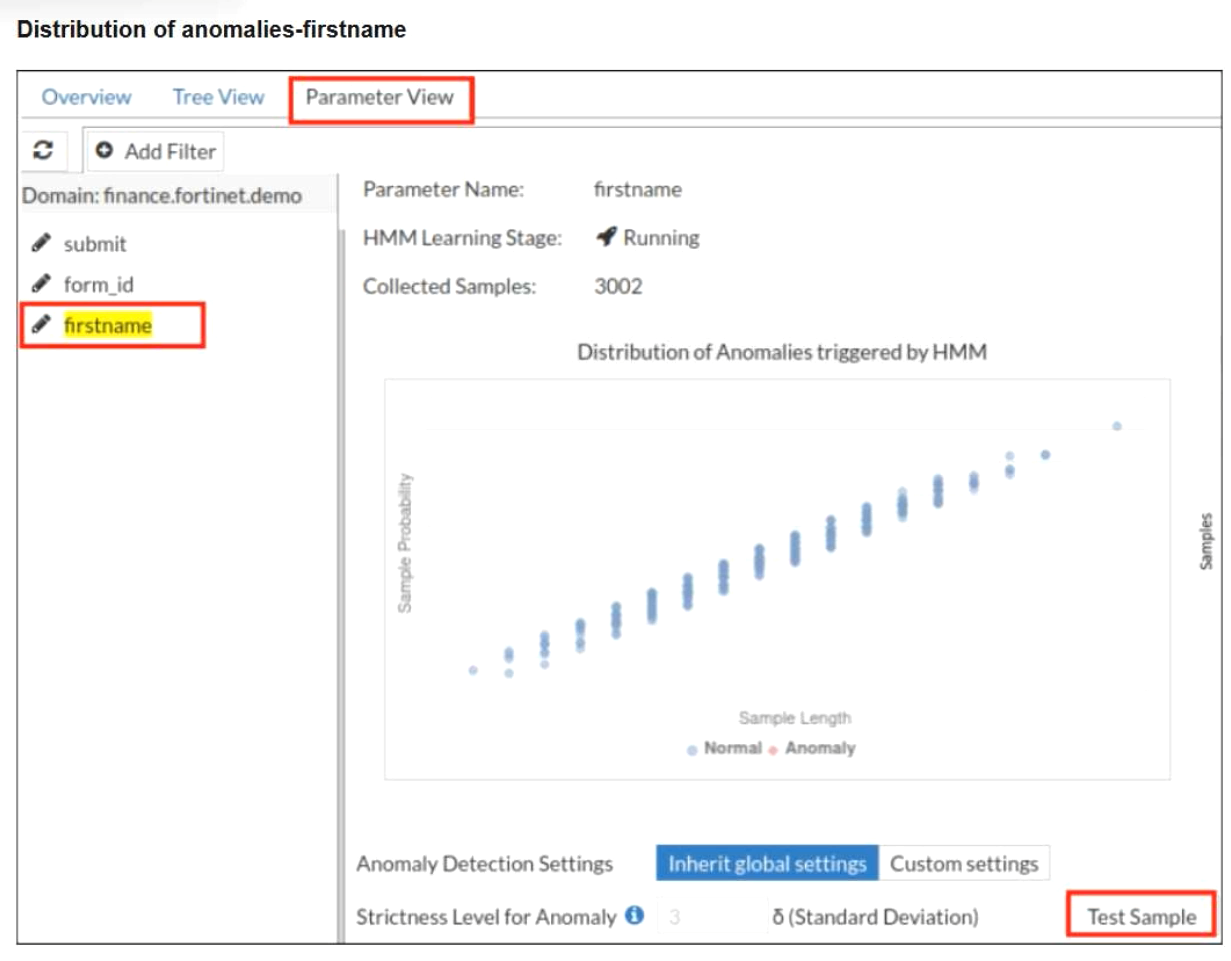
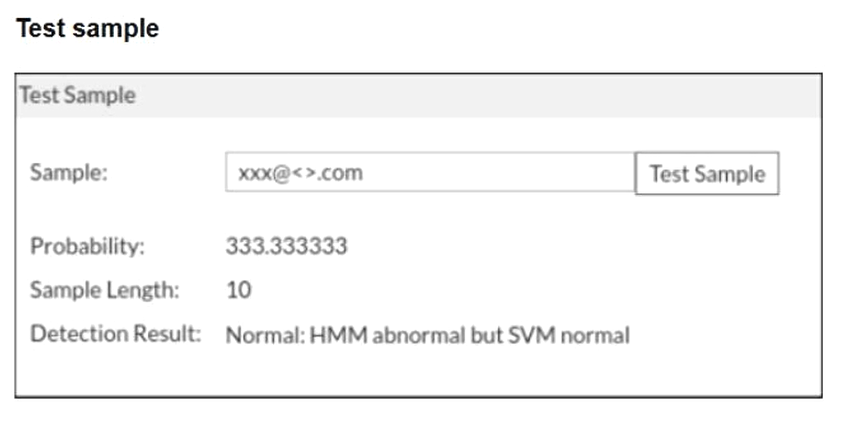
- FortiWeb is correctly allowing an unusual but non-malicious input based on combined HMM and SVM evaluation.
- The anomaly detection thresholds are too low and must be increased.
- FortiWeb failed to detect an attack and should have blocked the request.
- One of the ML models should be disabled to avoid inconsistent results.
The short version
A — HMM abnormal plus SVM normal resolving to allow is correct combined evaluation. Unusual is not malicious.
Key concepts in this question
- HMM flags statistical abnormality; SVM classifies maliciousness; FortiWeb fuses both.
- Allow on unusual-but-benign is the designed outcome, not a miss.
Why A is correct
The models disagree in the expected way (odd shape, benign class) and the fused verdict allows — correct behavior for a non-malicious anomaly.
Why the others are wrong
- B. Thresholds are not indicated as miscalibrated by one allowed anomaly.
- C. Nothing shows an attack was missed; SVM cleared it.
- D. Disagreement between models is normal input to fusion, not a fault.
FortiGate exam tip
HMM weird + SVM benign = allow. That is fusion working.
- Switch to a reverse-proxy mode to bypass cookie-based controls.
- Enable API protection and client management to enforce identity checks on mobile API traffic.
- Log only API traffic and rely on FortiAnalyzer for future alerts.
- Replace ZTNA with bot protection to reduce false positives.
The short version
B — mobile API bypass needs API protection plus client management. Identity checks on the API path close the gap.
Key concepts in this question
- API protection validates API traffic structure and access.
- Client management enforces identity on API clients including mobile.
Why B is correct
The gap is precisely the two disabled features; enabling both puts identity enforcement on the mobile API path the pentest abused.
Why the others are wrong
- A. Mode changes do not add identity checks.
- C. Logging without enforcement repeats the finding next test.
- D. Bot protection does not authenticate API users.
FortiGate exam tip
API auth bypass = enable API protection + client management.
- SAML authentication delegates login to an external system, while HTML authenticates directly on FortiWeb.
- SAML authentication is used for internal apps while HTML authentication is used for cloud apps.
- SAML authentication encrypts passwords while HTML authentication sends passwords in cleartext format.
- SAML authentication uses a passwordless login, while HTML authentication uses tokens.
The short version
A — SAML outsources login; HTML does it on-box. Delegated vs local authentication.
Key concepts in this question
- SAML: FortiWeb redirects to an external IdP for the login exchange.
- HTML (form) auth: credentials post directly to FortiWeb.
Why A is correct
Delegation-to-IdP versus direct-on-FortiWeb is the defining architectural difference between the two methods.
Why the others are wrong
- B. Internal/cloud placement does not define the methods.
- C. Both transport credentials securely; encryption is not the divider.
- D. Neither is inherently passwordless/token-based as described.
FortiGate exam tip
SAML = external login. HTML form = FortiWeb login.
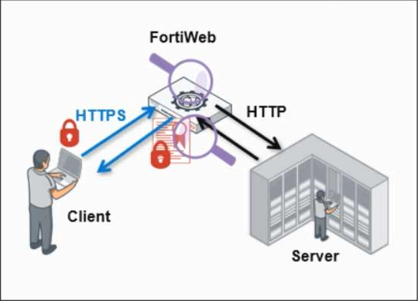
- Enable reencryption on the back-end interface so the server receives HTTPS traffic.
- Configure passive SSL inspection so FortiWeb analyzes encrypted packets without terminating SSL.
- Configure FortiWeb to reuse the same certificate for inbound and outbound HTTPS traffic without decrypting traffic.
- Enable SSL offloading so FortiWeb terminates the client's HTTPS session and forwards decrypted HTTP traffic to the back-end server.
The short version
D — SSL offloading terminates client HTTPS and forwards HTTP upstream. Decrypt, inspect, pass cleartext.
Key concepts in this question
- SSL offloading: FortiWeb holds the server certificate, ends the client TLS session, inspects, re-emits HTTP.
- Re-encryption, passive inspection, and cert reuse preserve encryption upstream instead.
Why D is correct
Terminate-then-forward-cleartext is the textbook offloading behavior the question describes.
Why the others are wrong
- A. Re-encryption keeps HTTPS upstream — the opposite asked.
- B. Passive inspection never terminates, so no cleartext forwarding.
- C. Cert reuse without decryption inspects nothing.
FortiGate exam tip
Decrypt + HTTP upstream = SSL offloading.

- Move the user to group A to increase their limit.
- Apply group-based rate limiting to restrict group B users to 50 requests per minute.
- Nothing. They should allow the request because the API key is valid.
- Change the host to block access to /api/v1/data.
The short version
B — enforce the group's 50-request limit with group-based rate limiting. 150/min at a 50/min entitlement is abuse by the numbers.
Key concepts in this question
- Group-based rate limiting caps requests per API group per minute.
- Moving groups up or trusting keys rewards the abuse.
Why B is correct
The user exceeds the stated entitlement 3x; applying the group limit throttles exactly this abuse pattern.
Why the others are wrong
- A. Raising limits legitimizes the overage.
- C. Valid keys do not exempt rate policy.
- D. Blocking unrelated paths misses the abusive endpoint.
FortiGate exam tip
Over-limit API user = group rate limit. Read the numbers.
Want the full bank of 63 questions for Fortinet NSE 5 - FortiWeb 8.0 Administrator? See all practice exams.