Fortinet NSE 5 - FortiSwitch 7.6 Administrator — Free Practice Questions
10 free sample questions from a bank of 64, with the correct answers and explanations. No signup required — start practising right now.
- Redirect frames to another port.
- Assign traffic to a high-priority egress queue.
- Encrypt frames.
- Drop frames.
The short version
A and D — a FortiSwitch ACL redirects or drops. Steering frames elsewhere or discarding them are its two processing actions.
Key concepts in this question
- ACL actions: redirect (mirror/steer to a port), drop, plus QoS/remark variants depending on stage.
- Encryption and queue assignment are not ACL processing actions.
Why A and D are correct
Redirecting matching frames to another port (A) and dropping them (D) are the documented ACL traffic-processing actions — the pair the question asks for.
Why the others are wrong
- B. Egress-queue assignment is QoS policy, not an ACL action here.
- C. ACLs never encrypt frames.
FortiGate exam tip
ACL action pair: redirect + drop. Encryption is never an ACL verb.
- In port-based 802.1x, all hosts behind an authenticated port are allowed access after a successful authentication.
- A port policy is used to apply 802.1x authentication on a FortiSwitch interface.
- 802.1X authentication can be applied only to trunk ports and not access ports.
- All devices connecting to FortiSwitch must support 802.1X authentication.
The short version
A and B — port-based 802.1X opens the port for all behind it, applied via a port policy. One authentication, whole port.
Key concepts in this question
- Port-based mode: a single successful authentication authorizes every host on that port.
- Port policies carry the 802.1X settings onto interfaces.
Why A and B are correct
All-hosts-behind-port access after one auth (A) plus port-policy application (B) are the two documented port-based behaviors.
Why the others are wrong
- C. 802.1X works on access ports too, not trunks only.
- D. Non-802.1X devices fall back to MAC auth/bypass — universal support is not required.
FortiGate exam tip
Port-based = one auth opens the port. MAC-based = per-device.
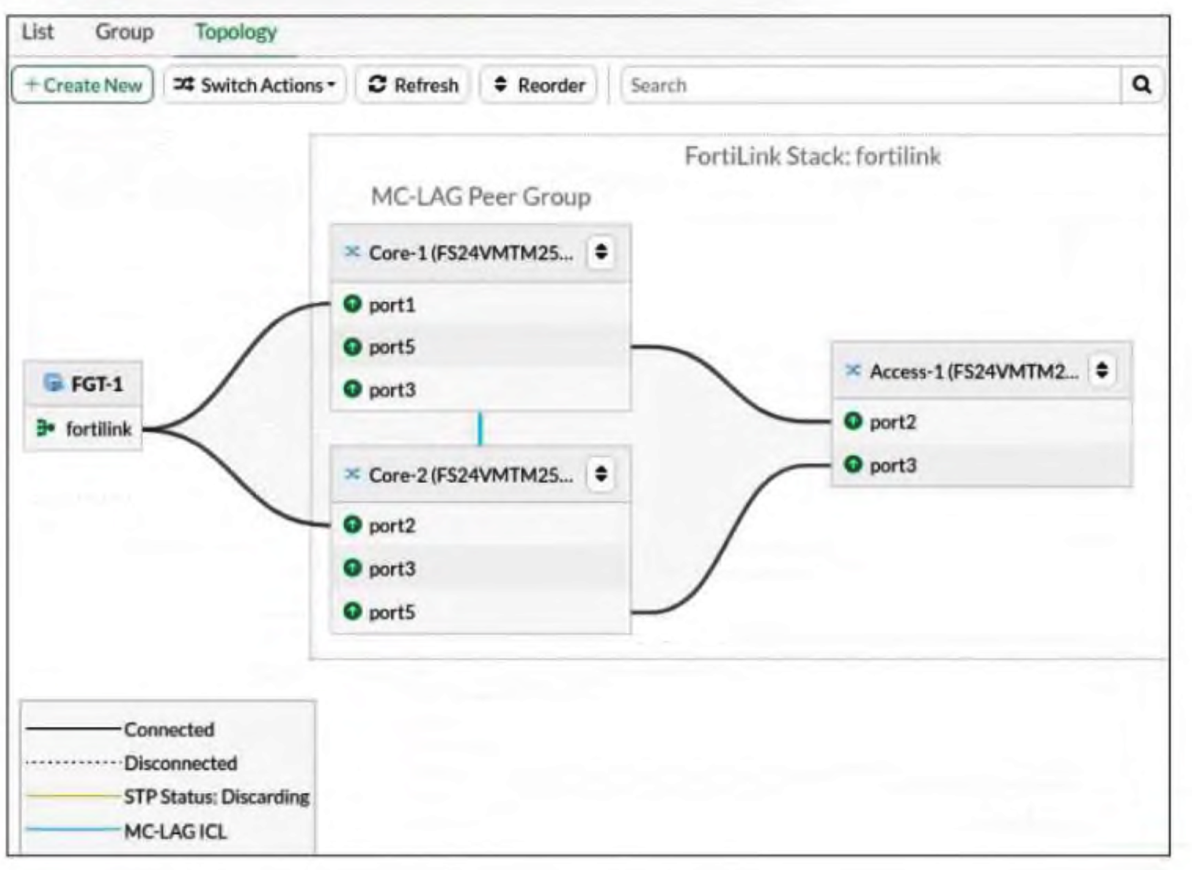
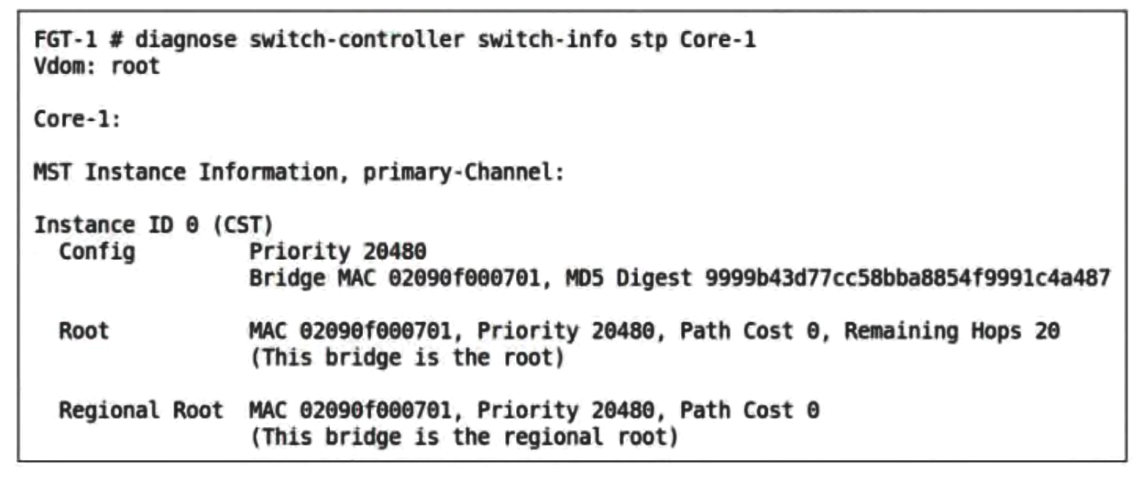
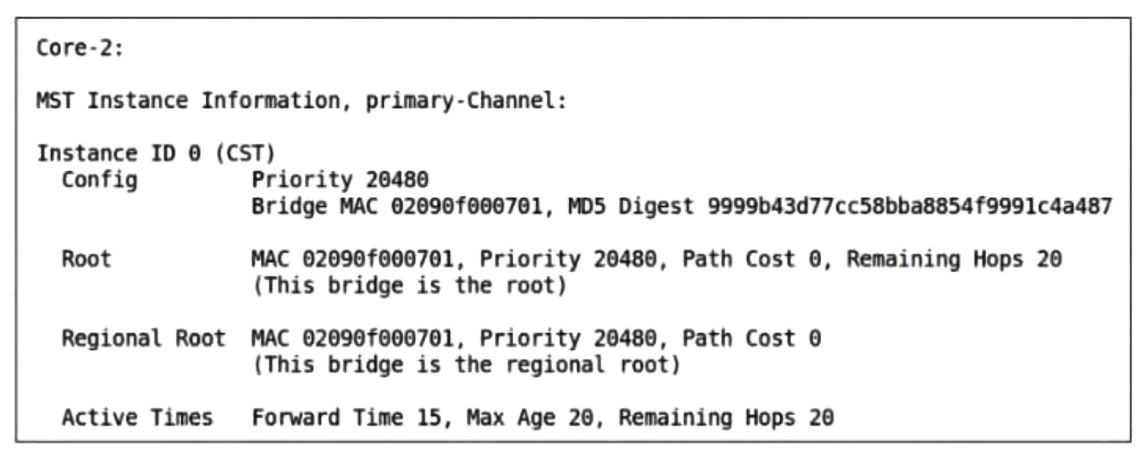
- FortiGate participates in MSTP and causes both switches to assume the root bridge role.
- The ISL was not configured correctly, leading to MSTP inconsistency.
- Both switches share the same bridge ID because MCLAG treats them as one logical switch.
- MCLAG automatically disables STP on all peer switches.
The short version
C — MCLAG peers present one bridge ID. Both cores claiming root is the single-logical-switch signature.
Key concepts in this question
- MCLAG makes two chassis act as one logical switch, including a shared STP bridge ID.
- Both peers therefore legitimately advertise root — by design, not by fault.
Why C is correct
A shared bridge ID across Core-1 and Core-2 is exactly how MCLAG presents itself to STP; the observed dual-root outcome follows from the architecture.
Why the others are wrong
- A. FortiGate does not participate in this MSTP domain as described.
- B. ISL misconfiguration would break the peer, not duplicate root cleanly.
- D. MCLAG does not disable STP on peers.
FortiGate exam tip
Both MCLAG peers root = shared bridge ID, normal by design.
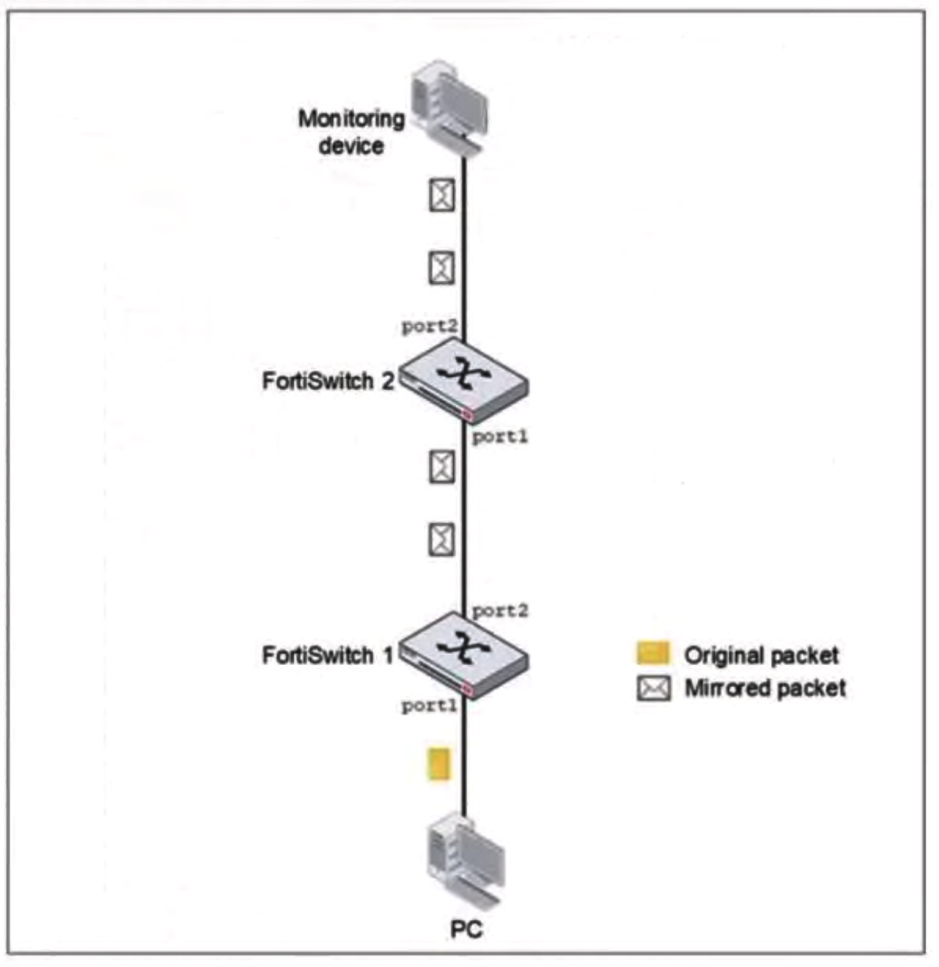
- SPAN does not support forwarding mirrored traffic across multiple switches.
- SPAN traffic must be filtered with an access control list (ACL).
- The SPAN session must be restarted after configuration.
- The monitoring device must use a management IP in the same subnet.
The short version
A — local SPAN never crosses switches. The monitor must sit on the same switch or you need RSPAN/ERSPAN.
Key concepts in this question
- SPAN mirrors within one switch only; cross-switch needs RSPAN (VLAN) or ERSPAN (GRE).
- The monitor on FortiSwitch 2 cannot hear FortiSwitch 1's SPAN session.
Why A is correct
A single-switch SPAN session's mirrored traffic never leaves the source switch — the documented SPAN limitation and the direct cause here.
Why the others are wrong
- B. ACL filtering is unrelated to SPAN transport scope.
- C. No session restart is required for SPAN operation.
- D. Monitor addressing is irrelevant to mirror transport.
FortiGate exam tip
Monitor on another switch = RSPAN/ERSPAN, never plain SPAN.
- It switches to FortiLink mode by default.
- It remains in local management mode.
- It requires manual reimaging.
- It disables auto-network.
The short version
B — no discovery means local management mode. The switch waits, managed by nobody, until FortiLink or Cloud claims it.
Key concepts in this question
- Undiscovered FortiSwitch boots into local (standalone) management.
- FortiLink mode, reimaging, and auto-network changes all require trigger conditions absent here.
Why B is correct
With neither FortiEdge Cloud nor a FortiLink FortiGate found, the switch remains locally managed — the documented default state.
Why the others are wrong
- A. FortiLink mode requires successful discovery, which failed.
- C. No reimaging is needed or triggered.
- D. Auto-network is a separate discovery aid, not something disabled here.
FortiGate exam tip
Undiscovered switch = local management mode. Discovery decides everything else.
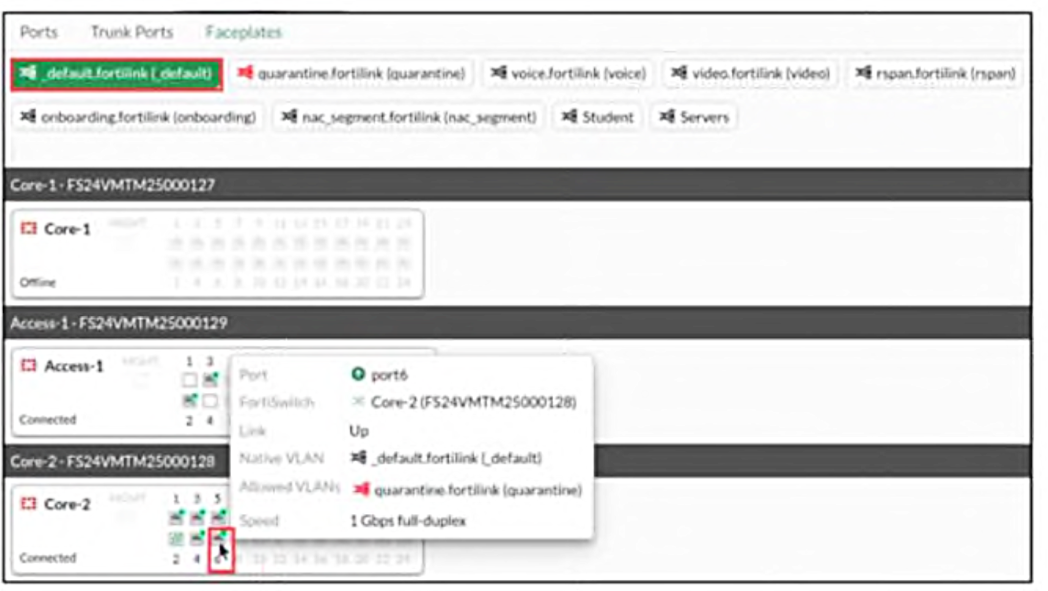
- The FortiSwitch model
- The Cisco Discovery Protocol (CDP) advertisements from FortiSwitch
- The LLDP advertisements received from the FortiSwitch
- The FortiLink discovery frames sent by FortiSwitch
The short version
D — faceplate port details come from FortiLink discovery frames. The switch announces itself; FortiGate draws from that.
Key concepts in this question
- FortiLink discovery frames carry switch identity and port data to FortiGate.
- CDP/LLDP/model data do not feed the faceplate view.
Why D is correct
FortiGate builds faceplate details from the discovery frames the FortiSwitch sends — the documented source for that view.
Why the others are wrong
- A. Model information alone cannot populate live port details.
- B/C. CDP and LLDP advertisements serve other discovery roles, not faceplates.
FortiGate exam tip
Faceplates = FortiLink discovery frames. Always.
- FortiSwitch is managed by FortiSwitch Cloud.
- FortiSwitch is managed by FortiGate.
- FortiSwitch is operating in standalone mode.
- FortiSwitch is operating in local mode.
The short version
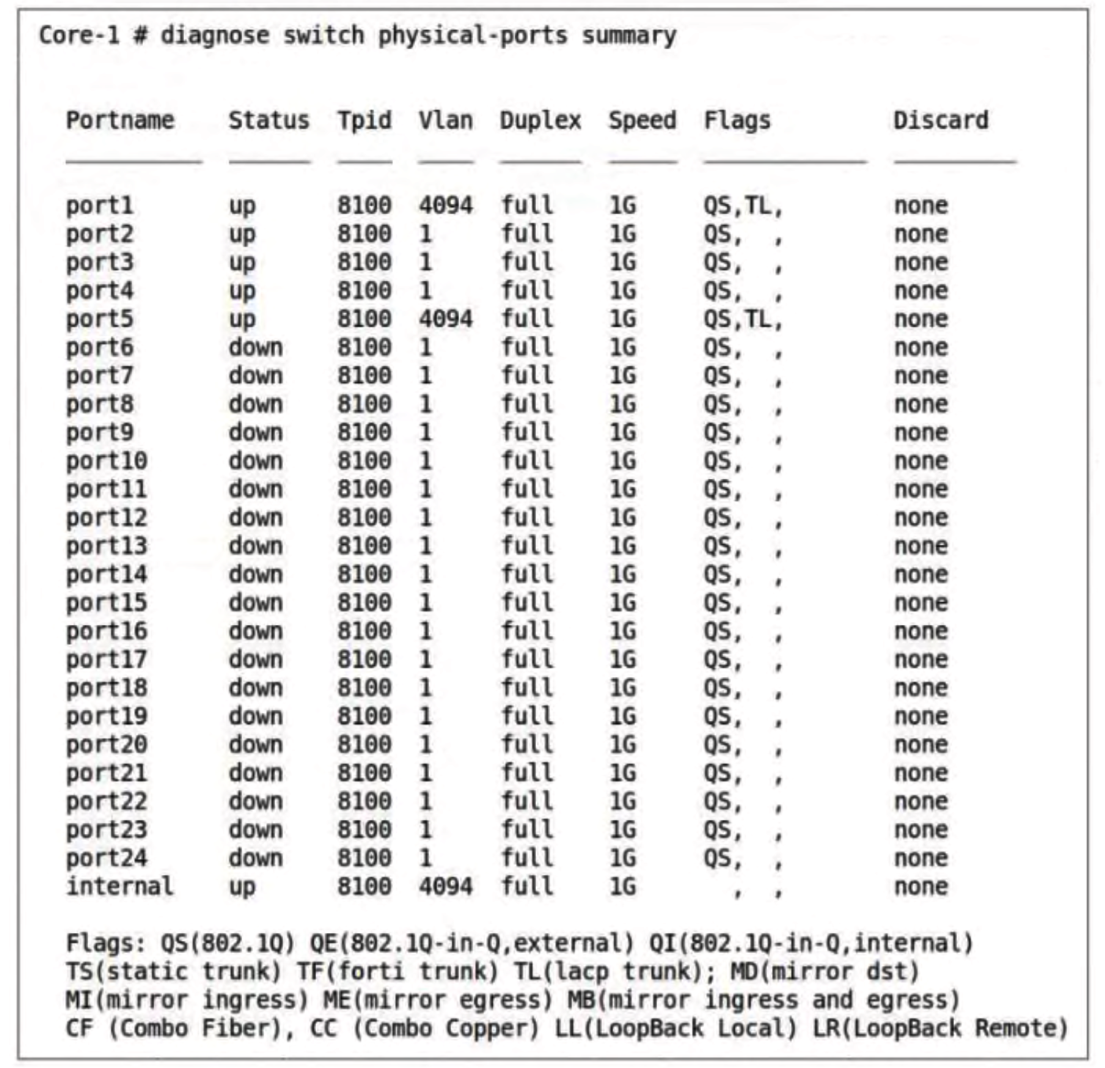
B — the VLAN output marks it FortiGate-managed. The assignments shown only appear under FortiLink management.
Key concepts in this question
diagnose switch physical-ports summaryVLAN data reflects the managing authority's configuration.- Standalone/local/cloud modes present differently.
Why B is correct
The exhibited VLAN assignment pattern is the FortiGate-managed signature — centrally pushed port VLANs visible in the summary.
Why the others are wrong
- A. FortiSwitch Cloud management presents different markers.
- C/D. Standalone/local modes would not show FortiGate-pushed assignments.
FortiGate exam tip
FortiGate-pushed VLANs in the summary = FortiGate-managed.
- FortiGate and FortiSwitch configured with VXLAN to tunnel VLANs over the WAN
- A layer 3 router at the remote location to handle inter-VLAN routing
- A FortiSwitch model that supports VXLAN hardware acceleration
- FortiSwitch and FortiGate devices configured with IPsec interfaces
- FortiGate with a layer 3 interface to terminate the VXLAN overlay
The short version
A and E — stretch VLANs over the WAN with VXLAN, terminated on a FortiGate L3 interface. Tunnel plus termination, no local router needed.
Key concepts in this question
- VXLAN overlay between FortiGate and FortiSwitch carries VLANs across the ISP WAN.
- The FortiGate L3 interface terminates the overlay; no site router required.
Why A and E are correct
VXLAN tunneling (A) provides the transport while a FortiGate layer-3 interface (E) terminates it — the documented remote-VLAN design for router-less sites.
Why the others are wrong
- B. No local L3 router is needed in this design.
- C. VXLAN hardware acceleration is a bonus, not a requirement.
- D. IPsec interfaces are a different overlay approach than asked.
FortiGate exam tip
Remote VLANs, no router = VXLAN + FortiGate L3 termination.
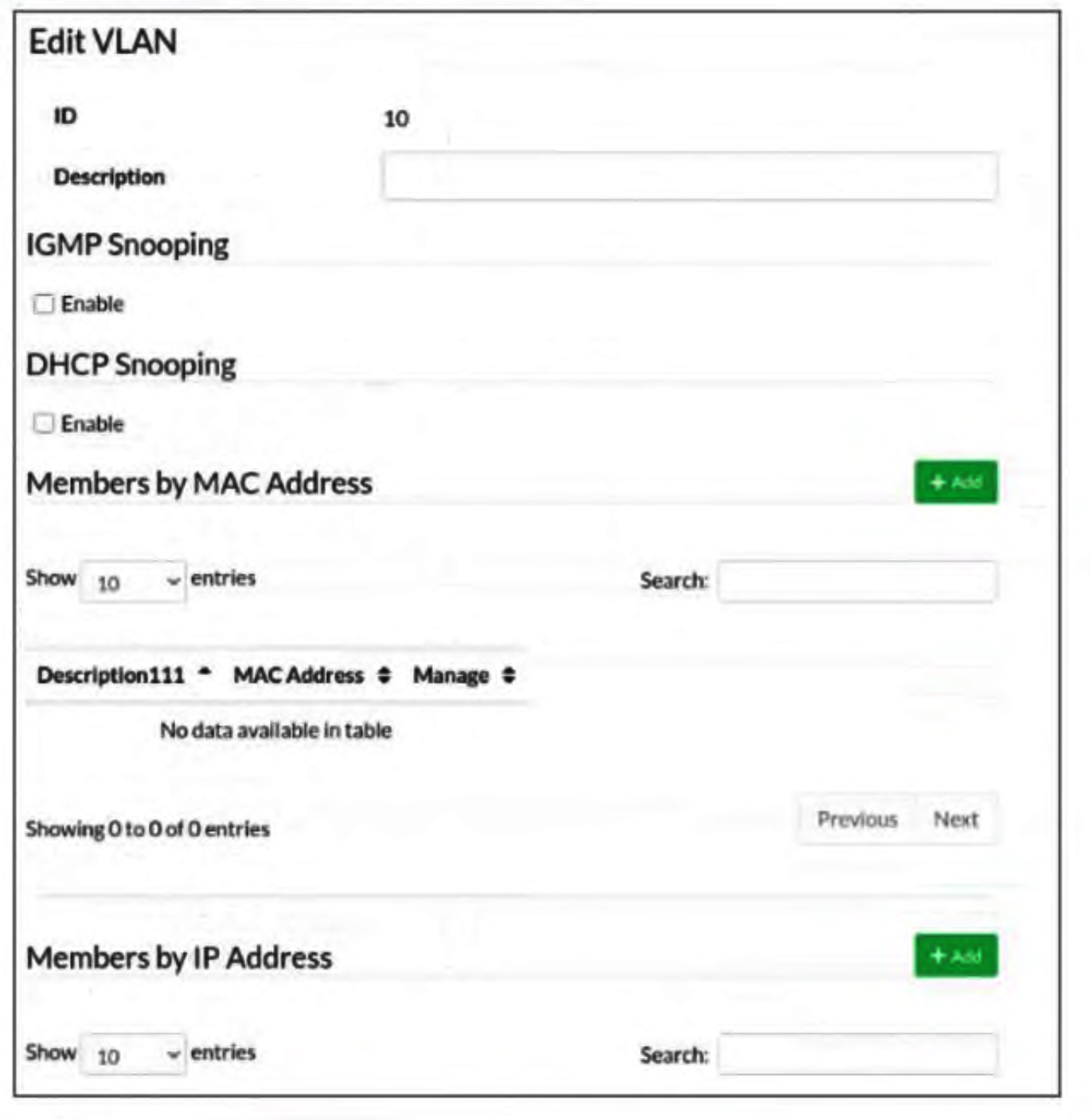
- Add VLAN ID 10 as a member of the untagged VLANs on port1.
- Include VLAN 10 and VLAN 20 as allowed VLANs on port1.
- Add the MAC address of PC1 as a member of VLAN 10.
- Remove VLAN 10 from the allowed VLANs and add it to untagged VLANs on port1.
The short version
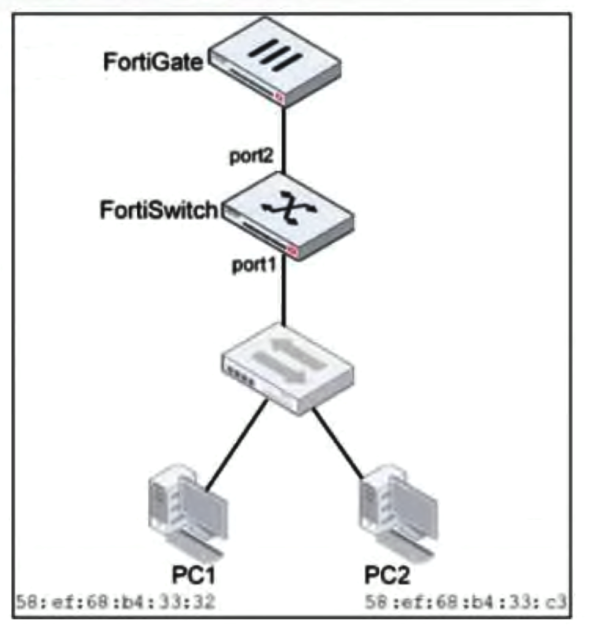
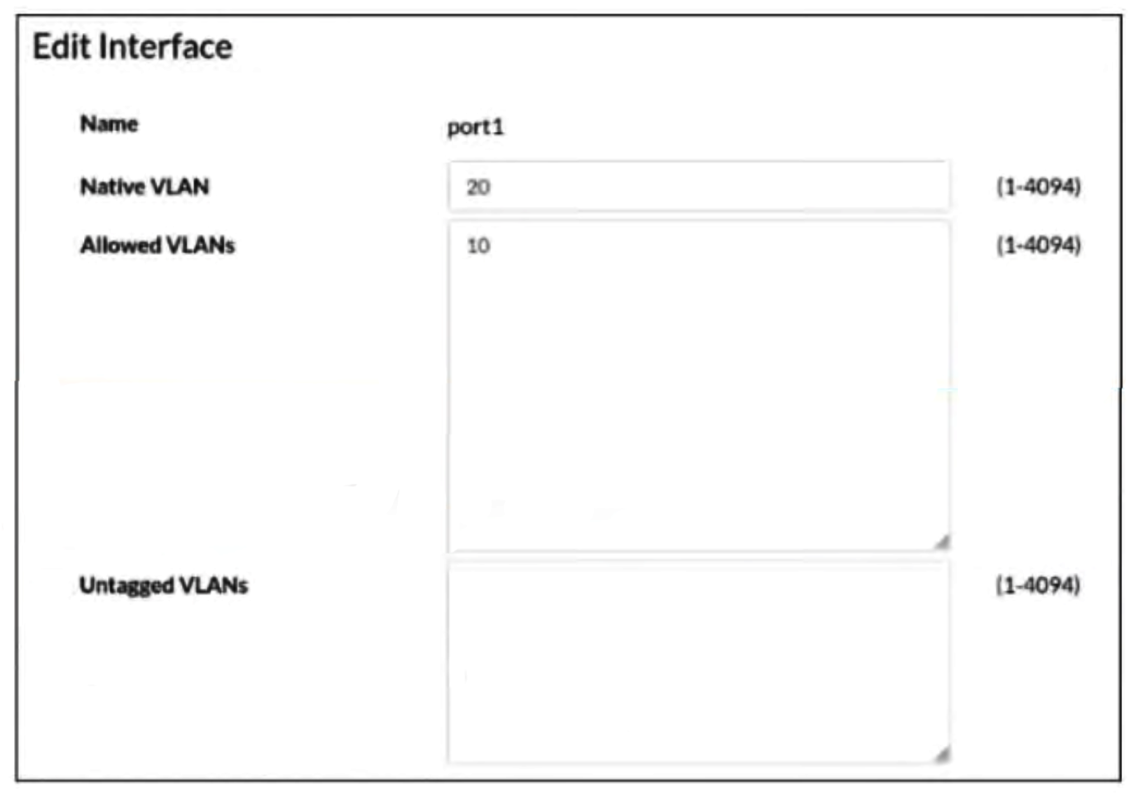
A and C — make VLAN 10 untagged on port1 (and never keyed by MAC). Native untagged membership delivers what the PC expects.
Key concepts in this question
- A PC expecting untagged frames needs the VLAN in the port's untagged/native set.
- Tagged arrival is stripped to untagged only by that membership.
Why A and C are correct
Adding VLAN 10 to port1's untagged set (A), equivalently removing it from tagged/allowed into untagged (C), strips the tag on egress — exactly PC1's expectation. MAC-based membership is irrelevant here.
Why the others are wrong
- B. Allowed-list membership without untagged change keeps frames tagged.
- C's alternative reading (MAC). MAC membership does not control tagging behavior.
FortiGate exam tip
PC wants untagged = VLAN goes native/untagged on that port.
- Classification for ingress traffic
- Queuing for egress traffic
- Policing for ingress traffic
- Shaping for egress traffic
The short version
B — CoS/DSCP-to-queue mapping is egress queuing. Classification decides, queuing executes.
Key concepts in this question
- Queuing (egress) places marked packets into hardware queues.
- Classification marks on ingress; policing/shaping rate-control.
Why B is correct
Mapping markings to an egress queue is the definition of the queuing mechanism — the stage that acts on CoS/DSCP values.
Why the others are wrong
- A. Classification marks; it does not assign queues.
- C. Policing drops/remarks on ingress, a different function.
- D. Shaping delays egress, it does not map markings to queues.
FortiGate exam tip
Markings → queue = queuing. Markings ← inspection = classification.
Want the full bank of 64 questions for Fortinet NSE 5 - FortiSwitch 7.6 Administrator? See all practice exams.