NSE5_FMG-7.2 — Free Practice Questions
10 free sample questions from a bank of 62, with the correct answers and explanations. No signup required — start practising right now.
1You are moving managed FortiGate devices from one ADOM to a new ADOM.
Which statement correctly describes the expected result?
- The shared device settings will be installed automatically.
- Any unused objects from a previous ADOM are moved to the new ADOM automatically.
- The shared policy package will not be moved to the new ADOM.
- Policy packages will be imported into the new ADOM automatically.
Answer: C
2An administrator has assigned a global policy package to a new ADOM called ADOM1.
What will happen if the administrator tries to create a new policy package in ADOM1?
- When a new policy package is created, the administrator must import the global policy package to ADOM1.
- When the new policy package is created, FortiManager automatically assigns the global policy package to the new policy package.
- When a new policy package is created, the administrator must assign the global policy package from the global ADOM.
- When creating a new policy package, the administrator can select the option to assign the global policy package to the new policy package.
Answer: B
3Refer to the exhibit. On FortiManager, an administrator created a new system template named Training with two new DNS addresses. During the installation preview stage, the administrator notices that central-management settings need to be purged.
What can be the main reason for the central-management purge command?
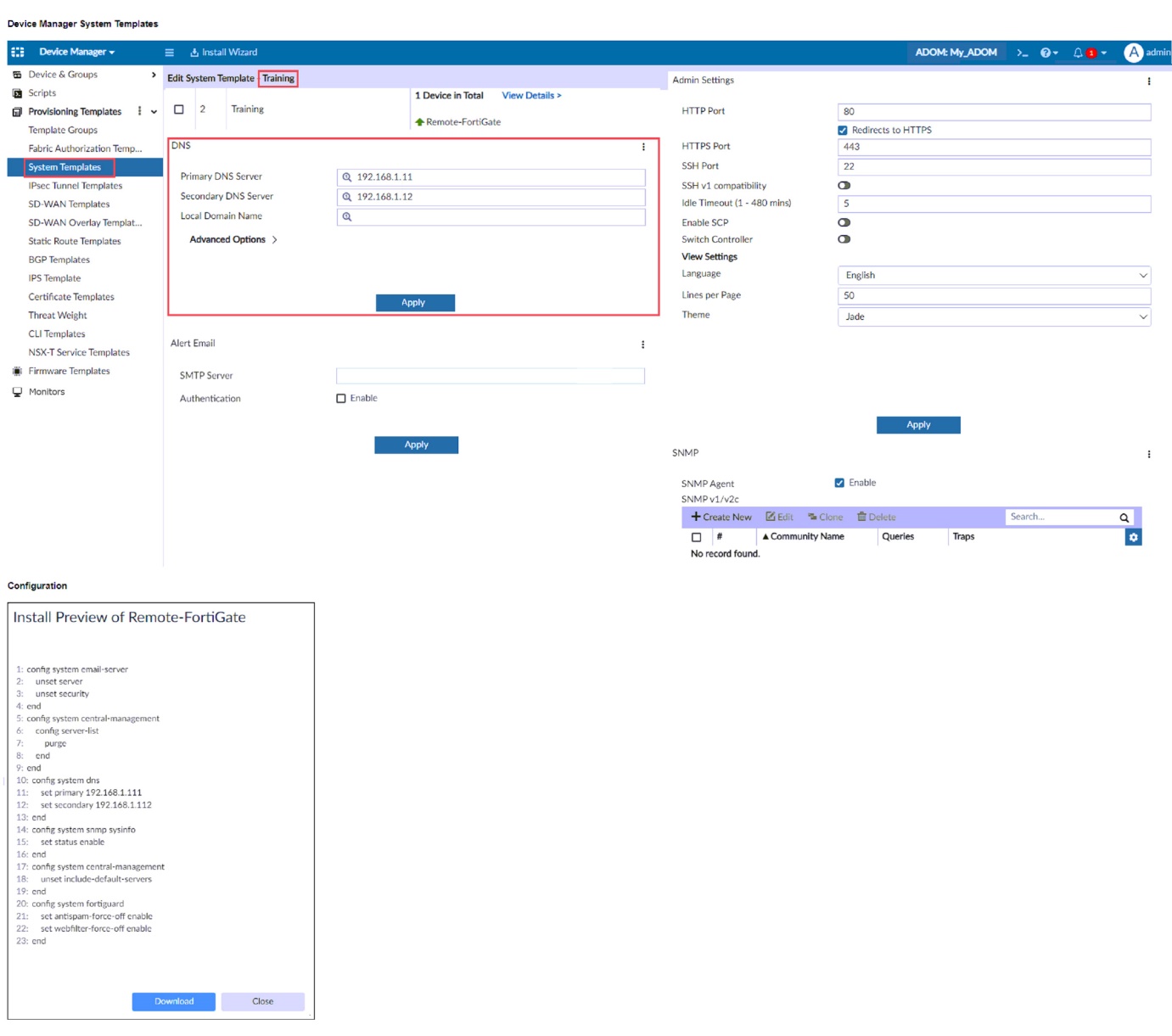
- The Remote-FortiGate device does not have any DNS server-list configured in the central-management settings.
- The DNS addresses in the default system settings are the same as the Training system template.
- The ADOM is locked by another administrator.
- The Training system template has a default FortiGuard widget.
Answer: D
4Refer to the exhibit. Which statement is true about the FortiManager ADOM policy tab based on the API request?
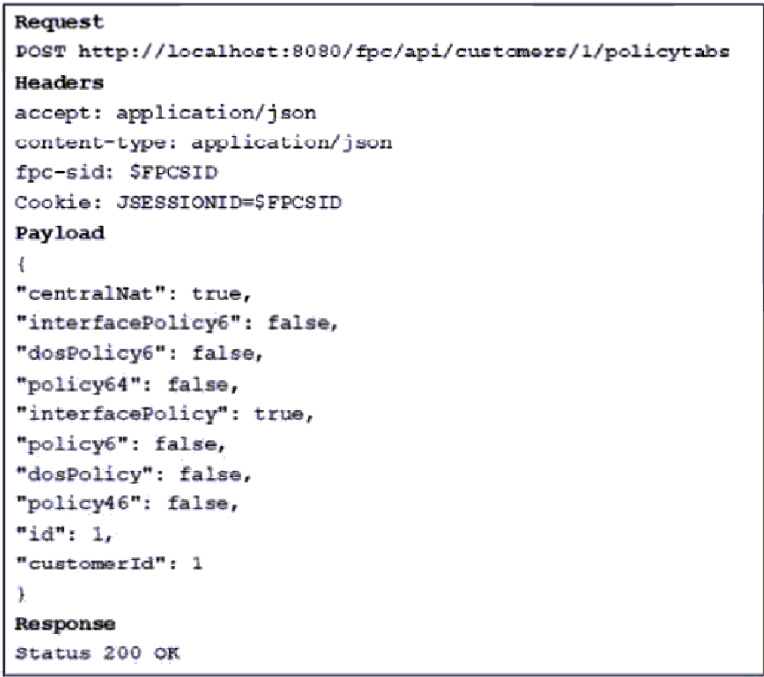
- The API command has enabled both central NAT and interface policy on the policy tab.
- The API command has requested the policy tab permissions information only.
- The API command has failed when requesting policy tab permissions information.
- The API command has applied to customer with ID: 200.
Answer: A
5What will happen if FortiAnalyzer features are enabled on FortiManager?
- FortiManager will keep all the logs and reports on the FortiManager.
- FortiManager will install the logging configuration to the managed devices.
- FortiManager can be used only as a logging device.
- FortiManager will enable ADOMs to collect logs automatically from non-FortiGate devices.
Answer: A
6An administrator would like to review, approve or reject all the firewall policy changes made by the junior administrators.
How should the workspace mode settings be configured on FortiManager?
- Set to normal and using the approval group feature
- Set to read/write and using the policy locking feature
- Set to workflow and using the ADOM locking feature
- Set to workspace and using the policy locking feature
Answer: C
7Refer to the exhibit. What will happen if the script is run using the Remote FortiGate Directly (via CLI) option? (Choose two.)
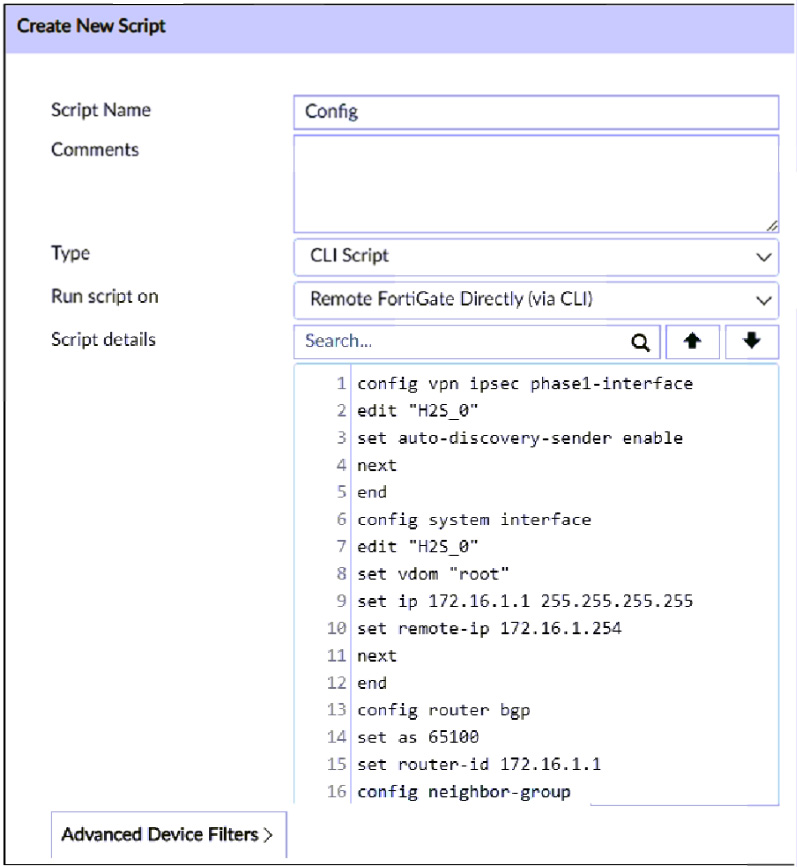
- FortiManager provides a preview of CLI commands before executing this script on a managed FortiGate.
- FortiManager will create a new revision history.
- FortiGate will auto-update the FortiManager device-level database.
- You must install these changes using the Install Wizard.
Answer:
8In addition to the default ADOMs, an administrator has created a new ADOM named Training for FortiGate devices only. The administrator authorized the FortiGate device on FortiManager using the Fortinet Security Fabric.
Given the administrator’s actions, which statement correctly describes the expected result?
- The FortiManager administrator must add the authorized device to the Training ADOM using the Add Device wizard only.
- The authorized FortiGate will appear in the root ADOM.
- The authorized FortiGate can be added to the Training ADOM using FortiGate Fabric Connectors.
- The authorized FortiGate will be automatically added to the Training ADOM.
Answer: B
9In the event that one of the secondary FortiManager devices fails, which action must be performed to return the FortiManager HA manual mode to a working state?
- The FortiManager HA state transition is transparent to administrators and does not require any reconfiguration.
- Manually promote one of the working secondary devices to the primary role, and reboot the old primary device to remove the peer IP of the failed device.
- Reconfigure the primary device to remove the peer IP of the failed device.
- Reboot the failed device to remove its IP from the primary device.
Answer: C
10Which three settings are the factory default settings on FortiManager? (Choose three.)
- The administrative domain is disabled.
- The Port1 interface IP address is 192.168.1.99/24.
- Management Extension applications are enabled.
- The FortiManager setup wizard is disabled.
- FortiAnalyzer features are disabled.
Answer:
Want the full bank of 62 questions for NSE5_FMG-7.2? See all practice exams.