Fortinet NSE 5 - FortiAnalyzer 7.6 Analyst — Free Practice Questions
10 free sample questions from a bank of 63, with the correct answers and explanations. No signup required — start practising right now.
- An ADOM with the Fabric type comes with multiple connectors configured.
- The local connector comes online once you have a playbook task referencing it.
- The actions available with FortiOS connectors are determined by automation rules configured on FortiGate.
- The playbook module must be enabled before external connectors are displayed.
The short version
C — FortiOS connector actions come from FortiGate automation rules. The connector exposes what the FortiGate side defines.
Key concepts in this question
- The FortiOS connector lets FAZ playbooks trigger FortiGate automation-stitch actions.
- Available actions mirror the automation rules configured on FortiGate, not FAZ-side settings.
Why C is correct
A FortiOS connector is a window into FortiGate's automation rules: only actions defined there appear as runnable actions on the connector. No FortiGate rule, no action.
Why the others are wrong
- A. Fabric-type ADOMs do not ship preconfigured connectors.
- B. The local connector's online state does not depend on playbook references.
- D. External connectors display independently of the playbook module toggle.
FortiGate exam tip
FortiOS connector actions = FortiGate automation rules. Always.
- Report templates
- Dashboards
- Event handlers
- Active Connectors
- Playbooks
- Incident templates
The short version
A, C, E — a SOC Automation license feeds report templates, event handlers, and playbooks. Content packs, not live modules.
Key concepts in this question
- The SOC Automation service delivers downloadable content: handlers that detect, playbooks that respond, report templates that present.
- Dashboards, connectors, and incident templates are configured locally, not downloaded.
Why A, C and E are correct
Report templates (A), event handlers (C), and playbooks (E) are the three content types the SOC Automation service publishes for auto-download — detection, response, and reporting in one bundle.
Why the others are wrong
- B. Dashboards are built locally from widgets, not downloaded.
- D. Active connectors are configured integrations, not content downloads.
- F. Incident templates are local definitions, not service content.
FortiGate exam tip
SOC Automation downloads = handlers + playbooks + report templates.

- This is a formatted view of the log.
- This is a normalized log.
- This log is in a raw log format.
- This is the original log that FortiAnalyzer received from FortiGate.
The short version
C and D — the exhibit is the raw key=value stream FortiGate sent. Unparsed, unformatted, original.
Key concepts in this question
- Raw logs are the as-received key=value lines (adom_oid, itime, logid, … with logMeta=undefined).
- Normalized/formatted views parse those lines into field tables or GUI layouts.
Why C and D are correct
The exhibit shows the unparsed stream exactly as received — raw format (C), which by definition is the original log from FortiGate (D). No parsing or GUI formatting has been applied.
Why the others are wrong
- A. A formatted view would show the GUI layout, not the raw stream.
- B. Normalized means parsed into indexed fields — this line is explicitly unparsed.
FortiGate exam tip
key=value stream with logMeta=undefined = raw + original. Tables = normalized.
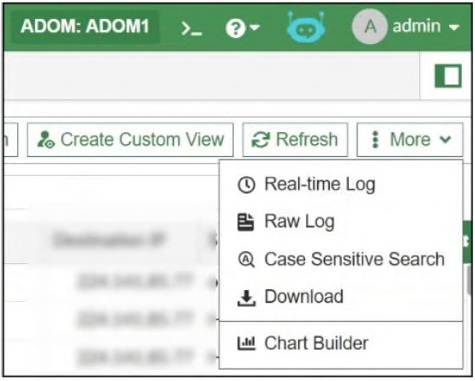
- To build a chart automatically based on the top 100 log entries
- To add charts to generate reports directly in the current ADOM
- To add a new chart under FortiView to be used in new reports
- To build a dataset and chart based on the filtered search results
The short version
D — Chart Builder turns your current filtered search into a dataset plus chart. Search first, chart second.
Key concepts in this question
- Chart Builder consumes the active Log View filter and builds a reusable dataset/chart from those results.
- It does not invent top-N charts or attach to ADOMs/FortiView directly.
Why D is correct
The feature's purpose is search-driven charting: filter the logs, then build the dataset and chart from exactly that result set for reports.
Why the others are wrong
- A. No automatic top-100 charting is involved.
- B. Charts are not generated into the current ADOM by this tool.
- C. FortiView placement is a separate concern.
FortiGate exam tip
Chart Builder = filtered search results become a chart. Search comes first.
- Threat hunter
- SOC engineer
- Security analyst
- Incident responder
The short version
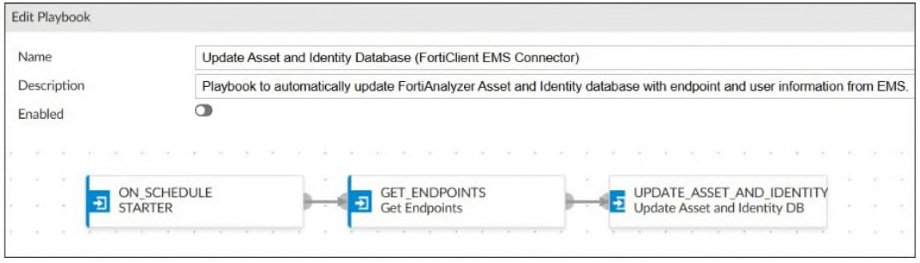
B — playbook/report edits are engineering work: the SOC engineer owns them. Tuning tasks is not hunting, analysis, or response.
Key concepts in this question
- SOC engineer: builds and tunes playbooks, connectors, reports.
- Threat hunter hunts, analyst triages, responder contains — none rewire playbook tasks.
Why B is correct
Configuring a report task on an EMS-fed asset list is playbook engineering — squarely the SOC engineer's responsibility in the SOC role model.
Why the others are wrong
- A/C/D. Hunting, analysis, and response consume playbook outputs; they do not author the tasks.
FortiGate exam tip
"Who edits the playbook" = SOC engineer. Every time.
- To alter tables in the database
- To purge log entries from the database
- To insert new data into an existing table
- To display the database schema
The short version
D — SELECT only reads, and reading the schema is a read. Dataset queries display; they never alter, purge, or insert.
Key concepts in this question
- FortiAnalyzer datasets/reports use read-only SELECT against the log database.
- Schema display, like any result set, is a display operation.
Why D is correct
Of the options, only displaying the schema is something SELECT can do — the query language available has no write path at all.
Why the others are wrong
- A/B/C. ALTER, purge, and INSERT are all writes, impossible through dataset SELECT.
FortiGate exam tip
Dataset SQL = SELECT = read-only. Any write verb is instantly wrong.
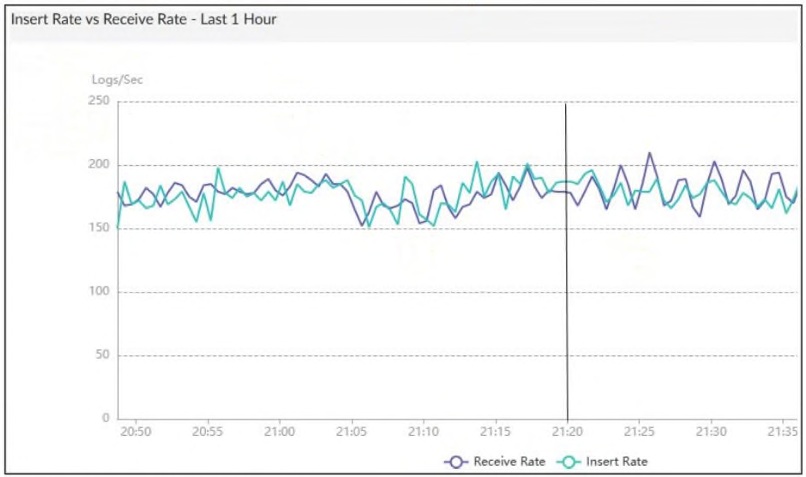
- FortiAnalyzer is indexing logs faster than logs are being received.
- The sqlpugind daemon is behind in receiving logs by one log.
- The fortilogd daemon is ahead in indexing by one log.
- The log insert lag time is high.
The short version
A — the 21:20 point shows indexing outpacing reception. The indexer is ahead, not behind.
Key concepts in this question
- Index rate vs receive rate: when indexing exceeds receiving, the pipeline is catching up or idle-healthy.
- Daemon lag would show the reverse relationship.
Why A is correct
The data point's ordering (indexed ahead of received) means FortiAnalyzer is indexing faster than new logs arrive — a healthy, caught-up pipeline.
Why the others are wrong
- B/C. Neither daemon lags here; the direction favors indexing, not receiving.
- D. Insert lag would present as growing backlog, the opposite of this reading.
FortiGate exam tip
Index-ahead-of-receive = healthy. Receive-ahead-of-index = lagging.
- Application category
- IP address
- URL
- Policy ID
The short version
B and C — an IOC is identified by IP address and URL. The two network locators.
Key concepts in this question
- FortiAnalyzer IOC matching keys on IP and URL observables from logs.
- Application category and policy ID are context, not identifiers.
Why B and C are correct
IP addresses and URLs are the two parameters the IOC engine uses to declare a match — the documented identifier pair.
Why the others are wrong
- A. Application category describes traffic, it does not identify IOCs.
- D. Policy IDs locate the rule, not the compromise.
FortiGate exam tip
IOC identity = IP + URL. Everything else is context.
- Logs that are parsed and normalized by FortiAnalyzer and available in the log view
- Logs received from other FortiAnalyzer devices
- Logs compressed and saved in files with the .gz extension
- Logs that are indexed and stored in the SQL database
The short version
C — archive logs are compressed .gz files. Cold storage, not live views.
Key concepts in this question
- Archive logs: gzipped files for retention, outside the indexed database.
- Live/parsed/indexed logs are the analytic (SQL/ClickHouse) set.
Why C is correct
Compressed .gz file storage is the definition of the archive tier — retrievable but not queryable until restored.
Why the others are wrong
- A. Parsed/normalized in log view describes analytic logs.
- B. Inter-Analyzer transfers are a different feature (aggregator tiers).
- D. Indexed SQL storage describes analytic logs.
FortiGate exam tip
.gz = archive. Indexed = analytic. Never mix the tiers.
- All charts and datasets associated with the report will be imported together.
- The date and time will be appended to the original report name to avoid conflicts.
- The ADOMs must be compatible types.
- The reports must be converted into templates first.
The short version
A and C — charts/datasets travel with the report, but only between compatible ADOMs. Portability with prerequisites.
Key concepts in this question
- Report export/import bundles associated charts and datasets automatically.
- Cross-ADOM moves require compatible ADOM types (e.g. Fabric vs FortiGate).
Why A and C are correct
The bundle behavior (A) plus the compatibility gate (C) are the two documented move semantics — everything arrives together, but only where the ADOM type allows.
Why the others are wrong
- B. No timestamp renaming happens on import.
- D. No template conversion is required to move a report.
FortiGate exam tip
Report moves = bundle travels, ADOM types must match.
Want the full bank of 63 questions for Fortinet NSE 5 - FortiAnalyzer 7.6 Analyst? See all practice exams.