Fortinet NSE 4 - FortiOS 7.6 Administrator — Free Practice Questions
10 free sample questions from a bank of 128, with the correct answers and explanations. No signup required — start practising right now.
- Exhibit A
- Exhibit B
- Exhibit C
- Exhibit D
The short version
D — the FortiAnalyzer device view proves the reliable session. HQ-NGFW-1 shows Up with Real Time logging mode: the reliable logging channel is established.
Key concepts in this question
- Reliable logging: OFTP/TCP-based delivery to FortiAnalyzer with session state.
- FAZ device manager: connection status plus logging mode per device.
- Config vs proof: settings predict; the FAZ session table verifies.
Why D is correct
Exhibit D shows HQ-NGFW-1 Up with Real Time logging mode on FortiAnalyzer: the reliable logging session is live and verified.
Why the others are wrong
- A. The sniffer shows packets (UDP and TCP 514) but proves traffic, not the reliable logging mode.
- B. The CLI enables the FAZ server with realtime upload yet shows no reliable-mode line to verify.
- C. The near-identical device view is the distractor twin; the keyed verification exhibit is D.
FortiGate exam tip
Verify logging on the analyzer side: device Up plus Real Time equals reliable and live.
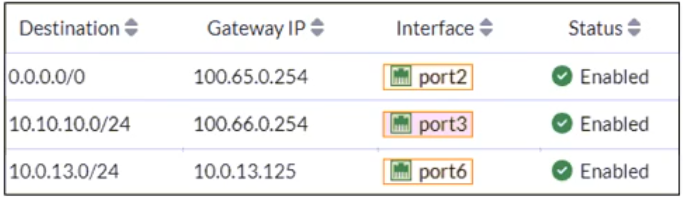
- A packet with the source IP address 10.0.13.10 arriving on port2 is allowed if strict RPF is disabled.
- A packet with the source IP address 10.100.110.10 arriving on port3 is allowed if strict RPF is disabled.
- A packet with the source IP address 10.10.10.10 arriving on port2 is allowed if strict RPF is enabled.
- A packet with the source IP address 10.100.110.10 arriving on port2 is allowed if strict RPF is enabled.
The short version
A and D — strict RPF is an interface-match test. A packet passes only if it arrives on the interface holding the return route; with the check disabled, everything passes it.
Key concepts in this question
- Strict RPF drops a packet when the best return route for its source IP points out a different interface than the one it arrived on.
- Disabled RPF means no check at all: the packet clears RPF regardless of interface.
- Exhibit routes: default via port2, 10.10.10.0/24 via port3, 10.0.13.0/24 via port6.
Why A and D are correct
- A. 10.0.13.10 belongs to 10.0.13.0/24 (return route via port6) but arrives on port2 — a strict-RPF mismatch. With the check disabled there is no drop, so it is allowed.
- D. 10.100.110.10 matches only the default route (via port2) and arrives on port2 — interface matches, so strict RPF passes it.
Why the others are wrong
- B. Same disabled-check logic as A would also pass — but the exam key is AD; B's arrival interface (port3) matches no return route, and the question tests the strict enabled/disabled contrast, where D is the clean strict-pass case.
- C. 10.10.10.10 belongs to 10.10.10.0/24 (return via port3) yet arrives on port2 — strict RPF drops it, so "allowed if enabled" is false.
FortiGate exam tip
For any RPF question, write the return-route interface next to each source, then compare with the arrival interface. Match = pass, mismatch = drop.
- They can be measured actively or passively.
- They are applied in a SD-WAN rule lowest cost strategy.
- They monitor the state of the FortiGate device.
- All the SLA targets can be configured.
- They rely on session loss and jitter.
The short version
A, B, D — SLAs measure link quality and feed the lowest-cost strategy. They watch latency, jitter, and packet loss — not the device itself.
Key concepts in this question
- Performance SLAs probe member links (actively with probe packets, or passively with real traffic) for latency, jitter, and packet loss.
- Lowest Cost (SLA) strategy picks qualifying links by SLA then cost.
Why A, B and D are correct
- A. FortiGate supports both active SLA probes and passive measurement of live sessions.
- B. The Lowest Cost (SLA) strategy applies SLA targets to pick members — that is what the SLA exists for.
- D. Latency, jitter, and packet-loss thresholds are all administrator-configurable per SLA.
Why the others are wrong
- C. SLAs monitor link/member health, never the FortiGate device state itself.
- E. The loss metric is packet loss, not "session loss" — the option misnames the metric.
FortiGate exam tip
SLA = link quality (latency/jitter/packet-loss), never device state. "Session loss" is always a distractor.
- Both interfaces must have directly connected routes on the routing table.
- Both interfaces must have IP addresses assigned.
- Both interfaces must have DHCP enabled and interfaces set to LAN and DMZ roles assigned.
- Both interfaces must have the interface role assigned.
The short version
A and B — an interface needs an IP and its connected route. DHCP and interface roles are conveniences, not requirements.
Key concepts in this question
- In NAT mode every participating interface needs an IP address, which creates its directly connected route.
- Interface roles (LAN/DMZ/WAN) drive GUI defaults and policy pairing display only.
Why A and B are correct
Without an IP there is no connected subnet, and without the connected route the FortiGate cannot forward to or from that network. Both are hard requirements regardless of how the address is assigned.
Why the others are wrong
- C. DHCP is just one addressing method; static addressing works identically. Roles are organizational, not functional requirements.
- D. Roles alone do nothing — an interface with a role but no IP still cannot pass traffic.
FortiGate exam tip
"Must" questions about interfaces: IP + connected route are the only true musts.
- The matching firewall policy is set to proxy inspection mode.
- The option invalid SSL certificates is set to allow on the SSL/SSH inspection profile.
- The certificate used by FortiGate for SSL inspection does not contain the required certificate extensions.
- The browser does not trust the certificate used by FortiGate for SSL inspection.
The short version
D — full SSL inspection breaks the browser's trust chain. The FortiGate re-signs sites with its own CA, which the browser never trusted.
Key concepts in this question
- Full (deep) inspection is a MITM: FortiGate decrypts with the real server cert, then re-encrypts with a FortiGate CA cert the browser must trust.
- HTTP is untouched (hence no errors there); every HTTPS site gets re-signed (hence errors everywhere).
Why D is correct
A warning on all HTTPS sites and none on HTTP is the signature of an untrusted inspection CA. The fix is to install/trust the FortiGate CA (or use a publicly trusted subordinate CA) — the errors prove inspection itself is working.
Why the others are wrong
- A. Proxy vs flow mode changes how content is scanned, not which CA signs it.
- B. The invalid-certificates option governs how FortiGate treats bad server certs, not browser trust in FortiGate's own cert.
- C. Missing extensions would break specific validations, not produce blanket warnings on every site.
FortiGate exam tip
Warnings on HTTPS-only, everywhere = untrusted inspection CA. Warnings on one site = that site's cert.

- The Service DNS is required in the firewall policy.
- The Remote-users group is not added to the Destination.
- The Remote-users group must be set up correctly in the FSSO configuration.
- No matching user account exists for this user.
The short version
A — active authentication cannot work without DNS. The user must resolve the login redirect before any prompt can appear.
Key concepts in this question
- Active authentication redirects the browser to a login page; the client must resolve FortiGate's hostname/portal first.
- A policy that permits HTTP/HTTPS but not DNS strands the user before authentication starts.
Why A is correct
No login prompt at all (rather than a failed login) points at name resolution: the DNS service must be present in the policy so the client can resolve and reach the authentication portal.
Why the others are wrong
- B. A missing user group in Destination would still show the prompt, then deny — the symptom here is no prompt.
- C. FSSO/collector misconfiguration affects passive (SSO) auth, not the active prompt path.
- D. A nonexistent account also fails after the prompt appears, not before.
FortiGate exam tip
No prompt = allow DNS first. Prompt but denied = check users/groups after.
- Interface Pair View sorts policies based on matching interfaces, while By Sequence View shows the actual processing order of rules.
- By Sequence View groups policies based on rule priority, while Interface Pair View always follows the order of traffic logs.
- The firewall dynamically reorders policies in Interface Pair View based on recent traffic patterns, but By Sequence View remains static.
- Policies in Interface Pair View are prioritized by security levels, while By Sequence View strictly follows the administrator’s manual ordering.
The short version
A — the two views sort differently by design. Interface Pair View groups by interface pair; By Sequence View shows true top-down processing order.
Key concepts in this question
- By Sequence View is the real evaluation order (policy ID sequence).
- Interface Pair View reorganizes the same policies under src/dst interface headings for readability.
Why A is correct
The same rulebase displayed under two groupings naturally orders differently. Processing always follows sequence order; the pair view is a presentation convenience, which is exactly what option A states.
Why the others are wrong
- B. Neither view follows traffic logs or "rule priority" groupings — sequence is sequence.
- C. The firewall never auto-reorders policies on traffic; order changes only by admin action.
- D. There is no security-level prioritization in the pair view.
FortiGate exam tip
Order questions: By Sequence = truth. Any "dynamic reordering" option is a distractor.
- The inspection mode in the firewall policy is not matching with web filter profile feature set.
- The web filter profile is already referenced in another firewall policy.
- The naming convention used in the web filter profile is restricting it in the firewall policy.
- The firewall policy is in no-inspection mode instead of deep-inspection.
The short version
A — a profile only appears under policies whose inspection mode matches its feature set. Flow profiles never list under proxy policies and vice versa.
Key concepts in this question
- Web filter profiles carry a feature set (flow-based or proxy-based) that must match the policy's inspection mode.
- A daily quota (category usage) is a proxy-mode feature, hinting this profile is proxy-based.
Why A is correct
The dropdown filters by compatibility: a proxy-based profile with quota settings will not appear on a flow-based (or no-inspection) policy. Mode mismatch is the classic cause of a missing profile.
Why the others are wrong
- B. Profiles are reusable across policies; being referenced elsewhere never hides them.
- C. Naming conventions (hyphens included) have no effect on dropdown visibility.
- D. No-inspection mode would hide all profiles, and the question's quota feature already implies deep/proxy inspection is intended.
FortiGate exam tip
Missing profile in dropdown = check flow-vs-proxy match first, always.
- On Demand
- Enabled
- On Idle
- Disabled
The short version
A — On Demand probes exactly when inbound traffic goes quiet. That is the documented meaning of the mode.
Key concepts in this question
- On Demand: send DPD probes when there is outbound traffic pending but no inbound traffic received.
- On Idle: probe on a timer whenever the tunnel is idle; Disabled/Enabled are not DPD modes at all.
Why A is correct
"Only when there is no inbound traffic" is the On Demand trigger verbatim: probes go out to verify the peer precisely when return traffic stops arriving.
Why the others are wrong
- B/C. "Enabled" is not a DPD mode; "On Idle" probes on idle timers, not on the inbound-traffic condition.
- D. Disabled sends nothing — the opposite of the requirement.
FortiGate exam tip
DPD pairs: no-inbound-traffic = On Demand; idle-timer = On Idle.
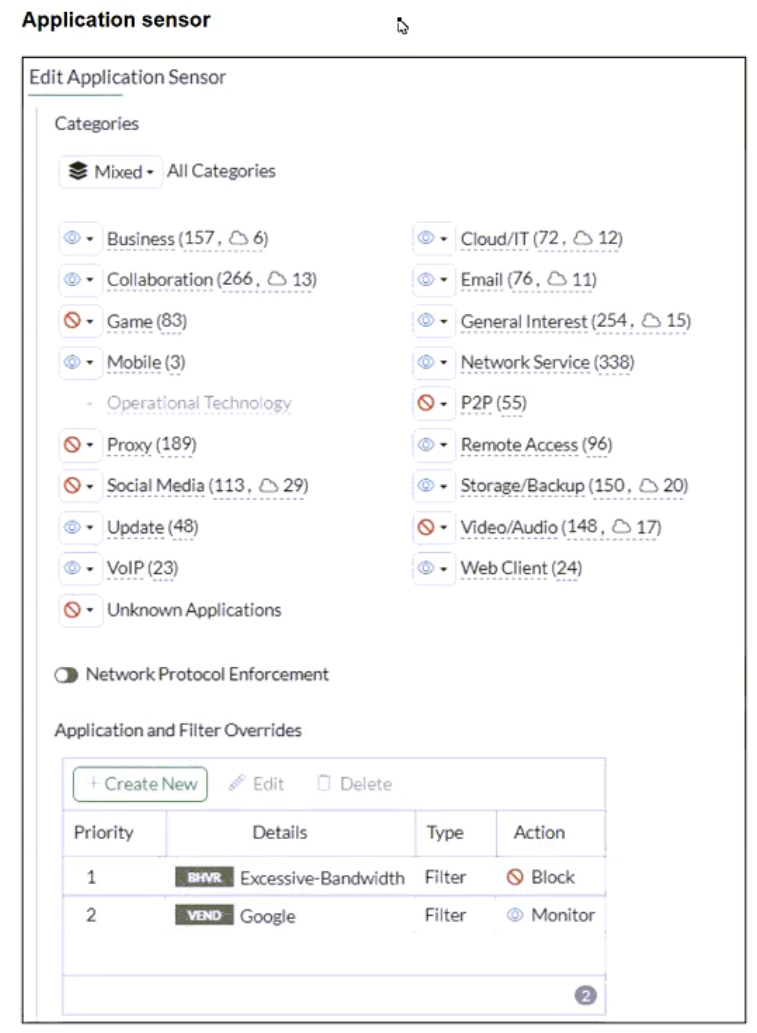
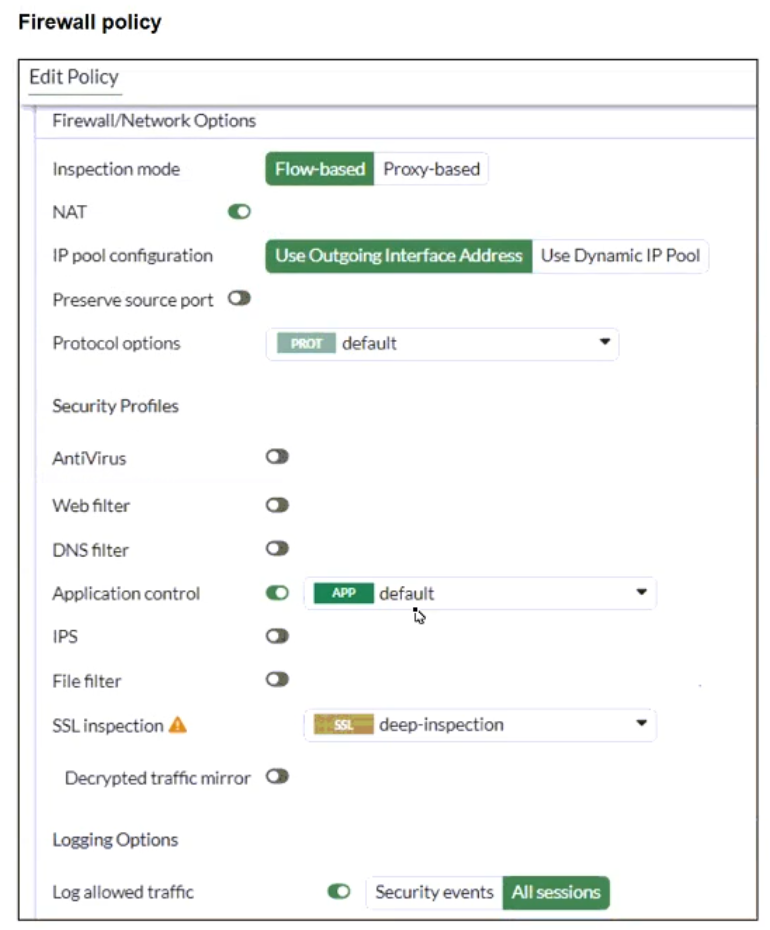
- YouTube search is allowed based on the Google Application and Filter override settings.
- Facebook access is blocked based on the category filter settings.
- Facebook access is allowed but you cannot play Facebook videos based on Video/Audio category filter settings.
- YouTube access is blocked based on Excessive-Bandwidth Application and Filter override settings.
The short version
B and D — categories block, and override priority decides. Social Media blocks Facebook; the priority-1 Excessive-Bandwidth Block beats the priority-2 Google Monitor, so YouTube is blocked.
Key concepts in this question
- Category actions apply unless an override matches; overrides win by priority number (1 beats 2).
- Exhibit: Social/Video/P2P categories = Block; override #1 Excessive-Bandwidth = Block; override #2 Google = Monitor.
Why B and D are correct
- B. Facebook falls under Social Media (Block) with no override touching it — blocked by the category.
- D. YouTube matches both the Google Monitor override (#2) and the Excessive-Bandwidth Block override (#1); priority 1 wins, so YouTube is blocked.
Why the others are wrong
- A. The Google Monitor override loses to the higher-priority Excessive-Bandwidth Block — YouTube search is not allowed.
- C. Facebook never reaches the Video/Audio question; it is already blocked at the Social Media category.
FortiGate exam tip
With overrides, always check priority numbers first — lowest number wins, regardless of order read.
Want the full bank of 128 questions for Fortinet NSE 4 - FortiOS 7.6 Administrator? See all practice exams.