Collaboration Communications Systems Engineer (MS-721) — Free Practice Questions
10 free sample questions from a bank of 268, with the correct answers and explanations. No signup required — start practising right now.
- a teams policy
- a voice routing policy
- a calling policy
- a caller ID policy
The short version
B — Voice routing policy enables international via Direct Routing. Teams separates experience from PSTN routing, and Direct Routing egress is governed by voice routing policies binding users to usages and SBC routes. Granting a policy with international usage authorizes and routes overseas dialing. Teams, calling, and caller ID policies control features or identity, not trunk selection.
Key concepts in this question
- Routing policy: Links usages to voice routes pointing at SBCs, deciding who may use which trunk.
- Direct Routing: Pairs Phone System with customer SBCs, relying on routing policy for breakout.
- Calling contrast: Toggles forwarding or recording without choosing the SBC route.
- Caller ID contrast: Sets presentation number, never route permission.
Why B is correct
Without an international-capable usage, user1 has no authorized SBC path for overseas numbers and lookup fails. Assigning the correct policy gives permission plus a route whose pattern includes international destinations. That single assignment gates the scenario, while other policies leave routing unchanged.
Why the others are wrong
- A. Teams policy governs messaging and meetings, not PSTN breakout.
- C. calling policy toggles features without granting usage or trunk.
- D. caller ID changes display, irrelevant to routing permission.
MS-721 exam tip
International via SBC equals voice routing policy every time.
- Enable Location-Based Routing.
- Create a new emergency calling policy that has external location lookup mode enabled.
- Create a new emergency call routing policy that has dynamic emergency calling configured.
- From Networks & locations, add the external subnets of the users.
The short version
B — Emergency calling policy with external lookup enables manual entry. Dynamic emergency calling separates corporate trusted addresses from remote locations via emergency calling policies. Enabling external location lookup exposes manual address control in the client for off-network users. Routing policies, Location-Based Routing, and subnet tables serve trunk or topology roles, not client entry.
Key concepts in this question
- Calling policy: Holds emergency numbers, notification, and lookup behaviour per user.
- Lookup mode: Lets remote clients prompt for manual dispatchable addresses for callback and routing.
- Routing contrast: Restricts toll bypass by topology without granting entry capability.
- Subnet contrast: Maps known corporate IPs but cannot help unknown home IPs.
Why B is correct
External users have no corporate subnet for inference, so the client must collect a civic address. Creating the policy with lookup enabled and assigning it lights up manual entry. No other object exposes that capability, making the settled choice uniquely sufficient.
Why the others are wrong
- A. Location-Based Routing governs admission, never manual address entry.
- C. call routing policy selects PSTN route, not client address capture.
- D. adding subnets maps known networks while roaming users still need manual entry.
MS-721 exam tip
Remote manual address equals emergency calling policy plus external lookup.
- Grant-CsVoicePolicy
- Grant-CsOnlineVoiceRoutingPolicy
- New-CsVoicePolicy
- New-CsPhoneNumberAssignment
- Set-CsUserPstnSettings
The short version
BD — Voice routing grant plus number assignment completes setup. After licensing, Direct Routing users need a voice routing policy for SBC authorization plus a number assignment for callable identity. Grant-CsOnlineVoiceRoutingPolicy binds the usage and route, while New-CsPhoneNumberAssignment provisions the number. Together they complete inbound and outbound paths.
Key concepts in this question
- Routing grant: Assigns online policy mapping the user to usages and SBC routes.
- Number assignment: Creates enterprise voice number for inbound reach and presentation.
- Legacy voice policy: Targets on-premises objects, not Teams online routing.
- Need for both: Route without number leaves inbound incomplete, number without route leaves outbound blocked.
Why BD is correct
Licensing alone leaves no trunk path and no public identity. Granting routing resolves outbound SBC selection, and number assignment anchors inbound delivery. Both are required before validation calls succeed, which is why the settled pair uses the modern cmdlets together. Either alone leaves half the path dark.
Why the others are wrong
- A. Grant-CsVoicePolicy assigns legacy policy, not online routing for Direct Routing.
- C. New-CsVoicePolicy creates an object rather than assigning routing or numbers.
- E. Set-CsUserPstnSettings is an older path, while settled flow uses number assignment.
MS-721 exam tip
Licensed plus Direct Routing equals routing grant plus number assignment.
- the calling policy
- the voice routing policy
- the caller ID policy
- the dial plan
The short version
B — New voice routing policy moves User1 to the Site2 SBC. Voice routes bind dialed patterns to site SBCs via PSTN usages, and voice routing policies bind users to those usages. After relocation with a new Site2 number, only a policy referencing the Site2 route sends outbound calls through the Site2 gateway. Calling policies, caller ID policies, and dial plans do not choose gateways or trunks.
Key concepts in this question
- Policy: Per-user link to PSTN usages and hence to SBC-backed voice routes for outbound selection.
- Site routes: Each site keeps a voice route whose gateway is the local SBC, distinguished by usage tags.
- Number cue: New Site2 number should consume Site2 usages so emergency and toll routing stay local.
- Dial plan: Normalizes dialed digits to E.164 format without selecting any trunk or gateway.
Why B is correct
Keeping the Site1 policy anchors the user to the old SBC, causing media tromboning and mismatch with the new number. Assigning the Site2 voice routing policy repoints outbound matching to the Site2 gateway, restoring local breakout without touching normalization rules. That single change is the minimal correct administrative move for the relocation.
Why the others are wrong
- A. calling policy toggles features such as transfer, never gateway or SBC choice.
- C. caller ID policy changes presentation identity, not egress SBC selection.
- D. dial plan changes digit normalization, leaving gateway selection unchanged.
MS-721 exam tip
Moved sites plus new number equals new voice routing policy for local SBC breakout.
- 203.0.113.0/24
- 198.51.100.0/24
- 52.112.0.0/14
- 192.168.0.0/24
The short version
A — Client external subnet as trusted enables emergency lookup. Trusted IPs decide whether a client is inside corporate network for automatic location assignment. The Teams client external egress range is the enterprise NAT identity seen by Microsoft. Registering it lets lookup proceed, while SBC or private ranges do not represent client egress.
Key concepts in this question
- Trusted IPs: Tenant list of external egress IPs authorizing dynamic policy evaluation.
- Client range: The 203 range is endpoint egress Microsoft actually sees and must match.
- SBC range: Identifies trunk signalling, not user endpoint membership.
- Private range: Hidden behind NAT, never observed by cloud for trust.
Why A is correct
Declaring the client external subnet as trusted lets Teams attempt dynamic lookup for those endpoints. Adding SBC or internal ranges leaves actual egress untrusted, so lookup is skipped and emergency routing misses location. The settled range alone satisfies trust matching and unlocks correct behaviour.
Why the others are wrong
- B. SBC range proves trunk identity, not endpoint corporate presence.
- C. backbone range is service infrastructure, not enterprise egress.
- D. private range is never seen past NAT and cannot match.
MS-721 exam tip
Trusted IPs means client external egress, never SBC or private ranges.
- messaging
- emergency call routing
- emergency calling
- calling
The short version
C — Emergency calling policy notifies and conferences the desk. Emergency calling policies define emergency numbers plus who is notified and whether they auto-conference. Conferencing the security desk bridges staff into emergency audio alongside responders. Messaging, call routing, and general calling policies lack that notify-plus-join construct.
Key concepts in this question
- Policy: Holds numbers, targets, and mode such as notify only versus conference.
- Conferencing: Dials the desk and joins them so staff guide responders with live audio.
- Routing: Chooses SBC path, not who joins.
- General calling: Manages forwarding and voicemail, not dispatch workflows.
Why C is correct
The goal is to loop the desk into the same audio, not merely route outward. Only the emergency calling policy exposes a target with conference behaviour that auto-dials and joins. Assigning it implements the join without changing trunks, making it uniquely sufficient.
Why the others are wrong
- A. messaging governs chat, with no emergency conferencing.
- B. routing selects emergency PSTN path without notifying parties.
- D. general calling handles call features, not desk conferencing.
MS-721 exam tip
Notify plus join the desk equals emergency calling policy.
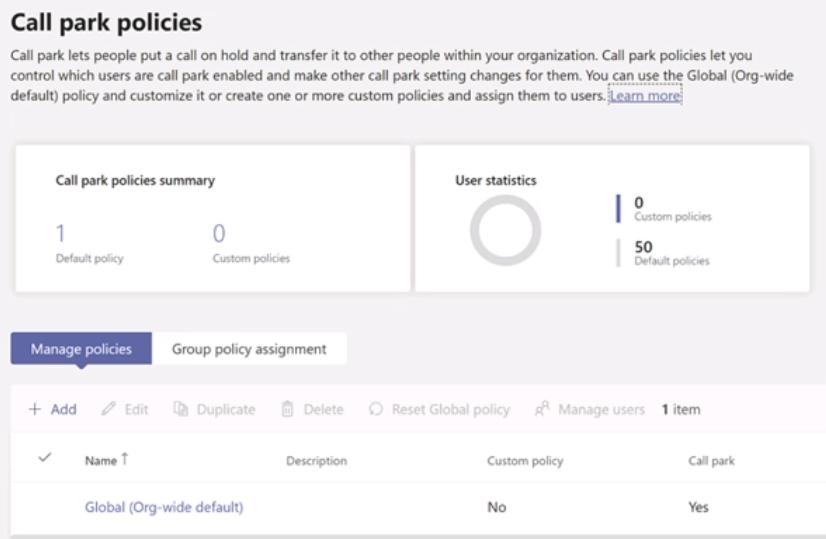
- Assign the Global (Org-wide default) policy to the users in the Help Desk group.
- Create a new call park policy named Policy2 and set Allow call park to Off
- Assign Policy1 to the Help Desk group.
- Create a new call park policy named Policy1 and set Allow call park to On.
- Assign Policy2 to all users.
- In the Global (Org-wide default) policy, set Allow call park to Off.
The short version
CDF — Deny globally then allow only Help Desk via Policy1. Global Off removes the org-wide grant with one setting. Creating an On policy and assigning it to Help Desk restores access narrowly with minimal policies.
Key concepts in this question
- Call park policy scope: Global default applies unless a user is granted a custom policy.
- Allow call park toggle: On permits parking, Off prohibits it for the granted scope.
- Group assignment: assigning Policy1 to Help Desk scopes the allowance to that group only.
- Policy minimization: one Global Off plus one scoped On beats per-user or duplicate policies.
- PSTN context: park behavior for PSTN users is governed by Teams voice policies.
Why CDF is correct
The tenant currently allows park for all PSTN users, so the least-effort lockdown is to set Allow call park to Off in the Global default, which revokes the broad grant at once. Creating Policy1 with Allow call park On and assigning it to the Help Desk group then re-enables park solely for that group. Settled keys C, D, and F together implement deny-all plus scoped-allow with only one custom policy.
Why the others are wrong
- A. Assigning Global to Help Desk does not narrow scope, it leaves org-wide behavior unchanged.
- B. Creating Policy2 set to Off adds an unnecessary deny policy when Global Off already covers it.
- E. Assigning Policy2 to all users adds broad assignment effort instead of using the Global default.
MS-721 exam tip
Restrict Teams feature to one group, turn Global Off then add one On policy.
- Create a new emergency call routing policy.
- Create a new dial plan.
- Assign a dial plan to the Brisbane office users.
- Create a new emergency calling policy.
- Assign an emergency calling policy to the Brisbane office users.
- Assign an emergency call routing policy to the Brisbane office users.
The short version
AF — New routing policy plus assignment pins Brisbane to SBC2. Emergency call routing policies map emergency strings to a specific SBC and usage per assigned user. A dedicated policy pointing at Brisbane SBC2, assigned only to Brisbane users, scopes emergency egress to that gateway. Dial and calling policies do not select gateways.
Key concepts in this question
- Routing policy: Binds emergency numbers to routes and SBCs per user for egress control.
- Scoping: Assigning only to Brisbane leaves Melbourne on its existing path.
- SBC2: Must be referenced explicitly before any user can use it.
- Creation need: Without a new object there is no container for the Brisbane-only mapping.
Why AF is correct
Deploying SBC2 alone steers nobody until a routing object references it. The new policy captures Brisbane to SBC2 mapping, and targeted assignment activates it exactly there. Melbourne stays unaffected, satisfying the only-Brisbane constraint with both actions necessary.
Why the others are wrong
- B. dial plan changes normalization, not emergency gateway.
- C. dial plan assignment affects translation, leaving gateway unchanged.
- D. calling policy manages notification, not SBC route.
- E. calling assignment changes notification, not trunk selection.
MS-721 exam tip
Site emergency SBC equals new routing policy plus targeted assignment.
- NOTIFY is enabled in the SIP options of the SBC.
- The carrier rejects the format of the forwarded FROM number.
- The SSL certificate of the SBC is incorrect.
- The Refer on the SBC is misconfigured.
The short version
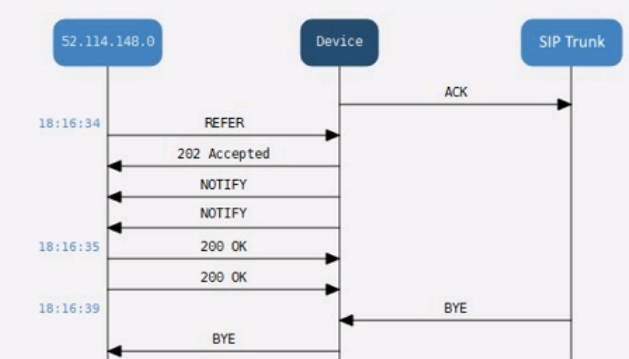
D — Misconfigured Refer breaks Direct Routing transfers. Healthy SBC plus successful setup proves signaling and media work. Transfer uses REFER to retarget the session, so REFER mishandling fails only that step.
Key concepts in this question
- Direct Routing SBC health: Teams admin-center healthy means SIP trunk and cert baseline pass.
- Successful initial call: INVITE plus media path works through the new SBC and carrier.
- Transfer mechanics: attended and blind transfers rely on SIP REFER with Replaces handling.
- Carrier vs SBC fault: carrier FROM rejection would usually fail setup, not only transfer.
- TLS and NOTIFY clues: bad cert breaks trunk entirely, NOTIFY relates to message-waiting indication rather than transfer.
Why D is correct
Because the SBC shows healthy and a test call completes, transport, cert, and basic routing are proven good. Transfer failure isolated after connect points to the REFER transaction that asks the SBC and carrier to re-target media to the transfer target. A misconfigured Refer on the SBC, as settled key D states, breaks that retarget while leaving initial INVITE flows intact, matching the SIP-ladder symptom.
Why the others are wrong
- A. NOTIFY enabled relates to voicemail indication, not to transfer REFER processing.
- B. Carrier rejection of FROM format would typically fail the initial call setup, not only transfer.
- C. Incorrect SBC cert would prevent healthy trunk status and successful calls altogether.
MS-721 exam tip
Setup works but transfer fails, inspect REFER handling on the SBC first.
- From Microsoft Call Quality Dashboard, download the current Tenant Data Upload file.
- Publish the template to the Power BI service.
- Install the Power BI Connector for CQD.
- Install the Microsoft Power Platform connector.
The short version
C — Install the CQD connector before opening PSTN reports. Power BI templates for Call Quality Dashboard depend on a custom connector to authenticate and shape CQD data. Installing it registers the MicrosoftCallQuality source so Desktop can load template queries for Direct Routing legs. Tenant uploads or early publishing cannot succeed without that provider.
Key concepts in this question
- CQD: Aggregates Teams telemetry including SBC legs for quality analysis.
- Templates: Prebuilt files with PSTN visuals referencing the custom connector as source.
- Connector: Handles auth, paging, and schema lacking in native connectors.
- Upload: Moves on-premises data to cloud, a separate workflow not first for templates.
Why C is correct
Opening the template without the connector yields unresolved source errors and no reports. Installing first satisfies the dependency, after which Desktop signs in, pulls datasets, and renders PSTN pages. That order is documented as mandatory, preventing a blocked workflow with one install.
Why the others are wrong
- A. tenant upload serves a different ingestion path yet still needs the connector to visualize.
- B. publishing first merely moves a broken model without fixing its source.
- D. Power Platform connector targets Dataverse, not CQD telemetry.
MS-721 exam tip
CQD templates first need the CQD connector, always.
Want the full bank of 268 questions for Collaboration Communications Systems Engineer (MS-721)? See all practice exams.