MS-500 — Free Practice Questions
10 free sample questions from a bank of 397, with the correct answers and explanations. No signup required — start practising right now.
1You have several Conditional Access policies that block noncompliant devices from connecting to services.
You need to identify which devices are blocked by which policies.
What should you use?
- the Setting compliance report in the Microsoft Endpoint Manager admin center
- Sign-ins in the Azure Active Directory admin center
- Activity log in the Cloud App Security portal
- Audit logs in the Azure Active Directory admin center
Answer: B
2Your company has a Microsoft 365 subscription.
The company does not permit users to enroll personal devices in mobile device management (MDM).
Users in the sales department have personal iOS devices.
You need to ensure that the sales department users can use the Microsoft Power BI app from iOS devices to access the Power BI data in your tenant.
The users must be prevented from backing up the app's data to iCloud.
What should you create?
- a conditional access policy in Microsoft Azure Active Directory (Azure AD) that has a device state condition
- an app protection policy in Microsoft Endpoint Manager
- a conditional access policy in Microsoft Azure Active Directory (Azure AD) that has a client apps condition
- a device compliance policy in Microsoft Endpoint Manager
Answer: B
3HOTSPOT -
You have a Microsoft 365 E5 subscription.
Users and device objects are added and removed daily. Users in the sales department frequently change their device.
You need to create three following groups: The solution must minimize administrative effort.
What is the minimum number of groups you should create for each type of membership? To answer, select the appropriate options in the answer area.
NOTE: Each correct selection is worth one point.
Hot Area:

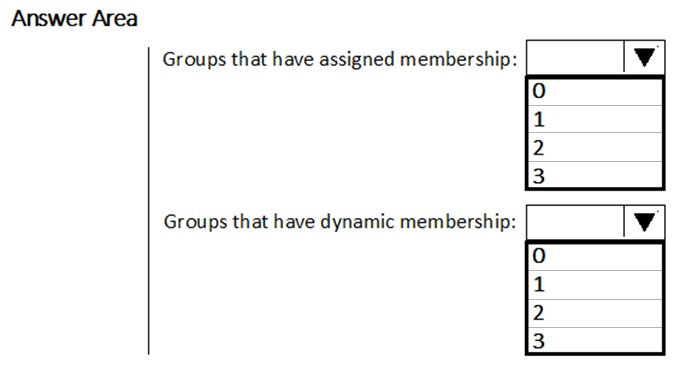
Answer:
4Your company has a main office and a Microsoft 365 subscription.
You need to enforce Microsoft Azure Multi-Factor Authentication (MFA) by using conditional access for all users who are NOT physically present in the office.
What should you include in the configuration?
- a user risk policy
- a sign-in risk policy
- a named location in Azure Active Directory (Azure AD)
- an Azure MFA Server
Answer: C
5HOTSPOT -
You have a Microsoft Azure Active Directory (Azure AD) tenant named contoso.com that contains the users shown in the following table. You create and enforce an Azure AD Identity Protection user risk policy that has the following settings:
✑ Assignments: Include Group1, Exclude Group2
✑ Conditions: User risk of Low and above
✑ Access: Allow access, Require password change
You need to identify how the policy affects User1 and User2.
What occurs when User1 and User2 sign in from an unfamiliar location? To answer, select the appropriate options in the answer area.
NOTE: Each correct selection is worth one point.
Hot Area:

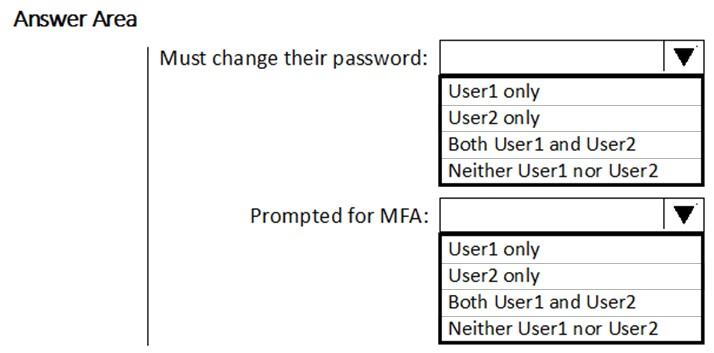
Answer:
6HOTSPOT -
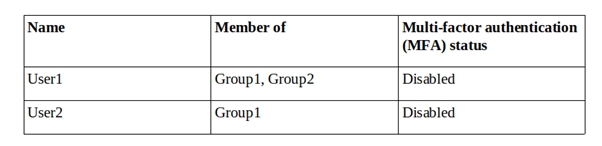
You have a Microsoft Azure Active Directory (Azure AD) tenant named contoso.com that contains the users shown in the following table. You create and enforce an Azure AD Identity Protection sign-in risk policy that has the following settings:
✑ Assignments: Include Group1, Exclude Group2
✑ Conditions: Sign-in risk of Low and above
✑ Access: Allow access, Require multi-factor authentication
You need to identify how the policy affects User1 and User2.
What occurs when each user signs in from an anonymous IP address? To answer, select the appropriate options in the answer area.
NOTE: Each correct selection is worth one point.
Hot Area:
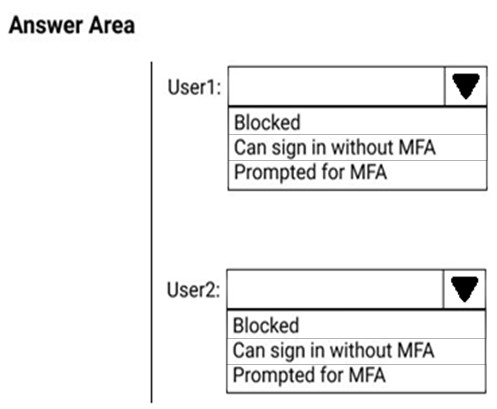
Answer:
7Note: This question is part of a series of questions that present the same scenario. Each question in the series contains a unique solution that might meet the stated goals. Some question sets might have more than one correct solution, while others might not have a correct solution.
After you answer a question in this section, you will NOT be able to return to it. As a result, these questions will not appear in the review screen.
You have an on-premises Active Directory domain named contoso.com.
You install and run Azure AD Connect on a server named Server1 that runs Windows Server.
You need to view Azure AD Connect events.
Solution: You use the Security event log on Server1.
Does that meet the goal?
- Yes
- No
Answer: B
8Note: This question is part of a series of questions that present the same scenario. Each question in the series contains a unique solution that might meet the stated goals. Some question sets might have more than one correct solution, while others might not have a correct solution.
After you answer a question in this section, you will NOT be able to return to it. As a result, these questions will not appear in the review screen.
You have an on-premises Active Directory domain named contoso.com.
You install and run Azure AD Connect on a server named Server1 that runs Windows Server.
You need to view Azure AD Connect events.
Solution: You use the System event log on Server1.
Does that meet the goal?
- Yes
- No
Answer: B
9Note: This question is part of a series of questions that present the same scenario. Each question in the series contains a unique solution that might meet the stated goals. Some question sets might have more than one correct solution, while others might not have a correct solution.
After you answer a question in this section, you will NOT be able to return to it. As a result, these questions will not appear in the review screen.
You have an on-premises Active Directory domain named contoso.com.
You install and run Azure AD Connect on a server named Server1 that runs Windows Server.
You need to view Azure AD Connect events.
Solution: You use the Application event log on Server1.
Does that meet the goal?
- Yes
- No
Answer: A
10You have a Microsoft 365 E5 subscription.
Some users are required to use an authenticator app to access Microsoft SharePoint Online.
You need to view which users have used an authenticator app to access SharePoint Online. The solution must minimize costs.
What should you do?
- From the Microsoft 365 Security admin center, download a report.
- From Azure Log Analytics, query the logs.
- From the Microsoft 365 Security admin center, perform an audit log search.
- From the Enterprise applications blade of the Azure Active Directory admin center, view the sign-ins.
Answer: D
Want the full bank of 397 questions for MS-500? See all practice exams.