MS-102 — Free Practice Questions
10 free sample questions from a bank of 447, with the correct answers and explanations. No signup required — start practising right now.
1Overview -
Fabrikam, Inc. is an electronics company that produces consumer products. Fabrikam has 10,000 employees worldwide.
Fabrikam has a main office in London and branch offices in major cities in Europe, Asia, and the United States.
Existing Environment -
Active Directory Environment -
The network contains an Active Directory forest named fabrikam.com. The forest contains all the identities used for user and computer authentication. Each department is represented by a top-level organizational unit (OU) that contains several child OUs for user accounts and computer accounts.
All users authenticate to on-premises applications by signing in to their device by using a UPN format of [email protected].
Fabrikam does NOT plan to implement identity federation.
Network Infrastructure -
Each office has a high-speed connection to the Internet.
Each office contains two domain controllers. All domain controllers are configured as DNS servers.
The public zone for fabrikam.com is managed by an external DNS server.
All users connect to an on-premises Microsoft Exchange Server 2016 organization. The users access their email by using Outlook Anywhere, Outlook on the web, or the Microsoft Outlook app for iOS. All the Exchange servers have the latest cumulative updates installed.
All shared company documents are stored on a Microsoft SharePoint Server farm.
Requirements -
Planned Changes -
Fabrikam plans to implement a Microsoft 365 Enterprise subscription and move all email and shared documents to the subscription.
Fabrikam plans to implement two pilot projects:
Project1: During Project1, the mailboxes of 100 users in the sales department will be moved to Microsoft 365.
Project2: After the successful completion of Project1, Microsoft Teams will be enabled in Microsoft 365 for the sales department users.
Fabrikam plans to create a group named UserLicenses that will manage the allocation of all Microsoft 365 bulk licenses.
Technical Requirements -
Fabrikam identifies the following technical requirements:
All users must be able to exchange email messages successfully during Project1 by using their current email address.
Users must be able to authenticate to cloud services if Active Directory becomes unavailable.
A user named User1 must be able to view all DLP reports from the Microsoft Purview compliance portal.
Microsoft 365 Apps for enterprise applications must be installed from a network share only.
Disruptions to email access must be minimized.
Application Requirements -
Fabrikam identifies the following application requirements:
An on-premises web application named App1 must allow users to complete their expense reports online. App1 must be available to users from the My Apps portal.
The installation of feature updates for Microsoft 365 Apps for enterprise must be minimized.
Security Requirements -
Fabrikam identifies the following security requirements:
After the planned migration to Microsoft 365, all users must continue to authenticate to their mailbox and to SharePoint sites by using their UPN.
The membership of the UserLicenses group must be validated monthly. Unused user accounts must be removed from the group automatically.
After the planned migration to Microsoft 365, all users must be signed in to on-premises and cloud-based applications automatically.
The principle of least privilege must be used.
You are evaluating the required processes for Project1.
You need to recommend which DNS record must be created while adding a domain name for the project.
Which DNS record should you recommend?
- host (A)
- host information (HINFO)
- text (TXT)
- pointer (PTR)
Answer: C
2HOTSPOT -
You have a Microsoft 365 E5 subscription that contains the users shown in the following table. You add the following assignment for the User Administrator role:
Scope type: Directory -
Selected members: Group1 -
Assignment type: Active -
Assignment starts: Mar 15, 2023 -
Assignment ends: Aug 15, 2023 -
You add the following assignment for the Exchange Administrator role:
Scope type: Directory -
Selected members: Group2 -
Assignment type: Eligible -
Assignment starts: Jun 15, 2023 -
Assignment ends: Oct 15, 2023 -
For each of the following statements, select Yes if the statement is true. Otherwise, select No.
NOTE: Each correct selection is worth one point.
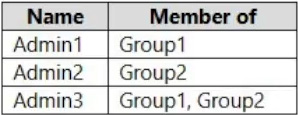
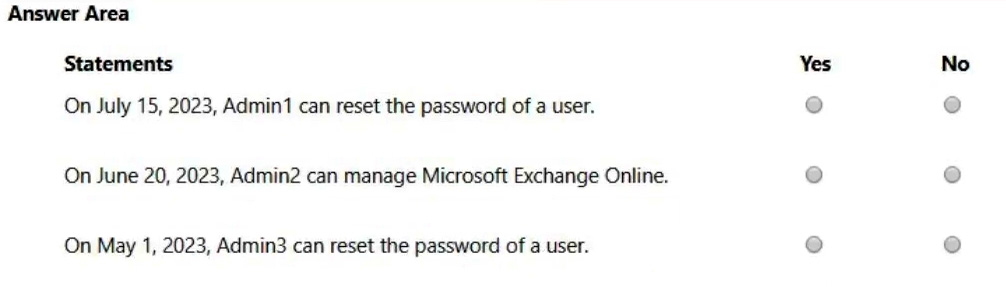
Answer:
3HOTSPOT -
Your company has a Microsoft 365 E5 tenant
Users at the company use the following versions of Microsoft Office:
Microsoft 365 Apps for enterprise
Office for the web -
Office 2016 -
Office 2019 -
The company currently uses the following Office file types:
.docx
.xlsx
.doc
.xls
You plan to use sensitivity labels.
You need to identify the following:
Which versions of Office require an add-in to support the sensitivity labels.
Which file types support the sensitivity labels.
What should you identify? To answer, select the appropriate options in the answer area.
NOTE: Each correct selection is worth one point.
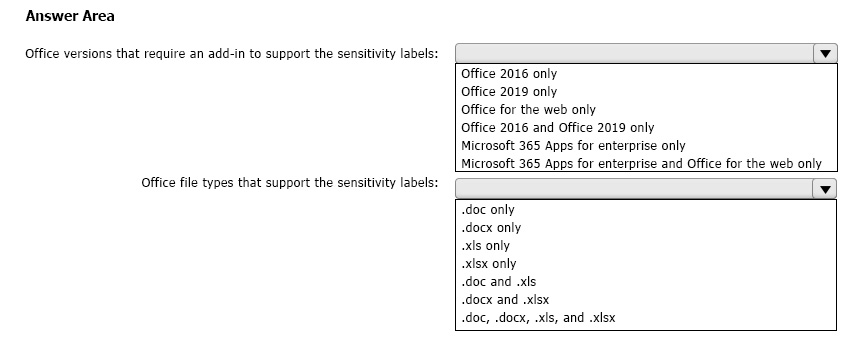
Answer:
4HOTSPOT -
You have a Microsoft 365 tenant.
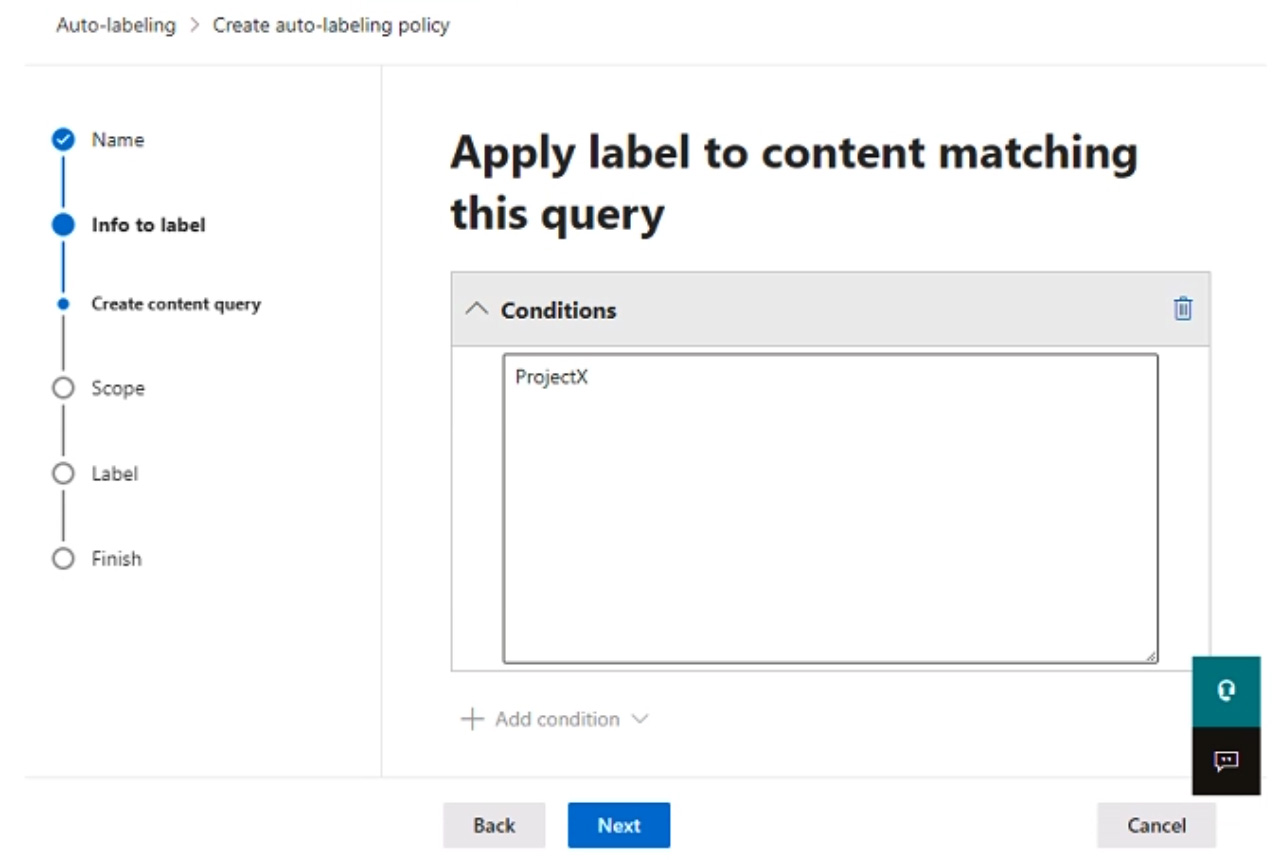
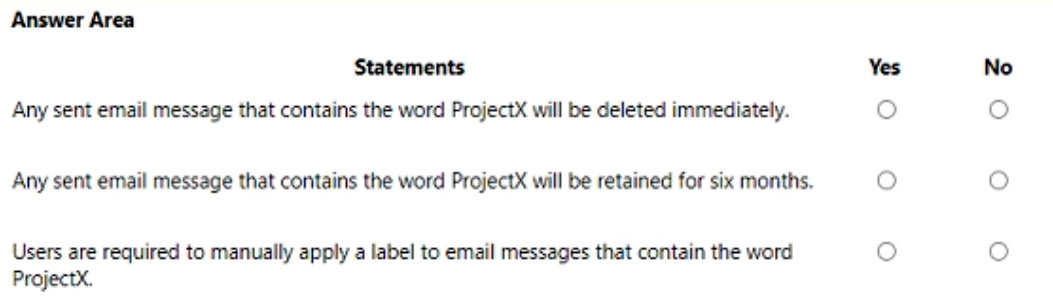
You create a retention label as shown in the Retention Label exhibit. (Click the Retention Label tab.) You create a label policy as shown in the Label Policy exhibit. (Click the Label Policy tab.) The label policy is configured as shown in the following table. For each of the following statements, select Yes if the statement is true. Otherwise, select No.
NOTE: Each correct selection is worth one point.
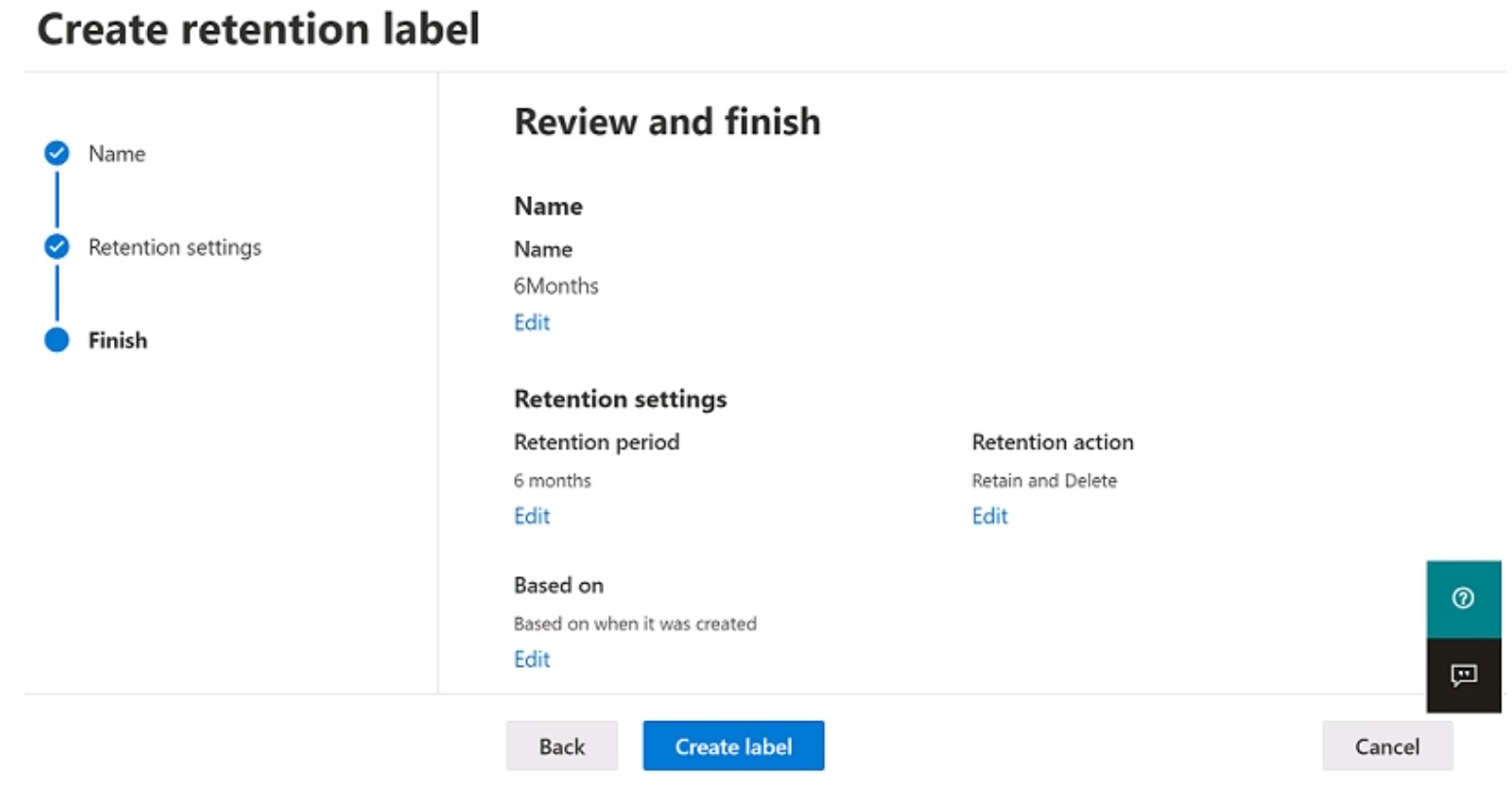

Answer:
5You have a Microsoft 365 subscription.
Your company has a customer ID associated to each customer. The customer IDs contain 10 numbers followed by 10 characters. The following is a sample customer ID: 12-456-7890-abc-de-fghij.
You plan to create a data loss prevention (DLP) policy that will detect messages containing customer IDs.
What should you create to ensure that the DLP policy can detect the customer IDs?
- a PowerShell script
- a sensitivity label
- a sensitive information type
- a retention label
Answer: C
6You have a Microsoft 365 E5 subscription.
You define a retention label that has the following settings:
Retention period: 7 years -
Start the retention period based on: When items were created
You need to prevent the removal of the label once the label is applied to a file.
What should you select in the retention label settings?
- Retain items forever or for a specific period
- Mark items as a regulatory record
- Mark items as a record
- Retain items even if users delete
Answer: B
7HOTSPOT -
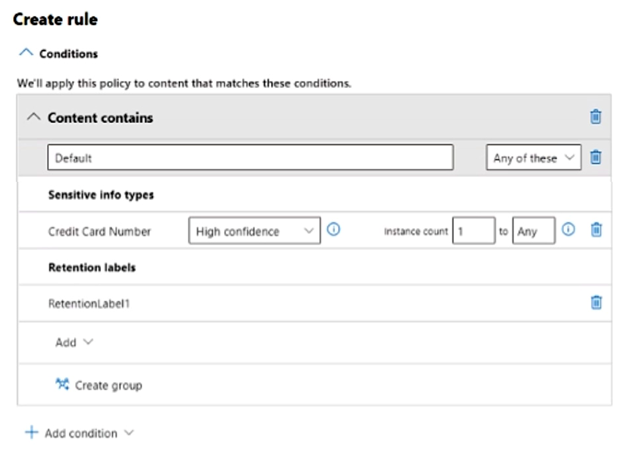
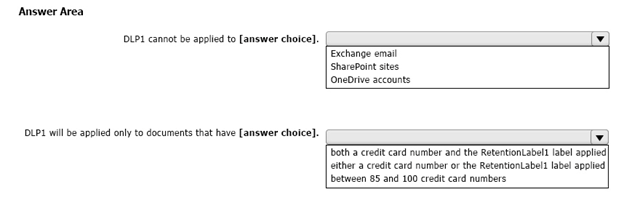
You configure a data loss prevention (DLP) policy named DLP1 with a rule configured as shown in the following exhibit. Use the drop-down menus to select the answer choice that completes each statement based on the information presented in the graphic.
NOTE: Each correct selection is worth one point.
Answer:
8Note: This question is part of a series of questions that present the same scenario. Each question in the series contains a unique solution that might meet the stated goals. Some question sets might have more than one correct solution, while others might not have a correct solution.
After you answer a question in this section, you will NOT be able to return to it. As a result, these questions will not appear in the review screen.
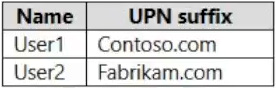
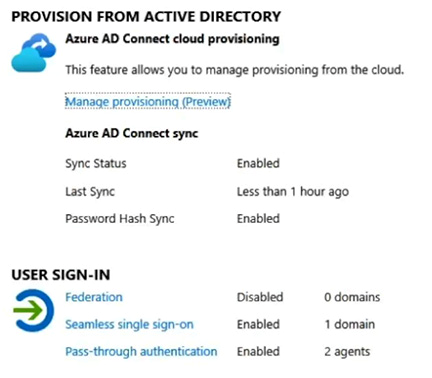
Your network contains an on-premises Active Directory domain named contoso.com. The domain contains the users shown in the following table. The domain syncs to an Azure AD tenant named contoso.com as shown in the exhibit. (Click the Exhibit tab.) User2 fails to authenticate to Azure AD when signing in as [email protected].
You need to ensure that User2 can access the resources in Azure AD.
Solution: From the on-premises Active Directory domain, you assign User2 the Allow logon locally user right. You instruct User2 to sign in as [email protected].
Does this meet the goal?
- Yes
- No
Answer: B
9Note: This question is part of a series of questions that present the same scenario. Each question in the series contains a unique solution that might meet the stated goals. Some question sets might have more than one correct solution, while others might not have a correct solution.
After you answer a question in this section, you will NOT be able to return to it. As a result, these questions will not appear in the review screen.
You have a Microsoft 365 E5 subscription.
You create an account for a new security administrator named SecAdmin1.
You need to ensure that SecAdmin1 can manage Microsoft Defender for Office 365 settings and policies for Microsoft Teams, SharePoint, and OneDrive.
Solution: From the Microsoft 365 admin center, you assign SecAdmin1 the SharePoint Administrator role.
Does this meet the goal?
- Yes
- No
Answer: B
10Note: This question is part of a series of questions that present the same scenario. Each question in the series contains a unique solution that might meet the stated goals. Some question sets might have more than one correct solution, while others might not have a correct solution.
After you answer a question in this section, you will NOT be able to return to it. As a result, these questions will not appear in the review screen.
You have a Microsoft 365 E5 subscription.
You create an account for a new security administrator named SecAdmin1.
You need to ensure that SecAdmin1 can manage Microsoft Defender for Office 365 settings and policies for Microsoft Teams, SharePoint, and OneDrive.
Solution: From the Microsoft Entra admin center, you assign SecAdmin1 the Security Administrator role.
Does this meet the goal?
- Yes
- No
Answer: A
Want the full bank of 447 questions for MS-102? See all practice exams.