MS-101 — Free Practice Questions
10 free sample questions from a bank of 509, with the correct answers and explanations. No signup required — start practising right now.
1Note: This question is part of a series of questions that present the same scenario. Each question in the series contains a unique solution that might meet the stated goals. Some question sets might have more than one correct solution, while others might not have a correct solution.
After you answer a question in this section, you will NOT be able to return to it. As a result, these questions will not appear in the review screen.
You are deploying Microsoft Endpoint Manager.
You successfully enroll Windows 10 devices in Endpoint Manager.
When you try to enroll an iOS device in Endpoint Manager, you get an error.
You need to ensure that you can enroll the iOS device in Endpoint Manager.
Solution: You add your user account as a device enrollment manager.
Does this meet the goal?
- Yes
- No
Answer: B
2You have a Microsoft 365 tenant.
All users are assigned the Enterprise Mobility + Security license.
You need to ensure that when users join their device to Microsoft Azure Active Directory (Azure AD), the device is enrolled in Microsoft Endpoint Manager automatically.
What should you configure?
- Enrollment restrictions from the Endpoint Manager admin center
- device enrollment managers from the Endpoint Manager admin center
- MAM User scope from the Azure Active Directory admin center
- MDM User scope from the Azure Active Directory admin center
Answer: D
3You have a Microsoft 365 E5 subscription. The subscription contains users that have the following types of devices:
• Windows 10
• Android
• iOS
On which devices can you configure the Endpoint DLP policies?
- Windows 10 only
- Windows 10 and Android only
- Windows 10 and iOS only
- Windows 10, Android, and iOS
Answer: A
4DRAG DROP
-
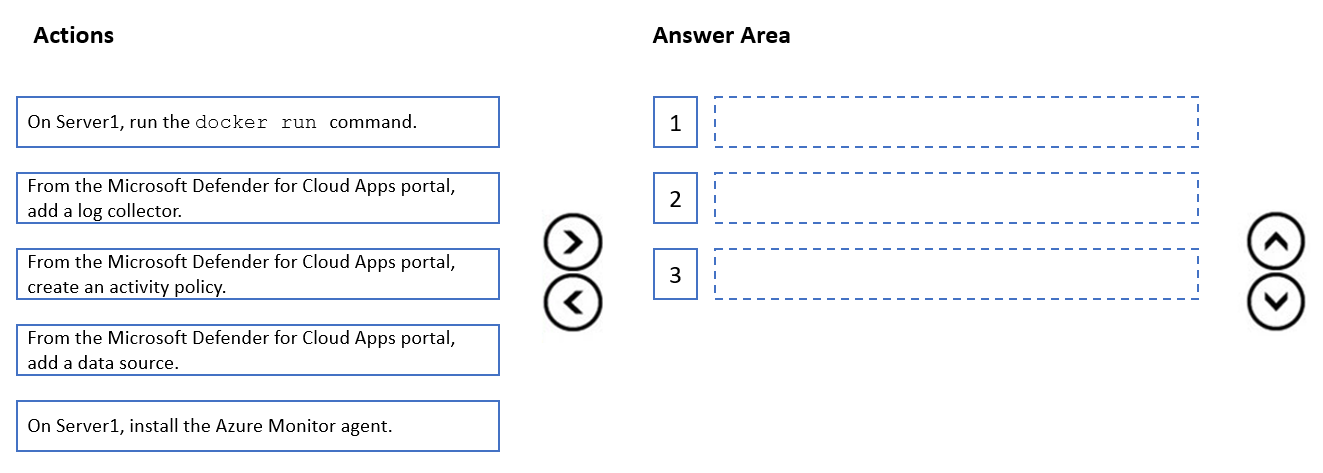
You have a Microsoft 365 E5 subscription and an on-premises server named Server1.
You plan to configure automatic log upload for continuous reports in Microsoft Defender for Cloud Apps.
You download a Docker log collector image to Server1.
You need integrate Defender for Cloud Apps with the log collector.
Which three actions should you perform in sequence? To answer, move the appropriate actions from the list of actions to the answer area and arrange them in the correct order.
Answer:
5HOTSPOT
-
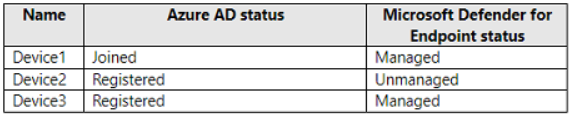
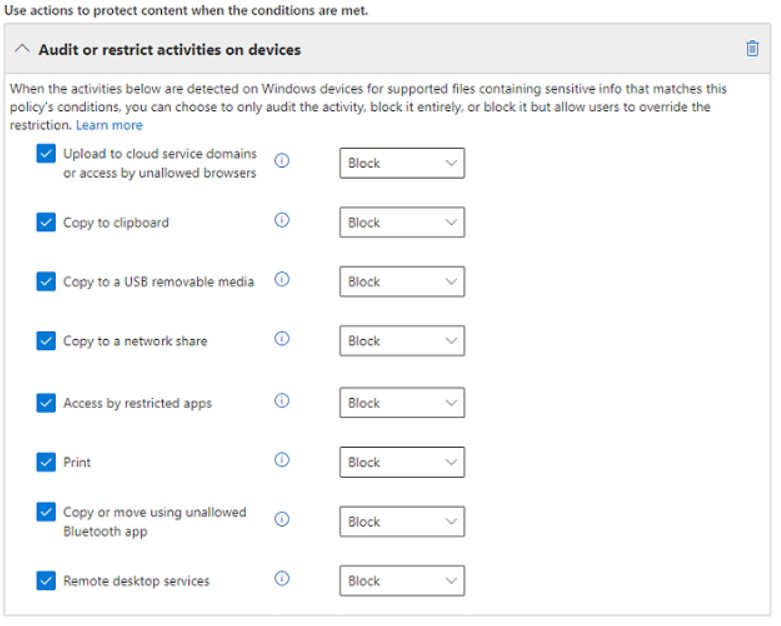
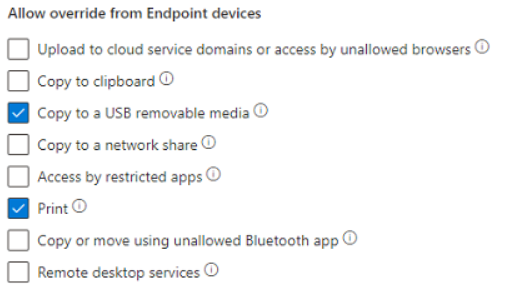
You have a Microsoft 365 subscription that contains an Endpoint data loss prevention (Endpoint DLP) policy named Policy1 and the devices shown in the following table. For Policy1, the Audit or restrict activities on devices settings are configured as shown in the Activities exhibit. (Click the Activities tab.) For Policy1, the Allow override from Endpoint devices settings are configured as shown in the Devices exhibit. (Click the Devices tab.) Test users discover that they cannot copy data to their network shares while working remotely.
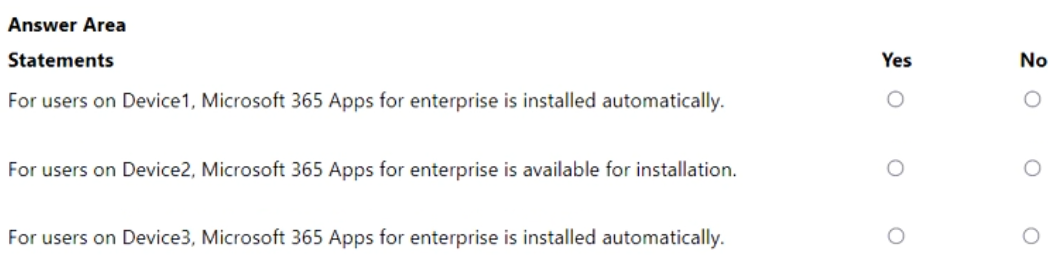
For each of the following statements, select Yes if the statement is true. Otherwise, select No.
NOTE: Each correct selection is worth one point.
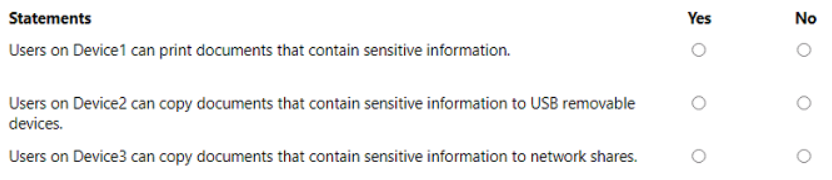
Answer:
6You have an on-premises network that has several legacy applications. The applications perform LDAP queries against an existing directory service.
You are migrating the on-premises infrastructure to a cloud-only infrastructure.
You need to recommend an identity solution for the infrastructure that supports the legacy applications. The solution must minimize the administrative effort to maintain the infrastructure.
Which identity service should you include in the recommendation?
- Azure Active Directory (Azure AD) B2C
- Active Directory Domain Services (AD DS)
- Azure Active Directory (Azure AD)
- Azure Active Directory Domain Services (Azure AD DS)
Answer: D
7HOTSPOT
-
You have a hybrid cloud infrastructure.
You plan to deploy the Azure applications shown in the following table. What should you use to meet the requirement of each app? To answer, select the appropriate options in the answer area.
NOTE: Each correct selection is worth one point.

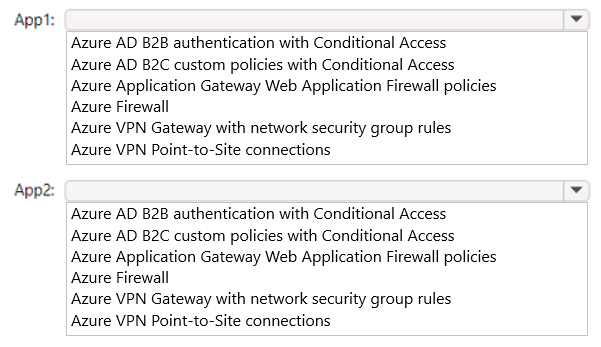
Answer:
8HOTSPOT
-
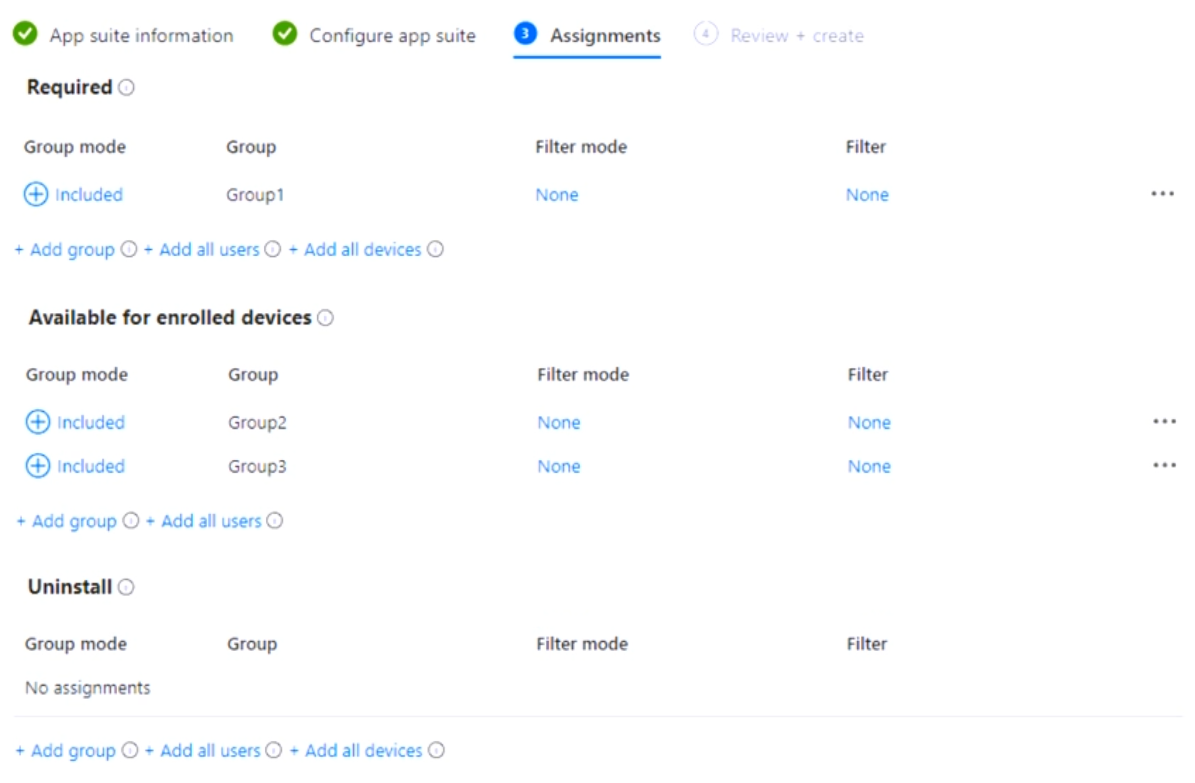
You have a Microsoft 365 E5 subscription that uses Microsoft Intune.
You have the Azure AD security groups shown in the following table. You have the Windows 10 devices shown in the following table. You deploy Microsoft 365 Apps for enterprise as shown in the following exhibit. For each of the following statements, select Yes if the statement is true. Otherwise, select No.
NOTE: Each correct selection is worth one point.
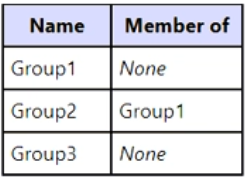
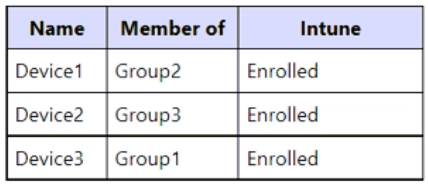
Answer:
9You have an Azure AD tenant.
You have 1,000 computers that run Windows 10 Pro and are joined to Azure AD.
You purchase a Microsoft 365 E3 subscription.
You need to deploy Windows 10 Enterprise to the computers. The solution must minimize administrative effort.
What should you do?
- From the Microsoft Endpoint Manager admin center, create a Windows Autopilot deployment profile. Assign the profile to all the computers. Instruct users to restart their computer and perform a network restart.
- Enroll the computers in Microsoft Intune. Create a configuration profile by using the Edition upgrade and mode switch template. From the Microsoft Endpoint Manager admin center, assign the profile to all the computers and instruct users to restart their computer.
- From Windows Configuration Designer, create a provisioning package that has an EditionUpgrade configuration and upload the package to a Microsoft SharePoint Online site. Instruct users to run the provisioning package from SharePoint Online.
- From the Azure Active Directory admin center, create a security group that has dynamic device membership. Assign licenses to the group and instruct users to sign in to their computer.
Answer: D
10You have a Microsoft 365 E5 subscription that contains 500 users. Two hundred users have personal devices that run either Android, Windows 10, or macOS. Three hundred users have corporate-owned devices that run either Windows 10 or macOS.
You plan to configure device enrollment.
You need to ensure that you can apply separate policies to the corporate-owned devices and the personal devices. The solution must minimize administrative effort.
What should you create first?
- a dynamic device group
- a dynamic user group
- a deployment package
- a Microsoft 365 group
Answer: A
Want the full bank of 509 questions for MS-101? See all practice exams.