MD-102 — Free Practice Questions
10 free sample questions from a bank of 457, with the correct answers and explanations. No signup required — start practising right now.
1HOTSPOT -
Case study -
Overview -
ADatum Corporation is a consulting company that has a main office in Montreal and branch offices in Seattle and New York.
ADatum has a Microsoft 365 E5 subscription.
Environment -
Network Environment -
The network contains an on-premises Active Directory domain named adatum.com. The domain contains the servers shown in the following table. ADatum has a hybrid Azure AD tenant named adatum.com.
Users and Groups -
The adatum.com tenant contains the users shown in the following table. All users are assigned a Microsoft Office 365 license and an Enterprise Mobility + Security E3 license.
Enterprise State Roaming is enabled for Group1 and GroupA.
Group1 and Group2 have a Membership type of Assigned.
Devices -
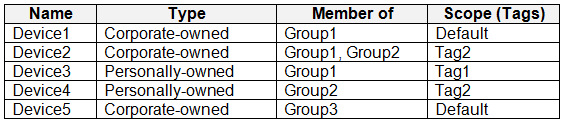
ADatum has the Windows 10 devices shown in the following table. The Windows 10 devices are joined to Azure AD and enrolled in Microsoft Intune.
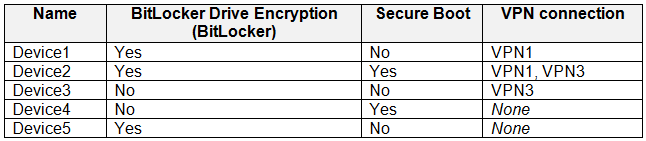
The Windows 10 devices are configured as shown in the following table. All the Azure AD joined devices have an executable file named C:\AppA.exe and a folder named D:\Folder1.
Microsoft Intune Configuration -
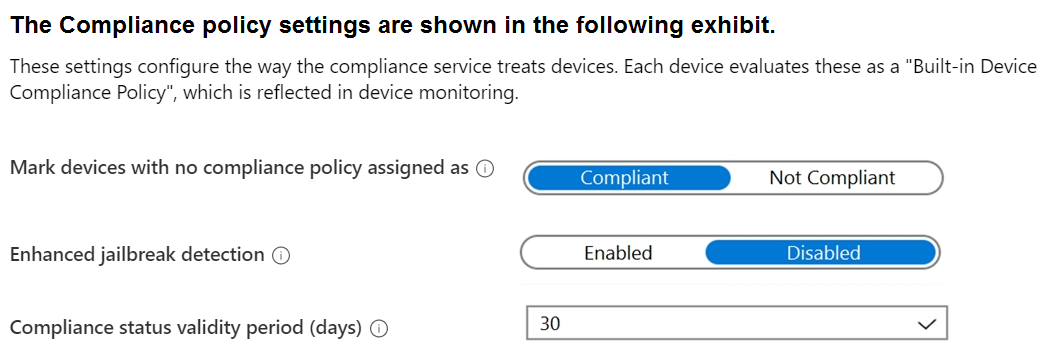
Microsoft Intune has the compliance policies shown in the following table. The Automatic Enrollment settings have the following configurations:
MDM user scope: GroupA -
MAM user scope: GroupB -
You have an Endpoint protection configuration profile that has the following Controlled folder access settings:
Name: Protection1 -
Folder protection: Enable -
List of apps that have access to protected folders: C:\*\AppA.exe
List of additional folders that need to be protected: D:\Folder1
Assignments:
Included groups: Group2, GroupB -
Windows Autopilot Configuration -
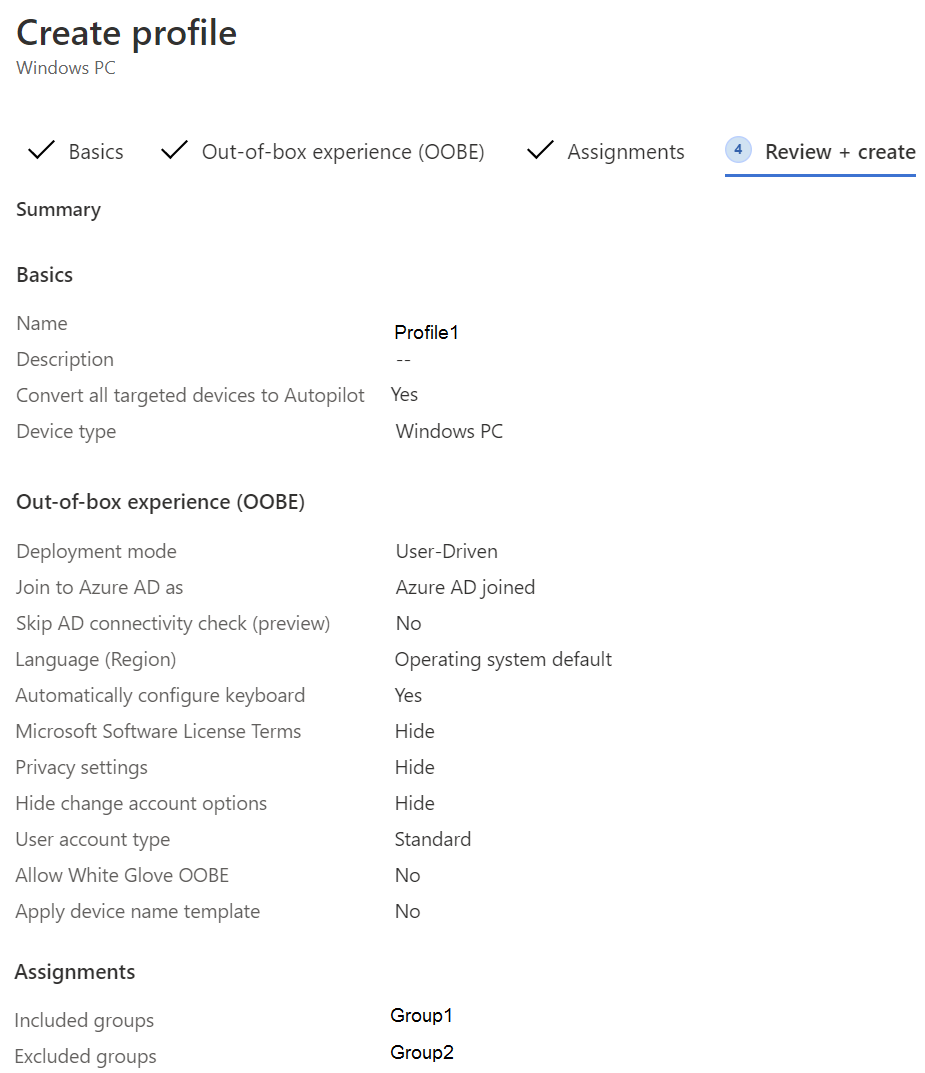
ADatum has a Windows Autopilot deployment profile configured as shown in the following exhibit. Currently, there are no devices deployed by using Windows Autopilot.
The Intune connector for Active Directory is installed on Server1.
Requirements -
Planned Changes -
ADatum plans to implement the following changes:
Purchase a new Windows 10 device named Device6 and enroll the device in Intune
New computers will be deployed by using Windows Autopilot and will be hybrid Azure AD joined.
Deployed a network boundary configuration profile that will have the following settings:
Name: Boundary1 -
Network boundary: 192.168.1.0/24
Scope tags: Tag1 -
Assignments:
Included groups: Group1, Group2 -
Deploy two VPN configuration profiles named Connection1 and Connection2 that will have the following settings:
Name: Connection1 -
Connection name: VPN1 -
Connection type: L2TP -
Assignments:
Included groups: Group1, Group2, GroupA
Excluded groups: --
Name: Connection2 -
Connection name: VPN2 -
Connection type: IKEv2 -
Assignments:
Included groups: GroupA -
Excluded groups: GroupB -
Technical Requirements -
ADatum must meet the following technical requirements:
Users in GroupA must be able to deploy new computers.
Administrative effort must be minimized.
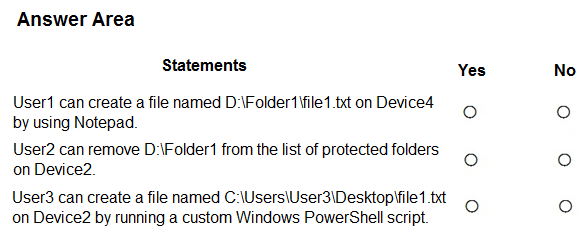
For each of the following statements, select Yes if the statement is true. Otherwise, select No.
NOTE: Each correct selection is worth one point.



Answer:
2You have a Microsoft Intune subscription.
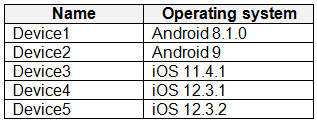
You have devices enrolled in Intune as shown in the following table. An app named App1 is installed on each device.
What is the minimum number of app configuration policies required to manage App1?
- 1
- 2
- 3
- 4
- 5
Answer: B
3DRAG DROP
-
You have 500 Windows 10 devices enrolled in Microsoft Intune.
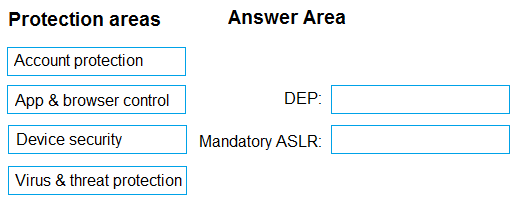
You plan to use Exploit protection in Microsoft Intune to enable the following system settings on the devices:
• Data Execution Prevention (DEP)
• Force randomization for images (Mandatory ASLR)
You need to configure a Windows 10 device that will be used to create a template file.
Which protection areas on the device should you configure in the Windows Security app before you create the template file? To answer, drag the appropriate protection areas to the correct settings. Each protection area may be used once, more than once, or not at all. You may need to drag the split bar between panes or scroll to view content.
NOTE: Each correct selection is worth one point.
Answer:
4You have an Azure AD tenant named contoso.com.
You have a workgroup computer named Computer1 that runs Windows 11.
You need to add Computer1 to contoso.com.
What should you use?
- dsregcmd.exe
- Computer Management
- netdom.exe
- the Settings app
Answer: D
5You have a Microsoft 365 subscription that uses Microsoft Intune Suite.
You use Microsoft Intune to manage Windows 11 devices.
You need to implement passwordless authentication that requires users to use number matching.
Which authentication method should you use?
- Microsoft Authenticator
- voice calls
- FIDO2 security keys
- text messages
Answer: A
6You use a Microsoft Intune subscription to manage iOS devices.
You configure a device compliance policy that blocks jailbroken iOS devices.
You need to enable Enhanced jailbreak detection.
What should you configure?
- the Compliance policy settings
- the device compliance policy
- a network location
- a configuration profile
Answer: B
7DRAG DROP
-
You have a Microsoft 365 subscription that contains two users named User1 and User2.
You need to ensure that the users can perform the following tasks:
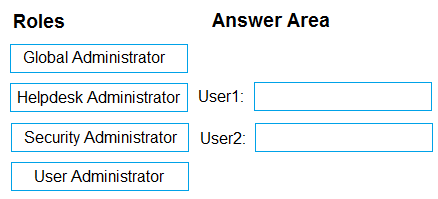
• User1 must be able to create groups and manage users.
• User2 must be able to reset passwords for nonadministrative users.
The solution must use the principle of least privilege.
Which role should you assign to each user? To answer, drag the appropriate roles to the correct users. Each role may be used once, more than once, or not at all. You may need to drag the split bar between panes or scroll to view content.
NOTE: Each correct selection is worth one point.
Answer:
8HOTSPOT
-
You have a Microsoft Intune subscription that has the following device compliance policy settings:
• Mark devices with no compliance policy assigned as: Compliant
• Compliance status validity period (days): 14
On January1, you enroll Windows 10 devices in Intune as shown in the following table. On January 4, you create the following two device compliance policies:
• Name: Policy1
• Platform: Windows 10 and later
• Require BitLocker: Require
• Mark device noncompliant: 5 days after noncompliance
• Scope (Tags): Tag1
• Name: Policy2
• Platform: Windows 10 and later
• Firewall: Require
• Mark device noncompliant: Immediately
• Scope (Tags): Tag2
On January 5, you assign Policy1 and Policy2 to Group1.
For each of the following statements, select Yes if the statement is true. Otherwise, select No.
NOTE: Each correct selection is worth one point.

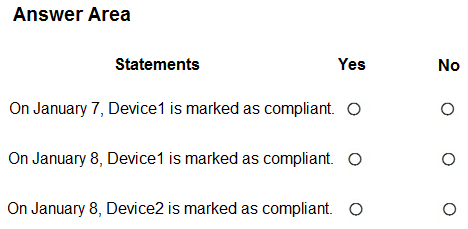
Answer:
9HOTSPOT
-
You have a Microsoft 365 subscription that includes Microsoft Intune.
You have computers that run Windows 11 as shown in the following table. You have the groups shown in the following table. You create and assign the compliance policies shown in the following table. The next day, you review the compliance status of the computers.
For each of the following statements, select Yes if the statement is true. Otherwise, select No.
NOTE: Each correct selection is worth one point.



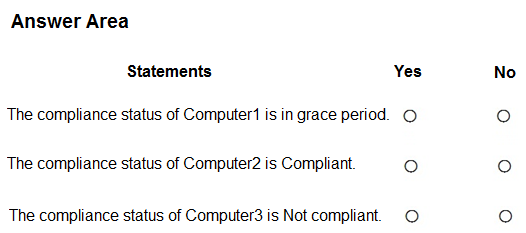
Answer:
10Note: This question is part of a series of questions that present the same scenario. Each question in the series contains a unique solution that might meet the stated goals. Some question sets might have more than one correct solution, while others might not have a correct solution.
After you answer a question in this section, you will NOT be able to return to it. As a result, these questions will not appear in the review screen.
Your company has an Azure AD tenant named contoso.com that contains several Windows 10 devices.
When you join new Windows 10 devices to contoso.com, users are prompted to set up a four-digit pin.
You need to ensure that the users are prompted to set up a six-digit pin when they join the Windows 10 devices to contoso.com.
Solution: From the Microsoft Entra admin center, you configure the Authentication methods.
Does this meet the goal?
- Yes
- No
Answer: B
Want the full bank of 457 questions for MD-102? See all practice exams.