MB-800 — Free Practice Questions
10 free sample questions from a bank of 304, with the correct answers and explanations. No signup required — start practising right now.
1DRAG DROP -
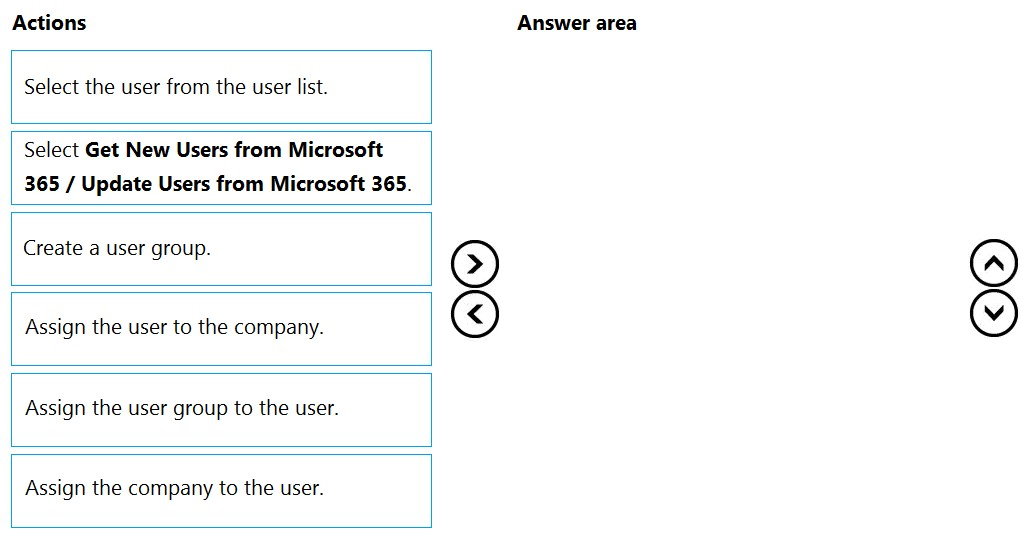
A company adds a user to Microsoft 365.
Existing user groups do not have the required permission sets for newly added users.
You need to assign a Dynamics 365 Business Central user group and permissions to the user and the company.
Which five actions should you perform in sequence? To answer, move the appropriate actions from the list of actions to the answer area and arrange them in the correct order.
NOTE: More than one order of answer choices is correct. You will receive credit for any of the correct orders you select.
Select and Place:
Answer:
2You are implementing Dynamics 365 Business Central for a customer.
The customer wants to upload starting entries for all master data through a general journal on the last day of the current month.
You need to upload the data according to this requirement.
Which three functions should you select? Each correct answer presents a complete solution.
NOTE: Each correct selection is worth one point.
- Vendors Opening balance
- G/L Accounts Opening balance
- Calculate Inventory
- Get Standard Journals
- Customers Opening balance
Answer:
3You are setting up and testing a workflow with approval hierarchy in Dynamics 365 Business Central.
In Approval User Setup, you configure the following users: You create and enable an approval workflow. You configure the workflow to use the approver limit type Approver Chain.
To test the workflow, User1 creates a purchase order for $1,100 and runs the Send Approval Request function.
You need to identify the actions that occur when the workflow runs.
Which set of actions occurs?

- User4 will receive an approval request. Once approved, the purchase order is released.
- User3 receives an approval request. Once User3 approves the request, the purchase order is released.
- User2 will receive an approval request. Once User2 approves the request, User3 will receive an approval request. Once User2 and User3 approve the request, the purchase order is released.
- User1 will receive an approval request. Once User1 approves the request, User2 must approve the request. Once User2 approves the request, User3 must approve the request. Once User3 approves the request, the purchase order is released.
- User3 will receive an approval request. Once User3 approves the request, the request is routed to User4 for approval. Once User4 approves the request, the purchase order is released.
Answer: C
4DRAG DROP -
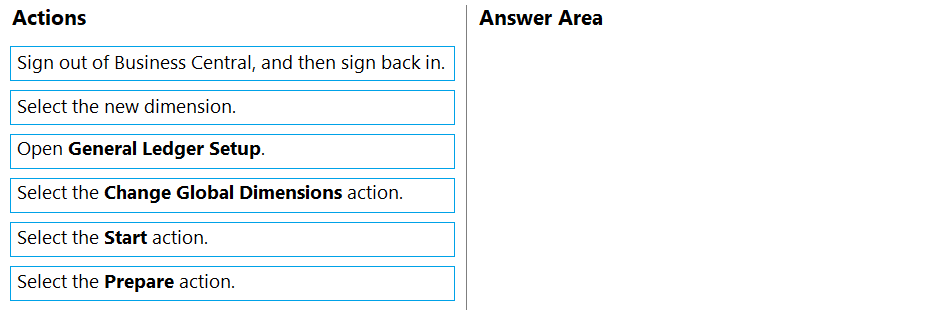
A company implements Dynamics 365 Business Central.
The database contains very few posted entries. You observe that Global Dimension 1 is configured incorrectly.
You need to run the Change Global Dimensions function in Sequential mode to replace Global Dimension 1.
Which four actions should you perform in sequence? To answer, move the appropriate actions from the list of actions to the answer area and arrange them in the correct order.
Select and Place:
Answer:
5A customer has premium licenses for Dynamics 365 Business Central.
You need to make all actions and fields for the Manufacturing and Service modules available to users.
What should you do?
- Assign users to the D365 BUS FULL ACCESS user group.
- Select the Premium option in the Experience field on the Company Information page.
- Assign SUPER permission sets to users.
- Assign users to the D365 BUS PREMIUM user group.
- Select the Custom option for the Company Badge field on the Company Information page.
Answer: B
6DRAG DROP -
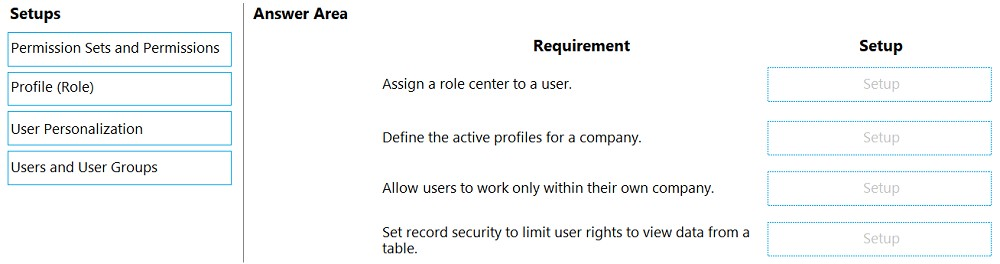
You manage several companies within one Dynamics 365 Business Central database. Most users work in only one of these companies, where they have a specific role.
You need to set up security according to company requirements.
Which setup should you use? To answer, drag the appropriate setups to the correct requirements. Each setup may be used once, more than once, or not at all.
You may need to drag the split bar between panes or scroll to view content.
NOTE: Each correct selection is worth one point.
Select and Place:
Answer:
7DRAG DROP -
You are implementing Dynamics 365 Business Central.
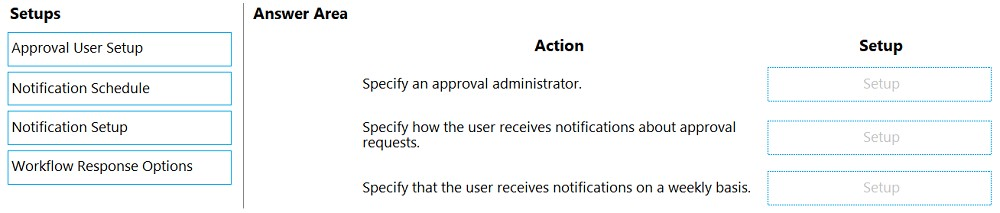
The purchasing manager wants to implement an approval system by using email notifications.
You need to set up the notification system.
Which setup should you use? To answer, drag the appropriate setup to the correct actions. Each setup may be used once, more than once, or not at all. You may need to drag the split bar between panes or scroll to view content.
NOTE: Each correct selection is worth one point.
Select and Place:
Answer:
8You are implementing Dynamics 365 Business Central.
You are unable to view some expected functionality in the system.
You need to demonstrate the use of different options for assigning profiles to users.
In which three places can you assign profiles to users? Each correct answer presents a complete solution.
NOTE: Each correct selection is worth one point.
- Assign a User Group to the user. Assign the Profile to the User Group.
- Assign a Profile on the User Personalization page.
- Assign the Profile on the User card.
- Accept the default Profile.
- Add the user to the Profile card.
Answer:
9A customer is using Dynamics 365 Business Central.
The customer is currently sending quotes and invoices using postal services. The customer wants to begin sending quotes and invoices by email directly from
Business Central.
You need to configure outbound email.
What are two possible ways to achieve the goal? Each correct answer presents a complete solution.
NOTE: Each correct selection is worth one point.
- Configure SMTP Mail Setup options.
- Run the Set up your Business Inbox in Outlook assisted setup tool.
- Run the Set up email logging assisted setup tool.
- Run the Email setup assisted setup tool.
Answer:
10A company uses Dynamics 365 Business Central to record payments for vendors. All payment records include similar data elements.
You are onboarding a new vendor. You must create a unique number series for payments from the vendor. No other vendors will use the new number series.
You need to configure the system.
What should you use?
- Vendors
- General Journals
- General Journal template
- Payment journals
- Workflow
Answer: C
Want the full bank of 304 questions for MB-800? See all practice exams.