Data Center, Specialist (JNCIS-DC) — Free Practice Questions
10 free sample questions from a bank of 10, with the correct answers and explanations. No signup required — start practising right now.
- Active
- Staged
- Analytics
- Dashboard
The short version
C — The Analytics tab is where Apstra holds the pre-built time-series views, including link utilization.
Active and Staged describe the deployed and candidate configuration state of the fabric, and Dashboard is a pre-deployment summary, so none of them is where historical telemetry lives.
Key concepts
- Apstra Analytics / IBA: the intent-based analytics layer that stores telemetry from devices in a time-series database and renders pre-built graphs such as interface utilization.
- Active tab: the view of the currently deployed fabric — versions, health, device state and which changes have been pushed.
- Staged tab: the view of the candidate configuration and the pending changes that will be deployed.
- Dashboard: the pre-deployment review page showing versions, resources, properties and the diff before you deploy.
- Capacity planning: using historical utilization trends to decide whether links or devices need to grow.
Why C is correct
Apstra splits the operator's workflow into distinct top-level tabs, and telemetry is deliberately kept out of the configuration views. The Analytics tab is the one that owns the time-series database: probes and built-in analytics collect interface counters, memory, CPU and queue data from the devices and write them to a time-series store, where pre-built graphs such as link utilization can be inspected historically. That is exactly what a capacity-planning exercise needs — a trend over time, not a snapshot. Active and Staged deal with configuration state (what is running versus what is proposed) and Dashboard is a summary of the candidate version, so none of them can hold pre-built time-series data.
Why the others are wrong
- A. The Active tab shows the running configuration of the deployed blueprint: device and job status, health, and the versions currently active. It is a live configuration view and does not present historical time-series graphs.
- B. The Staged tab shows the candidate version you are building or editing and the changes it will deploy. Its content is prospective configuration, not measured utilization history.
- D. The Dashboard is a review-and-confirm page summarizing the version about to be deployed — assigned devices, resources, properties and the diff. It is a one-shot pre-deployment summary with no time-series dimension.
JN0-481 exam tip
Configuration intent lives in Active/Staged/Dashboard; measurements live in Analytics. If the question says "time series", "pre-built graphs" or "utilization history", the answer is the Analytics tab.
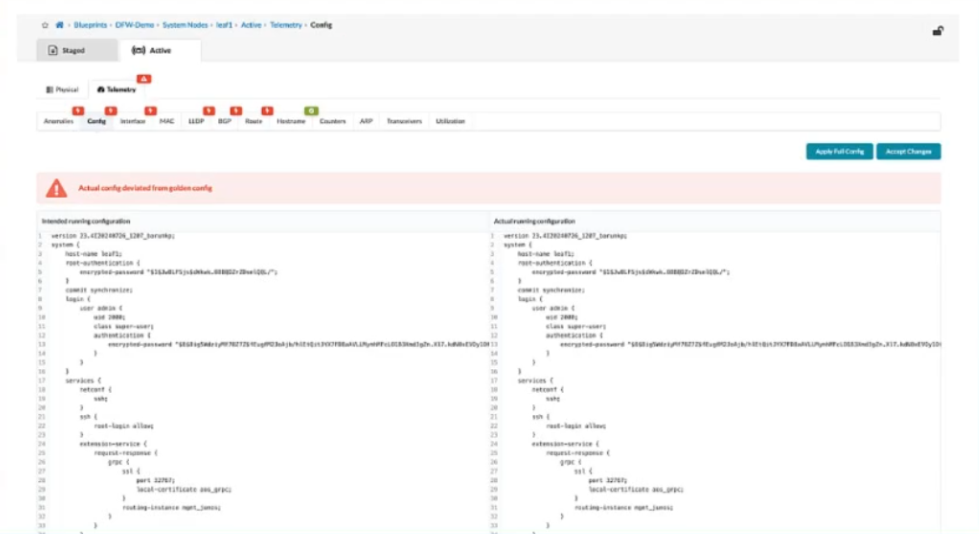
- Apstra will add a similar configuration from a known device context to accomplish the goal of the CLI-entered configuration.
- Apstra will incorporate the new CLI into the "golden config".
- Apstra will not commit new changes to this device until the user clicks the Apply Full Config button.
- Apstra will stop warning about the changes, but the changes will be overwritten at the next commit.
The short version
B — Accepting the changes folds the operator's CLI into the "golden config".
The golden config is Apstra's rendered Junos configuration; accepting out-of-band CLI edits makes them part of that intent so they are rendered and enforced on subsequent deploys.
Key concepts
- Golden config: the final, fully rendered Junos configuration Apstra computes from the blueprint intent plus templates; it is what gets committed to devices.
- Accept Changes: the action on the CLI/config deviation screen that tells Apstra the out-of-band CLI change is sanctioned and must be preserved.
- Intent-based reconciliation: Apstra renders intent, compares the result with the running config and either warns about deviations or reverts them.
- Out-of-band (OOB) change: a configuration change made directly on the device CLI, bypassing Apstra; Apstra flags it as a deviation because it is not represented in the intent.
- Re-render / revert: what Apstra does to a device whose running configuration has drifted from the golden config.
Why B is correct
Apstra is intent-based: the blueprint is the intent, and the golden config is the Junos configuration rendered from it. When an operator types configuration directly into a device, Apstra sees a mismatch between the running config and the golden config and raises a deviation warning. Clicking Accept Changes is the operator saying "this CLI is correct and should be kept". Apstra therefore incorporates the CLI into the golden config, so the next render includes it and the change survives future deploys instead of being reverted. That is the whole purpose of the button; the alternative buttons describe behaviours Apstra does not implement.
Why the others are wrong
- A. Apstra does not try to infer or copy a configuration from another device to fulfil the CLI you typed. It renders intent from templates; there is no "similar configuration from a known device context" mechanism triggered by Accept Changes.
- C. There is no requirement to press Apply Full Config before the change takes effect. Accepting is about blessing the CLI into the golden config for future renders; it does not create a pending deploy gate of that kind.
- D. This describes the opposite behaviour of intent-based networking. The whole point is that accepted CLI becomes part of the golden config and is re-applied and preserved; changes are not destined to be overwritten at the next commit unless they were never accepted.
JN0-481 exam tip
Apstra treats the device CLI as untrusted drift. Accept Changes = "make my CLI part of the golden config"; anything you do not accept gets reverted on the next deploy.
- The Freeform reference design requires knowledge of device CLI.
- The data center reference design supports only Junos devices.
- The data center reference design requires knowledge of device CLI.
- The Freeform reference design supports only Junos devices.
The short version
A and C — Both the Freeform and the data center reference designs depend on device CLI, and neither is limited to Junos devices.
The Freeform design takes CLI as its input contract, and the data center (EVPN-VXLAN) design builds its intent from the same Junos configuration constructs, while both remain vendor-aware rather than Junos-only.
Key concepts
- Reference design: the starting point Apstra uses to create a blueprint, defining which properties and graphs are available.
- Freeform reference design: a generic, minimally-opinionated design built from device profiles and raw intent; the operator writes/imports CLI-level configuration, so CLI knowledge is required.
- Data center reference design: the EVPN-VXLAN fabric design; its leaf/spine fabric, IRB, VXLAN and underlay properties are rendered into device configuration, so the operator must still understand the CLI constructs being produced.
- Multi-vendor: Apstra supports non-Junos devices through device profiles and agent/agentless drivers, so a reference design is not restricted to Junos.
- Vendor-specific profiles: the profile in a reference design defines which platforms and drivers the blueprint may use; it does not restrict the design to a single vendor by definition.
Why A and C are correct
- A. The Freeform design is deliberately unopinionated: instead of a fabric model, it exposes generic elements and lets the operator supply the configuration in CLI form, importing existing device configuration or writing intent in CLI terms. Because the operator is effectively authoring configuration rather than describing high-level intent, knowledge of device CLI is required to use it.
- C. The data center (EVPN-VXLAN) reference design abstracts a well-understood fabric, but the intent it models — leaf/spine underlay routing, IRB interfaces, VXLAN domains, VLAN and routing-instance configuration — is rendered onto devices as real Junos configuration. An operator deploying it must therefore understand those CLI constructs and be able to reason about the resulting configuration, so CLI knowledge is a genuine part of working with the design.
Why the others are wrong
- B. The data center reference design is not restricted to Junos. Apstra is built on device profiles and drivers, and the EVPN-VXLAN design can be instantiated with partner platforms, so claiming it supports only Junos devices is incorrect.
- D. The Freeform design is precisely the vendor-neutral, CLI-driven design: it carries whatever configuration you give it for whichever platform the profile covers. Restricting it to Junos devices contradicts how it is designed to work.
JN0-481 exam tip
For reference designs, remember the pairing: Freeform and data center both live on device CLI, and neither one is Junos-only — Apstra multi-vendor support is a platform fact, not a per-design limitation.
Note on the key: the exclusion of B and D (neither design is Junos-only) is solid; the claim that the data center EVPN-VXLAN design requires CLI knowledge is arguable, since that design is usually taught as fully intent-based. The key is left as given.

- Devices must be assigned to profiles.
- There are changes that are not active on the fabric.
- Resources must be assigned to devices.
- There are anomalies that must be addressed.
The short version
B and D — The banner reports that there are changes not active on the fabric and anomalies that must be addressed.
Both are post-deployment health conditions surfaced by a deployed blueprint; device profile and resource assignment are pre-deployment Staged-phase tasks that must already be complete for a blueprint to deploy at all.
Key concepts
- Deployed blueprint: a blueprint that has been assigned devices and resources and pushed to devices; the Staged workflow is over.
- Change indicator ("not active on the fabric"): Apstra's banner warning that a version, or part of it, has been created or assigned but has not yet been deployed/activated on the devices.
- Anomaly indicator: an analytics/IBA condition that violates a probe or health rule and needs operator attention.
- Device profile: an Apstra object defining a platform (model, interface names, agent type) that devices must be assigned to; this happens in the Staged phase.
- Resource pools: pools of ASNs, subnets or VLAN IDs created under Global Resources and assigned to blueprint properties, also a Staged-phase step.
Why B and D are correct
A blueprint that has already been deployed has satisfied its Staged-phase prerequisites, so a banner on it reports runtime condition rather than unfinished setup.
- B. Changes that are not active on the fabric: a version, or a set of changes, has been created and assigned in the fabric object but has not been activated or deployed to the devices, so the running system does not yet reflect all of the work that exists.
- D. Anomalies that must be addressed: the analytics and health layer reports this when one or more IBA probes or device health rules have tripped, meaning the deployed fabric is outside its expected thresholds and needs investigation.
Both entries are exactly what a deployed-blueprint banner is for, and both demand operator action before the fabric is called healthy.
Why the others are wrong
- A. Devices must be assigned to profiles, but that assignment happens in the Staged phase, before deployment. Since this blueprint is already deployed, the assignment has been completed and the banner would not report it as outstanding.
- C. Resources must be assigned to devices, but again this is a Staged-phase prerequisite tied to deployment; a deployed blueprint has already had its resources assigned, so it is not what the banner is flagging.
JN0-481 exam tip
Deployed-blueprint banners only ever warn about runtime state — unactivated changes and anomalies. If an option describes a Staged-phase prerequisite, it cannot be what a deployed banner reports.
- filter-based forwarding (ChooseFBF)
- firewall filters
- policy-based routing (ChoosePBR)
- access control lists (ChooseACLs)
The short version
B and D — Apstra pushes firewall filters and ACLs to switches when it enforces Security Policies.
Security Policies are rendered into access-control constructs on the devices, while filter-based forwarding and policy-based routing are steering mechanisms that Apstra does not emit for them.
Key concepts
- Security Policy: an Apstra intent object describing which traffic between which principals is permitted; it is the primary security construct of the design.
- Firewall filter: a Junos filter that matches on packet headers and applies actions (permit, deny, count, mirror); it is the main translation target of a Security Policy on EX Series.
- ACL: access control list terminology for the same header-matching, permit/deny model, used where a filter is referred to as an access list.
- Filter-based forwarding (ChooseFBF): a data-plane technique that steers traffic by input interface into a next hop or VRF using a filter with an FBF next-hop action — forwarding steering, not access control.
- Policy-based routing (ChoosePBR): steering packets toward a next hop based on source/destination rather than destination alone; it is routing policy, not packet admission control.
Why B and D are correct
A Security Policy is an access-control intent — "this principal may talk to that principal" — so the constructs Apstra must push are the header-matching accept/deny ones.
- B. Firewall filters: Apstra renders the policy into the device packet filter and installs it on the interfaces facing the endpoints, where matching traffic is accepted and everything else is dropped, counted or logged. The filtering happens at the edge where traffic enters the device.
- D. Access control lists: an ACL is the same match-on-headers, permit-or-deny model that Junos describes with list terminology on platforms and protocols that use it, which is why it is paired with firewall filters as a push-to-switch policy type.
Neither construct steers traffic; they decide whether traffic is admitted.
Why the others are wrong
- A. Filter-based forwarding uses a filter as a steering tool, not an access-control one: the filter's action is a forwarding next hop (route, VRF, table, discard-for-us) applied on input. Apstra does not push FBF constructs to implement Security Policies.
- C. Policy-based routing decides which next hop a packet takes based on source and destination; it does not decide whether the packet is allowed at all. It is part of routing/forwarding policy, not Security Policy rendering, so Apstra does not push PBR for Security Policies.
JN0-481 exam tip
Security Policy renders to filters and ACLs (accept/deny on headers). FBF and PBR are steering mechanisms that reuse filters for next-hop selection, not access control.
- The Juniper Apstra server processes are stateful.
- The Juniper Apstra server processes are stateless.
- The Juniper Apstra server provides REST API endpoints for UI functions.
- The Juniper Apstra server provides limited support for REST APIs.
The short version
A and C — Apstra server processes are stateful, and the server exposes REST API endpoints that back the UI functions.
The server keeps persistent state (configs, version graph, jobs, device status) and every GUI action is a REST call, which is also how you automate Apstra.
Key concepts
- Apstra server: the stateful application and services that hold the configuration database, the version graph, job queues and telemetry, and that render device configuration.
- Stateful: a process that keeps information across requests and restarts — Apstra stores blueprints, versions, device status and history in its database rather than recomputing them.
- REST API: the north-bound interface used by the Apstra GUI itself and available for automation, CI/CD and third-party integration.
- Stateless request: a request that carries everything it needs; Apstra's server-side processing is the opposite, because it depends on stored graph and job state.
- Automation surface: because the GUI uses the same REST endpoints, any UI workflow can be reproduced by a script or an external orchestration tool.
Why A and C are correct
- A. The Apstra server is a stateful application: blueprints, property and resource objects, the version graph, deployment job state, device telemetry and analytics data all live in its database. A given REST call's outcome depends on what that server already knows, and the state persists across requests and restarts.
- C. The Apstra GUI is itself a client of the Apstra REST API — every tab, form and action in the interface is an API call. That makes the full functional surface available for north-bound automation: create a blueprint, assign resources, build and deploy a version, or read analytics, all over REST.
Why the others are wrong
- B. Statelessness contradicts the fundamental design. If the processes were stateless, the server could not keep a version graph, job history, device status or analytics time series, and Apstra could not run at all as an intent-based orchestrator.
- D. Apstra's REST API support is not "limited" — it is a first-class north-bound interface, and the GUI is built on it. Understating it contradicts the fact that the UI itself consumes those endpoints.
JN0-481 exam tip
Apstra server = stateful services + full REST API. If a statement makes Apstra stateless or its API "limited", it is wrong; the GUI is just another API client.
- To assign resources in the blueprint, you must have completed the device profile and device assignments.
- To assign resources in the blueprint, you must have already created them under global resources.
- All resources are created and assigned under the blueprint's resources tab.
- All resources are automatically assigned values from the available resource pools.
The short version
B — The resources must already exist under Global Resources before they can be assigned in the blueprint.
Apstra resource pools (ASNs, subnets, VLAN IDs) are created centrally and then referenced by blueprint properties, so assignment consumes an existing pool rather than creating anything.
Key concepts
- Global Resources: the Apstra scope where reusable resources such as ASNs, IP subnets and VLAN ID ranges are created and managed for the whole system.
- Resource pool: a range of values (for example 65000-65500 or a subnet) that properties consume from as devices need values.
- Blueprint resource assignment: binding a global resource (or an explicit value) to a property in the staged blueprint so the property has a source of values.
- Property: a blueprint element whose value is rendered into device configuration; a property is what consumes a resource pool.
- Staged-phase workflow: resources are assigned while building the blueprint in Staged, after the global resources exist.
Why B is correct
Apstra separates resource definition from resource use. Pools of ASNs, subnets and VLAN IDs are created once under Global Resources so that many blueprints, and many re-deployments of them, draw from the same authoritative range. Inside the blueprint you do not create resources — you assign existing ones to properties, and the render process takes the next free value from the assigned pool. That is also why resources must exist beforehand: a property with no assigned pool or literal value has nothing to render into the device configuration, which is exactly why option A's stated ordering requirement is backwards.
Why the others are wrong
- A. Device profiles and device assignments are prerequisites for deploying a blueprint, but they are not what you must have finished in order to assign resources. Resource assignment is an independent Staged-phase step that can be done before devices are assigned.
- C. Resources are not created inside a blueprint's resources tab; they are created centrally under Global Resources and only referenced from the blueprint. Creating per-blueprint resources would defeat the shared-pool model.
- D. Resources are never assigned automatically. A property renders only from values the operator explicitly supplied or from a pool the operator explicitly assigned, which is the whole point of intent-based resource management.
JN0-481 exam tip
Resources are made in Global Resources, consumed in blueprints. If an option implies a blueprint invents its own resources or auto-populates them, it is wrong.
- reference design schema
- graph query
- database nodes
- node-edge relationship
The short version
B — The graph query is the element that selects which database objects the probe applies to.
An IBA probe is built from a graph query that returns the objects to report on, plus report/threshold definitions that decide what is an anomaly.
Key concepts
- IBA (intent-based analytics): the Apstra framework for continuous verification and monitoring of the network state.
- Graph query: the structured (GQL) query defining which objects and properties of the graph database the probe covers — the probe's object selection.
- Report: a function over the selected objects (counters, values, properties) that produces a measurement, for example average interface traffic.
- Anomaly rule / threshold: the condition that raises an alert when the measured value crosses a configured threshold.
- Probe: the combination of graph query + report + anomaly threshold + schedule, which can then be enabled, disabled and analysed.
Why B is correct
An Apstra database is a graph of objects — devices, interfaces, AS paths, tenants, transactions — and a probe has to be told which slice of that graph it is responsible for. That is exactly the job of the graph query: it names the object types, their properties and the filters, so the probe applies to the right set of database objects (for example "all interfaces on nodes whose name matches X"). Once the query has produced that object set, the report computes values over those objects and the anomaly rules decide when to alert. The query is therefore the scoping element, not a cosmetic extra.
Why the others are wrong
- A. The reference design schema defines the structure of the graph database itself — the object types and properties available in that design. It is the data model, not the per-probe selection of objects.
- C. Database nodes are the objects in the graph, i.e. the result of the query. They are not the element you use to specify which objects the probe applies to; the query is what selects them.
- D. A node-edge relationship describes how two database objects are connected (for example which interfaces belong to which device). It is part of the data model the query traverses, not the scoping statement of the probe.
JN0-481 exam tip
Probe anatomy: graph query (which objects) → report (what to measure) → anomaly rule (when to alert). The question about "which objects" is always the graph query.
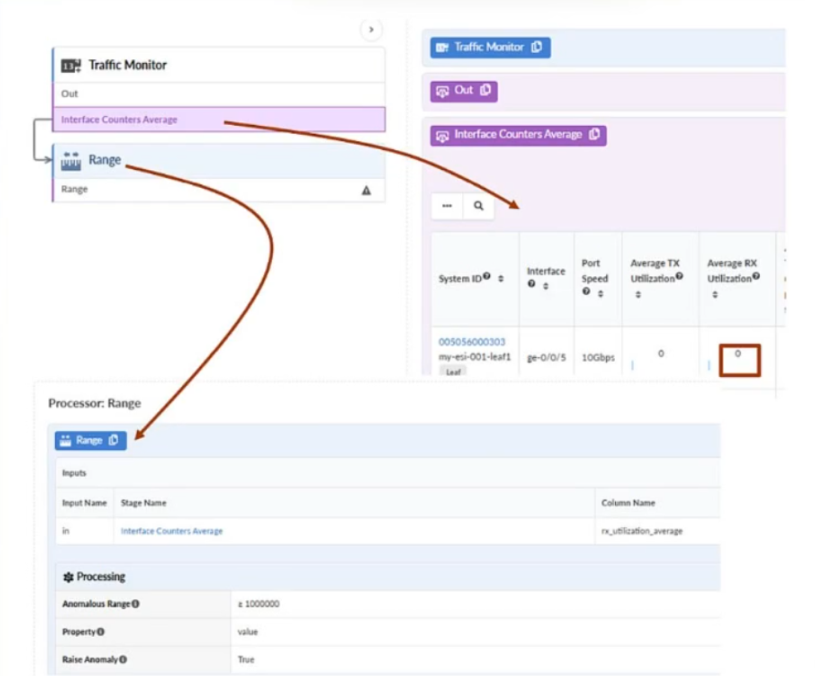
- A probe anomaly will be raised.
- The indicator for the Analytics tab in the blueprint will turn red.
- The indicator for the Active tab in the blueprint will turn red.
- A service anomaly will be raised.
The short version
A and B — A probe anomaly is raised and the Analytics tab indicator turns red.
The enabled probe's threshold is breached by the traffic on ge-0/0/5, so the analytics layer records an anomaly and flags the Analytics tab; the fabric is still healthy, so the Active tab stays fine.
Key concepts
- Probe anomaly: an alert raised when a probe's measured value violates its configured threshold — here the average traffic exceeds the configured limit.
- Analytics tab indicator: the badge in the blueprint UI that turns red when anomalies exist in the analytics layer.
- Active tab indicator: the badge that reflects deployed-state health and configuration state; it does not turn red for an analytics threshold breach.
- Service anomaly: an alert tied to a service intent (a tenant's connectivity or a specific service SLA), not to a generic telemetry threshold on an interface.
- ge-0/0/5 on my-esl-001-leaf1: the specific interface/node the probe is watching, which is why this threshold violation is attributable to that link.
Why A and B are correct
The probe in the exhibit is enabled and its report measures average traffic on ge-0/0/5 of node my-esl-001-leaf1, which is carrying more than 1 Mbps against the probe's configured threshold.
- A. A probe anomaly is raised: when an enabled probe's measured value crosses its threshold, the analytics layer records a probe anomaly and names the offending interface and node.
- B. The Analytics tab indicator turns red: the blueprint UI represents that anomaly by colouring the Analytics tab's status indicator red, so the operator sees the condition from the tab itself.
The two statements are two views of one event — the alert that was raised and how the UI surfaces it.
Why the others are wrong
- C. The Active tab indicator reflects deployed fabric state — health, device status and whether the running configuration matches intent. An interface simply carrying more traffic than a probe threshold is not a deployment or health fault, so this indicator stays unchanged.
- D. A service anomaly is raised when a service intent or SLA is violated — for example a tenant's path or connectivity failing. A counter threshold on a single interface is a probe anomaly in the analytics layer, not a service anomaly.
JN0-481 exam tip
Telemetry threshold breach = probe anomaly + red Analytics tab. If the Active tab or service health were implicated, the fault would be a deployment or service problem, not a probe.
- The user role can only be assigned to specific blueprints.
- The user role can make changes to any other role.
- The user role cannot make any changes to other user types.
- The user role can only make changes to the view role.
The short version
C — The user role cannot make any changes to other user types.
The administrator role is the one that creates and modifies roles and assigns permissions; the user role works inside its own scope and has no authority over other accounts.
Key concepts
- Predefined roles: Apstra ships with fixed roles — administrator, operator, auditor, user and viewer — that bundle a set of permissions.
- Administrator: full control, including creating and editing roles, users and permissions across the system.
- Operator: performs deployment and day-two operations but cannot change roles or permissions.
- User: creates and edits content such as blueprints and graphs within what is permitted, but cannot administer accounts or roles.
- Viewer: read-only access to the fabric, blueprints and analytics.
Why C is correct
Apstra's role model separates "operate on the network" from "administer the system". The administrator role is the only one that can modify other roles, create users and change permission assignments. The user role, by contrast, is scoped to authoring and editing its own content — blueprints, graphs, properties — under the permissions it was granted, and it carries no authority to alter any other role or account. That is the essential difference between the two: what you may create versus what you may administer. Every other option describes the user role gaining an authority it does not have.
Why the others are wrong
- A. A user's scope is defined by role permissions and by assignment, but "assigned to specific blueprints only" is not what distinguishes the user role from the administrator role — the administrator can equally be restricted in assignment. The defining difference is administrative authority, not blueprint scoping.
- B. This reverses the model. No role other than the administrator can make changes to other roles; allowing a user role to modify roles would be a privilege-escalation hole.
- D. Being able to change only the view role would still be an administrative capability, and it is not what the user role has. The user role changes nothing about other role definitions at all.
JN0-481 exam tip
Only the administrator administers roles. Everything else — operator, user, viewer — operates on the network within the permissions it was given.
Want the full bank of 10 questions for Data Center, Specialist (JNCIS-DC)? See all practice exams.