Fortinet FCSS - FortiSASE 23 Administrator — Free Practice Questions
10 free sample questions from a bank of 44, with the correct answers and explanations. No signup required — start practising right now.
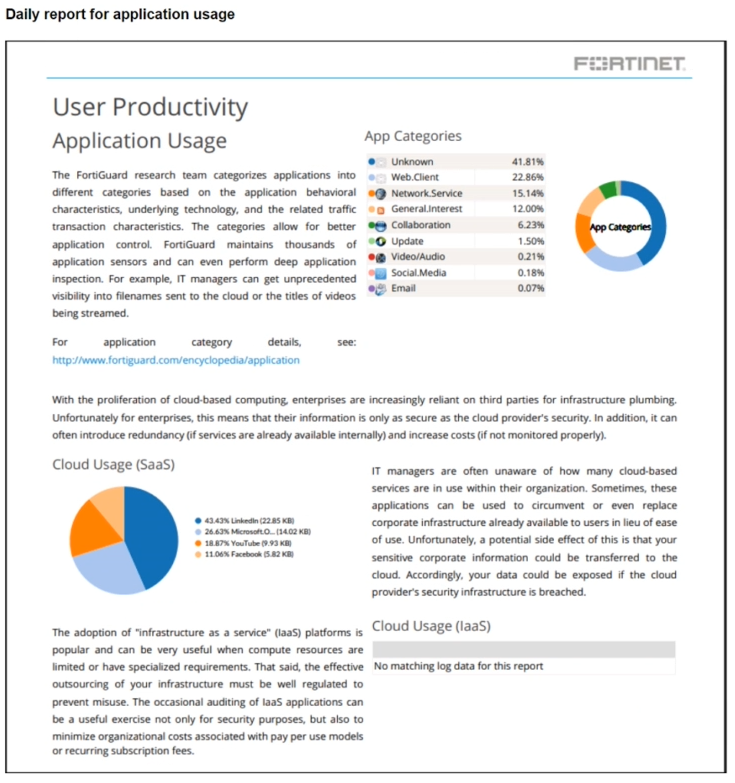
- Certificate inspection is not being used to scan application traffic.
- The inline-CASB application control profile does not have application categories set to Monitor.
- Zero trust network access (ZTNA) tags are not being used to tag the correct users.
- Deep inspection is not being used to scan traffic.
The short version
B and D — unknown-app floods mean missing cert inspection plus missing deep inspection. Blind to encrypted, blind to content.
Key concepts in this question
- Certificate inspection exposes TLS application identity.
- Deep inspection feeds full content classification.
Why B and D are correct
The two documented unknown-app explanations (matches SASE-25 Q51).
Why the others are wrong
- B. Monitor-mode categories refine known apps; they do not identify unknowns.
- C. ZTNA tags gate access; they do not classify applications.
FortiSASE exam tip
Unknown apps = inspect certs + content.
- Zero-trust tags can be used to allow or deny access to network resources.
- Zero-trust tags can determine the security posture of an endpoint.
- Zero-trust tags can be used to create multiple endpoint profiles which can be applied to different endpoints.
- Zero-trust tags can be used to allow secure web gateway (SWG) access.
The short version
A and B — tags allow/deny resources and determine posture. Gate plus assess.
Key concepts in this question
- Allow/deny gating enforces policy by tag.
- Posture determination classifies endpoint health.
Why A and B are correct
The two documented tag advantages.
Why the others are wrong
- C. Profiles assign by groups; tags do not mint profiles.
- D. SWG access is proxy work, not a tag advantage.
FortiSASE exam tip
Tags = gate + assess.
- NAT needs to be enabled in the Spoke-to-Hub firewall policy.
- The BGP router ID needs to match on the hub and FortiSASE.
- FortiSASE spoke devices do not support mode config.
- The hub needs IKEv2 enabled in the IPsec phase 1 settings.
The short version
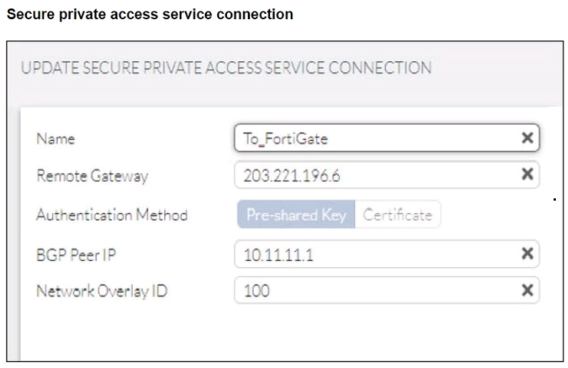
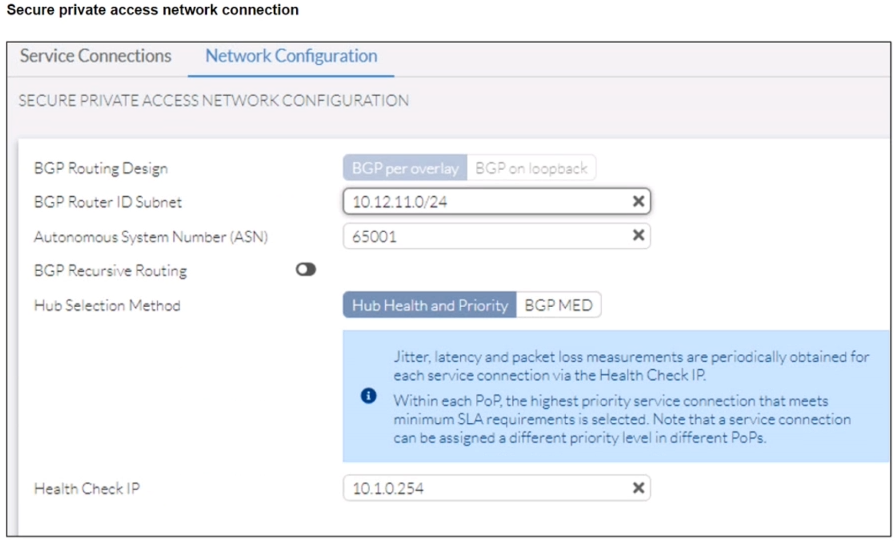
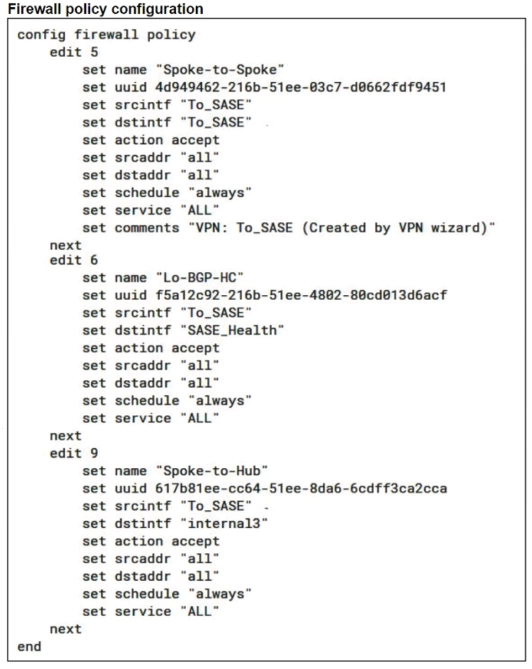
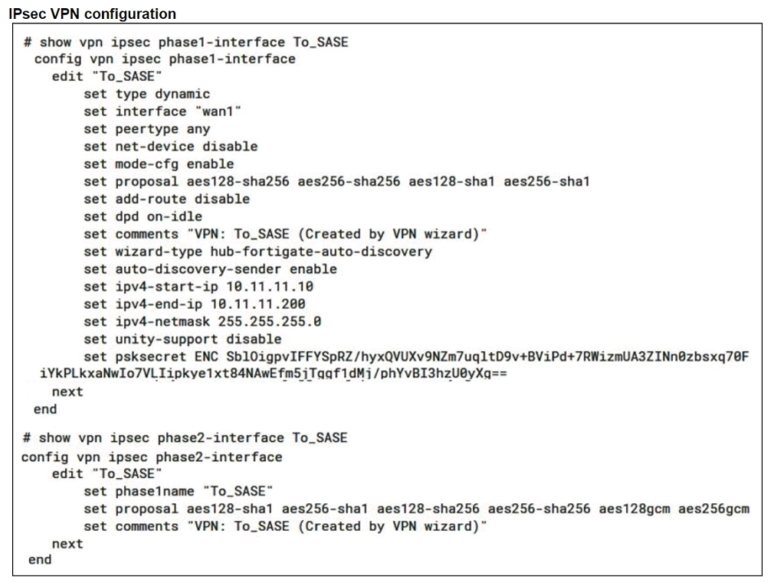
D — Hub missing IKEv2 keeps the FortiSASE spoke phase 1 down. FortiSASE secure private access initiates IKEv2 while the hub To_SASE phase 1 shows no IKEv2, so negotiation never completes.
Key concepts in this question
- IKE version match: both peers must offer the same IKE version for phase 1 to negotiate.
- Mode-config for spokes: the hub assigns overlay addresses such as 10.11.11.10-200 to dial-in spokes.
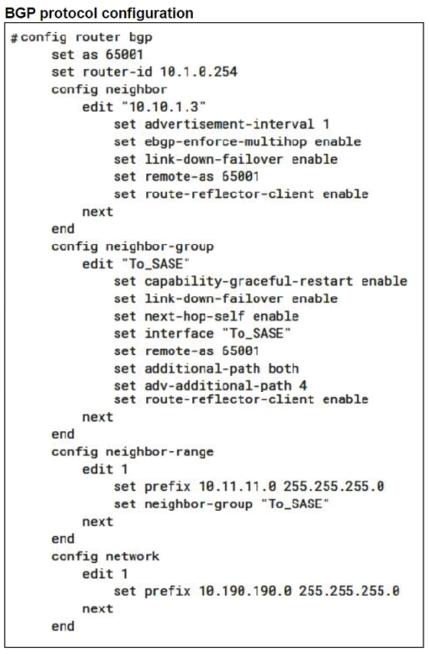
- BGP router-ID uniqueness: hub and spoke router IDs must differ, never match.
Why D is correct
The hub To_SASE phase 1 is type dynamic with mode-cfg enabled, auto-discovery sender enabled, and correct overlay pool, which is the proper hub design for FortiSASE spokes. The FortiSASE service connection targets 203.221.196.6 with BGP peer 10.11.11.1 and overlay 100. The hub phase 1 lists proposals and DPD but no IKEv2 setting, meaning default IKEv1. Enabling IKEv2 on the hub aligns with FortiSASE and brings the tunnel up, after which BGP per overlay with ASN 65001 can establish.
Why the others are wrong
- A. Spoke-to-hub private traffic must not use NAT; NAT would hide overlay sources and break return routing.
- B. BGP router IDs must be unique; forcing hub and FortiSASE to match would prevent peering.
- C. FortiSASE spokes do support mode-config; the hub pool 10.11.11.10-200 exists precisely to serve them.
FortiSASE exam tip
Tunnel never comes up means check IKE version before touching routing.
- FortiSASE will use the SD-WAN capability and determine that traffic will be directed to HUB-2, which will then route traffic to Branch-2.
- FortiSASE will use the AD VPN protocol and determine that traffic will be directed to Branch-2 directly, using a static route.
- FortiSASE will use the SD-WAN capability and determine that traffic will be directed to HUB-1, which will then route traffic to Branch-2.
- FortiSASE will use the AD VPN protocol and determine that traffic will be directed to Branch-2 directly, using a dynamic route.
The short version
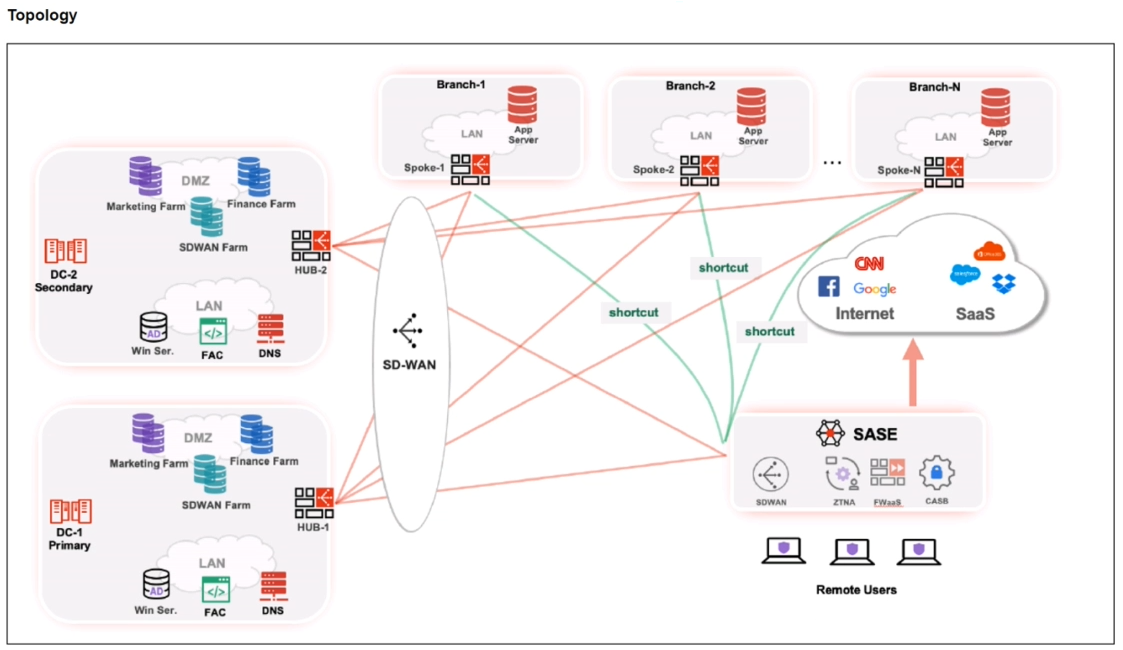
D — Branch-2 traffic goes direct via ADVPN on a dynamic route. Green shortcuts in the topology bypass the hubs, and BGP supplies the branch prefix dynamically to FortiSASE.
Key concepts in this question
- ADVPN shortcuts: spokes and SASE build direct tunnels after initial hub setup for optimal paths.
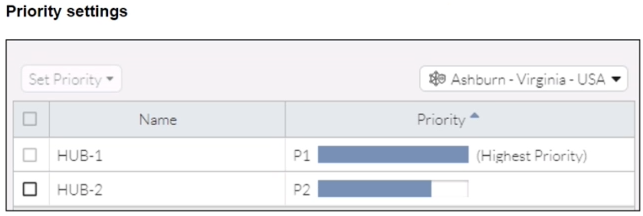
- SD-WAN hub priority: HUB-1 P1 outranks HUB-2 P2 only for hub-routed fallback, not shortcut traffic.
- Dynamic versus static: BGP-learned branch routes are dynamic, not manually entered static routes.
Why D is correct
The topology shows SD-WAN with HUB-1, HUB-2, and Spoke-1/2/N plus explicit shortcut lines from the SASE PoP toward the branches and SaaS, proving ADVPN is in play. Priority settings confirm HUB-1 is highest, which rules out HUB-2 as a hub path. With shortcuts available, FortiSASE resolves Branch-2 privately and forwards directly over the negotiated shortcut using the BGP-learned prefix, which is dynamic by definition.
Why the others are wrong
- A. HUB-2 is P2 lower priority and no hub hop is needed when a shortcut exists.
- B. Direct via ADVPN is right, but the route is BGP dynamic, not a static route.
- C. HUB-1 is the correct hub fallback, but shortcut traffic does not hairpin through any hub.
FortiSASE exam tip
See shortcut lines plus hub priority means direct ADVPN wins over hub.
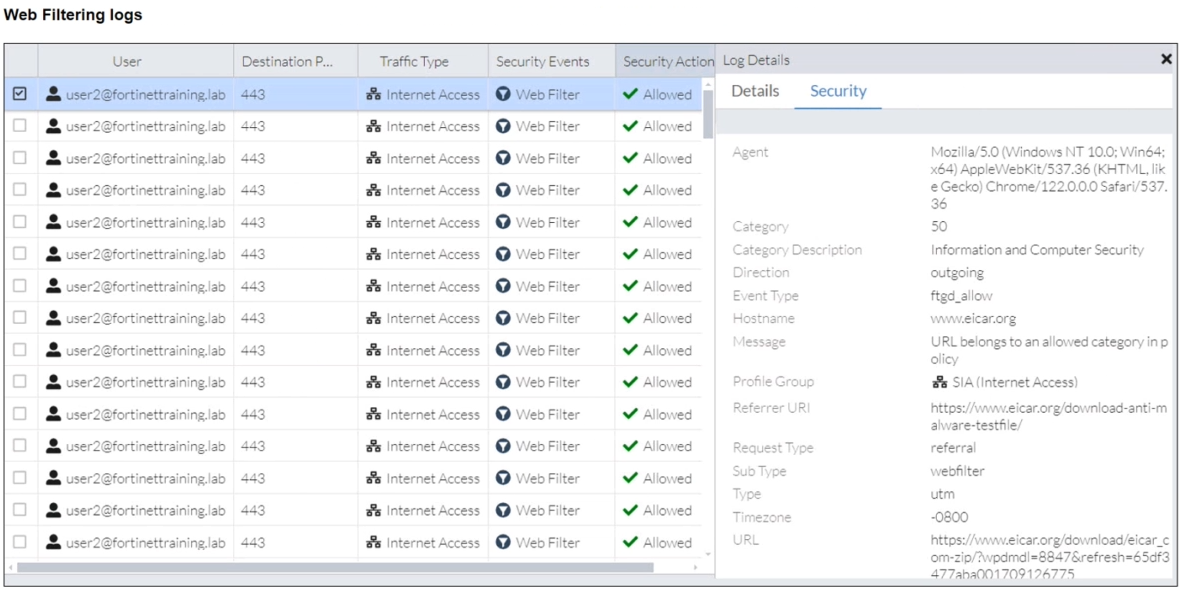
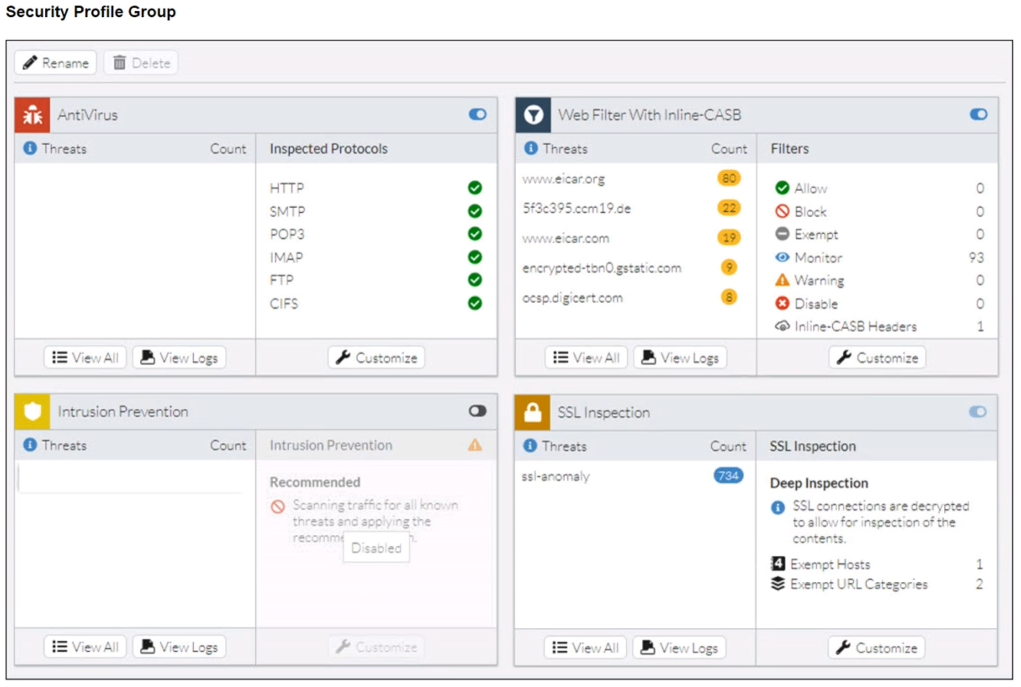
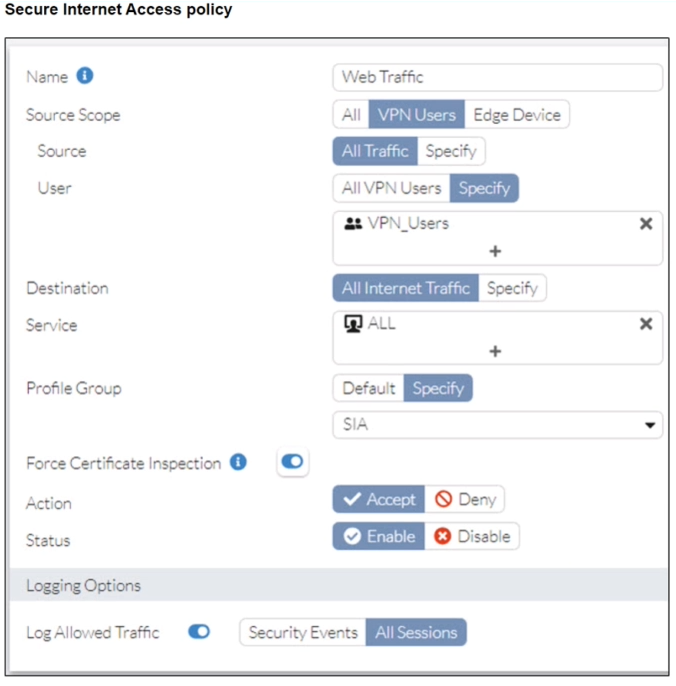
- Web filter is allowing the traffic.
- IPS is disabled in the security profile group.
- The HTTPS protocol is not enabled in the antivirus profile.
- Force certificate inspection is enabled in the policy.
The short version
D — cert-inspection-only policies let HTTPS downloads dodge AV. No full decryption, no scan.
Key concepts in this question
- Certificate inspection checks identity without content decryption.
- AV needs deep inspection to see payloads.
Why D is correct
Cert-only mode is the documented AV bypass (matches SASE-25 Q6's deep-inspection-off mechanism).
Why the others are wrong
- A. Allowed URLs still scan when decrypted.
- B. IPS state does not gate AV.
- C. HTTPS-in-AV-profile is not the framed control.
FortiSASE exam tip
Cert-only inspection = AV blind.
- Exempt the Google Maps FQDN from the endpoint system proxy settings.
- Configure a static route with the Google Maps FQDN on the endpoint to redirect traffic
- Configure the Google Maps FQDN as a split tunneling destination on the FortiSASE endpoint profile.
- Change the default DNS server configuration on FortiSASE to use the endpoint system DNS.
The short version
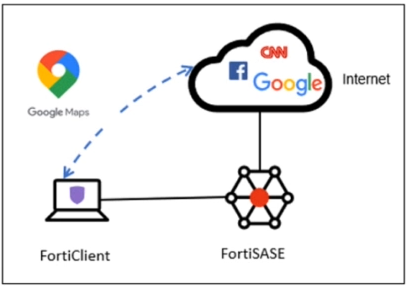
C — Google Maps bypasses the VPN as a split-tunneling destination. The requirement wording is the textbook split-tunnel definition, and the diagram shows Maps dashed direct to the laptop.
Key concepts in this question
- Split tunneling: selected FQDNs exit the endpoint physical interface instead of the FortiSASE tunnel.
- Full inspection default: all other internet traffic stays on the tunnel for FortiSASE inspection.
- VPN versus proxy controls: tunnel bypass uses split-tunnel lists, not PAC or proxy exemptions.
Why C is correct
The stem demands inspect everything on FortiSASE yet exclude Google Maps from the VPN tunnel to the physical interface. That is exactly what a split-tunneling destination does on the FortiSASE endpoint profile. The exhibit confirms it: FortiClient holds a solid tunnel to FortiSASE for Internet, while Google Maps has a dashed blue arrow straight to FortiClient, bypassing the tunnel. Configuring the Maps FQDN as a split-tunnel destination implements that bypass.
Why the others are wrong
- A. Proxy exemption applies to explicit-proxy SWG endpoints, not to traffic already inside the VPN tunnel.
- B. Endpoint static routes need numeric IPs and do not create FQDN-based split-tunnel policy.
- D. Changing DNS servers controls resolution, it does not steer Maps out of the tunnel.
FortiSASE exam tip
Exclude from VPN tunnel to local breakout equals split-tunnel destination.
- FortiGuard category-based filter
- content filter
- URL Filter
- inline cloud access security broker (CASB) headers
The short version
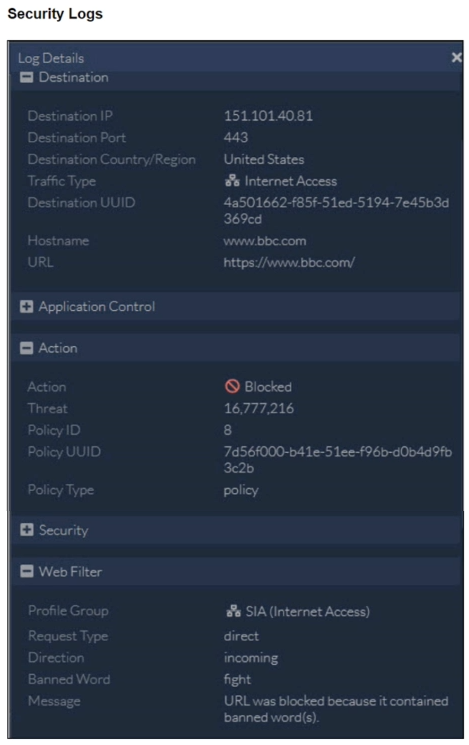
B — BBC is blocked by a banned word, so fix the content filter. The log names banned word fight and says URL blocked for banned words.
Key concepts in this question
- Content filter: banned-word lists block pages whose URL or content contains listed terms.
- FortiGuard categories: category blocks cite a category such as news, not a banned word.
- URL versus content: URL filters match explicit patterns, while banned words are content inspection.
Why B is correct
Log Details for 151.101.40.81 www.bbc.com shows Action Blocked under Web Filter with Profile Group SIA Internet Access, Request Type direct, Banned Word fight, and Message URL was blocked because it contained banned word(s). That message is generated only by the web-filter content-filter banned-word engine. Removing or excepting fight from the content filter releases https://www.bbc.com/ without touching categories or URLs.
Why the others are wrong
- A. A category block would cite the FortiGuard category, not a banned word hit.
- C. A URL-filter block would cite a configured URL entry or pattern, not Banned Word fight.
- D. Inline-CASB headers control SaaS tenant access, not BBC news page filtering.
FortiSASE exam tip
Blocked for banned words always means content filter.

- The Win7-Pro device posture has changed.
- Win7-Pro cannot reach the FortiSASE SSL VPN gateway
- The Win7-Pro FortiClient version does not match the FortiSASE endpoint requirement.
- Win-7 Pro has exceeded the total vulnerability detected threshold.
The short version
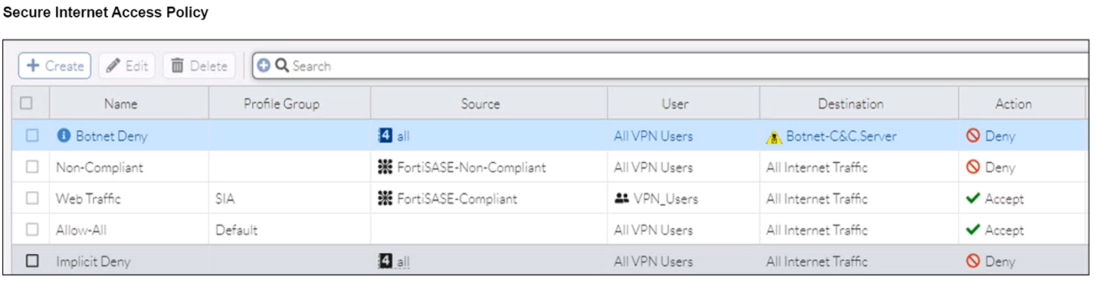
A — Win7-Pro lost access because its posture flipped to Non-Compliant. The endpoint table shows the Non-Compliant tag, and the SIA policy denies that tag before any allow.
Key concepts in this question
- ZTNA posture tags: FortiSASE-Compliant versus FortiSASE-Non-Compliant drive policy selection.
- Policy order: the Non-Compliant deny precedes the Compliant accept for All Internet Traffic.
- Management reachability: Online management proves VPN and gateway reachability are intact.
Why A is correct
Managed Endpoints shows Win10-Pro with only FortiSASE-Compliant on 7.0.10.0538 and Win7-Pro with FortiSASE-Non-Compliant plus FortiSASE-Compliant on 7.0.8.0427, both Online. The Secure Internet Access Policy lists Non-Compliant with source FortiSASE-Non-Compliant to All Internet Traffic Deny above Web Traffic with FortiSASE-Compliant to Accept. Win7-Pro therefore matches the deny first and loses browsing, while Win10-Pro matches the accept. That is a posture-driven outage.
Why the others are wrong
- B. Both endpoints show Management Connection Online, so the SSL VPN gateway is reachable.
- C. The older 7.0.8 client may explain why posture failed, but the enforcing cause is the Non-Compliant tag, not a version check.
- D. No vulnerability threshold value is shown; 176 versus 140 alone does not trigger the deny.
FortiSASE exam tip
Compliant browses, Non-Compliant denied means posture changed.
- The Secure Private Access (SPA) policy needs to allow PING service.
- Quick mode selectors are restricting the subnet.
- The BGP route is not received.
- Network address translation (NAT) is not enabled on the spoke-to-hub policy.
The short version
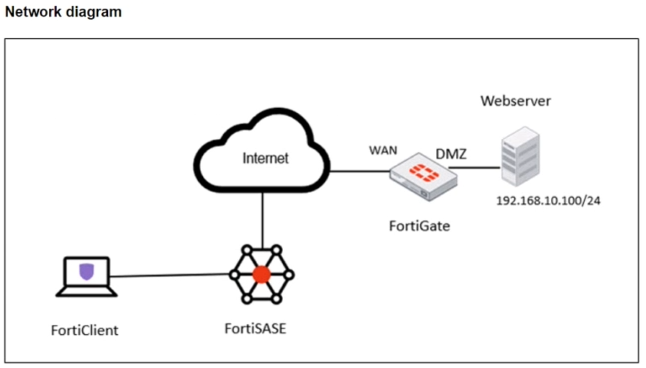
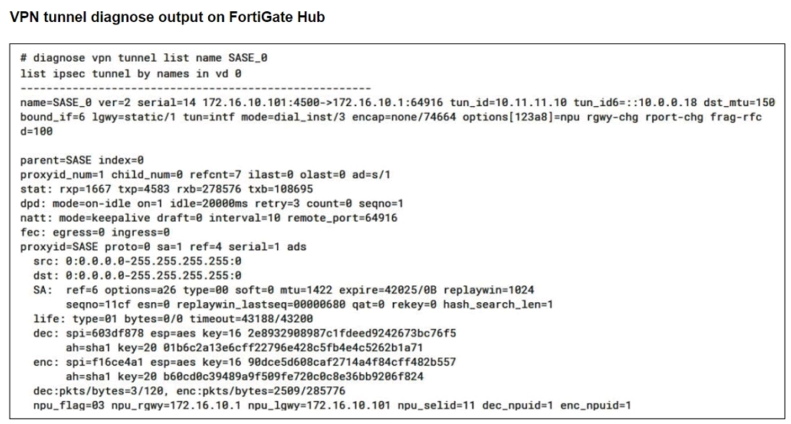
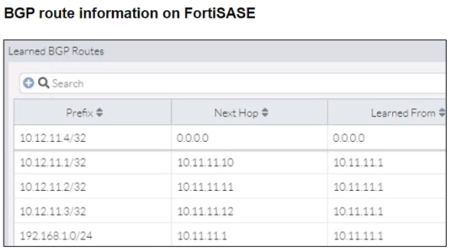
C — The BGP route is not received. Tunnel, selectors, SPA and hub policy all check out in the exhibits, leaving the BGP routing path as the ping failure domain.
Key concepts in this question
- BGP-learned hub routes: FortiSASE spokes learn private subnets such as 192.168.10.0/24 from the hub via iBGP, and the hub needs the return path.
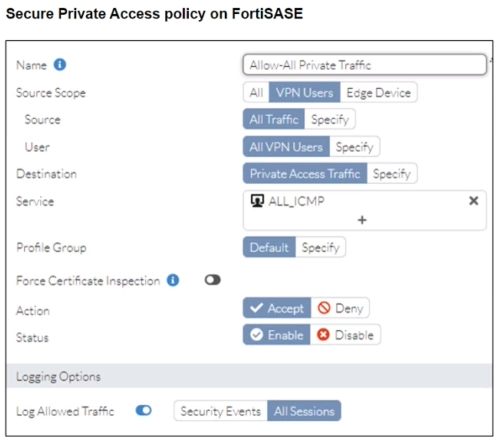
- SPA service scope: the Allow-All Private Traffic policy already permits ALL_ICMP, so ICMP is not policy-blocked.
- Quick-mode selectors: the diagnose output shows 0.0.0.0/0 in both directions, so phase 2 is not restricting the subnet.
Why C is correct
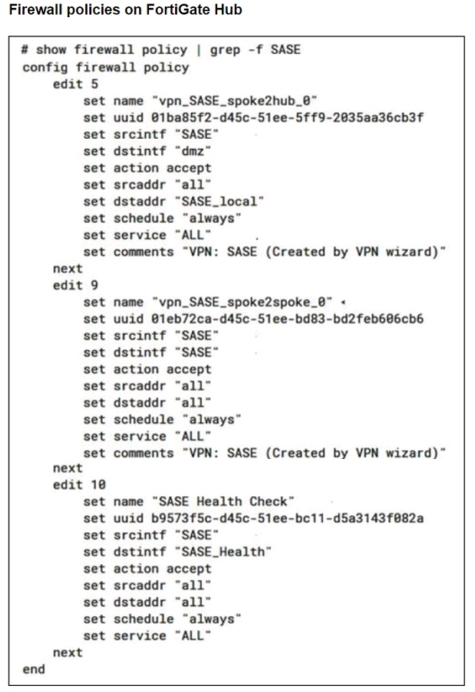
The tunnel is up (diagnose vpn tunnel list shows SASE_0 established with traffic), the SPA policy accepts ALL_ICMP, the selectors are fully open, and the hub policy accepts SASE-to-DMZ traffic. With every other option eliminated by the exhibits, the documented remaining cause of unreachable private subnets in SPA hub-and-spoke designs is the BGP route exchange, matching the banked answer and the FortiSASE BGP-per-overlay troubleshooting flow.
Why the others are wrong
- A. The SPA policy already allows the ALL_ICMP service with action Accept, so no PING-service change is needed.
- B. The proxy IDs are 0.0.0.0/0 to 0.0.0.0/0, so quick-mode selectors are not restricting any subnet.
- D. Spoke-to-hub private traffic must not be NATed; enabling NAT would hide overlay sources and break return routing.
FCSS_SASE_AD-23 exam tip
Ping over SPA with tunnel up: check SPA service, then selectors, then BGP, then hub policy.
- Allow
- Pass
- Permit
- Exempt
The short version
A — CNN exceptions among blocked AV use the Allow override. Block-all plus permit-one.
Key concepts in this question
- Application overrides carve exceptions from category blocks.
- Allow permits the named source through the block.
Why A is correct
Allow-override is the documented exception action.
Why the others are wrong
- B/C. Pass/Permit are not the override verbs.
- D. Exempt removes from inspection, not the framed allow.
FortiSASE exam tip
Block-all plus one = Allow override.
Want the full bank of 44 questions for Fortinet FCSS - FortiSASE 23 Administrator? See all practice exams.