FCP_FMG_AD-7.4 — Free Practice Questions
10 free sample questions from a bank of 85, with the correct answers and explanations. No signup required — start practising right now.
1Refer to the exhibit. Given the configuration shown in the exhibit, which two statements are true? (Choose two.)
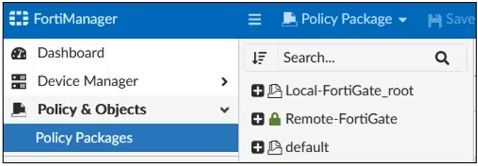
- An administrator can also lock the Local-FortiGate_root policy package.
- FortiManager is in workflow mode.
- The FortiManager ADOM is locked by the administrator.
- The FortiManager ADOM workspace mode is set to Normal.
Answer:
2Refer to the exhibit. Given the configuration shown in the exhibit, which two conclusions can you draw from the installation targets in the Install On column? (Choose two.)
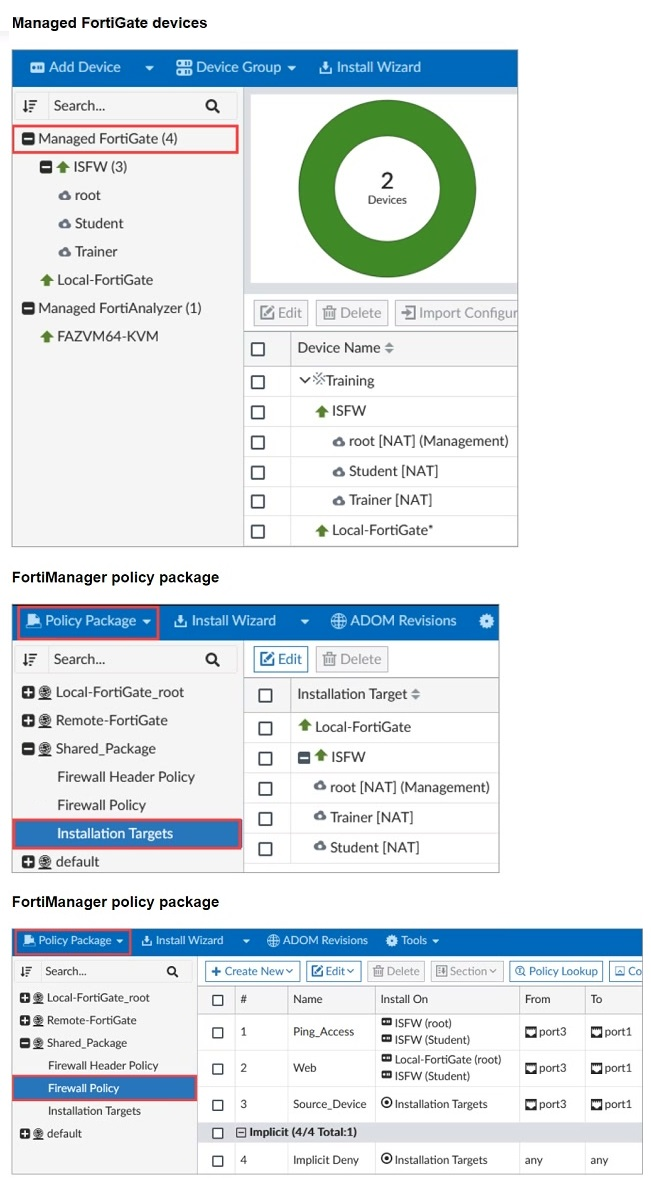
- Policy seq.# 3 will be installed on all managed devices and VDOMs that are listed under Installation Targets.
- Policy seq.# 3 will be skipped because no installation targets are specified.
- Policy seq.# 2 will not be installed on the Local-FortiGate root VDOM because there is no root VDOM in the Installation Target.
- Policy seq.# 1 will be installed on the ISFW device root[NAT] and Student[NAT] VDOMs only.
Answer:
3What will be the result of reverting to a previous revision version in the revision history?
- It will install configuration changes to managed device automatically.
- It will tag the device settings status as Auto-Update.
- It will modify the device-level database.
- It will generate a new version ID and remove all other revision history versions.
Answer: C
4An administrator wants to create a policy on an ADOM that is in backup mode and install it on a FortiGate device in the same ADOM.
How can the administrator perform this task?
- The administrator must use the Policy & Objects section to create a policy first.
- The administrator must use a FortiManager script.
- The administrator must disable the FortiManager offline mode first.
- The administrator must change the ADOM mode to Advanced to bring the FortiManager online.
Answer: B
5Refer to the exhibit. What can you conclude from the failed installation log shown in the exhibit?
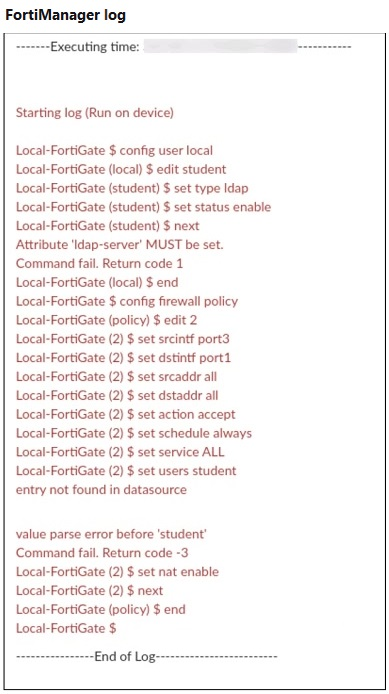
- Policy ID 2 is installed in the disabled state.
- Policy ID 2 is installed without the remote user student.
- Policy ID 2 will not be installed.
- Policy ID 2 is installed without a source address.
Answer: B
6In the event that one of the secondary FortiManager devices fails, which action must be performed to return the FortiManager HA manual mode to a working state?
- The FortiManager HA state transition is transparent to administrators and does not require any reconfiguration.
- Reboot the failed device to remove its IP from the primary device.
- Manually promote one of the working secondary devices to the primary role, and reboot the old primary device to remove the peer IP of the failed device.
- Reconfigure the primary device to remove the peer IP of the failed device.
Answer: D
7An administrator has assigned a global policy package to custom ADOM1. Then the administrator creates a new policy package, Fortinet, in the custom ADOM1.
What happens to the Fortinet policy package when it is created?
- You must assign the global policy package from the global ADOM.
- The global policy package is automatically assigned.
- You must reapply the global policy package to ADOM1.
- You can select the option to assign the global policies.
Answer: B
8Which output is displayed right after moving the ISFW device from one ADOM to another?
Answer:
9An administrator has enabled Service Access on FortiManager.
What is the purpose of Service Access on the FortiManager interface?
- It allows administrative access to FortiManager.
- It allows FortiManager to respond to requests for FortiGuard services from FortiGate devices.
- It allows third-party applications to gain read/write access to FortiManager.
- It allows FortiManager to determine the connection status of managed devices.
Answer: B
10Refer to the exhibit. A junior administrator is troubleshooting a FortiManager connectivity issue that is occurring with a managed FortiGate device.
Given the FortiManager device manager settings shown in the exhibit, what can you conclude from this scenario?
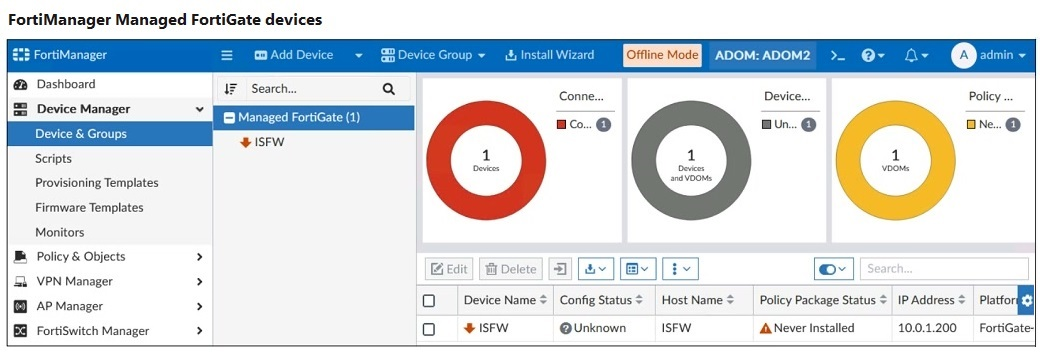
- The administrator must refresh the device to restore connectivity.
- FortiManager lost internet connectivity, therefore, the device appears to be down.
- The administrator can reclaim the FortiGate to FortiManager protocol (FGFM) tunnel to get the device online.
- The administrator recently restored a FortiManager configuration file.
Answer: D
Want the full bank of 85 questions for FCP_FMG_AD-7.4? See all practice exams.