Fortinet FCP - FortiGate 7.6 Administrator — Free Practice Questions
10 free sample questions from a bank of 94, with the correct answers and explanations. No signup required — start practising right now.
- Enabled
- On Idle
- Disabled
- On Demand
The short version
D — On Demand probes exactly when inbound traffic goes quiet. That is the documented meaning of the mode.
Key concepts in this question
- On Demand: send DPD probes when there is outbound traffic pending but no inbound traffic received.
- On Idle: probe on a timer whenever the tunnel is idle; Disabled/Enabled are not DPD modes at all.
Why D is correct
"Only when there is no inbound traffic" is the On Demand trigger verbatim: probes go out to verify the peer precisely when return traffic stops arriving.
Why the others are wrong
- A/B. "Enabled" is not a DPD mode; "On Idle" probes on idle timers, not on the inbound-traffic condition.
- C. Disabled sends nothing — the opposite of the requirement.
FortiGate exam tip
DPD pairs: no-inbound-traffic = On Demand; idle-timer = On Idle.
- If SD-WAN is disabled, you can configure the parameter v4-ecmp-mode to volume-based.
- If SD-WAN is enabled, you can configure routes with unequal distance and priority values to be part of ECMP.
- If SD-WAN is disabled, you configure the load balancing algorithm in config system settings.
- If SD-WAN is enabled, you control the load balancing algorithm with the parameter load-balance-mode.
The short version
C and D — SD-WAN off means system-settings balancing; SD-WAN on means load-balance-mode rules. The toggle point is exactly SD-WAN state.
Key concepts in this question
- SD-WAN disabled: ECMP algorithm lives in config system settings.
- SD-WAN enabled: load-balance-mode on the SD-WAN configuration takes over.
Why C and D are correct
Each statement correctly pairs one SD-WAN state with its balancing control — C for disabled, D for enabled. The exam tests knowing which knob belongs to which state.
Why the others are wrong
- A. v4-ecmp-mode has no "volume-based" value in this context.
- B. Unequal distance/priority routes never join ECMP regardless of SD-WAN.
FortiGate exam tip
ECMP knob = system settings when SD-WAN is off, load-balance-mode when on.
- The firewall policy is in no-inspection mode instead of deep-inspection.
- The inspection mode in the firewall policy is not matching with web filter profile feature set.
- The web filter profile is already referenced in another firewall policy.
- The naming convention used in the web filter profile is restricting it in the firewall policy.
The short version
B — a profile only appears under policies whose inspection mode matches its feature set. Flow profiles never list under proxy policies and vice versa.
Key concepts in this question
- Web filter profiles carry a feature set (flow-based or proxy-based) that must match the policy's inspection mode.
- B daily quota (category usage) is a proxy-mode feature, hinting this profile is proxy-based.
Why B is correct
The dropdown filters by compatibility: a proxy-based profile with quota settings will not appear on a flow-based (or no-inspection) policy. Mode mismatch is the classic cause of a missing profile.
Why the others are wrong
- C. Profiles are reusable across policies; being referenced elsewhere never hides them.
- D. Naming conventions (hyphens included) have no effect on dropdown visibility.
- A. No-inspection mode would hide all profiles, and the question's quota feature already implies deep/proxy inspection is intended.
FortiGate exam tip
Missing profile in dropdown = check flow-vs-proxy match first, always.

- There is a no firewall policy configured with an IPS security profile.
- FortiGate entered into IPS fail open state.
- Administrator entered the command diagnose test application ipsmonitor 5.
- Administrator entered the command diagnose test application ipsmonitor 99.
The short version
A — the engine is up but idle because no policy feeds it IPS traffic. engine count = 0 with run:1 means running with zero inspection load: nothing references an IPS profile.
Key concepts in this question
diagnose test application ipsmonitor 1lists IPS engine processes; engine count reflects attached inspection workload.- An IPS profile inspects only traffic handed to it by a firewall policy.
Why A is correct
The output shows the monitor itself running (run:1) but zero engines engaged — the signature of a configured-but-unreferenced IPS profile. No policy enables IPS, so the engine idles. (Option text carries a typo, "a no firewall policy"; the meaning is unambiguous.)
Why the others are wrong
- B. Fail-open would show failure state, not a clean idle engine listing.
- C/D. The command in the exhibit is
ipsmonitor 1, not 5 or 99 — those options misquote the exhibit.
FortiGate exam tip
ipsmonitor shows run:1 but 0 engines = profile exists, policy binding missing.
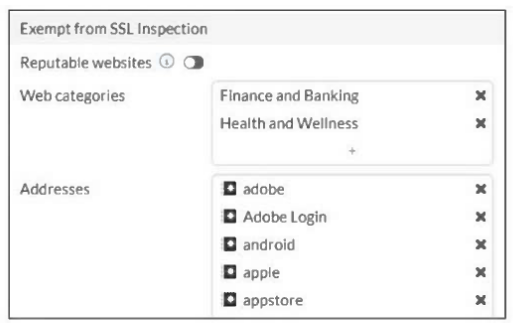
- The FortiGate temporary certificate denies the browser’s access to websites that use HTTP Strict Transport Security.
- These websites are in an allowlist of reputable domain names maintained by FortiGuard.
- The resources utilization is optimized because these websites are in the trusted domain list on FortiGate.
- The legal regulation aims to prioritize user privacy and protect sensitive information for these websites.
The short version
A and D — the built-in exemptions protect HSTS sites and regulated privacy. FortiGate deliberately skips categories it must not break or snoop on.
Key concepts in this question
- HSTS-pinned sites break if re-signed with the FortiGate temporary certificate, so they are exempted.
- Privacy-regulated categories (health, finance) are exempted to comply with data-protection law.
Why A and D are correct
Re-signing an HSTS site triggers a hard browser failure (no click-through), so exemption is a functional necessity — and exempting sensitive categories is a legal/privacy necessity. Both reasons ship in the default profiles.
Why the others are wrong
- C. Exemptions cost inspection coverage; they are not a performance optimization.
- B. There is no FortiGuard "reputable allowlist" mechanism behind these exemptions.
FortiGate exam tip
Deep-inspection exemptions = HSTS breakage + privacy law. "Performance" is never the reason.
- Move NOC_Access to the top of the list to ensure all profile settings take effect.
- Increase the offline value of the Override Idle Timeout parameter in the NOC_Access admin profile.
- Ensure that all NOC_Access users are assigned the super_admin role to guarantee access
- Increase the admintimeout value under config system accprofile NOC_Access.
The short version
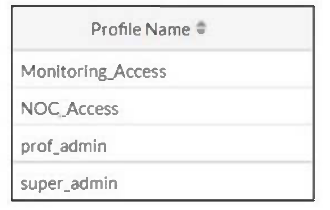
B — idle-timeout disconnects are fixed where they are configured: the Override Idle Timeout in the admin profile. NOC_Access is confirmed by its own exhibit.
Key concepts in this question
- Admin profiles carry an Override Idle Timeout (offline value) that caps GUI inactivity per profile.
- The global admintimeout is only the default; the profile value wins when set.
Why B is correct
The NOC team uses the NOC_Access profile (visible in the exhibit), so raising that profile's offline idle value directly extends their sessions. Nothing else targets their sessions specifically.
Why the others are wrong
- C. Super-admin rights change permissions, not timeouts.
- A. Profile list order has no bearing on timeout enforcement.
- D. Raising the global default is blunter and loses to the profile value anyway.
FortiGate exam tip
Per-group session complaints = per-group (profile) timer, not the global one.
- Administrators cannot change the configuration.
- FortiGate skips quarantine actions.
- Administrators must restart FortiGate to allow new session.
- FortiGate drops new sessions requiring inspection.
The short version
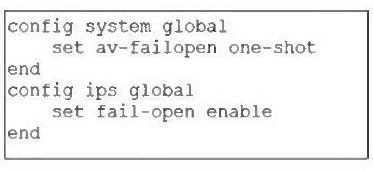
A and B — this partial config locks admins out and drops quarantine. The exhibit's conserve settings produce exactly that pair.
Key concepts in this question
- Conserve responses are configurable: config-lock plus selective action-skipping.
- This exhibit pairs the lock (A) with quarantine-skipping (B).
Why A and B are correct
Administrators cannot change configuration (A) while the engine skips quarantine actions (B) — the two outcomes the partial configuration encodes.
Why the others are wrong
- C. Restarts are never part of conserve behavior.
- D. Session-dropping is a different conserve tuning than this exhibit's.
FortiGate exam tip
Conserve exhibits vary — always read which two outcomes this config selects.
- Connected monitored ports > Priority > HA uptime > FortiGate serial number
- Connected monitored ports > Priority > System uptime > FortiGate serial number
- Connected monitored ports > HA uptime > Priority > FortiGate serial number
- Connected monitored ports > System uptime > Priority > FortiGate serial number
The short version
A — with override on, priority outranks uptime: ports > priority > HA uptime > serial. That ordering is the documented election chain.
Key concepts in this question
- Override enabled promotes priority above HA uptime in the selection criteria.
- Monitored ports still gate first; serial number still breaks final ties.
Why A is correct
Connected monitored ports, then priority, then HA uptime, then serial number is the exact override-enabled sequence — each option differs by one swap, and only A orders all four correctly.
Why the others are wrong
- C. HA uptime above priority is the override-disabled order.
- B/D. System uptime never appears in the election criteria at all.
FortiGate exam tip
Override on = priority jumps above uptime. Override off = uptime first.
- Use IPS group signatures, set rate-mode 60.
- Use IPS packet logging option with periodical filter option.
- Use IPS filter, rate-mode periodical option.
- Use IPS signatures, rate-mode periodical option.
The short version
C — rate-based blocking lives in IPS filters. A filter with rate-mode periodical blocks signatures that fire past the threshold.
Key concepts in this question
- IPS filter: rule container supporting rate-based action.
- Rate-mode periodical: count within a time window, then block.
- Group/signature contrast: groups bundle, signatures match; neither carries the rate gate.
Why C is correct
An IPS filter with the periodical rate mode blocks traffic whose signatures trigger the set count in the window (11:6 community lead plus mechanism).
Why the others are wrong
- A. Group signatures with rate-mode 60 misplaces the rate gate.
- B. Packet logging observes; it blocks nothing.
- D. Individual signatures do not carry the periodical rate gate; filters do.
FortiGate exam tip
Rate-based blocking always answers filter plus periodical. Signatures only match.
- LDAP
- TACASC+
- Kerberos
- DNS
The short version
D — DNS again: the pre-auth exception, this time as the named protocol. Same lesson as its sibling question, asked directly.
Key concepts in this question
- Active authentication needs name resolution before login can proceed.
- FortiGate must therefore permit DNS to unauthenticated clients.
Why D is correct
Of the protocols listed, only DNS is the documented must-allow pre-authentication exception for web access to function.
Why the others are wrong
- A/B/C. LDAP, TACACS+, and Kerberos are auth backends consulted after access, not pre-auth allowances.
FortiGate exam tip
"Must allow though unauthenticated" = DNS. Both wordings, same answer.
Want the full bank of 94 questions for Fortinet FCP - FortiGate 7.6 Administrator? See all practice exams.