CompTIA Tech+ (FC0-U71) — Free Practice Questions
10 free sample questions from a bank of 417, with the correct answers and explanations. No signup required — start practising right now.
- File extension
- Default permissions
- Backup policy
- Data compression
The short version
A — file extension is the key GUI consideration when opening a file. The extension maps the file to its handler application.
Key concepts in this question
- File association: OS GUI links extensions to default programs for open, edit, and preview actions.
- Extension role: suffix signaling format and handler, determining what happens on double click.
- Permissions scope: controls who may read or execute, important but secondary to choosing the right opener.
- Backup policy: recovery planning that does not affect immediate open behavior.
- Compression trait: storage optimization that the handler manages transparently after launch.
Why A is correct
A is correct because opening a file from an OS GUI depends most on the file extension to select the correct application. The shell consults associations to launch the viewer or editor that understands the format. Permissions matter for access, backup matters for recovery, and compression matters for size, yet none decides which program opens the content. The settled consideration is extension to handler mapping.
Why the others are wrong
- B. Wrong because default permissions gate access, but do not choose the opening application.
- C. Wrong because backup policy protects against loss, but does not influence GUI open handling.
- D. Wrong because compression reduces size, yet the associated app still opens the decompressed view.
FC0-U71 exam tip
GUI open equals extension to app: perms allow, backup recovers, extension launches.
- 3
- 4
- 12
- 21
The short version
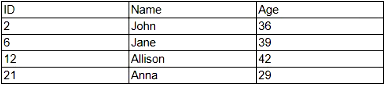
B — the schema shows four records. Rows hold records, columns hold fields, so count rows not cells.
Key concepts in this question
- Schema reading: tables display entities as rows and attributes as columns.
- Record definition: one row equals one record with values across its fields.
- Field versus record: fields describe properties, records instantiate entities.
- Cell count trap: multiplying rows by columns yields values, not records.
- Image based counting: visual tables require careful row enumeration excluding headers.
Why B is correct
B is correct because the database schema image contains four data rows, hence four records. Each record spans its columns with specific values, while the header names fields. Counts of twelve or twenty one mistake cells or combinations for records, and three miscounts rows. The settled count follows the rule that records equal data rows in the presented schema.
Why the others are wrong
- A. Wrong because three undercounts the data rows visible in the schema image.
- C. Wrong because twelve counts cells or field combinations, not whole records.
- D. Wrong because twenty one is an inflated combination count, not the row based record total.
FC0-U71 exam tip
Records equal rows: never multiply rows by columns when asked for record count.
- Modem
- Server
- Host firewall
- Access point
The short version
D — access point extends network range. It bridges wired backbone to wider wireless coverage.
Key concepts in this question
- Range extension: increasing usable coverage so clients connect farther from the core.
- Access point role: radiating managed WiFi cells tied to the wired network with shared SSID and security.
- Modem function: translating ISP signal to digital, not extending local range.
- Server function: hosting services and data, not propagating signals.
- Host firewall function: filtering traffic on an endpoint, unrelated to coverage.
Why D is correct
D is correct because an access point extends the range of a network by adding wireless coverage connected to the existing infrastructure. Additional or repositioned points fill dead zones and support roaming while preserving policy. Modems connect to providers, servers provide resources, and host firewalls protect endpoints. Only the access point exists to propagate network availability outward.
Why the others are wrong
- A. Wrong because modems terminate provider connectivity rather than extend local range.
- B. Wrong because servers deliver applications and storage, not signal coverage.
- C. Wrong because host firewalls filter endpoint traffic and do not radiate coverage.
FC0-U71 exam tip
Need more range equals more access points: modem connects, server serves, firewall filters.
- Configuring a firewall
- Applying updates
- Enabling authentication
- Uninstalling the program
The short version
B — applying updates best secures vulnerable software. Patches close the disclosed weakness directly.
Key concepts in this question
- Vulnerability response: removing exploitability by installing vendor fixes for known flaws.
- Patching: replacing buggy code with corrected versions that eliminate attack paths.
- Firewall value: limiting exposure during the window, but not fixing the underlying bug.
- Authentication value: controlling who reaches features, yet flawed code stays exploitable by allowed users.
- Uninstall tradeoff: removes risk but also removes needed function, excessive as first response.
Why B is correct
B is correct because notification of a new software vulnerability calls for applying updates that contain the fix. Updates replace the vulnerable component with tested code that closes the hole while preserving function. Firewalls buy time, authentication narrows audience, and uninstalling sacrifices capability. The settled best way restores security with minimal loss by patching promptly.
Why the others are wrong
- A. Wrong because firewalls reduce reachability but leave the vulnerable code intact.
- C. Wrong because authentication limits users, yet authorized paths can still trigger the flaw.
- D. Wrong because uninstalling removes function unnecessarily when a patch retains value securely.
FC0-U71 exam tip
New vuln equals patch first: firewall contains, auth narrows, uninstall only if no fix.
- System logs
- Cookie data
- Location tracking
- Web browser history
The short version
D — web browser history reveals inappropriate content access. It lists visited sites with times for review.
Key concepts in this question
- Usage evidence: artifacts showing which online resources a user actually opened.
- Browser history: chronological log of URLs, titles, and visit times maintained by the browser.
- System logs: broad event records that may lack complete browsing detail.
- Cookie data: site stored state for preferences and tracking, not a full visit ledger.
- Location tracking: physical movement data that does not prove content viewed.
Why D is correct
D is correct because determining whether users accessed inappropriate online content is best done through web browser history. History directly enumerates destinations and timestamps that reviewers can compare to policy. System logs help correlation, cookies show state, and location shows place, yet none lists browsing as completely as history. The settled source for content review is the browser ledger.
Why the others are wrong
- A. Wrong because system logs capture events broadly but rarely detail every URL visited.
- B. Wrong because cookie data reflects site storage, not a comprehensive visit record.
- C. Wrong because location tracking shows where the device was, not what content was viewed.
FC0-U71 exam tip
Content visited equals browser history: logs correlate, cookies persist, location places.
- Password complexity
- Password management
- Password expiration
- Password privacy
The short version
C — sixty day resets define password expiration. Time based rotation forces periodic credential renewal.
Key concepts in this question
- Password expiration: policy requiring replacement after a fixed interval to limit credential lifetime.
- Sixty day rule: concrete interval triggering reset workflows and lockout until changed.
- Complexity: length and character rules shaping guess resistance, not timing.
- Management breadth: lifecycle handling including storage and recovery, wider than interval alone.
- Privacy scope: handling and disclosure limits, distinct from rotation timing.
Why C is correct
C is correct because requiring all passwords to be reset every sixty days is password expiration. The interval caps how long a compromised secret remains useful and spreads rotation workload predictably. Complexity governs strength, management covers the full lifecycle, and privacy governs protection. The settled term for time triggered renewal is expiration.
Why the others are wrong
- A. Wrong because complexity controls composition, not sixty day rotation timing.
- B. Wrong because management spans the whole lifecycle, while expiration names the interval rule.
- D. Wrong because privacy addresses protection and sharing, not scheduled replacement.
FC0-U71 exam tip
Days plus reset equals expiration: complexity shapes, expiration times, privacy guards.
- File-level
- VPN
- HTTPS
- Plaintext
The short version
A — file level encryption protects data at rest. It renders stored files unreadable without keys.
Key concepts in this question
- Data at rest: bytes on disks and media awaiting use, needing confidentiality independent of transit.
- File level protection: encrypting files or folders so stolen media yields ciphertext.
- VPN scope: securing tunnels in transit between networks, not stored files.
- HTTPS scope: securing web sessions in transit, not data sitting on disk.
- Plaintext absence: unprotected form that offers no security at all.
Why A is correct
A is correct because file level encryption protects data at rest by transforming stored content into ciphertext governed by keys. Theft or disposal then exposes no usable information. VPN and HTTPS protect movement across networks, while plaintext is the absence of protection. The settled at rest control among the choices is file level encryption.
Why the others are wrong
- B. Wrong because VPN secures transit tunnels, not files stored on media.
- C. Wrong because HTTPS secures web transport, not resting file bytes.
- D. Wrong because plaintext is unprotected data, the opposite of encryption.
FC0-U71 exam tip
At rest equals file or disk encryption: VPN plus HTTPS equal in transit, plaintext equals none.
- Petabyte
- Terabyte
- Kilobyte
- Megabyte
The short version
C — kilobyte is the smallest unit among the choices. Scale rises from kilo through mega to tera and peta.
Key concepts in this question
- Storage hierarchy: standard decimal or binary steps where each level is roughly a thousand times the prior.
- Kilobyte place: thousand byte range, below megabyte, terabyte, and petabyte.
- Megabyte place: million byte range, larger than kilobyte.
- Terabyte and petabyte: trillion and quadrillion ranges for large arrays and archives.
- Comparison task: selecting minimum from listed tiers without distraction.
Why C is correct
C is correct because among petabyte, terabyte, kilobyte, and megabyte, the kilobyte is the smallest storage unit. Each higher tier multiplies capacity by about a thousand, so kilo sits at the bottom of this set. Petabyte tops the list, terabyte follows, and megabyte sits mid scale. The settled ordering makes kilobyte the minimum.
Why the others are wrong
- A. Wrong because petabyte is the largest unit in the set, not the smallest.
- B. Wrong because terabyte is far larger than kilobyte and megabyte.
- D. Wrong because megabyte exceeds kilobyte by roughly a thousand fold.
FC0-U71 exam tip
Order kilo mega tera peta upward: smallest in mixed lists is usually kilo.
- Fiber optic
- DSL
- Cellular
- Satellite
The short version
D — satellite best connects remote areas without cabling or towers. It reaches where wired and cellular cannot.
Key concepts in this question
- Remote constraint: no cabling for DSL or fiber and no towers for cellular service.
- Satellite reach: sky based links requiring only dish visibility, independent of ground plant.
- Fiber need: trench or pole plant that does not exist in the described area.
- DSL need: reuse of phone cabling that is also absent.
- Cellular need: nearby towers for radio coverage that are unavailable.
Why D is correct
D is correct because a user in a remote area without cabling or towers needs satellite internet. The dish communicates with orbit, bypassing missing ground infrastructure. Fiber demands new lines, DSL demands phone pairs, and cellular demands towers. Only satellite delivers connectivity under the stated absence of plant.
Why the others are wrong
- A. Wrong because fiber requires cabling plant that the stem says is unavailable.
- B. Wrong because DSL rides phone cabling that does not exist in the area.
- C. Wrong because cellular depends on towers that are not available remotely.
Additional context helps learners retain the distinction for test day recall and practical use.
FC0-U71 exam tip
No wires plus no towers equals satellite: all else needs ground plant.
- DisplayPort
- VGA
- DVI
- USB-C
The short version
D — USB-C is the bidirectional display type among the choices. It carries video plus data and power both ways.
Key concepts in this question
- Bidirectional: single connector supporting host to display video plus return data, power, or control.
- USB-C Alt Mode: repurposing high speed lanes for DisplayPort video alongside USB and power delivery.
- DisplayPort focus: primarily video forward, not the bidirectional multi use interface in this set.
- VGA legacy: analog video only in one direction with no data return.
- DVI scope: digital video with limited side signals, not full bidirectional convergence.
Why D is correct
D is correct because USB-C is the bidirectional display type that handles video output while also moving data and power in both directions through one port. DisplayPort centers on video delivery, VGA is legacy one way analog, and DVI is video focused without converged return paths. The settled converged bidirectional choice is USB-C.
Why the others are wrong
- A. Wrong because DisplayPort is video centric, not the converged bidirectional port in the set.
- B. Wrong because VGA is legacy analog video only with no bidirectional data plus power.
- C. Wrong because DVI carries video with minimal extras, not full bidirectional convergence.
FC0-U71 exam tip
Bidirectional plus display plus power plus data equals USB-C in Tech plus lists.
Want the full bank of 417 questions for CompTIA Tech+ (FC0-U71)? See all practice exams.