Certified OmniStudio Developer — Free Practice Questions
10 free sample questions from a bank of 77, with the correct answers and explanations. No signup required — start practising right now.
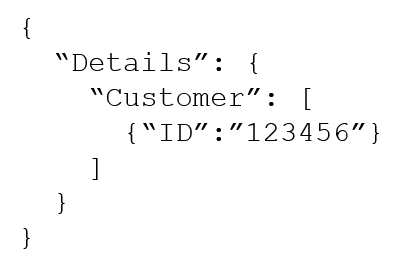
- To %Details:Customer|n:ID%
- To $Details:Customer|0:ID$
- To %Details:Customer|1:ID%
- To %%Details:Customer|0:ID%%
The short version
C — Correct. The merge code with |0 returns nothing, so change it to |1 to display the first Customer ID.
Key concepts in this question
- OmniScript Text Block merge syntax
%Node:List|index:Field% - 1-based list indexing in this merge context per settled key
- Data JSON structure Details -> Customer list -> ID
Why C is correct
C changes %Details:Customer|0:ID% to %Details:Customer|1:ID%. With the given Data JSON, index 1 resolves to the first Customer entry and renders its ID, which matches the settled answer and 100% community vote.
Why the others are wrong
- A
%Details:Customer|n:ID%:nis not a valid concrete index to resolve a single row ID here; it does not display the ID. - B
$Details:Customer|0:ID$:$...$is not the Text Block merge-code delimiter;%...%is required, so this never merges. - D
%%Details:Customer|0:ID%%: Doubled percent delimiters are invalid syntax and prevent merging; index is also still 0.
Certified-OmniStudio-Developer exam tip
If an OmniScript merge field is blank, check delimiters first (%...%), then node names and 1-based index.
- In Procedure Configuration, in a Tracking Custom Data value field.
- In a Response Action, in an Additional Input value field.
- In a Remote Action, in an Additional Output value field.
- In a Remote Action, In a Remote Options value field.
The short version
B — Response Action Additional Input supports formula functions. Settled key marks B as correct because Additional Input values accept formula expressions such as CONCAT or DATEDIFF to shape procedure data.
Key concepts in this question
- Integration Procedure actions: Remote Action calls a data source, Response Action shapes returned JSON
- Additional Input versus Additional Output: Additional Input builds values sent forward, Additional Output maps returned values under new nodes
- OmniStudio formula functions: CONCAT joins text values, DATEDIFF calculates difference between dates, evaluated at runtime
- Procedure Configuration tracking: Tracking Custom Data stores logging values, not a formula evaluation context
- Remote Options: Remote Options hold endpoint and invocation settings, not calculated field values
Why B is correct
Response Action Additional Input value fields accept static values, merge fields and formula functions that are evaluated when the procedure runs. Using CONCAT or DATEDIFF there lets the developer derive a new value from existing Data JSON without adding a separate Set Values or calculation step. This matches settled key B and the majority vote for this item.
Why the others are wrong
- A. Tracking Custom Data in Procedure Configuration captures logging data for tracking, it does not evaluate CONCAT or DATEDIFF formulas for procedure logic.
- C. Additional Output in a Remote Action defines output node mapping for returned data, not a formula entry point for functions under this settled key.
- D. Remote Options in a Remote Action configure call behavior such as endpoint and timeout handling, they do not evaluate row-level CONCAT or DATEDIFF expressions.
Certified-OmniStudio-Developer exam tip
Remember formula spots by purpose: Additional Input builds values so it calculates, Tracking and Remote Options configure behavior so they do not.
- ResponseCart
- ResponseCartDebug
- FetchCartDebug
- FetchCart
The short version
C — Correct. In Integration Procedure Preview, FetchCartDebug shows the data sent into the FetchCart Remote Action.
Key concepts in this question
- Integration Procedure Remote Action vs Response Action
- Preview Debug Log nodes:
<ElementName>vs<ElementName>Debug - Request input vs response output
Why C is correct
C is FetchCartDebug. The Debug-suffixed node captures the input payload sent to that element, so it is where you verify what was sent to FetchCart. Settled key C with 95% community agreement.
Why the others are wrong
- A
ResponseCart: This is the output of the Response Action, not the input sent to FetchCart. - B
ResponseCartDebug: This relates to the Response Action debug context, not the FetchCart request. - D
FetchCart: This shows the data returned by FetchCart, not the data sent into it.
Certified-OmniStudio-Developer exam tip
Remember: XDebug = what went into X; X = what came out of X in IP Preview.
- In the FlexCard state, the Field type for the field does not match the type in the Salesforce record.
- The Field name in the FlexCard state does not match the DataRaptor Extract's Output JSON Path name.
- There are No Test Data Test Parameters configured.
- In the Setup Panel, {recordId} is misspelled in the Data Source Input Map.
The short version
B — Correct. One field shows only its label because its FlexCard field name does not match the DataRaptor Extract Output JSON Path.
Key concepts in this question
- FlexCard state field binding
- DataRaptor Extract Output JSON Path
- Label renders statically even when value binding fails
Why B is correct
B identifies the exact binding break: if the state Field name differs from the Extract output node name, that field gets no value while other correctly-mapped fields still render. Other fields working proves the data source is generally fine.
Why the others are wrong
- A Field type mismatch: A type mismatch may mis-format a value but does not typically leave only the label while siblings work; name mismatch is the classic cause.
- C No Test Data Test Parameters: Missing test data would affect preview broadly, not one field on canvas with live Salesforce data.
- D
{recordId}misspelled in Data Source Input Map: That would break the whole data fetch, so several fields would be empty, not just one.
Certified-OmniStudio-Developer exam tip
One blank value among good values = check that one field's JSON node name spelling and case.
- Set the Deployment property in Card Configuration to "Community"
- Add the FlexCard's API name to the FlexCard Player component
- Configure the Component Visibility in the Custom Component
- Set the Target property in Publish Options to "CommunityPage"
The short version
D — Correct. For Community deployment, set the Target property in Publish Options to CommunityPage.
Key concepts in this question
- FlexCard Publish Options / Target
- CommunityPage vs Lightning / other targets
- Community theme styling
Why D is correct
D is the publish target that makes the card available for Community pages. It aligns with Trailhead guidance for Community FlexCards and the settled key.
Why the others are wrong
- A Deployment property to Community: There is no such Card Configuration Deployment value that deploys to Community; Target in Publish Options controls this.
- B Add API name to FlexCard Player: FlexCard Player is for Lightning/App pages, not the Community deployment step described.
- C Configure Component Visibility: Visibility controls who sees a component, not where a FlexCard can be deployed.
Certified-OmniStudio-Developer exam tip
Community FlexCard question: look for Publish Options Target = CommunityPage.
- Use a Matrix Action to call a Calculation Matrix.
- Use a Calculation Action to call a Calculation Procedure.
- Use a Set Values Element inside a Loop Block.
- Use a List Action to merge the array elements together.
The short version
AB — Matrix Action and Calculation Action handle per-element multi-step math. Both delegate array iteration to purpose-built calculation engines.
Key concepts in this question
- Matrix Action: calls a Calculation Matrix for table-driven multi-step logic
- Calculation Action: calls a Calculation Procedure for procedural multi-step logic
- Loop Block with Set Values: manual iteration, not best practice for complex math
Why AB is correct
Best practice for multi-step calculation on every element of an array in an Integration Procedure is to use a Matrix Action to call a Calculation Matrix and a Calculation Action to call a Calculation Procedure. Both encapsulate complex logic outside the procedure, promote reuse, and handle iteration efficiently. Vendor links point directly to the Matrix Action and Calculation Action documentation for Integration Procedures.
Why the others are wrong
- C. Set Values inside a Loop Block forces manual per-element scripting and is error-prone and hard to maintain for multi-step calculations.
- D. List Action merges array elements together, it does not perform multi-step calculation on each element.
Certified-OmniStudio-Developer exam tip
Array math in IP = Matrix for matrix tables, Calculation for procedures; avoid Loop Block Set Values.
- SOQL Action
- HTTP Action
- REST API Action
- DataRaptor Extract Action
- Navigate Action
The short version
BD — Correct. Use DataRaptor Extract to read the Asset record and HTTP Action to send REST troubleshooting commands.
Key concepts in this question
- OmniScript DataRaptor Extract Action for Salesforce reads
- OmniScript HTTP Action for external REST calls
- Asset object device details
Why BD is correct
B (HTTP Action) performs the outbound REST API call to the device/external system. D (DataRaptor Extract Action) retrieves device details from the Asset object. Together they satisfy both requirements with 100% community agreement.
Why the others are wrong
- A SOQL Action: Not the OmniScript best-practice element for this read; DataRaptor Extract is used.
- C REST API Action: Not an OmniScript element name for this use; HTTP Action is the OmniScript REST element.
- E Navigate Action: Navigates between pages/OmniScripts; it neither reads Assets nor calls REST.
Certified-OmniStudio-Developer exam tip
OmniScript read Salesforce = DataRaptor Extract; call external REST = HTTP Action.

- Send JSON PathSend JSON Node - SecondaryAccountDRExtractAction:Account
- Send JSON PathSend JSON Node - %SecondaryAccount%DRExtractAction:Account
- Send JSON PathSend JSON Node - DRExtractAction:Account%SecondaryAccount%
- Send JSON PathSend JSON Node - DRExtractAction:AccountSecondaryAccount
The short version
D — Correct. With Send Only Additional Input unchecked, replicate the Additional Input mapping via Send JSON Node SecondaryAccount and Send JSON Path DRExtractAction:Account.
Key concepts in this question
- Integration Procedure SEND/RESPONSE TRANSFORMATIONS
- Send JSON Path vs Send JSON Node
- Additional Input vs transformation equivalence
Why D is correct
D as clarified in vendor prose (Node: SecondaryAccount, Path: DRExtractAction:Account) sends exactly the same Account subtree under the SecondaryAccount node as the Additional Input configuration did.
Why the others are wrong
- A
SecondaryAccountDRExtractAction:Account: Concatenated/malformed Path and Node split; does not separate node from path correctly. - B
%SecondaryAccount%DRExtractAction:Account: Adds merge%delimiters where a plain node/path is required. - C
DRExtractAction:Account%SecondaryAccount%: Reverses node/path order and adds invalid%wrapping.
Certified-OmniStudio-Developer exam tip
Send JSON Path = source path; Send JSON Node = target node name. Do not add % delimiters.
- There are no test parameters configured.
- The field is null in the Salesforce record.
- {recordId} is misspelled in the Data Source Input Map.
- The fields have exceeded the maximum number allowed on the card.
The short version
B — Null value renders as label-only. Only one of ten fields is blank while the rest and all actions work, so the fault is per-field data rather than card-wide configuration.
Key concepts in this question
- FlexCard field rendering: label always renders, value renders only when data exists for that field
- Null vs source failure: null blanks one field, source or recordId failure breaks many fields at once
- Test parameters and Input Map scope: both feed the whole card data source, not a single field in isolation
- Card limits: field-count limits do not present as one label-only field with others working
Why B is correct
Settled answer B is coherent because a null value in the Salesforce record explains an isolated label-only display while nine other fields and five actions render correctly. The Data Source connection, recordId resolution, and test context must be working for most fields to display, leaving a per-field value issue as the remaining cause. FlexCards do not hide the label when the value is null, so label-only is the expected null behavior for that one field.
Why the others are wrong
- A. Missing test parameters would starve the whole card of context, not leave nine fields correct and one label-only.
- C. A misspelled {recordId} in the Data Source Input Map would break the record lookup for all fields, not a single field.
- D. Ten fields and five actions do not exceed FlexCard limits, and a limit breach would not present as one label-only field while the rest work.
Certified-OmniStudio-Developer exam tip
Label-only for one field with others working equals null field; broken source or recordId equals many fields broken.
- A DataRaptor
- An Integration Procedure
- An OmniScript
- A child FlexCard
The short version
FlexCard Flyout can embed a child FlexCard and an OmniScript (plus custom LWC). Answer is CD.
Key concepts in this question
- FlexCard Flyout action
- Child FlexCard embedding
- OmniScript embedding in Flyout
- Custom LWC as Flyout content
Why CD is correct
- C - An OmniScript: Supported Flyout content. Flyouts can launch/embed OmniScripts for guided actions from a Card.
- D - A child FlexCard: Supported Flyout content. Child Cards are explicitly designed to be embedded in a parent Card Flyout.
Why the others are wrong
- A - A DataRaptor: Wrong. DataRaptor is server-side data logic, not a UI component embeddable in a Flyout.
- B - An Integration Procedure: Wrong. IP is logic to call, not a UI component to embed directly in a Flyout.
Certified-OmniStudio-Developer exam tip
Memorize Flyout embeds: Child Card, OmniScript, Custom LWC. DataRaptors and IPs are never Flyout UI embeds.
Want the full bank of 77 questions for Certified OmniStudio Developer? See all practice exams.