Certified Data Engineer Associate — Free Practice Questions
10 free sample questions from a bank of 146, with the correct answers and explanations. No signup required — start practising right now.
- Both teams would autoscale their work as data size evolves
- Both teams would use the same source of truth for their work
- Both teams would reorganize to report to the same department
- Both teams would be able to collaborate on projects in real-time
- Both teams would respond more quickly to ad-hoc requests
The short version
B — Both teams would use the same source of truth. A lakehouse keeps one governed copy usable for engineering and analytics, so reports from that shared foundation stop diverging as siloed pipelines do.
Key concepts in this question
- Data silo: separate stores and pipelines that drift in definitions and freshness and yield conflicting reports.
- Single source of truth: one curated copy every consumer reads, keeping logic and results consistent.
- Lakehouse: Databricks design joining lake scale with warehouse reliability and governance on Delta Lake.
- Delta foundation: ACID transactions plus schema enforcement and time travel that make the shared copy trusted.
Why B is correct
The leader blames siloed stacks where each team keeps its own copies and logic, which naturally produces different numbers. A lakehouse lets both teams query the same governed tables instead of duplicated extracts. Shared storage, metadata and engine behavior align definitions and freshness, removing the divergence. Both the scraped vendor prose and the community majority support this settled key, giving high exam day confidence.
Why the others are wrong
- A. Autoscaling handles data growth efficiently but does not unify copies or definitions.
- C. Reorganizing departments is an org change, not a platform fix for divergent data.
- D. Real time collaboration is vague and does not guarantee identical inputs.
- E. Faster ad hoc response improves agility but leaves separate pipelines intact.
Certified-Data-Engineer-Associate exam tip
Silos equal copies equal conflicts: one Delta copy for all engines means same source of truth. Keep this mapping in mind to answer quickly and avoid traps.
- Databricks Repos automatically saves development progress
- Databricks Repos supports the use of multiple branches
- Databricks Repos allows users to revert to previous versions of a notebook
- Databricks Repos provides the ability to comment on specific changes
- Databricks Repos is wholly housed within the Databricks Lakehouse Platform
The short version
B — Databricks Repos supports multiple branches. Built in versioning keeps linear history, while Repos adds full Git workflows so teams can build features in parallel and merge safely.
Key concepts in this question
- Notebook versioning: built in history with autosave and revert for a single notebook.
- Databricks Repos: Git backed folders linked to remote providers with clone, commit, pull and merge.
- Branching: isolated lines for features that evolve without breaking main.
- Review flow: pull requests with diff comments and approvals, impossible in linear history alone.
Why B is correct
Both options save history and allow revert, so those are not differentiators. The decisive edge of Repos is native Git branching, letting each feature use its own branch before merging to main. That parallel plus review workflow is absent from plain versioning, making B the only true advantage. Both the scraped vendor prose and the community majority support this settled key, giving high exam day confidence.
Why the others are wrong
- A. Autosave exists in hosted notebooks already, not unique to Repos.
- C. Revert to prior versions is core versioning functionality.
- D. Commenting on changes describes pull requests, but branching is the headline advantage asked here.
- E. Both live on the platform, while Repos value is connecting to external Git.
Certified-Data-Engineer-Associate exam tip
Versioning equals history, Repos equals Git: branches and parallel work always mean Repos. Keep this mapping in mind to answer quickly and avoid traps.
- INSERT INTO my_table VALUES ('a1', 6, 9.4)
- INSERT VALUES ('a1', 6, 9.4) INTO my_table
- UPDATE my_table VALUES ('a1', 6, 9.4)
- UPDATE VALUES ('a1', 6, 9.4) my_table
The short version
A - INSERT INTO with VALUES appends the typed row. Standard Delta DML uses INSERT INTO table VALUES with ordered literals, so the a1 plus 6 plus 9.4 record lands correctly.
Key concepts in this question
- Delta DML inserts: INSERT INTO appends new rows while preserving schema, transaction log history and time travel.
- VALUES ordering: Literal list must match table column order and compatible types, here STRING plus INTEGER plus FLOAT.
- Single-quote literals: String values use single quotes, numeric values stay bare, matching SQL literal rules.
- UPDATE contrast: UPDATE mutates existing rows via SET plus WHERE and never creates a brand-new record by itself.
Why A is correct
Option A follows the exact INSERT INTO my_table VALUES single-quote-a1, 6, 9.4 pattern that Delta SQL parses as one new row. Column order aligns with id, rank and rating, and types coerce cleanly. It is the minimal idempotent append without extra clauses or procedural code.
Why the others are wrong
- B. INSERT VALUES before INTO reverses required SQL keyword order and fails parsing.
- C. UPDATE with VALUES misuses mutation syntax and cannot append a fresh row.
- D. UPDATE VALUES without SET plus INTO is invalid for both reads and writes.
Certified-Data-Engineer-Associate exam tip
Memorize INSERT INTO table VALUES in that order, and reserve UPDATE plus SET plus WHERE for changing existing rows.
- OPTIMIZE
- VACUUM
- COMPACTION
- REPARTITION
The short version
A — OPTIMIZE compacts small files. When Delta tables collect many tiny files, OPTIMIZE rewrites them into fewer larger files to cut listing overhead and speed reads.
Key concepts in this question
- Small files problem: many tiny files inflate metadata and scheduling cost and slow reads.
- OPTIMIZE: Delta command that coalesces files, optionally with Z ORDER clustering for skipping.
- VACUUM: retention cleanup that deletes stale files, not a compaction tool.
- REPARTITION: in memory shuffle control, not durable table layout rewrite.
Why A is correct
The engineer wants to compact live small files for performance, exactly what OPTIMIZE does on Databricks. It rewrites affected files into larger ones transactionally and improves scan efficiency. No other keyword performs this maintenance, so A completes the task and matches vendor guidance and community consensus. Both the scraped vendor prose and the community majority support this settled key, giving high exam day confidence.
Why the others are wrong
- B. VACUUM removes old unreferenced files for storage cleanup, it does not merge current files.
- C. COMPACTION names the outcome in prose but is not a valid Delta SQL keyword.
- D. REPARTITION changes job parallelism, it does not durably rewrite Delta files.
Certified-Data-Engineer-Associate exam tip
Small files think OPTIMIZE: VACUUM deletes the past, OPTIMIZE fixes the present layout. Keep this mapping in mind to answer quickly and avoid traps.
- Table
- Function
- View
- Temporary view
The short version
A — Table is the persistent and shareable object. It stores data in physical storage and stays visible to other sessions and users, which is exactly what the scenario demands for reuse across engineers.
Key concepts in this question
- Table: a named dataset backed by files in cloud storage plus metadata in the metastore, queryable across sessions and notebooks until dropped.
- View: a saved query that presents data from tables without storing a separate physical copy.
- Temporary view: a session-scoped alias for a query result that disappears when the session or cluster ends and is invisible to other users.
- Function: reusable logic for transforming values, not a storage object, so it cannot hold rows or provide a physical location.
- Persistence versus scope: the question filters for survival beyond one session plus materialization to files, which only tables satisfy.
Why A is correct
A table persists both metadata and data files, so other engineers can reference it by name from different sessions and read the same physical bytes. Views only store logic and temporary views vanish with the session, while functions store code rather than rows. Because the requirement explicitly calls for cross-session reuse plus a physical location, the table is the only fit.
Why the others are wrong
- B. Function stores executable logic for calculations, not rows, and has no data files for others to query as a dataset.
- C. View saves only a query text and reads base data on demand, so it does not create the required separate physical copy.
- D. Temporary view is scoped to the creating session and is dropped automatically, so other engineers cannot reliably use it.
Certified-Data-Engineer-Associate exam tip
If the stem says used by others in other sessions plus saved physically, pick table, if it says session-only or logic-only, think temporary view or view.
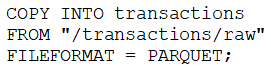
- The format of the files to be copied were not included with the FORMAT_OPTIONS keyword.
- The COPY INTO statement requires the table to be refreshed to view the copied rows.
- The previous day’s file has already been copied into the table.
- The PARQUET file format does not support COPY INTO.
The short version
C - COPY INTO skips files it has already ingested. Its idempotent tracking means rerunning after the file was copied adds zero rows, which explains the unchanged count.
Key concepts in this question
- COPY INTO semantics: Idempotent bulk load from cloud paths that records ingested file names to avoid duplicates.
- File discovery tracking: The transaction and state tracking prevent reprocessing the same raw file on subsequent runs.
- Daily-file pattern: Each day drops a new file under slash transactions slash raw, and only unseen files load on each execution.
- FORMAT_OPTIONS contrast: Missing format options would typically error or misparse, not silently load zero rows when data exists.
Why C is correct
If the previous-day file was already copied, perhaps by an earlier run or retry, COPY INTO correctly recognizes it as processed and copies nothing new. Record count therefore stays flat even though the command succeeds. That exactly-once file-level guard is the documented behavior distinguishing COPY INTO from naive full reloads.
Why the others are wrong
- A. Missing format options would cause errors or wrong parsing, not silent idempotent skip.
- B. COPY INTO makes rows visible after commit, no manual table refresh is required to see them.
- D. PARQUET is fully supported by COPY INTO, so format incompatibility is false.
Certified-Data-Engineer-Associate exam tip
Link unchanged count after COPY INTO to already-ingested file, and remember its file tracking gives exactly-once loads.
- DROP
- INSERT
- MERGE
- APPEND
The short version
C — MERGE avoids duplicates by matching on keys. It updates existing rows and inserts only truly new ones in one atomic statement, while plain writes would blindly append copies.
Key concepts in this question
- MERGE INTO: Delta Lake upsert syntax with WHEN MATCHED and WHEN NOT MATCHED clauses that compares source to target on a join condition.
- Deduplication: preventing the same business key from appearing twice, which requires a lookup before insert rather than an unconditional append.
- INSERT and APPEND: operations that add rows without checking for prior existence, so re-running them creates exact duplicates.
- DROP: a DDL operation that removes the whole table or partition, unrelated to careful row-level loading.
- Atomicity: MERGE runs as a single transaction, so concurrent readers never see a half-applied mix of old and new rows.
Why C is correct
MERGE lets the engineer declare a key, such as an id, and then specify update logic for matches plus insert logic for non-matches. That conditional behavior is precisely what avoids writing duplicate records when the same batch may be retried. INSERT and APPEND lack any match check, so they cannot enforce uniqueness on their own.
Why the others are wrong
- A. DROP deletes objects or data wholesale and does not write rows conditionally, so it cannot help with deduplicated loads.
- B. INSERT adds every source row to the target without comparing keys, so reruns or overlapping sources produce duplicates.
- D. APPEND is conceptually the same as INSERT for this purpose, adding data without a match clause or key check.
Certified-Data-Engineer-Associate exam tip
See avoid duplicates or upsert in the stem and immediately choose MERGE, see full reload and choose INSERT or COPY INTO.
- SELECT * FROM sales
- spark.table("sales")
- spark.sql("sales")
- spark.delta.table("sales")
The short version
B - Use spark dot table with the table name in Python. It returns the Delta table as a DataFrame for PySpark tests, bridging the SQL-created sales table into engineering code.
Key concepts in this question
- spark dot table API: Takes a table identifier string and loads it as a DataFrame with full schema and Delta metadata.
- PySpark testing need: Engineering tests use DataFrame assertions, null checks and expectations that require a Python object, not SQL text.
- spark dot sql contrast: Executes a full query string and is overkill when simply loading a table by name for transforms.
- SELECT contrast: Bare SELECT text only runs inside SQL cells or spark dot sql, not as a standalone Python expression.
Why B is correct
The team works in Python and needs sales as an object to filter, count and validate cleanliness. spark dot table with sales in single quotes does exactly that lookup and returns a testable DataFrame. It preserves types, partitions and Delta properties while staying native to PySpark workflows.
Why the others are wrong
- A. Bare SELECT text is SQL syntax, not a Python call returning a DataFrame.
- C. spark dot sql with just a table name lacks SELECT and fails, it needs a full query.
- D. spark dot delta dot table is not the valid PySpark table-loading API.
Certified-Data-Engineer-Associate exam tip
Remember spark dot table takes a name while spark dot sql takes a query, and pick table for direct Python access.
- dbfs:/user/hive/database/customer360
- dbfs:/user/hive/warehouse
- dbfs:/user/hive/customer360
- dbfs:/user/hive/database
The short version
B — Default databases land in the warehouse directory. Without a custom LOCATION clause, CREATE DATABASE uses the configured warehouse root, which in this legacy workspace is dbfs:/user/hive/warehouse.
Key concepts in this question
- CREATE DATABASE IF NOT EXISTS: creates a namespace for tables if missing, with an optional LOCATION to override the default path.
- Warehouse directory: the root location for managed databases and tables, set by the Spark warehouse dir, historically under dbfs:/user/hive/warehouse.
- Managed versus external: managed objects live under the warehouse default, while external objects point to user-specified paths outside it.
- DBFS paths: Databricks File System URIs such as dbfs:/user/hive/warehouse that map to backing cloud storage for the workspace.
- Database location: the directory that will hold subdirectories for each managed table created inside that database.
Why B is correct
Because the statement supplies no LOCATION keyword, Hive-style defaults apply and the new customer360 database directory is created as a child of the warehouse root. That makes dbfs:/user/hive/warehouse the parent location, with customer360 as a subdirectory beneath it. The other listed paths are not the warehouse default and would only apply with explicit LOCATION or different configs.
Why the others are wrong
- A. That path invents an extra database segment that is not the standard warehouse root for default databases.
- C. That path uses a customer360 folder directly under hive without the warehouse element, which does not match the default.
- D. That path points at a generic database folder that is not the configured warehouse directory in this context.
Certified-Data-Engineer-Associate exam tip
No LOCATION in CREATE DATABASE means warehouse default, memorize dbfs:/user/hive/warehouse for legacy Hive-style questions.
- The table was managed
- The table's data was smaller than 10 GB
- The table did not have a location
- The table was external
The short version
A — The table was managed. Managed tables let Spark own metadata and files, so DROP removes the catalog entry plus data, matching the full deletion seen.
Key concepts in this question
- Managed table: no user LOCATION, stored under warehouse dir and fully owned by Spark.
- External table: user controlled LOCATION where DROP keeps files by default.
- DROP TABLE IF EXISTS: idempotent delete that cleans up what the table type owns.
- Filesystem payload: data plus metadata that survives only when external storage owns the path.
Why A is correct
Both data and metadata vanished after DROP, which happens only when Spark owns storage. That ownership defines a managed table. An external table would have left files behind, and size or missing location wording does not alter drop semantics, so managed is the only fitting reason. Both the scraped vendor prose and the community majority support this settled key, giving high exam day confidence.
Why the others are wrong
- B. Size under ten gigabytes never changes DROP behavior for either table type.
- C. No location hints at managed but alone does not explain deletion, ownership does.
- D. External tables preserve files after DROP, opposite of the observation.
Certified-Data-Engineer-Associate exam tip
Managed means Spark owns files: drop managed and data goes, drop external and data stays. Keep this mapping in mind to answer quickly and avoid traps.
Want the full bank of 146 questions for Certified Data Engineer Associate? See all practice exams.