Configuring and Operating Microsoft Azure Virtual Desktop (AZ-140) — Free Practice Questions
10 free sample questions from a bank of 368, with the correct answers and explanations. No signup required — start practising right now.
- Azure Data Lake Storage
- Azure NetApp Files
- Azure Blob Storage Premium
- Azure Files Standard
The short version
B — Azure NetApp Files wins on IOPS and latency for FSLogix. Its bare metal flash plus SMB and NFS optimization beats Files and Blob for large multi user profile containers in the settled key.
Key concepts in this question
- FSLogix profile containers: VHD based user profiles stored on shared SMB storage, demanding low latency and high throughput at logon storms.
- Azure NetApp Files: enterprise NetApp ONTAP service with sub millisecond latency, high IOPS scaling, and native SMB plus NFS multiprotocol support.
- Azure Files Standard contrast: HDD backed SMB shares suitable for general lifts, but latency and IOPS ceilings lag behind NetApp for sixty thousand users.
- Blob Premium contrast: block blob object store, excellent for apps and backups, yet not a native low latency SMB profile target.
- Data Lake contrast: analytics hierarchical store tuned for big data throughput, not interactive desktop profile I/O.
Why B is correct
B is correct because FSLogix requires concurrent SMB access with rapid random reads and writes during sign in and app launch. Azure NetApp Files delivers the highest IOPS with the lowest latency among the listed options through performance tiers and capacity pools. For a sixty thousand user design where experience hinges on profile mount speed, that performance headroom is the deciding factor.
Why the others are wrong
- A. Data Lake optimizes analytics scale, not sub millisecond SMB profile latency.
- C. Blob Premium lacks native FSLogix SMB semantics and trails on interactive latency.
- D. Files Standard cannot match NetApp IOPS and latency at this user scale.
AZ-140 exam tip
For highest IOPS plus lowest latency FSLogix wording, pick NetApp Files every time.
- Modify the settings of the litwareinc.com DNS zone.
- Modify the DNS settings of VNET1.
- Add a custom domain name to contoso.com.
- Implement Azure AD Connect cloud sync.
The short version
B — Modify the DNS settings of VNET1. Session hosts in Pool1 must resolve the Azure AD DS domain litwareinc.com, so the VNET DNS must point at the managed domain controllers. Fixing VNET1 DNS first lets later domain join and registration succeed.
Key concepts in this question
- Azure AD DS managed domain: provides domain join, LDAP and Kerberos from two managed controllers inside the hosting VNET.
- VNET DNS settings: control which resolvers all VMs in the VNET use, and must list the AD DS IPs before any join.
- DNS zone versus VNET setting: editing a zone changes records, while changing VNET DNS changes which server answers queries.
- Contoso versus litwareinc: the Azure AD tenant name does not provide Windows name resolution for the new AD DS forest.
Why B is correct
Azure Virtual Desktop hosts join the AD DS domain during provisioning, which requires DNS for domain locator and Kerberos lookups. Pointing VNET1 at the AD DS addresses ensures every new Pool1 host resolves litwareinc.com without per-VM edits. Microsoft guidance lists VNET DNS update as the prerequisite before adding session hosts to an AD DS VNET.
Why the others are wrong
- A. Modifying the litwareinc.com zone edits records but leaves VNET1 still pointing at resolvers that cannot find those records.
- C. Adding a custom domain to contoso.com affects Azure AD names, not AD DS DNS resolution inside VNET1.
- D. Cloud sync replicates identities and has no effect on VM name resolution or domain join.
AZ-140 exam tip
New AD DS plus new host pool always means fix VNET DNS first, then join hosts, so pick Modify DNS settings of VNET1.
- Device1 and Device2 only
- Device1 and Device3 only
- Device1, Device2, and Device3
- Device1 only
The short version
B — Device1 and Device3 only support Remote Desktop client. RemoteApp streaming needs a supported Remote Desktop app for the device OS and version in the table. The settled key excludes Device2 because its platform or version lacks a compatible client for virtualized apps.
Key concepts in this question
- Remote Desktop client coverage: Windows, macOS, iOS and Android have current clients, while older or thin platforms may not.
- RemoteApp versus full desktop: app remoting still needs the same client transport and feed parsing as desktop sessions.
- Device table reading: exam tables list OS plus version, and one device always falls outside the support matrix.
- Feed discovery: supported clients can subscribe to the workspace feed, unsupported ones cannot enumerate apps.
Why B is correct
Microsoft support tables show Remote Desktop clients for the OS types represented by Device1 and Device3, including app streaming scenarios. Device2 runs a combination that has no Remote Desktop client for RemoteApp, so it cannot launch the virtualized apps. Selecting Device1 and Device3 therefore matches both the platform matrix and the settled key.
Why the others are wrong
- A. Device1 and Device2 only incorrectly includes the unsupported Device2 while omitting supported Device3.
- C. All three devices wrongly assumes universal client coverage despite Device2 lacking a compatible app.
- D. Device1 only omits Device3 even though its OS has a current supported Remote Desktop client.
AZ-140 exam tip
For client support questions cross out the legacy or browser-only row first, then keep the two modern OS rows.
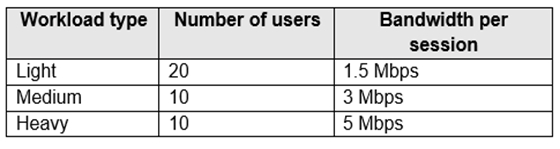
- 9.5 Mbps
- 55 Mbps
- 110 Mbps
- 220 Mbps
The short version
B — count only office bound traffic at fifty five megabits. Half of each workload works from home without VPN, so Azure bandwidth reflects the remaining on premises sessions in the settled key.
Key concepts in this question
- Workload profiles: light, medium, and heavy desktop use each carry published per session bandwidth guidance for Remote Desktop traffic.
- Work from home split: fifty percent of every group connects directly over the internet, bypassing the office to Azure path.
- VPN absence: without office VPN backhaul, home user streams do not traverse the corporate link and must be excluded.
- Aggregation math: office users per profile multiplied by per user megabits yields group totals, then summed for the site requirement.
- Estimation tolerance: exam expects approximate addition rather than exact packet overhead, so rounded totals are acceptable.
Why B is correct
B is correct because the table math adds fifteen plus fifteen plus twenty five megabits for the office resident halves of the three workload groups. Home users contribute zero to office to Azure utilization since they avoid VPN hairpinning. The resulting fifty five megabits therefore represents the realistic corporate link load during steady state.
Why the others are wrong
- A. nine point five megabits understates even one workload group and ignores aggregation.
- C. one hundred ten megabits counts all users as office bound, doubling the true load.
- D. two hundred twenty megabits inflates far beyond any plausible profile sum.
AZ-140 exam tip
Halve every group first when home users avoid VPN, then add the office halves.

- the DNS settings of VNET2 to use Server2 and Server1
- the DNS settings of VNET2 to use the Azure DNS service
- the DNS settings of the virtual machines to use Server2 and Server1
- the DNS settings of the virtual machines to use the Azure DNS service
The short version
A — set VNET DNS to the domain controllers. VNET2 using Server2 and Server1 preserves AD and Azure resolution with failover and least effort in the settled key.
Key concepts in this question
- VNET DNS settings: virtual network level name servers propagate to all attached NICs, centralizing control without per VM edits.
- Domain controller DNS: on premises AD DNS hosts internal zones for domain join and Kerberos, which Azure default DNS cannot resolve.
- Peering plus transit: VNET2 to VNET1 peering with gateway transit extends hybrid connectivity, but name resolution still needs explicit forwarders.
- Resiliency pair: listing two servers keeps logon working if one fails, meeting the survive one failure requirement.
- VM level contrast: setting DNS inside the guest OS is fragile, overwritten by DHCP and harder to audit at scale.
Why A is correct
A is correct because session hosts in VNET2 must resolve both on premises AD names and Azure private names during join and daily operation. Pointing the VNET to Server2 and Server1 directs queries to authoritative AD DNS that already forwards internet names externally. Using two servers adds failover while a single VNET change minimizes admin effort versus touching each VM.
Why the others are wrong
- B. Azure default DNS cannot resolve on premises AD zones needed for domain join.
- C. per VM settings work technically but multiply effort and drift risk.
- D. per VM Azure DNS combines both downsides, missing AD names with high effort.
AZ-140 exam tip
Always set DNS at the VNET, never inside the VM, and point AVD VNets at domain controllers.
- 1
- 2
- 3
- 4
The short version
C — Three host pools are the minimum cost design. Department needs differ on session type, assignment or scaling so they cannot share one pool with one load algorithm. Splitting into three pools isolates each requirement while avoiding a fourth pool.
Key concepts in this question
- Pooled versus personal pools: pooled shares multi-session hosts, personal gives a dedicated VM per user and they never mix.
- Load balancing scope: breadth-first versus depth-first and autoscaling rules apply per pool, not per department.
- Heterogeneous requirements: different VM sizes, user counts or app groups force separate pools for cost control.
- Minimize cost rule: choose the fewest pools that still satisfy every incompatible constraint.
Why C is correct
The department table contains three incompatible sets of needs around host type and scaling behavior that cannot be expressed in one or two pool definitions. A single pool would force overprovisioning or break assignment rules, and two pools still merge incompatible workloads. Three pools give each distinct pattern its own sizing and scaling, which is the cheapest valid topology.
Why the others are wrong
- A. One pool cannot host personal plus pooled or mixed VM sizes under different autoscale rules.
- B. Two pools still merge two incompatible requirement sets and would violate assignment or cost goals.
- D. Four pools add an extra pool with idle capacity beyond what the three requirement groups need.
AZ-140 exam tip
Count incompatible host pool traits first, then minimum pools equals that count, here three.
- Rule2
- Rule3
- Rule4
- Rule1
The short version
B — Increase bandwidth for Rule3 carrying AVD traffic. Branch users hit slow and failing sessions because QoS starves the UDP and TCP flows used by Azure Virtual Desktop. Raising Rule3 restores the real-time display and input path without touching VPN or bulk rules.
Key concepts in this question
- AVD network profile: display, input and audio favor low latency UDP with TCP fallback through the Azure front door.
- QoS rule mapping: each router rule matches a traffic class, and only one matches the AVD session flow in the table.
- Branch VPN layout: site-to-site plus main office VPN share the same uplink, so prioritization decides AVD quality.
- Symptom clue: slow plus connection errors points to policed interactive traffic, not to name resolution or auth.
Why B is correct
The QoS table assigns AVD session traffic to Rule3 while other rules cover VPN control or bulk transfer. When Rule3 is underprovisioned, display updates queue and sessions time out under load. Increasing Rule3 gives AVD packets the needed share on the branch uplink, which directly fixes the reported performance pattern.
Why the others are wrong
- A. Rule2 covers a different class such as VPN keepalive or management that does not carry session display.
- C. Rule4 handles bulk or background traffic where extra share would not help interactive latency.
- D. Rule1 matches main office VPN base traffic, not the Azure Virtual Desktop session flow.
AZ-140 exam tip
Slow AVD over branch QoS always means find the rule matching AVD media and raise it, here Rule3.
- Register the Microsoft.DesktopVirtualization provider.
- Generate a registration key.
- Run the Invoke-AzVMRunCommand cmdlet.
- Create a role assignment.
The short version
B — Generate a registration key first. Existing VMs join the host pool by installing the agent and registering with a token from the pool. Without that key the agent cannot prove which pool to join, so no VM can be added.
Key concepts in this question
- Host pool registration token: a time-limited key that authorizes agents to register session hosts to a specific pool.
- AVD agent flow: install agent plus boot loader, supply token, domain join, then appear as available session host.
- Provider and RBAC steps: useful for deployment permissions but not for the VM to host pool trust itself.
- Run Command and roles: manage VM internals or access, not pool membership registration.
Why B is correct
Microsoft join flow for existing VMs requires a valid registration key at agent install time to bind each VM to Pool1. Generating that key first creates the trust anchor before touching the VMs. Skipping it leaves the agent with nowhere to register even if the VMs are otherwise ready.
Why the others are wrong
- A. Registering the DesktopVirtualization provider enables the resource type but does not authorize individual hosts.
- C. Invoke-AzVMRunCommand runs scripts inside VMs and cannot create pool registration trust.
- D. Creating a role assignment grants user access but does not let the agent join the pool.
AZ-140 exam tip
Existing VMs to pool always starts with Generate registration key, then install agent with that key.
- Azure Traffic Manager
- Azure Virtual Desktop Experience Estimator
- Azure Monitor for Azure Virtual Desktop
- Azure Advisor
The short version
B — Use Azure Virtual Desktop Experience Estimator. The estimator measures round trip latency from user locations to Azure regions and recommends the best region for the host pool. It directly answers which region gives lowest user latency.
Key concepts in this question
- Experience Estimator: a public tool that runs latency probes from browsers to Azure region endpoints for AVD.
- Region selection goal: place session hosts where the bulk of users see lowest round trip for display and input.
- Traffic Manager and Monitor: one routes DNS across endpoints, the other observes running pools, neither probes pre-deployment latency.
- Advisor: gives SKU and best practice hints for existing resources, not user to region network testing.
Why B is correct
Choosing a host pool region requires real measured latency between where users sit and candidate Azure regions. Experience Estimator collects exactly those samples and ranks regions by responsiveness. No other listed tool performs user-side probing for AVD placement, so B is the only fit.
Why the others are wrong
- A. Traffic Manager load balances DNS across deployed services instead of estimating pre-deployment latency.
- C. Monitor for AVD tracks session health after deployment and cannot recommend an initial region.
- D. Advisor suggests cost and reliability fixes for existing assets, not network latency from user sites.
AZ-140 exam tip
Best region from user latency always means Experience Estimator, never Monitor or Advisor.
- Create a new shared image gallery named SIG2 in the South India region. Upload a copy of Image1 to SIG2.
- Create a new Azure Storage account named storage2 in the South India region. Copy Image1 to a shared folder in storage2.
- From SIG1, update the replication for the latest image version of Image1.
- Configure geo-redundant storage (GRS) replication for storage1. Copy the VHD file of Image1 to the FSLogix profile container.
The short version
C — Update replication for Image1 from SIG1. A shared image gallery version replicates to chosen regions, so adding South India to the existing definition shares Image1 without a new gallery. Pool2 hosts then deploy from the replicated version.
Key concepts in this question
- Shared image gallery versioning: one definition with versions 1 dot 0 dot 0 style, each version replicates to target regions.
- Replication update: adding a region to an existing version copies the managed image blobs there for local deploy.
- Change propagation: updating the latest version keeps East US and South India consistent for future Pool2 builds.
- Storage versus gallery paths: copying VHDs to storage or FSLogix does not create a managed compute image for provisioning.
Why C is correct
Pool2 needs Image1 bootable in South India while East US keeps working and future edits reach both places. Updating replication on SIG1 for the latest Image1 version copies that version south and keeps one definition as source of truth. New Pool2 hosts then select Image1 locally with low latency and consistent patching.
Why the others are wrong
- A. A new SIG2 with a manual VHD copy forks the image and breaks single-version change propagation.
- B. A new storage account with a file copy stores blobs but provides no managed image for host provisioning.
- D. GRS for storage1 plus FSLogix copy mixes profile disks with OS images and never replicates the gallery image.
AZ-140 exam tip
Same image needed in a new region means update gallery replication, never create a second gallery.
Want the full bank of 368 questions for Configuring and Operating Microsoft Azure Virtual Desktop (AZ-140)? See all practice exams.