Conducting Forensic Analysis & Incident Response Using Cisco Technologies — Free Practice Questions
10 free sample questions from a bank of 91, with the correct answers and explanations. No signup required — start practising right now.
- Decompiler
- Unpacker
- Disassembler
- Sandbox
The short version
D — Sandbox is the dynamic malware analysis tool. It executes the sample in an isolated environment and observes its real behavior.
Key concepts in this question
- Static vs. dynamic analysis: static inspects code without running it; dynamic runs it and watches behavior.
- Sandbox: isolated virtual environment that detonates files and records file, registry, process, and network activity.
- Decompiler/disassembler/unpacker: static-analysis aids that reverse or decompress code without executing it.
Why D is correct
Dynamic analysis by definition requires executing the malware and observing what it does, which is exactly what a sandbox provides: a contained VM where the sample can drop files, modify persistence, contact command-and-control, and exhibit exploits safely. The resulting behavioral report (processes spawned, DNS/HTTP calls, encryption activity) is the output dynamic analysis is designed to produce.
Why the others are wrong
- A. Decompiler translates binaries back toward source code — static analysis, no execution.
- B. Unpacker decompresses or decrypts a packed binary so it can be examined — a static-analysis preparation step.
- C. Disassembler converts machine code to assembly for reading — static analysis, the sample never runs.
300-215 exam tip
Static reads the code, sandbox runs the code — pick sandbox whenever the question asks about observing live malware behavior.
- Delete the file immediately from the endpoint to prevent the potential spread of malware.
- Flag the file as a potential false positive due to not matching any known malware signatures
- Install different antivirus software on the endpoint and perform another deep scan of affected assets.
- Submit the file to a threat intelligence platform for further analysis and to identify potential lOCs.
The short version
D — Submit the file to a threat intelligence platform for deeper analysis and IOCs. No signature match plus suspicious network behavior means investigation, not dismissal.
Key concepts in this question
- Signature vs. behavior: a clean signature database does not clear a file that acts maliciously at runtime.
- Dynamic-analysis finding: unusual network behavior is a high-value signal of possible command-and-control or exfiltration.
- Threat intelligence platform: sandbox detonation, reputation, and indicator (IOC) enrichment service.
Why D is correct
The antivirus scan is inconclusive (no signature) but dynamic analysis is positive (anomalous network activity), so the analyst must escalate rather than close the case. Submitting the sample to a threat intelligence platform yields a sandbox verdict, related hashes, domains, IPs, and IOCs that can be pushed to detection tools and used to scope the incident across the enterprise.
Why the others are wrong
- A. Deleting the file destroys evidence, breaks chain of custody, and does nothing to find persistence or lateral movement.
- B. Calling it a false positive ignores the observed malicious behavior, which outweighs a signature miss.
- C. Installing another AV and rescanning repeats the same signature-based approach that already failed to explain the behavior.
300-215 exam tip
Signature miss plus bad behavior equals escalate and enrich — never delete evidence or declare a false positive on behavior alone.
- ISE presents an appropriate page for the user to create authentication credentials.
- If the user account does not exist, the user is offered an option to authenticate as a guest.
- If a previously allocated account does not exist, the user is rejected and not allowed to log in.
- ISE makes an API call to the MDM server, which returns a list of devices for the user.
The short version
D — ISE queries the MDM server via API for the user's devices._Device registration status then drives the authorization decision.
Key concepts in this question
- Cisco ISE: policy engine that authenticates users and authorizes network access.
- MDM integration: ISE uses the MDM API to check enrollment, compliance, jailbreak, and PIN status.
- SSID association: only the trigger; device posture comes from the MDM lookup.
Why D is correct
In the Cisco MDM onboarding flow, after the endpoint associates to the SSID and the user authenticates, ISE must determine whether that device is known and compliant before granting full access. It does this with an API call to the MDM server, which returns the device list for the user, and ISE compares the connecting device against it to select the right authorization profile (registered, noncompliant, unregistered redirect).
Why the others are wrong
- A. ISE does not ask the user to create credentials here; authentication precedes the MDM device lookup.
- B. Guest fallback is a separate flow, not the automatic next step after SSID association in an MDM scenario.
- C. Rejection is an authorization outcome, not the next step; ISE first needs the MDM device inventory to decide.
300-215 exam tip
MDM plus ISE means API lookup first — associate, authenticate, then ISE asks the MDM who owns what.
- Install the patch for the vulnerability as soon as it becomes available.
- Use the web application firewall to block access to the exploited URL.
- Deploy a custom IDS signature to detect successful exploitation of the vulnerability.
- Use a stateful firewall to disable access to OWA ports.
The short version
B — Block the exploited URL on the WAF now. That virtual patch stops the zero-day while no vendor patch exists.
Key concepts in this question
- Zero-day with no patch: mitigation must come from configuration, not patching.
- WAF virtual patching: filtering malicious requests at the application layer by URL, pattern, or payload.
- Detection vs. prevention: IDS detects exploitation; a WAF rule actually blocks it.
Why B is correct
The vulnerability is triggered by a crafted request to a specific, uncommonly used URL, and no patch is available yet. A WAF sitting in front of OWA can immediately deny requests to that URL while allowing legitimate mail traffic through, which directly breaks the exploit path without taking email offline. Patching later becomes the permanent fix.
Why the others are wrong
- A. Installing the patch is the long-term fix but impossible now — the patch is still being developed.
- C. A custom IDS signature only detects successful exploitation after the fact; it does not prevent compromise.
- D. Blocking OWA ports on a stateful firewall kills all legitimate email access — excessive denial of service, not targeted mitigation.
300-215 exam tip
No patch plus known bad URL equals WAF block — virtual-patch first, real patch when it ships.
- Normal application activity involving domain resolution and secure communication with an approved external service
- Command-and-control communication through DNS-based beaconing followed by encrypted outbound traffic
- Scheduled update checks using randomized DNS queries before establishing standard outbound connections
- Internal service-discovery traffic before connecting to a trusted enterprise application over TLS
The short version
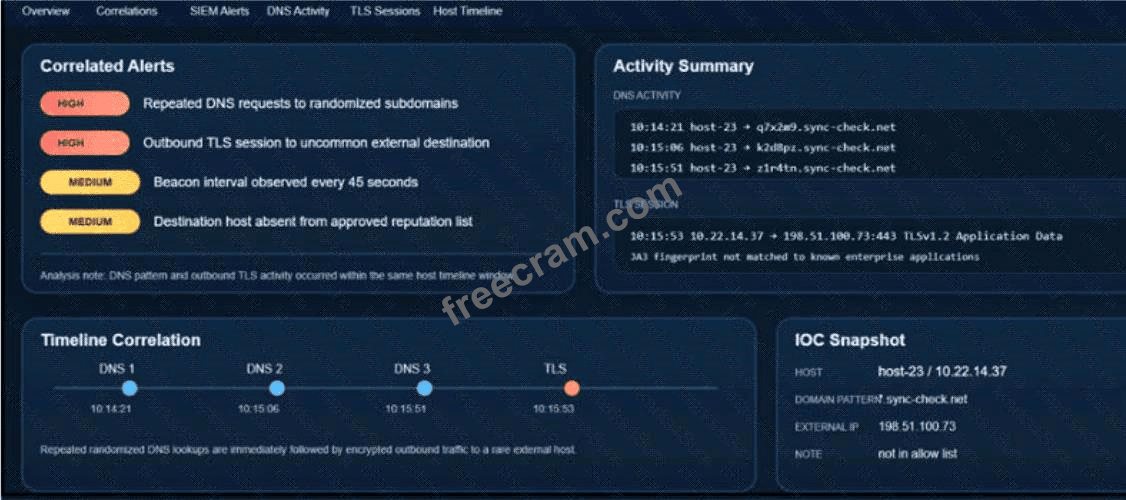
B — C2 DNS beaconing with encrypted egress. Exhibit shows randomized DNS subdomains every 45s followed by TLS to an unlisted external host.
Key concepts in this question
- DNS beaconing: repeated queries to randomized subdomains (q?x2a9.sync-check.net, k2d8BpZ.sync-check.net, z1r4tn.sync-check.net) at fixed 45-second intervals.
- TLS egress to rare host: 10.22.14.37 to 198.51.100.73:443 with JA3 not matched to enterprise apps and destination absent from reputation list.
- Correlation: DNS pattern and TLS occurred within same host timeline window.
Why B is correct
Correlated Alerts flag HIGH Repeated DNS requests to randomized subdomains and HIGH Outbound TLS session to uncommon external destination plus MEDIUM Beacon interval every 45 seconds. Timeline Correlation states Repeated randomized DNS lookups are immediately followed by encrypted outbound traffic to a rare external host, classic DNS-beacon then C2 over TLS.
Why the others are wrong
- A. Normal/approved activity is contradicted by HIGH alerts, randomized subdomains, uncommon destination, and not in allow list.
- C. Not scheduled updates: JA3 not matched, destination not approved, subdomains randomized, not standard connections.
- D. Not internal discovery to trusted app: traffic is outbound to 198.51.100.73, TLSv1.2 Application Data to external, absent from reputation list.
300-215 exam tip
Randomized subdomains + fixed beacon interval + TLS to unlisted IP = C2 beaconing, not updates.
- An executable file is requesting an application download.
- A malicious file is redirecting users to different domains.
- The MD5 of a file is identified as a virus and is being blocked.
- A forged DNS request is forwarding users to malicious websites.
The short version
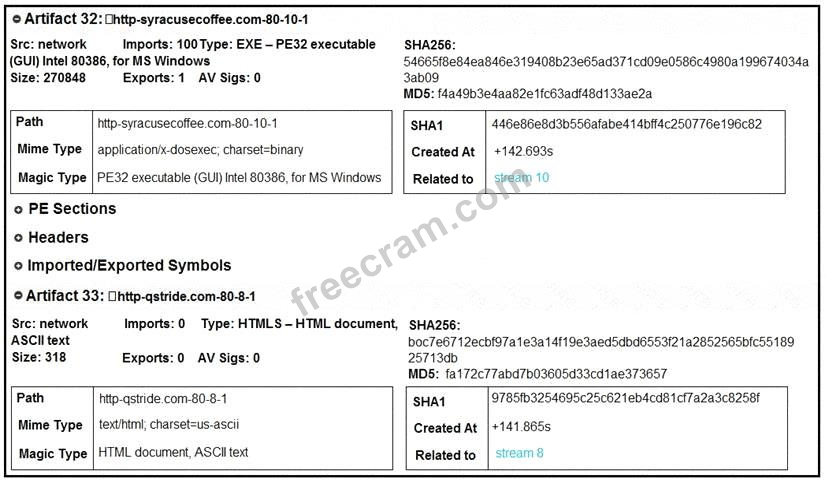
B — Malicious EXE plus HTML redirector across domains. Two network artifacts from syracusecoffee.com and qstride.com show PE32 executable and HTML delivery chain.
Key concepts in this question
- PE32 executable artifact: Artifact 32 Type EXE-PE32 executable, Mime application/x-dosexec, Magic PE32 executable for MS Windows.
- HTML artifact: Artifact 33 Type HTMLS-HTML document, Mime text/html, second domain qstride.com.
- AV Sigs 0: neither artifact detected/blocked as virus in this view.
Why B is correct
Artifact 32 is an EXE pulled over network (http-syracusecoffee.com-80-10-1) paired with Artifact 33 HTML document from a different domain (http-qstride.com-80-8-1), indicating a malicious file chain redirecting users across domains to deliver the executable, not a single blocked virus.
Why the others are wrong
- A. No application-download request shown; it is a PE32 executable delivery via network streams, not a benign app request.
- C. Both artifacts show AV Sigs: 0, so not identified as virus and being blocked; hashes/MD5 listed without block verdict.
- D. No DNS forgery shown; artifacts are network file/HTML captures (Related to stream 10 / stream 8), not DNS forwarding.
300-215 exam tip
EXE + HTML from two different domains with AV Sigs 0 = redirector to malicious download.
- Isolate the files and perform a deeper heuristic analysis to detect potential unknown malware or data exfiltration payloads.
- Rename the file extensions to .txt to enable easier opening and review by team members.
- Delete the files immediately to prevent potential risks.
- Move the files to a less secure network segment for analysis.
The short version
A — Isolate the files and run deeper heuristic analysis. Large unknown files that evade AV are treated as suspicious until proven otherwise.
Key concepts in this question
- Unknown file triage: quarantine first, analyze second, delete only with evidence.
- Heuristic/behavioral analysis: detects unknown malware by structure and behavior rather than signatures.
- Evidence preservation: renaming, moving to weaker segments, or deleting destroys forensic value.
Why A is correct
Antivirus silence proves nothing against custom, packed, or zero-day payloads, and an odd extension with large size is a classic exfiltration or dropper indicator. Isolating the files contains the risk while heuristic and sandbox analysis determines whether they are malicious, what they do, and which IOCs to hunt for elsewhere — the standard contain-then-analyze sequence.
Why the others are wrong
- B. Renaming to .txt invites someone to open a live payload and alters evidence for no benefit.
- C. Immediate deletion destroys the sample needed for analysis and may leave persistence behind undiscovered.
- D. Moving files to a less secure segment spreads the risk instead of containing it.
300-215 exam tip
Unknown and undetected means isolate and analyze — never open, rename, spread, or delete the evidence.
- /var/log/access.log
- /var/log/messages.log
- /var/log/httpd/messages.log
- /var/log/httpd/access.log
The short version
B — Pull /var/log/messages.log (system log) next. An out-of-memory crash is a kernel/system event, not a web hit.
Key concepts in this question
- System vs. access logs: kernel and resource events go to the OS log; HTTP requests go to the web access log.
- OOM killer: the Linux kernel logs memory exhaustion and process kills in the system log.
- Troubleshooting order: confirm the OS-level cause before chasing application traffic.
Why B is correct
The ticket already states the symptom — the server exhausted usable memory and crashed — so the next question is what the operating system recorded: OOM-killer invocations, failing processes, memory pressure, and timestamps. On Linux that lives in /var/log/messages (or messages.log), which correlates the crash with preceding system events and guides deeper checks of leaky processes and capacity.
Why the others are wrong
- A. /var/log/access.log is not a standard path and even a web access log only shows requests, not memory state.
- C. /var/log/httpd/messages.log is not the standard Apache error path and would show web-server errors, not kernel OOM events.
- D. The Apache access log shows which URLs were hit, useful for traffic spikes but not for proving kernel memory exhaustion.
300-215 exam tip
Dead server means OS log first — memory crashes live in messages, web hits live in access logs.
The short version
MATCH — on-demand maps to volatility, broad access maps to no seizure, pooling maps to tenancy, elasticity maps to dispersal.
Key concepts in this question
Core ideas: NIST cloud traits create matching forensic gaps.
- On-demand self-service: customer-provisioned resources with no operator checkpoint.
- Broad network access: data reached over the network, not by disk seizure.
- Resource pooling: shared hardware across tenants.
- Rapid elasticity: artifacts spread as instances scale in and out.
Why this mapping is correct
Each characteristic produces its paired evidence challenge by definition. On-demand provisioning is volatile so it vanishes before preservation, broad network access means no physical seizure is possible, pooling means ownership and isolation are obscured across tenants, and elasticity means artifacts disperse across nodes as capacity shifts.
Why the others are wrong
Crossed pairings break the definitional link.
- On-demand as seizure or tenancy or dispersal: misses the volatility point of self-provisioning.
- Broad access as volatility or tenancy or dispersal: misses the remote-access-only point.
- Pooling as volatility or seizure or dispersal: misses the shared-ownership point.
- Elasticity as volatility or seizure or tenancy: misses the scaling-dispersal point.
300-215 exam tip
Map cloud trait to forensic gap word-for-word: on-demand equals volatile, pooling equals shared, elasticity equals dispersed.
- C:\Windows\System32\msvcrt.dll
- C:\Windows\System32\bcrypt.dll
- C:\Windows\System32\CRYPT32.dll
- C:\Windows\System32\lsasrv.dll
- C:\Windows\Temp\samsrv.dll
The short version
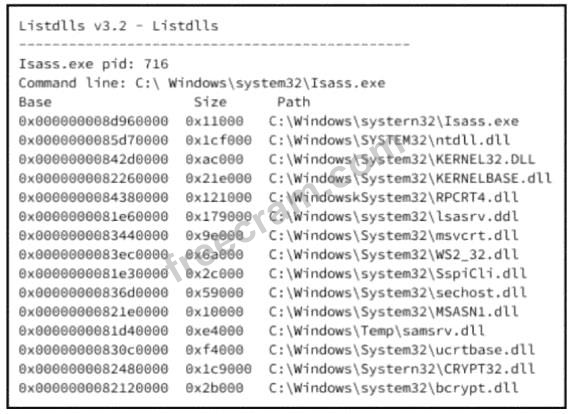
AE — Temp samsrv.dll and odd msvcrt.dll in lsass need triage. ListDLLs for lsass.exe pid 716 shows C:\Windows\Temp\samsrv.dll alongside System32 DLLs.
Key concepts in this question
- lsass.exe baseline: normally loads only C:\Windows\System32 DLLs such as ntdll.dll, KERNEL32.DLL, lsasrv.dll, CRYPT32.dll, bcrypt.dll.
- Temp hijack: C:\Windows\Temp\samsrv.dll loaded into lsass mimics SAM server DLL outside System32.
- Post-ransomware reimage: recovered server with inconsistent report needs log validation for persistence.
Why AE is correct
Exhibit line 0x00000000821d0000 shows C:\Windows\Temp\samsrv.dll injected into C:\Windows\system32\lsass.exe, which must come from System32; any Temp location is a persistence / credential-theft red flag. Banked A (msvcrt.dll entry 0x0000000083440000) is retained as second triage item per bank since post-compromise review requires validating non-baseline CRT load in lsass context.
Why the others are wrong
- B. C:\Windows\System32\bcrypt.dll is normal System32 crypto provider for lsass.
- C. C:\Windows\System32\CRYPT32.dll is normal System32 crypto path.
- D. C:\Windows\System32\lsasrv.dll is the legitimate LSA server DLL expected in lsass.exe.
300-215 exam tip
Anything in lsass from \Temp\ or non-System32 = investigate immediately.
Want the full bank of 91 questions for Conducting Forensic Analysis & Incident Response Using Cisco Technologies? See all practice exams.